Miles Wolbe was looking for some strings in a Dell BIOS update; it took him some time to figure out they are ROT-1 encoded.
I updated my XORSearch tool to support ROT encoding.
Miles Wolbe was looking for some strings in a Dell BIOS update; it took him some time to figure out they are ROT-1 encoded.
I updated my XORSearch tool to support ROT encoding.
Hakin9 has published my bpmtk article. The article mentions bpmtk version 0.1.4.0; however, this new version has no new features. But it comes with extra PoC code, like a LUA-mode keylogger and “rootkit”. New blogposts will explain this new PoC code.

And upcoming bpmtk version 0.1.5.0 contains a new feature to inject shellcode. Just have to update the documentation.
On the PDF front: I’ve produced my first Ruby code ;-). I worked together with MC from Metasploit to optimize the PDF generation code in this util.printf exploit module. It uses some obfuscation techniques I described 8 months ago.
As more malware seems to delete the SafeBoot keys nowadays, and even prevents you from restoring these keys, I’m posting this “Enhanced Fix Safe Mode” procedure. In essence, it’s the same as my first procedure, but to avoid interference by the malware, we will boot from a Live CD and then fix the registry. Booting from a Live CD means that we boot a clean OS from the CD, and thus prevent the malware from running and interfering with our rescue operation. In a nutshell: boot from a Live CD, load the HKLM registry hive and merge the missing SafeBoot keys.
Notice that the configuration of the machine you’re fixing might be different from the one I’m describing. The system directory could be on another drive than C, you could need to fix ControlSet002 in stead of ControlSet001, …
So watch out, and update this procedure according to the configuration of the crippled machine.
And since you’re going to modify a critical system file, make a backup first (at least of the CONFIG directory).
Copy the respective reg file to your C:\ drive (for example SafeBoot-for-Windows-XP-SP2.reg for XP SP2).
Shutdown the PC and start from a Windows Live CD, like the Ultimate Boot CD For Windows.
Start RegEdit:

Select HKEY_LOCAL_MACHINE, and load the hive file C:\WINDOWS\system32\config\system (File / Load Hive…):
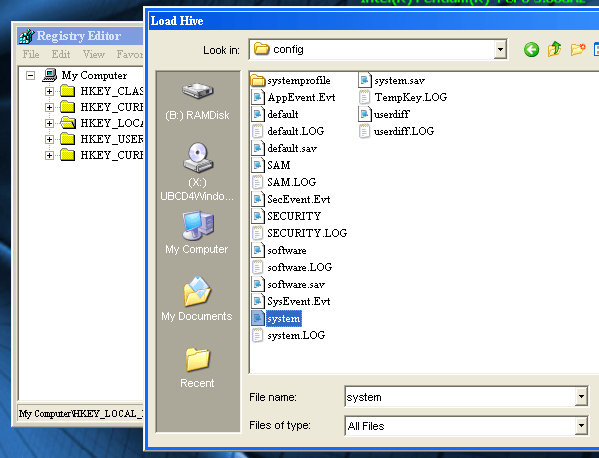
Name the loaded hive FixSafeboot:

Open the key HKLM\FixSafeboot\ControlSet### which is lacking the Safeboot key (there could be more than one ControlSet key you want to fix):

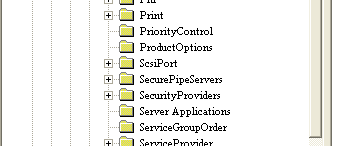
If the SafeBoot key is not missing (or the keys beneath it), you’re either looking in the wrong place or you’re not dealing with a corrupted SafeBoot key (in which case applying this procedure is useless).
If you’re not sure which ControlSet### to fix, take a peek at the value of Current in the Select key:
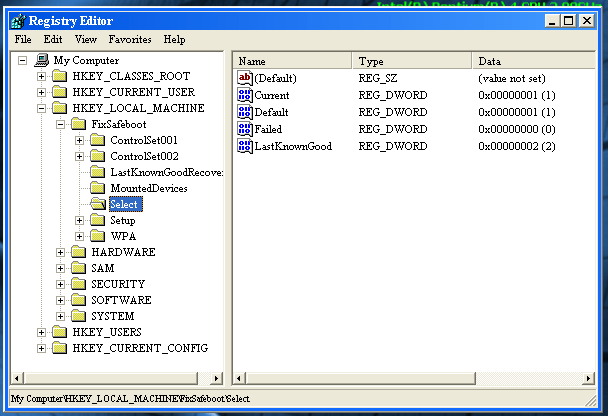
Here the value for Current is 1, so it’s ControlSet001 which will be used when the system boots, and that’s the one we want to fix.
Open C:\SafeBoot-for-Windows-XP-SP2.reg (the one you copied on the C:\ drive) with notepad:
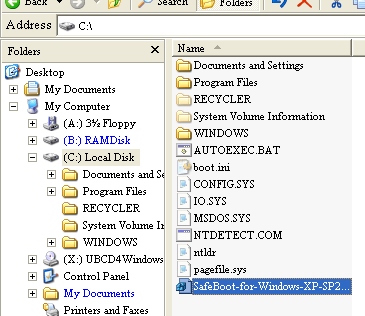
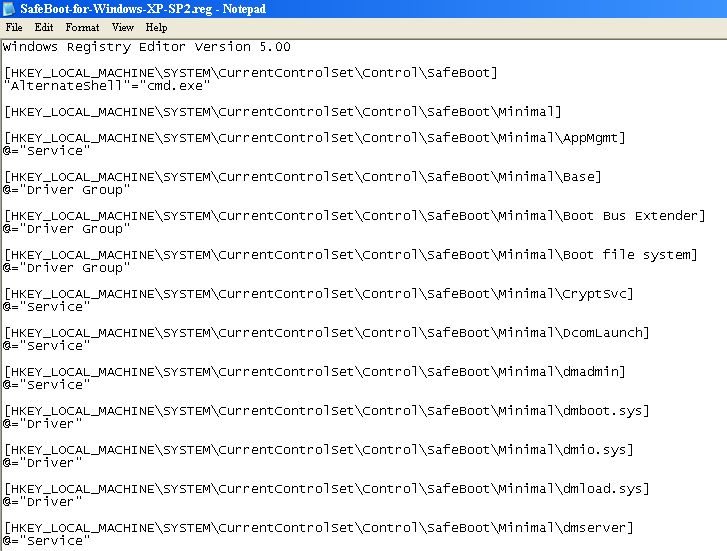
Perform a search and replace: replace SYSTEM\CurrentControlSet with FixSafeboot\ControlSet### (### being the number of the ControlSet you want to fix, like 001). Save the modified reg file:


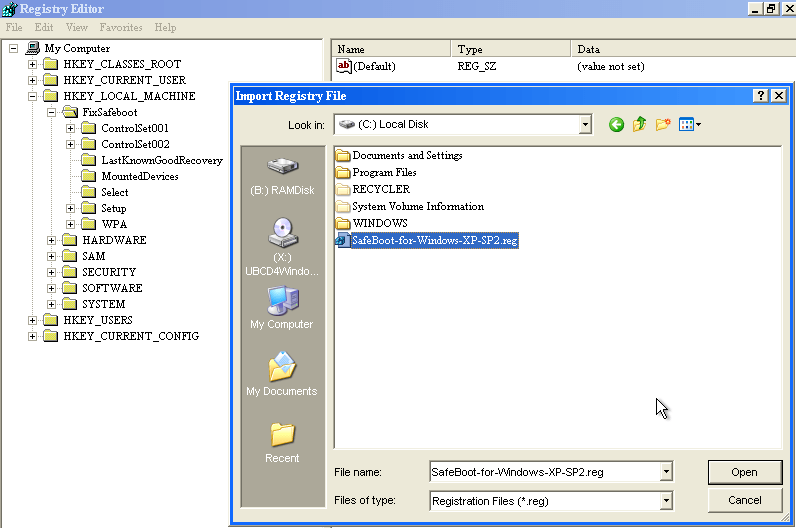
Import the reg file C:\SafeBoot-for-Windows-XP-SP2.reg with regedit (File / Import…):
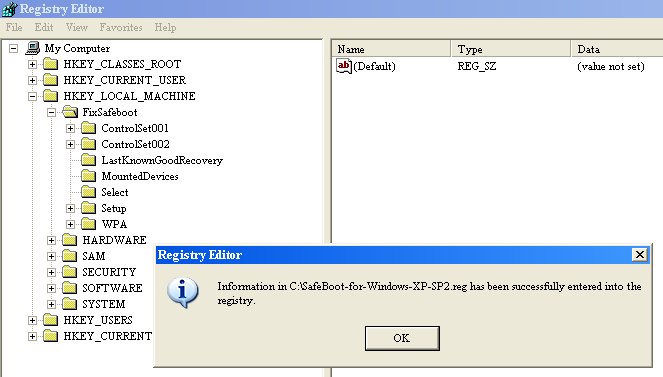
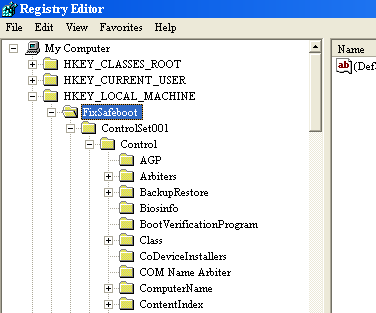
Check that the SafeBoot key has been added:

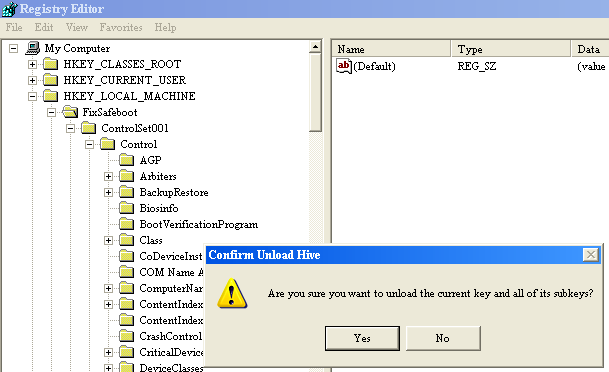
Select the FixSafeboot key and unload it (File / Unload Hive…):
Shutdown the PC and start in Safe Mode (F8).
If you still can’t boot into Safe Mode, you’re either facing another problem than a Safe Mode disabling malware, or the malware operates early in the boot process and interferes with Safe Mode booting. If you suspect malware, try scanning with a Live CD with an anti-virus scanner, like the F-Secure Rescue CD.
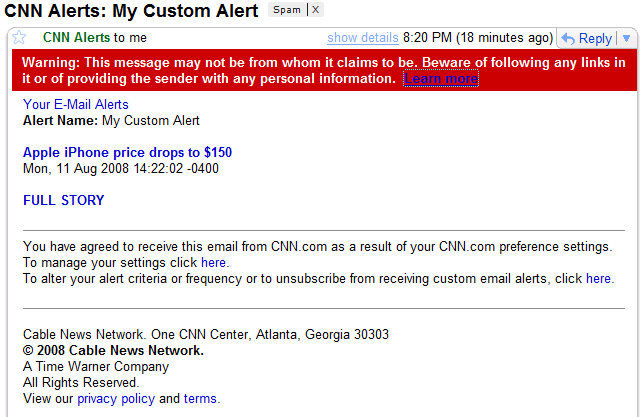
Gmail identified the Fake CNN Alerts as SPAM from the beginning, but now warns against phishing too:
I release USBVirusScan version 1.7.2.
Two new features:
-s scan available removable drives when USBVirusScan is started
-r also start the command at drive removal, parameter %e indicates drive arrival ‘A’ or drive removal ‘R’
Download:
USBVirusScan_V1_7_2.zip (https)
MD5: BDEF7BAE13C10B2B6CD650A89FD910ED
SHA256: 0090C73D6A3725E75C3388387A7A9E869C5D6BEA83E0D4D612E1CB25458163F3
Ryan Goodings suggested I modify the header (starting_frequency and readings_per_sweep) of a band-pass filtered wsr file, to have Chanalyzer scale the filtered section. Here is the new version (use option –reduce), and this is the result:

I’ve updated my WhoAmI? Firefox add-on for version 3.
You can download it here or get it from the Mozilla site. It has remained in the Sandbox since my first post, but now I’ve nominated to leave the Sandbox. If you use it, please post a review on the Mozilla page to help it on its way out of the the Sandbox (or keep it there if it’s too buggy).
And now for the little puzzle: what is special about this other version of my WhoAmI? add-on?
So don’t get confused by these 2 versions:
Just a small change in this new version: now you can disable the automatic loading of the local registry data when the UserAssist tool is launched. Use the “Load at Startup” menu command.
The setting is saved in Isolated Storage, in a file called UserAssist.config.
This new version of USBVirusScan adds a new placeholder %f and provides debugging support.
%f contains the filesystem of the inserted drive, like NTFS, FAT, CDFS, …
Newer versions of DAEMON Tools (a virtual CD-ROM utility to mount CD images) report to Windows as a removable drive, thereby triggering USBVirusScan. You can use %f in your scripts to detect this and execute the appropriate action. For example, if you want to scan each USB drive with Avira but don’t want to scan images mounted with DAEMON Tools, use this script (avira.vbs):
dim WshShell

Set WshShell = WScript.CreateObject("WScript.Shell")

if Wscript.Arguments.Item(1)  <> "CDFS" then
	WshShell.run """C:\Program Files\Avira\AntiVir PersonalEdition Classic\avscan.exe"" /GUIMODE=2 /PATH= """ & Wscript.Arguments.Item(0) & ":\""", 1, true
end if
Start USBVirusScan with these parameters: USBVirusScan wscript avira.vbs %d %f
The balloon info also contains information about the filesystem of the inserted drive:

A new flag, -d, adds debugging support to USBVirusScan. When this flag is present, USBVirusScan will write debug output when drives are inserted. This debug output can be viewed with DebugView.
A word of caution about DAEMON Tools. I use an older version of more DAEMON Tools, but newer versions contain an adware component, that you should be able to skip when installing.
I’ve updated ExtractScripts to handle comments inside <script> tags.

 Didier Stevens