Now that malicious PDFs using the /Launch action become more prevalent, I release a new PDFiD version to detect (and disarm) the /Launch action.

Now that malicious PDFs using the /Launch action become more prevalent, I release a new PDFiD version to detect (and disarm) the /Launch action.
Some new info after last week’s Adobe and Foxit escapes.
Foxit Software has release a new version to issue a warning when using a /Launch action, like Adobe Reader does:
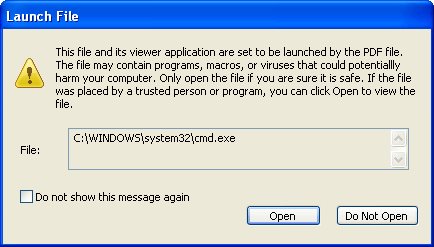
The interesting thing about this fix is that it breaks my Foxit PoC, but that the Adobe PoC works for Foxit now!
This means that Foxit Software changed the way arguments are passed to the launched application (in the previous version, it didn’t work per the PDF standard, and that’s why I had to use a workaround). I draw some interesting conclusions from this:
Adobe Reader has a Trust Manager setting to disable opening non-PDF attachments with external applications.

This setting also disables the /Launch action:
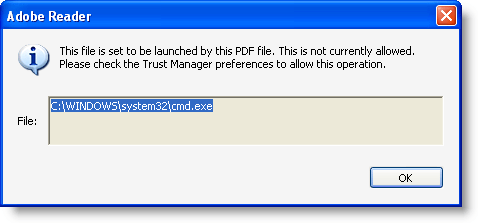
For more details about the PoC, I refer to my interview on the Eurotrash Security podcast.
A couple of new features:
Unicode support is rather simple: I consider Unicode as ASCII with 2 bytes per character, last byte always equals 0.
Usage case of hexcode search: search for embedded and encoded PE-file by searching for the PE-magic bytes MZ:
XORSearch -h malware.exe 50450000
Remember that XORSearch is not limited to win32, you can compile it on *nix too: cc -o XORSearch XORSearch.c
Download here.
There are no real changes in this new version of bpmtk, only a new DLL (hook-createprocess.dll) was added. You can use this DLL to protect your Windows machine from getting infected by the current malicious documents found in-the-wild.
You can download bpmtk version 0.1.6.0 here.
Hook-createprocess.dll is a DLL that patches the process into which it is loaded to prevent it from creating new processes. It does this by patching the Import Address Table of kernel32.dll for ntdll.dll to hook API functions NtCreateProcessEx, NtCreateProcess and NtCreateUserProcess.
Calls to these functions are intercepted and not passed on to the original functions. Instead, a code is returned indicating that the operation was blocked. The result is that functions in kernel32 used to create new processes fail (like WinExec) and hence that the patched process can’t create new processes.
This is all it takes to block most shellcode found in malicious documents like PDF malware. Shellcode like this does the following:

Of course, since this protective measure is taken by patching the process, shellcode could undo this patching and bypass our protection. Or it could use the ntdll API and not be hindered by our patch. But actual malware found in-the-wild doesn’t do this (not talking about targeted attacks) and is thus prevented from executing the trojan it just downloaded or extracted from the PDF document.
If you want better protection, you’ll have to use something that works at the level of the kernel, like sandboxing software.
However, this patch comes with some drawbacks, because it also blocks bening new processes. For example, the update function of Adobe Acrobat requires the creation of a new process. To reenable the creation of processes, you have to unload hook-createprocess.dll (unloading removes the hooks). bpmtk has a function to unload DLLs from a process (reject).
There are a couple of trick to load this DLL with the program you want to protect. I’ll describe a generic method in an upcoming post, but now I want to explain it for a specific program.
Programs have a list of DLLs they need for their execution. We will use a PE-file editor to add our hook-createprocess.dll to this list. hook-createprocess.dll exports a dummy function (_Dummy) just so you can add to the imports table of an executable. We will use LordPE to add hook-createprocess.dll with _Dummy to Adobe Reader:
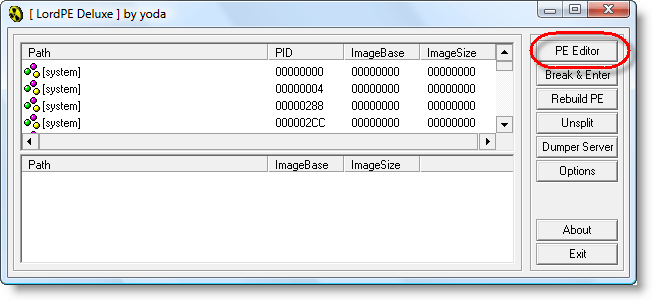


Right-click the Import table:


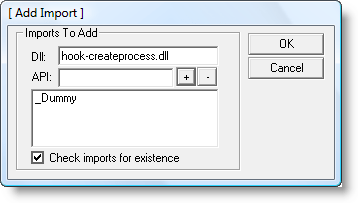

And don’t forget to save…
I’ve updated my WhoAmI? Firefox add-on for Firefox version 3.5.
You can download it here or get it from the Mozilla site. I’ve nominated it to leave the Sandbox. If you use it, please post a review on the Mozilla page to help it on its way out of the the Sandbox (or keep it there if it’s too buggy).
I’ve debugged the issues some people had with my Nokia time lapse Python script, you can find a new version here.
I had an interesting discussion with Hans Heins concerning the timestamp displayed by my UserAssist tool.
The first version of the UserAssist tool would only decode the UserAssist registry keys of the account under which it was running. And thus it made sense to display the timestamp in local time format, even if the entry is stored in UTC.
I added a warning about the time zones when I added registry file import functions, but this was confusing.
This new version of the UserAssist tool adds an extra column, with the timestamp in UTC:
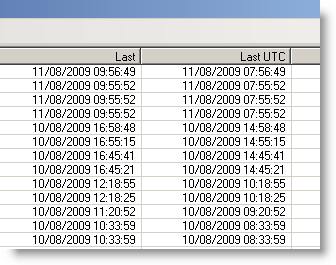
And I’ll be posting a new version to support the new UserAssist registry key format of Windows 7 and Windows 2008 R2.
Download:
MD5: A5244C7F83E0DE70600E27F5D3B8AD7D
SHA256: 7E2D107BE84FBBF7E79F1BD11703401A374B5138B2F77E4FF8AFE1A3E749CCDA
After PDFiD, it’s pdf-parser’s turn to get updated.
The major change is support for /Names obfuscation through canonicalization. Now that these obfuscation techniques are found in in-the-wild samples, this feature became a necessity. For example, searching for /JavaScript when the PDF document contains /Java#53cript will also retrieve this obfuscated instance.
And if you need to see the obfuscated names like they are, use option –nocanonicalizedoutput
Support for filter ASCII85Decode has been added.
And option –hash displays the MD5 hash value of objects, making it easier to compare 2 PDF documents.
Download:
MD5: 07EA2C47766ADF248102E378C65D03F3
SHA256: 5EAD0F9BE9693EF836CF67FF2B796324ED5E7053D34BF4FA588D250A7DA2E761
PDFiD is updated.
Changes:
Download:
MD5: 9769FB96899F3AD15510C903A4FB29EF
SHA256: 542734C2613439851AF99B59725B1607F96A6E9396B447C5BD3AF197AABB0231
Last January, I got a little challenge from @hdmoore via my Twitter account: add data to a signed executable without invalidating the Authenticode signature. I updated my Digital signature tool, but I realize now I had only announced the update on Twitter, not on my blog.
The trick is to increase the size of the image data directory for the digital signature and inject the extra data after the digital signature. This way, the Authenticode validation algorithm ignores the extra data, because it considers it to be part of the signature. Use Disitool’s new inject command:
disitool.py inject ms-patch.exe data.bin ms-patch-data.exe
The authenticode signature of ms-patch.exe will remain valid in ms-patch-data.exe, provided that the length of the injected data (file data.bin) is a multiple of 8.
You can use the paddata option to make the injected data size a multiple of 8 if it isn’t:
disitool.py inject --paddata ms-patch.exe data.bin ms-patch-data.exe
Disitool can be downloaded here.

 Didier Stevens