This updates changes the THP_READALL logic, and adds THP_ECHO_THIS and THP_ALLOW_LIST.
simple_listener_v0_1_3.zip (http)MD5: 6C90E789D4C10B6EF5E918306A7A58E7
SHA256: 16E55E8983E4208151CB407F72238537C7631396FFFECC431230F7879AFAC664
This updates changes the THP_READALL logic, and adds THP_ECHO_THIS and THP_ALLOW_LIST.
simple_listener_v0_1_3.zip (http)This new versions adds 2 new features:
Option -H adds a human hash for each hash:

Option -r renames a file to its hash (hash) or to its hash with extension .vir (vir).
When more that one hash algorithm is used (default: md5, sha1, sha256), the last hash algorithm is used for the rename operation.

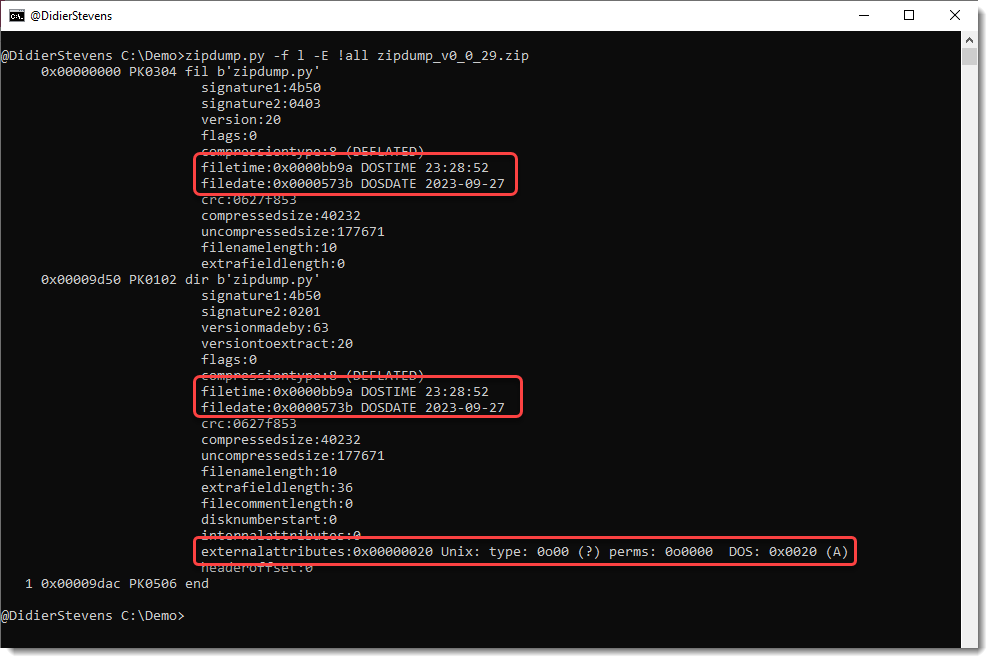
This update of zipdump.py adds parsing for external attributes and DOSDATE and DOSTIME fields when options -f and -E are used.

This update is just a definition update to detect MSO (ActiveMime files).
file-magic_V0_0_7.zip (http)This new update can produce JSON output for each part (option–jsonoutput).
emldump_V0_0_13.zip (http)This is an update linked to option -f l to find PKZIP records.
When option -E all is used, field externalattributes is parsed now:

This update to emldump.py adds a new feature to fix (-F) some obfuscations.
For the moment, only one obfuscation method is fixed (many are already ignored with option -f –filter), used in polyglot PDF/Word files.
emldump_V0_0_12.zip (http)Some new options for my tool sortcanon.py to handle more inputs.
A bit of context: when one sorts a list of IPv4 addresses as text, one gets a result as follows. Take this list:

Just sorting this gives this result:

The IPv4 address starting with 185 comes first, because by default, sorting is string based and digit 1 comes before digit 3.
With sortcanon, one can provide a Python function that will be used to interpret the input and achieve the desired sorting. There are a couple of builtin functions, like ipv4. This is the result:

This time, the IPv4 address starting with 185 comes last, because it has the highest most significant byte.
Recently, I had to sort some files where with extra data, like IPv4 addresses with port numbers. Something like this list:

But this did not work:

Because the function that parses IPv4 addresses, does not expect a port number.
I could create a custom function to handle this, but I pursued another solution. I added an option to select the part of the line, that will be used for sorting, with a regular expression. This is done with option -s (select). Like this:

Regular expression “^([^ ]+) ” selects all characters from the beginning of the line (^) until the first space character (excluded). This selection is stored in a capture group (), and the ipv4 sorting function takes this capture group as input, in stead of the complete line.
The list I selected as example, has some duplicate IPv4 addresses:

If I use option -u (unique), duplicate lines are removed:

But of course the lines with identical IPv4 address 53… remain, because the lines themselves are different (different port number).
This is the desired result, most of the time. But I had an exceptional case, where I had to drop duplicate IPv4 addresses, but still keep one port number. This can be done with option –selectoptions u:

This is a bug fix release.
zipdump_v0_0_27.zip (http)In this new version, new features/updates are: