Didier Stevens

Monday 2 October 2006

Reversing an anonymous proxy

Filed under: Reverse Engineering — Didier Stevens @ 10:08

Unipeak is a free anonymous proxy, it encodes the URLs like this:

http://www.unipeak.com/gethtml.php?_u_r_l_=aHR0cDovL3d3dy5nb29nbGUuY29t (this is http://www.google.com).

Suppose you had to reverse engineer the encoding scheme, how could you proceed? You are in a comfortable position, because you can execute a Chosen Plaintext Attack.

First we need to find out if the encoding scheme is reversible, because it could also be a hash or another key used to access the cache of the proxy (if it’s a caching proxy).

So we add a letter ‘a’ to the encoded URL and see what Unipeak replies:

http://www.unipeak.com/gethtml.php?_u_r_l_=aHR0cDovL3d3dy5nb29nbGUuY29ta

and we see the Google website.

So it’s not a hash, it’s reversible.

We add another ‘a’:

http://www.unipeak.com/gethtml.php?_u_r_l_=aHR0cDovL3d3dy5nb29nbGUuY29taa

and now we get an error message:

unable to connect to http://www.google.comi:80/

It’s definitely reversible.

Searching with Google via Unipeak gives another URL:
http://www.unipeak.com/gethtml.php?_u_r_l_=aHR0cDovL3d3dy5nb29nbGUuY29tOjgwL3NlYXJjaA%3D%3D&hl=en&q=unipeak&btnG=Google+Search

This URL starts with the same sequence as our first URL, so it’s probably a simple encoding scheme where the characters are processed from left to right.

So let’s start another experiment, we enter this URL: aaaaaaaaaa

The encoded URL is:

http://www.unipeak.com/gethtml.php?_u_r_l_=YWFhYWFhYWFhYQ==

Very interesting, we also get a repeating pattern, but the cycle is 4 characters long (YWFh).

Ok, now let’s use a trick: we enter a series of characters Us. The character U is special, its ASCII encoding written in binary is 01010101. Thus UU is 0101010101010101, UUU is 010101010101010101010101, …

Entering UUUUUUUUUU gives us:

http://www.unipeak.com/gethtml.php?_u_r_l_=VVVVVVVVVVVVVQ==

Another nice sequence!

This is a strong indication that the encoding is done at the bit level: the input is seen as a stream of bits, the bits are grouped in groups of X bits (where X is unknown). Each group is transformed to another sequence of bits by a function F, and the same function F is used for each group. We can also assume that X is even, otherwise we wouldn’t get a sequence of identical characters, but a sequence of identical pairs.

We perform some extra tests to prove (or disprove) our hypothesis.

We encode sequences of different lengths and compare the length of the cleartext and the cyphertext: the ratio is about 3 to 4, 3 input characters generate 4 output characters (BTW, the fact that we get a cycle of 4 characters for aaaaa… is also a strong indication for this ratio).

So X can be 3, 6, 9, 12, … . Except we assume X is even: 6, 12, …

Let’s test X = 6.

We try URL 000, this gives us MDAw (http://www.unipeak.net/gethtml.php?_u_r_l_=MDAw)
Now 000 is 30 30 30 (in hexadecimal ASCII)

or 00110000 00110000 00110000 in binary, grouped in 8 bits (1 byte)
or 001100 000011 000000 110000 in binary, but grouped in 6 bits (X = 6)

Now increment the first group:

001101 000011 000000 110000

or 00110100 00110000 00110000 in binary, grouped in 8 bits (1 byte)

or 34 30 30 (in hexadecimal ASCII)

or 400

So 000 becomes 400 when you increment the first group of 6 bits.

Testing URL 400 gives NDAw: changing the first 6 bits changes only the first character!

We do the same for the remaining groups:

000 -> 0@0 -> MEAw

000 -> 00p -> MDBw

000 -> 001 -> MDAx
So X is indeed 6, because changing a group of 6 bits at a time changes only one encoded character.

And we can also assume that function F is linear, because incrementing the input with 1 increments the output with 1 (M -> N, D -> E, A -> B and w -> x).

Now we could try every possible permutation of 6 bits, and see what the corresponding encoded character is.

We would discover that F maps 0..63 to ABCDEFGHIJKLMNOPQRSTUVWXYZabcdefghijklmnopqrstuvwxyz0123456789+/

And this is a very common encoding scheme: base64
Monday 18 September 2006

A Windows Live CD plugin for my UserAssist utility

Filed under: Reverse Engineering — Didier Stevens @ 15:24

I’ve published a BartPE plugin for my UserAssist utility, you can download it here (https, MD5 D43E519B7BCE90F31EB54884E7AA75C1 DE9D576C0F5FF8D33E039A5064BD8AFF). And I’m posting another movie.
Windows Live CDs are a popular troubleshooting and forensic investigation tool, they allow you to boot a (Windows) PC from a CD. Bart Lagerweij developed BartPE, a tool to create a Windows Live CD (a Windows “pre-install” environment CD), and several people build their own tools based on his work. The Ultimate Boot CD for Windows is based on BartPE.

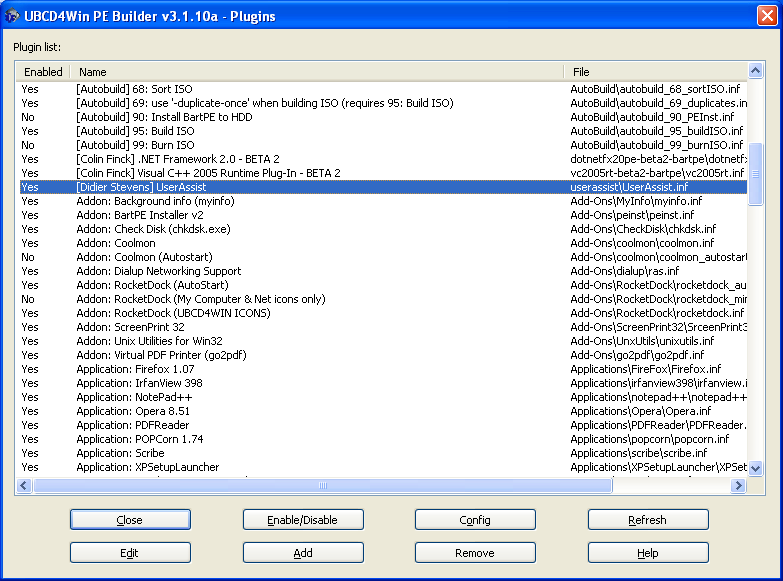
Bart’s PE has an open architecture, you can integrate your own tools by making a dedicated plugin. My UserAssist utility uses the Microsoft .NET Framework 2.0, which is not supported by BartPE. You need to add Colin Finck’s Microsoft .NET Framework 2.0 plugin to the Ultimate Boot CD for Windows plugins to use my plugin.

You add plugins to the Ultimate Boot CD for Windows with the Plugins dialog:

plugins.PNG

Afterwards you create your own Ultimate Boot CD for Windows (you have to provide your own licensed Windows XP SP2 CD).

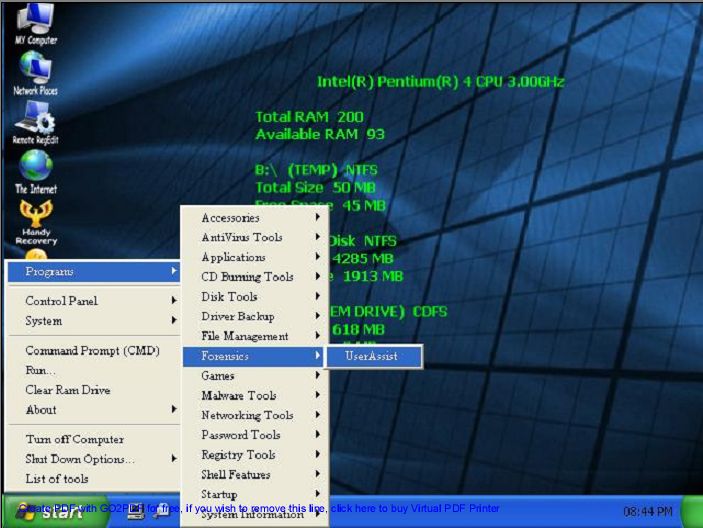
The UserAssist utility is located in the Programs/Forensics menu (when you boot from the CD):

screenshot.png

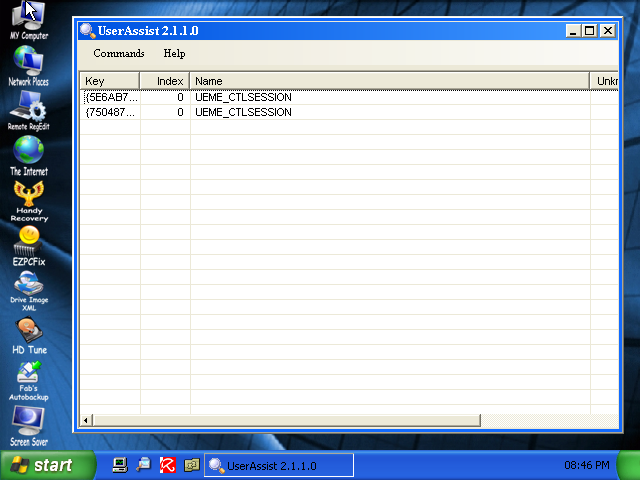
The UserAssist utility displays the activity of the current user at startup. This is of course not useful for a Live CD, because the profile of the current user of a Live CD is not persisted.

You will have to load the NTUSER.DAT registry hive of the user you want to investigate in RegEdit and export it to a reg file, before you can import it in UserAssist (I plan to add a feature to UserAssist to automate this task).

userassist.PNG

I’ve tested my plugin with the Ultimate Boot CD for Windows, not with BartPE.
There’s a movie here on YouTube, or hires (XviD) here showing you how to do this for user Employee.

Sunday 27 August 2006

Hiding the password

Filed under: Reverse Engineering — Didier Stevens @ 13:35

Where and how do you store credentials used by applications? There is no easy solution in Windows. We all agree that storing cleartext passwords in the source code or a configuration file is a bad idea. We should encrypt these passwords. But what do we do with the decryption key? Is the decryption algorithm easy to break?

I wondered how difficult it would be to extract the password from McAfee’s EPO agent installation program. It turns out to be rather easy, it took me about 3 hours of debugging with OllyDbg. And then I developed a OllyDbg plugin to automate the task.

McAfee’s EPO provides centralized anti-virus management. It connects to EPO agents installed on each managed machine. One can install the EPO agent centrally via the EPO manager or locally by copying the EPO agent installation program to the machine and executing it with local admin credentials. McAfee provides a solution when the install has to be done by a user without administrative privileges. The necessary credentials are stored in the EPO agent installation program.

Here’s how I proceeded to extract the password from the EPO agent installation program.

First I create 2 EPO agent installation programs with different passwords (password and P@ssw0rd) and I compare the files with JojoDiff.

jdiff-w32 -lr FramePkg-1.exe FramePkg-2.exe:

1        1 EQL 25792
25793    25793 MOD 64
25856    25856 EQL 1487303

The files are identical, except for 64 bytes.

I extract the 64 bytes from FramePkg-1.exe with my binary tools:

middle FramePkg-1.exe 25792 64 password.bin

I examine password.bin with XVI32 and discover it’s ASCII:

jXoAADpNAADvOY9WkCYp0xOk6ON8lFjm4af+X4+8IVL6vuLPafhTAuyfdv52BG4e

This must be the encrypted password (P@ssw0rd).

I debug FramePkg-1.exe with OllyDbg, looking for the password (encrypted and cleartext). It takes an hour to discover that FramePkg-1.exe extracts several files to a temporary folder and starts another program it extracted: FrmInst.exe
This program takes several arguments, one of which is the encrypted password:

/CreateService="C:mydirsEPOAgentEPOAgentFramePkg-1.exe"
/LOGDIR=C:DOCUME~1ADMINI~1LOCALS~1TempNAILogs
/Cleanup2="C:DOCUME~1ADMINI~1LOCALS~1Tempunz6.tmp"
/EmbeddedUsername="administrator"
/EmbeddedDomain="."
/EmbeddedPassword="jXoAADpNAADvOY9WkCYp0xOk6ON8lFjm4af+X4+8IVL6vuLPafhTAuyfdv52BG4e"
/Install=Agent

I debug FrmInst.exe with these arguments, and after 2 hours I find register EBP pointing to ASCII string P@ssw0rd. This is at address 0x004101BD.

pssw0rd.PNG

This confirms my suspicion: the password is safe from a normal user, but someone with assembly debugging skills can recover the password within a few hours. No big surprise, but you know, there are people who can only be convinced when you deliver a proof to backup your claim.

This dreary debugging process inspired me to develop a OllyDbg plugin called OllyStepNSearch to automated the debugging process. It will automatically step through the debugged program until a register points to the string you specified. You can download it, but it’s still beta.

I used it to debug the EPO agent to look for P@ssw0rd. It’s slow (about 45 minutes), but it runs unattended.

Tuesday 8 August 2006

Khallenge: hints for solving level 2

Filed under: Reverse Engineering — Didier Stevens @ 16:57

Some people have asked me for details about Khallenge level 2.

First hint: Have you already unpacked level2.exe? It’s packed with UPX. Take a look at Ryan’s post.

My second hint is ROT13 encrypted:

Ng 00401029, fpnas vf pnyyrq gb ernq gur cnffjbeq lbh glcrq va.
Nsgre gung pnyy, gur cnffjbeq lbh ragrerq vf grfgrq, naq lbh ner
vasbezrq vs vg’f pbeerpg.

Gurer vf na neenl bs fgevat cbvagref fgnegvat ng 00407034, gurl cbvag
gb jbeqf va Svaavfu.
N svefg ybbc jvyy grfg vs n cneg bs gur cnffjbeq lbh ragrerq vf rdhny
gb n Svaavfu jbeq.
N frpbaq ybbc jvyy grfg vs nabgure cneg bs gur cnffjbeq lbh ragrerq vf
rdhny gb n Svaavfu jbeq.
Vs obgu grfgf ner fhpprffshy, lbhe cnffjbeq vf npprcgrq naq gur rznvy
nqqerff vf qvfcynlrq.

Monday 7 August 2006

Khallenge: solution for level 3 posted

Filed under: Reverse Engineering — Didier Stevens @ 17:11

sp has posted his solution for level 3. Excellent post, but I should mention that level 3 contains lots of obfuscated code, something sp doesn’t emphasize.

Sunday 6 August 2006

Khallenge results

Filed under: Reverse Engineering — Didier Stevens @ 22:09

F-Secure Reverse Engineering Challenge is over. From the Khallenge page:

Khallenge is now over. During 70 hours, Khallenge was started by over 1200 people. First level was completed by about 400 individuals, second by less than a hundred and the final level of Khallenge was finished by just 16 people.

I think I was 9th of those 16 people.

Saturday 5 August 2006

It’s late in Brussels…

Filed under: Reverse Engineering — Didier Stevens @ 2:08

It’s late in Brussels, around 4 AM, but I solved the F-Secure Reverse Engineering Challenge. Now I can go to bed…

Friday 4 August 2006

Update: UserAssist utility

Filed under: Reverse Engineering,Update — Didier Stevens @ 6:16

I’ve enhanced my UserAssist utility. After I published my utility, I had do to a small forensic investigation, but I couldn’t install my program on the machine. That’s why I added a feature to import from a REG file.

The treeview has been replaced with a table that also displays the session ID, counter and last timestamp of each entry.

userassistv2a.PNG

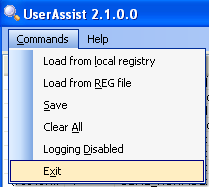
The commands are in a pull-down menu:

userassistv2b.PNG

New commands:

  • Load from REG file.
  • Logging Disabled

The about dialog contains a help section.

I posted my program (source code and binaries) here on the gotdotnet site. Download the ZIP file, you’ll have to extract UserAssist\UserAssist\bin\Release\UserAssist.exe to get my program. There is no setup, it’s just one executable. You’ll need the .NET Framework 2.0 runtime to run my program (download it only if you have a problem running my program, if you have an up-to-date version of Windows XP, the .NET 2.0 Framework will already be installed).

Monday 31 July 2006

YACoSTO

Filed under: Reverse Engineering — Didier Stevens @ 17:24

A friend faced the following problem: his company has to provide confidential data to a financial company. To maintain the confidentiality of the data, this financial company provided my friend with a custom-made program to “protect” the data to be provided.

But my friend doesn’t trust unknown programs, he wanted to know exactly what protection this program offered. The financial company didn’t want to provide further details about their program, so my friend called me for help.

To remain confidential, data transferred on public channels must be protected with strong encryption, the implementation of the cryptographic process must be free of errors and the cryptographic keys must be managed securely.

First we get acquainted with the program. In fact, it’s very simple: you start the program, open the file to be protected and save the resulting file with another extension.
So there’s no password to be provided. This is an indication that the cryptographic key is stored in the program. This is no problem, as long as public key cryptography is used. However, if secret-key cryptography is used, the secret key can be retrieved from the program by reverse engineering and can then be used to decrypt the data.

The protected file is much smaller (around 4 times), so compression is involved. A first glance at the protected file with a hex editor (like XVI32) doesn’t reveal much, there’s nothing readable.

One can follow 2 paths to identify if cryptographic methods are used in a program: you can analyze the program and you can analyze the data.

When analyzing the program , the goal is to identify cryptographic algorithms. The cryptographic library can be linked statically or dynamically. For Windows programs, you can use a dependency viewer (like Dependency Walker) to view the imported DLLs. For statically linked programs, you can use FindCrypt2 by Ilfak. It’s an IDA Pro plugin that looks for cryptographic constants in the disassembled code.

We decide to proceed with the analysis of the protected data. Reverse engineering will come later, but I can’t resist a quick peek at the strings in the program (with BinText). These strings stand out to me:

deflate 1.1.4 Copyright 1995-2002 Jean-loup Gailly 
inflate 1.1.4 Copyright 1995-2002 Mark Adler

They come from the zlib library, an open source library for GZip compression.

We encrypt the same data file a second time, and save it with another name. The size of the 2 protected files is the same. Comparing these 2 files with JojoDiff (a binary comparison program) shows that the files are almost identical:

jdiff-w32 -lr test1.prt test2.prt 
       1        1 EQL 10 
      11       11 MOD 256 
     267      267 EQL 2380

The –lr options displays ASCII output with regions (sequential parts of the binary files).
This result shows us that the first 10 bytes and the last 2380 bytes are the same, there’s only a region of 256 bytes that differ. Because most of the file is the same, we can deduce that the protection always uses the same encryption key (the 256 different bytes are probably a structure of status fields like filename, timestamps and other stuff). So this program doesn’t use “fancy” stuff like session keys, salting, initialization vectors, …

Now we protect several other files and compare them: the size is different and only the first 10 bytes are the same.
We formulate our hypothesis for the file format:
Bytes 1-10: header (magic bytes)
Bytes 11-266: status data
Bytes from 267 on: encrypted data

Now we will concentrate on the encrypted data. Strong ciphertext should be hard to distinguish from a series of random bytes. CrypTool is a freeware program which enables you to apply and analyse cryptographic mechanisms. It’s an excellent educational program. We will use it to see how “random” the encrypted data is.

The Analysis / General menu option in CrypTool has several tools to analyze ciphertext (like calculating the entropy), but because we have no clear idea of the results we can expect with strong encryption, we do the following:

We take our data file and use several methods to generate a “transformed” file:

  1. We protect it with the provided program
  2. We ZIP it
  3. We GZip it
  4. We password protect it with ZIP but don’t use compression, just store.
  5. We encrypt it with RSA
  6. We encrypt it with Ncrypt

We analyze each file with the CrypTool cryptanalysis tools and compare the results. I won’t detail each result here, but we have 2 important results.

First, the entropy of our protected file is in the same range as the entropy of the compressed files, rather than the encrypted files:

File Entropy
File 1 7.92
File 2 7.89
File 3 7.93
File 4 7.98
File 5 7.97
File 6 7.97

The maximum entropy is 8.

Second, we find the same periodicity cycle in the protected file and the GZipped file, but at a different offset:

Periodicity analysis of test1.prt: 
No.    Offset    Length    Number of cycles    Cycle content 
1    2637    1    2        .     00
Periodicity analysis of test.gz: 
No.    Offset    Length    Number of cycles    Cycle content 
1    2388    1    2        .     00

The difference in offset is 249 bytes, almost the size of the header and status data (265)!
This is a strong indication that the protected data is just compressed, not encrypted, and that it’s GZip compressed.

The binary comparison of the protected data and the GZipped opens our eyes:

jdiff-w32 -lr test1.prt test.gz 
       1        1 MOD 598 
     599      599 DEL 129 
     727      598 EQL 1791

Both files share the same sequence of 1791 bytes!

We review our hypothesis for the file format:
Bytes 1-10: header (magic bytes)
Bytes 11-266: status data
Bytes from 267 on: encrypted GZipped data

I know that jdiff can be confused when comparing files which start differently but then continue identically, so we decide to compare them starting from the end. We binary reverse both files and compare them again:

jdiff-w32 -lr reverse-test1.prt reverse-test.gz 
       1        1 EQL 2370 
    2371     2370 MOD 19

Wow! The GZipped file is almost completely included in the protected file, except for 19 bytes (this is very likely the GZip header which contains, among other things, the original file name).

To test our hypothesis, we strip the first 266 bytes from the protected file (with the tail command), name it test.gz and decompress it with the gzip command. Success! We have recovered our original file, and we prove that the so-called “protection” provided by the program is not encryption, just standard compression! It can easily be defeated in a few seconds with 2 simple commands: tail and gzip.

This analysis has taken us about 2 hours. My friend has his answer about the protection level provided by the program. Now it’s up to him to report this to his manager and decide how to proceed.

Later on, I started reverse engineering the program.
The first 10 bytes are a fixed string, the so-called magic bytes, used to identify the file type.
The next 256 bytes are just random bytes generated by the program, and have no meaning whatsoever! The program seeds the RNG with the current time, explaining why protecting the same file twice gives a different 256 byte sequence.

By now I knew enough to formulate a final, proven hypothesis about the file format:
Bytes 1-10: header (magic bytes)
Bytes 11-266: status data garbage
Bytes from 267 on: encrypted GZipped data.

Yet Another Case of Security Through Obscurity. Or, quoting Bruce Schneier, “Snake Oil”!

Monday 24 July 2006

ROT13 is used in Windows? You’re joking!

Filed under: Reverse Engineering — Didier Stevens @ 21:50

We where telling “encryption jokes” (like ROT26) at the office, until a colleague mentioned that a part of the Windows Registry is ROT13 encrypted.

It appeared to be true, Windows Explorer will store info about the programs you run in registry key
HKEY_CURRENT_USER\Software\Microsoft\Windows\CurrentVersion\Explorer\UserAssist\{75048700-EF1F-11D0-9888-006097DEACF9}\Count.
The value names stored in this key are ROT13 encrypted.

Google for UserAssist and you’ll find several pages where this is explained in detail, like this one. Some of these pages mention programs to decrypt ROT13, but I didn’t find a program to display and manage the UserAssist data. So I decided to write my own, just for the fun of it.

I wanted this program to have a GUI and I didn’t want to spend much time coding low-level details, so I decided to code it with the Microsoft .NET 2.0 Framework.
I posted my program (source code and binaries) here on the gotdotnet site.

Download the ZIP file, you’ll have to extract UserAssist\UserAssist\bin\Release\UserAssist.exe to get my program. There is no setup, it’s just one executable.

I used Microsoft Visual C# 2005 Express Edition because it’s free, so you can examine and modify my program. But it’s not needed to run my program, you’ll only need the .NET Framework 2.0 runtime to run my program (download it only if you have a problem running my program, if you have an up-to-date version of Windows XP, the .NET 2.0 Framework will already be installed).

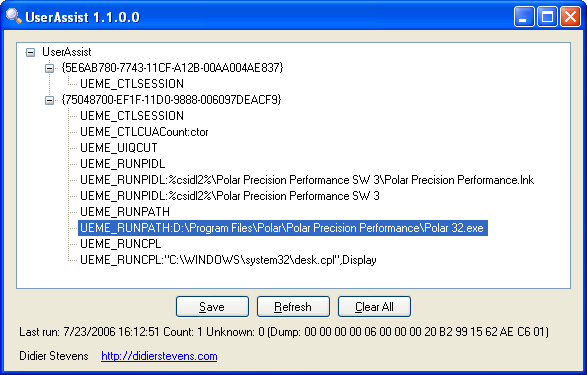
My program displays the decrypted UserAssist entries as a treeview:

screenshot1.PNG

ROT13 is a monoalphabetic substitution cipher, these ciphers are very easy to decrypt, e.g. by frequency analysis. The namespace System.Security.Cryptography in .NET 2.0 does not implement the ROT13 cipher, I had to implement my own method.

While I developed my program, I became intrigued with the binary data. Because I had no access to the Internet at that time, I had to resort to the good old trial and error technique to discover the meaning of this data (I tested my program on Windows XP SP2).
For all entries starting with UEME_RUN, the binary data is 16 bytes long. The first 4 bytes at first always remained zero, and the fifth byte increased with one each time I ran the corresponding program (like notepad.exe). Because the sixth, seventh and eight byte are zero, I surmized that the 4 bytes starting at byte 5 are a 32 bit counter. Data on Intel machines is usually stored in little-endian format, this means that the least significant byte is stored first, e.g. a 32 bit integer with value 9 is stored as 09 00 00 00. When I ran a program the first time, this counter was initialized to the value of 6. This was also the case when I deleted the entry and ran the program again.
The remaining 8 bytes changed apparently at random each time I ran the corresponding program, but in fact only the least significant bytes changed. I hypothesized that the remaining 8 bytes are a timestamp. I ran notepad, noted the value of the 8 bytes, ran notepad exactly one minute later and noted the new value of the 8 bytes. The difference was 0x23B9D020, or 599380000, which is almost equal to 60 seconds times 10.000.000. Hence it definitely was a timestamp, I tried to convert the 8 last bytes to a timestamp with the C# method DateTime.FromFileTime, and Bingo!, I got the date and time when I last ran notepad.

Now back to the first 4 bytes. I noticed a trend: they are set to the value of the last 4 bytes of the UEME_CTLSESSION, and these 4 bytes appear to be a 32 bit counter that increases each time the user logs on (only after a reboot?). I need to analyze this further.

To summarize, the 16 data bytes are organized as:
• 4 bytes, meaning unknown, probably a 32 bit integer, appears to be a session counter
• 4 bytes, a 32 bit integer, counts the number of times the corresponding program was executed, is equal to 6 for the first run
• 8 bytes, a 64 bit timestamp, last time the corresponding program was executed

When you select an entry in the treeview, the binary data will be decoded and displayed at the bottom of the form.

My program should be self-explanatory.

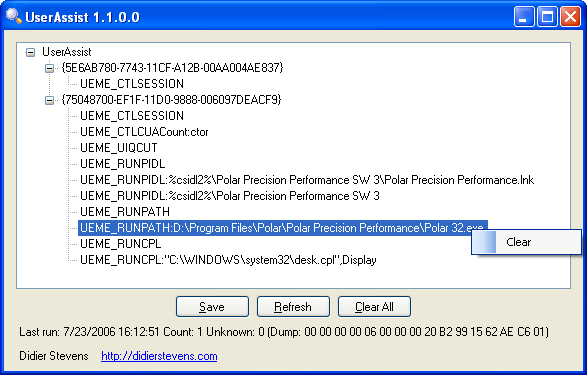
Right-click an entry to clear it:

screenshot2.PNG

Clear All will delete the root keys, thus deleting all entries and also preventing Windows Explorer to record program execution until you perform a new logon (in fact, the entries are (re)created when Windows Explorer is started).

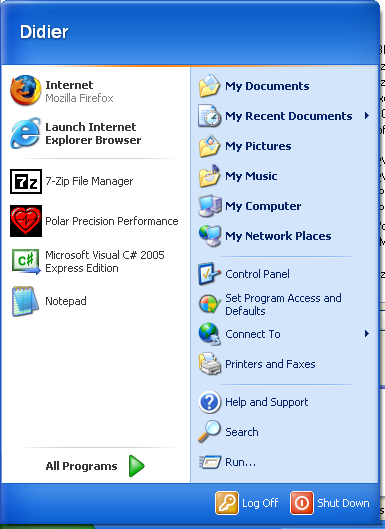
Caution: the UserAssist entries are used by Windows to display programs you use frequently in the Start menu:

startmenu.png

Clearing the UserAssist entries will impact the Most Frequently Used Programs portion of your Start menu.

Reverse-Engineering the UserAssist entries was relatively easy, but I can’t explain why they are ROT13 encrypted!

« Previous PageNext Page »

Blog at WordPress.com.