Didier Stevens

Wednesday 16 April 2025

Quickpost: Testing The Capacity Of My New Power Bank

Filed under: Hardware,Quickpost — Didier Stevens @ 0:00

I bought a new power bank (Anker PowerCore 533, capacity 10.000 mAh 36 Wh, 30 Watt Power Delivery) and did some tests that I’m summarizing here.

Charging it with a generic USB C charger capable of delivering 20 W PD required 46,979 Wh. That’s measured on the 230V side, thus including the loss in the charger.

Charging it with a Anker 737 Charger (GaNPrime 120W) required 45,515 Wh.

Discharging the power bank via the USB A port connected to an electronic load gave me:

  • 30,970 Wh (6516 mAh ) when drawing 0,5A
  • 29,362 Wh (6523 mAh) when drawing 1,0A

30 Wh compared to 36 Wh (the advertised capacity of the power bank) is 83,33%, which is much better than what Anker estimates you can get out of a power bank (60% to 70%).

As I couldn’t get more than 1,0A out of the power bank via the USB A port, I used the USB C port with a trigger module to deliver 20,0V.

The electronic load drew 1,250A and measured around 18,6V, or 23,25W. I got 29,020 Wh (1557 mAh) out of it.

The power bank became hot while getting completely drained at 23W:

You can see the outline of the cells and the electronic circuit (it’s the hottest: white).

I couldn’t immediately recharge my power bank after that, I had to let it cool down (“Let the power bank cool down before use”):

I also tried to get more out of the power bank by drawing 1,5A at 18,55V or 27,82W (advertized maximum is 30W).

But after 34 minutes (delivering 15,670 Wh) it stopped delivering power and displayed the following message (“Use after protection removal”):

I guess that’s the overcurrent protection kicking in. I’m not sure why this happened, as the electronic load was in constant current mode.

I had to disconnect the cable to use the power bank again.

And finally, this power bank is capable of trickle charging: delivering a very low current for about two hours. You enable this mode by pushing the button twice.

I configured the electronic load to draw a really low current of 0,005A (it measured 0,003A) from the USB A port and it delivered 0,032 Wh (6 mAh) over a period of 2:01:05 after which it shut down automatically (as advertized).


Quickpost info

Sunday 30 March 2025

Quickpost: Electrical Power & Mining: Dissipated Heat

Filed under: Hardware,Quickpost — Didier Stevens @ 0:00

I got an interesting question on my blog post “Quickpost: Electrical Power & Mining“:

Does the temperature in your room increase due to the miner running full blast? Would you turn down the heater to compensate (which may change the calculation slightly).

That was indeed the case: I did turn down the heating in the room, and the heat of the desktop computer made it a nice 20°C.

We heat our home with natural gas, and on that day, we consumed 2,23 cubic meters to heat the rooms in our house, except for the office where the computer was running. Counting the volumes of the rooms, I estimate that 0,55 cubic meters would have been necessary to heat the office.

Using that same spreadsheet, consuming an extra 0,55 cubic meter would cost me €0,55. Deducting this from the €3,91 I had to spend on electricity gives me €3,36, which is still around 10 times more than the €0,39 I earned through mining.


Quickpost info

Monday 10 February 2025

Quickpost: Electrical Power & Mining

Filed under: Hardware,Quickpost — Didier Stevens @ 0:00

I was wondering: how costly is crypto mining for me?

I let an easy-to-use mining application run on my desktop computer (RTX 3080 GPU) for 24 hours.
After 24 hours, the miner reported that I had mined 0,00000365 BTC, and that this would earn me €0,39. The electrical power consumption of my desktop computer for that period was 13,024 kWh.

How much does 13 kWh cost me? Here in Belgium, we pay a lot of taxes on our utility bill. So just multiplying 13 kWh with the cost for 1 kWh would not produce realistic costs.
What I did instead: I took my utility bill of December 2024, with all the taxes, and created a spreadsheet that re-calculates all of the costs and taxes. That gives me a spreadsheet were I can simulate changes to my bill and see what the final result is. And with that spreadsheet, I increased my electrical power consumption for December 2024 with 13,024 kWh. That gave me an extra cost of €3,91.

Spending €3,91 to earn €0,39 is not viable at all.

But what if I would run the miner only when my solar panels produce enough power? That’s free electricity, right?

Yes, but … my electricity supplier also pays me money for the solar power I produce and don’t consume (e.g., inject).
Injecting 13,024 kWh would earn me €0,86. So that’s at least double the amount that mining would earn me.

Conclusion: as long as electricity tariffs don’t change significantly, mining is not financially viable for me. One would be better of buying BTC with the small payouts for injected power.


Quickpost info

Thursday 21 November 2024

Quickpost: The Electric Energy Consumption Of A Soundbar

Filed under: Hardware,Quickpost — Didier Stevens @ 0:00

I have a Samsung Neo QLED 65 inch TV.

Its standby power consumption is pretty good: 1,3 Watt.

It comes with a soundbar, and its standby power consumption is pretty awful: 5,5 Watt!


Quickpost info

Sunday 3 November 2024

Quickpost: The Electric Energy Consumption Of A Wired Doorbell

Filed under: Hardware,Quickpost — Didier Stevens @ 0:00

I have a classic wired doorbell at home: the 230V powered transformer produces 12V on its secondary winding. The circuit on that secondary winding powers an electromechanical doorbell via a pushbutton. The bell rings (“ding-dong”) when the button is pushed (closing the circuit).

Since losses occur in all transformers, I wanted to know how much my doorbell transformer consumes in standby mode (doorbell not ringing). The primary winding is always energized, as the pushbutton (normal-open switch) is on the circuit of the secondary winding.

I made the measurements on the primary winding: 3,043 Watt. That’s more than I expected, so I double-checked, and noticed I had forgotten this:

There’s a small incandescent light-bulb in the doorbell button. That consumes power too!

Second set of measurements after removing the light-bulb: 1,475 Watt.

So with light-bulb, my doorbell consumes 3 Watt 24/7, and 1,5 Watt without light-bulb.

1,5 Watt is very similar to the standby consumption of linear power supplies. As energy experts here in Europe advice to replace linear power supplies in favor of switched-mode power supplies, I wonder why they never mention doorbells … Replacing your doorbell would not be as easy as replacing a (USB) charger though (it would best be done by an electrician), so that might explain it, but on the other hand, there are enough energy experts proposing impractical solutions.

3 Watt is 26,28 kWh for a whole year. In my case, that’s a cost of €5,89 (that’s total cost: electricity plus taxes). I could reduce this by half, just by removing the incandescent light-bulb.

Should I do this? Well, the decision has already been taken for me: I dropped the light-bulb while it was still hot, and the impact broke the filament …

For comparison: 3 Watt is at least three times higher than the individual standby consumption of our appliances like TV, fridge, freezer, …

Yet another comparison: asking an LLM to write an email requires less (< 0,3 Wh) than my doorbell over a period of an hour (3 Wh).


Quickpost info

Tuesday 8 October 2024

Quickpost: The Electric Energy Consumption Of LLMs – No GPU

Filed under: Quickpost — Didier Stevens @ 0:00

A friend asked me if I had used a GPU for my tests described in blog post “Quickpost: The Electric Energy Consumption Of LLMs”. Because he had tried running an LLM on a machine without GPU, and it was too slow.

I did a quick test, just redoing previous test but without GPU (by setting environment variable CUDA_VISIBLE_DEVICES=-1).

Answering my query took 17 seconds, and required 1.13 Wh (again, for the whole PC).


Quickpost info

Sunday 6 October 2024

Quickpost: The Electric Energy Consumption Of LLMs

Filed under: Quickpost — Didier Stevens @ 19:17

I’ve read claims that AI queries require a lot of energy. Today I heard another claim on the Nerdland Podcast (a popular science podcast here in Belgium): “letting ChatGPT write an email of 100 words requires 70 Wh” (if you’re interested, that’s said at 00:28:05 in this episode).

I though to myself: that’s a lot of energy. 70 Wh is 252,000 Ws (70 W * 3600 s). Assume that it takes 10 seconds to write that email, then it requires 25,200 W of power, or 25 kW. That’s way more than the theoretical maximum I can get here at home from the power grid (9 kW).

So I decided to do some quick & dirty tests with my desktop computer and my powermeter.

First test: measure everything.

Step 1: starting up my desktop computer (connected to my powermeter) and waiting for the different services to startup, required 2.67 Wh of electrical energy:

Step 2: I opened a command prompt, started Ollama, typed a query to generate an email, and waited for the result. By then, the required electrical energy op my desktop computer (since starting up) was 3.84 Wh:

So step 2 took 57 seconds (00:02:36 minus 00:01:39) and required 1.17 Wh (3.84 – 2.67). That’s way less than 70 Wh.

Second test: just measure the query.

I restarted my computer and started Ollama. Then I started my powermeter and pasted my query and waited for the answer:

That took 3 seconds and required 0.236 Wh:

Notice that I have not just measured the electrical energy consumption of Ollama processing my query, but I measured the total electrical energy consumption of my desktop computer while Ollama was processing my query.

0.236 Wh for a computer running Ollama and processing a query is very different than 70 Wh for ChatGPT processing a query. That’s almost 300 times more, so even though my test here is just anecdotal and I’m using another LLM than ChatGPT, I will assume that 70 Wh is a gross overestimation.

FYI: asking Google “what is the electrical energy consumption of chatgpt processing a query”, I find results mentioning between 1 and 10 Wh. That’s closer to my tests than the 70 Wh claim.


Quickpost info

Tuesday 29 August 2023

Quickpost: PDF/ActiveMime Maldocs YARA Rule

Filed under: maldoc,Malware,Quickpost — Didier Stevens @ 18:07

Here is a YARA rule I developed to detect PDF/ActiveMime maldocs I wrote about in “Quickpost: Analysis of PDF/ActiveMime Polyglot Maldocs“.

It looks for files that start with %PDF- (this header can be obfuscated) and contain string QWN0aXZlTWlt (string ActiveMim in BASE64), possibly obfuscated with whitespace characters.

rule rule_pdf_activemime {
    meta:
        author = "Didier Stevens"
        date = "2023/08/29"
        version = "0.0.1"
        samples = "5b677d297fb862c2d223973697479ee53a91d03073b14556f421b3d74f136b9d,098796e1b82c199ad226bff056b6310262b132f6d06930d3c254c57bdf548187,ef59d7038cfd565fd65bae12588810d5361df938244ebad33b71882dcf683058"
        description = "look for files that start with %PDF- and contain BASE64 encoded string ActiveMim (QWN0aXZlTWlt), possibly obfuscated with extra whitespace characters"
        usage = "if you don't have to care about YARA performance warnings, you can uncomment string $base64_ActiveMim0 and remove all other $base64_ActiveMim## strings"
    strings:
        $pdf = "%PDF-"
//        $base64_ActiveMim0 = /[ \t\r\n]*Q[ \t\r\n]*W[ \t\r\n]*N[ \t\r\n]*0[ \t\r\n]*a[ \t\r\n]*X[ \t\r\n]*Z[ \t\r\n]*l[ \t\r\n]*T[ \t\r\n]*W[ \t\r\n]*l[ \t\r\n]*t/
        $base64_ActiveMim1 = /Q  [ \t\r\n]*W[ \t\r\n]*N[ \t\r\n]*0[ \t\r\n]*a[ \t\r\n]*X[ \t\r\n]*Z[ \t\r\n]*l[ \t\r\n]*T[ \t\r\n]*W[ \t\r\n]*l[ \t\r\n]*t/
        $base64_ActiveMim2 = /Q \t[ \t\r\n]*W[ \t\r\n]*N[ \t\r\n]*0[ \t\r\n]*a[ \t\r\n]*X[ \t\r\n]*Z[ \t\r\n]*l[ \t\r\n]*T[ \t\r\n]*W[ \t\r\n]*l[ \t\r\n]*t/
        $base64_ActiveMim3 = /Q \r[ \t\r\n]*W[ \t\r\n]*N[ \t\r\n]*0[ \t\r\n]*a[ \t\r\n]*X[ \t\r\n]*Z[ \t\r\n]*l[ \t\r\n]*T[ \t\r\n]*W[ \t\r\n]*l[ \t\r\n]*t/
        $base64_ActiveMim4 = /Q \n[ \t\r\n]*W[ \t\r\n]*N[ \t\r\n]*0[ \t\r\n]*a[ \t\r\n]*X[ \t\r\n]*Z[ \t\r\n]*l[ \t\r\n]*T[ \t\r\n]*W[ \t\r\n]*l[ \t\r\n]*t/
        $base64_ActiveMim5 = /Q\t [ \t\r\n]*W[ \t\r\n]*N[ \t\r\n]*0[ \t\r\n]*a[ \t\r\n]*X[ \t\r\n]*Z[ \t\r\n]*l[ \t\r\n]*T[ \t\r\n]*W[ \t\r\n]*l[ \t\r\n]*t/
        $base64_ActiveMim6 = /Q\t\t[ \t\r\n]*W[ \t\r\n]*N[ \t\r\n]*0[ \t\r\n]*a[ \t\r\n]*X[ \t\r\n]*Z[ \t\r\n]*l[ \t\r\n]*T[ \t\r\n]*W[ \t\r\n]*l[ \t\r\n]*t/
        $base64_ActiveMim7 = /Q\t\r[ \t\r\n]*W[ \t\r\n]*N[ \t\r\n]*0[ \t\r\n]*a[ \t\r\n]*X[ \t\r\n]*Z[ \t\r\n]*l[ \t\r\n]*T[ \t\r\n]*W[ \t\r\n]*l[ \t\r\n]*t/
        $base64_ActiveMim8 = /Q\t\n[ \t\r\n]*W[ \t\r\n]*N[ \t\r\n]*0[ \t\r\n]*a[ \t\r\n]*X[ \t\r\n]*Z[ \t\r\n]*l[ \t\r\n]*T[ \t\r\n]*W[ \t\r\n]*l[ \t\r\n]*t/
        $base64_ActiveMim9 = /Q\r [ \t\r\n]*W[ \t\r\n]*N[ \t\r\n]*0[ \t\r\n]*a[ \t\r\n]*X[ \t\r\n]*Z[ \t\r\n]*l[ \t\r\n]*T[ \t\r\n]*W[ \t\r\n]*l[ \t\r\n]*t/
        $base64_ActiveMim10 = /Q\r\t[ \t\r\n]*W[ \t\r\n]*N[ \t\r\n]*0[ \t\r\n]*a[ \t\r\n]*X[ \t\r\n]*Z[ \t\r\n]*l[ \t\r\n]*T[ \t\r\n]*W[ \t\r\n]*l[ \t\r\n]*t/
        $base64_ActiveMim11 = /Q\r\r[ \t\r\n]*W[ \t\r\n]*N[ \t\r\n]*0[ \t\r\n]*a[ \t\r\n]*X[ \t\r\n]*Z[ \t\r\n]*l[ \t\r\n]*T[ \t\r\n]*W[ \t\r\n]*l[ \t\r\n]*t/
        $base64_ActiveMim12 = /Q\r\n[ \t\r\n]*W[ \t\r\n]*N[ \t\r\n]*0[ \t\r\n]*a[ \t\r\n]*X[ \t\r\n]*Z[ \t\r\n]*l[ \t\r\n]*T[ \t\r\n]*W[ \t\r\n]*l[ \t\r\n]*t/
        $base64_ActiveMim13 = /Q\n [ \t\r\n]*W[ \t\r\n]*N[ \t\r\n]*0[ \t\r\n]*a[ \t\r\n]*X[ \t\r\n]*Z[ \t\r\n]*l[ \t\r\n]*T[ \t\r\n]*W[ \t\r\n]*l[ \t\r\n]*t/
        $base64_ActiveMim14 = /Q\n\t[ \t\r\n]*W[ \t\r\n]*N[ \t\r\n]*0[ \t\r\n]*a[ \t\r\n]*X[ \t\r\n]*Z[ \t\r\n]*l[ \t\r\n]*T[ \t\r\n]*W[ \t\r\n]*l[ \t\r\n]*t/
        $base64_ActiveMim15 = /Q\n\r[ \t\r\n]*W[ \t\r\n]*N[ \t\r\n]*0[ \t\r\n]*a[ \t\r\n]*X[ \t\r\n]*Z[ \t\r\n]*l[ \t\r\n]*T[ \t\r\n]*W[ \t\r\n]*l[ \t\r\n]*t/
        $base64_ActiveMim16 = /Q\n\n[ \t\r\n]*W[ \t\r\n]*N[ \t\r\n]*0[ \t\r\n]*a[ \t\r\n]*X[ \t\r\n]*Z[ \t\r\n]*l[ \t\r\n]*T[ \t\r\n]*W[ \t\r\n]*l[ \t\r\n]*t/
        $base64_ActiveMim17 = /QW [ \t\r\n]*N[ \t\r\n]*0[ \t\r\n]*a[ \t\r\n]*X[ \t\r\n]*Z[ \t\r\n]*l[ \t\r\n]*T[ \t\r\n]*W[ \t\r\n]*l[ \t\r\n]*t/
        $base64_ActiveMim18 = /QW\t[ \t\r\n]*N[ \t\r\n]*0[ \t\r\n]*a[ \t\r\n]*X[ \t\r\n]*Z[ \t\r\n]*l[ \t\r\n]*T[ \t\r\n]*W[ \t\r\n]*l[ \t\r\n]*t/
        $base64_ActiveMim19 = /QW\r[ \t\r\n]*N[ \t\r\n]*0[ \t\r\n]*a[ \t\r\n]*X[ \t\r\n]*Z[ \t\r\n]*l[ \t\r\n]*T[ \t\r\n]*W[ \t\r\n]*l[ \t\r\n]*t/
        $base64_ActiveMim20 = /QW\n[ \t\r\n]*N[ \t\r\n]*0[ \t\r\n]*a[ \t\r\n]*X[ \t\r\n]*Z[ \t\r\n]*l[ \t\r\n]*T[ \t\r\n]*W[ \t\r\n]*l[ \t\r\n]*t/
        $base64_ActiveMim21 = /QWN[ \t\r\n]*0[ \t\r\n]*a[ \t\r\n]*X[ \t\r\n]*Z[ \t\r\n]*l[ \t\r\n]*T[ \t\r\n]*W[ \t\r\n]*l[ \t\r\n]*t/
    condition:
        $pdf at 0 and any of ($base64_ActiveMim*)
}

The regex used to detect characters QWN0aXZlTWlt interspersed with whitespace characters (YARA string $base64_ActiveMim0) has no atoms (for YARA’s Aho-Corasic algorithm) larger than 1 byte, and thus generates a warning, that prohibits its use for hunting with VirusTotal.

That is why I replaced that regex with 21 regexes that all start with 3 fixed bytes and thus allow YARA to select atoms that are large enough.


Quickpost info

Quickpost: Analysis of PDF/ActiveMime Polyglot Maldocs

Filed under: maldoc,Malware,My Software,Quickpost — Didier Stevens @ 10:50

jpcert reported a new type of maldoc: “MalDoc in PDF – Detection bypass by embedding a malicious Word file into a PDF file –“.

These maldocs are PDF files that embed a Word document (ActiveMime) in MIME format.

ActiveMime documents can be analyzed by combining my emldump.py tool and oledump.py.

ActiveMime documents were heavily obfuscated in the past, and this is also the case here. As emldump.py version 0.0.11 was only able to handle the obfuscation of 2 of the 3 samples mentioned by jpcert, I released a new version to handle more obfuscation.

Here is an analysis example for sample 5b677d297fb862c2d223973697479ee53a91d03073b14556f421b3d74f136b9d.

Run emldump (version 0.0.12 or later) with option -F to fix the obfuscation of the mime-version header:

To find the part where the ActiveMime file was hidden, use option -E %HEADASCII% to view the first 20 characters of each part:

Here we can see that part 14 is not a JPEG file, but an ActiveMime file.

We extract it and pipe it into oledump.py:

That ActiveMime file contains VBA code:

These maldocs (at least the 3 samples shared by jpcert) can be detected by pdfid with option -e to display extra information:

There are a lot of bytes outside streams (usually for PDFs, there shouldn’t be) and the count of stream and endstream documents is different.

But like I said, these are detections for these 3 samples, it’s possible to modify those samples to remove the anomalies.


Quickpost info

Saturday 12 November 2022

Quickpost: Testing A USB Fridge (Update)

Filed under: Hardware,Quickpost — Didier Stevens @ 0:00

I performed some extra tests with my USB fridge (see Quickpost: Testing A USB Fridge).

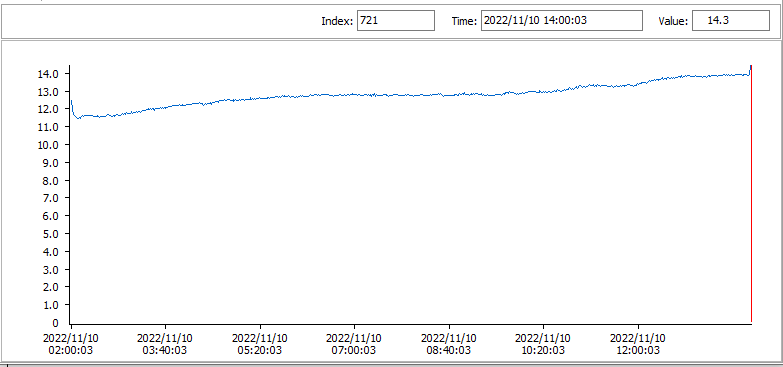
Here is how the temperature evolved when I put a can with cold water (around 12° C) in the USB fridge:

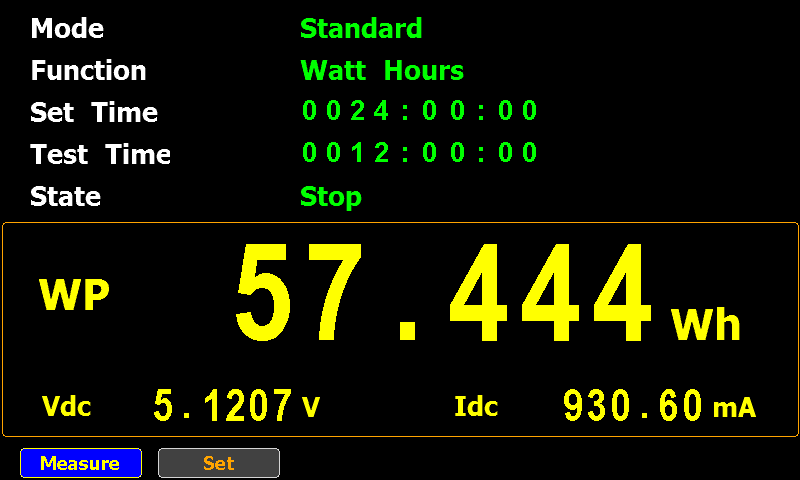
The temperature increased around 2° C over a period of 12 hours (room temperature was around 17 °C).

That required around 57 Wh.

And the temperature at the top of the can increased more than at the bottom:

For reference, here is how the temperature evolves of a cooled can of water left on the desk in that same room (so not inside the USB fridge):


Quickpost info
« Previous PageNext Page »

Blog at WordPress.com.