Didier Stevens

Tuesday 8 April 2008

Quickpost: Back from Black Hat Europe 2008

Filed under: Hacking,Quickpost — Didier Stevens @ 7:44

Back from Black Hat Europe 2008, my laptop has undergone another lobotomy.

Mikko from F-Secure was in my training class.

Some briefings I really liked:

  • New Viral Threats of PDF Language
    Good overview of the format of PDF files, and the inherent security issues. Good demos (like rewriting the Acrobat reader alert dialog box to mislead the user) and interesting insights (a PDF has a logical and physical structure, changing the physical structure doesn’t change the content of the document: this is polymorphism). The speaker confirmed that his exploits don’t affect Foxit reader. But the slides don’t to this justice, let’s hope they publish more details. And it was fun to see some French military lingo popping up in a BH presentation.
  • Intercepting Mobile Phone/GSM Traffic
    THC explained how they cracked GSM A5/1 encryption, FPGA style and with 2 TB of rainbow tables. Interesting tidbits: mobile operators don’t provide the strongest available encryption A5/3 (my guess as to why: cost), and the GSM status channel will carry permanent subscriber IDs, although the protocol only foresees temporary IDs.
  • Mobile Phone Spying Tools
    Tools mainly used by untrusting spouses, but I see potential uses for industrial espionage: sales man leaves company for competition, installs mobile phone spying tool on his corporate mobile phone just before handing it back.
  • DTRACE: The Reverse Engineer’s Unexpected Swiss Army Knife
    Looks really powerful and flexible, let’s hope someone is brave enough to attempt a Windows port.

And the networking was great, shout-out to Malta Info Security.

Quickpost info


Wednesday 23 January 2008

Quickpost: The Digital Signature of a Cryptographic Service Provider

Filed under: Encryption,Quickpost — Didier Stevens @ 9:43

This post is the result of additional research started by this comment. A Cryptographic Service Provider (CSP) must be digitally signed by Microsoft before it can be installed and used on Windows. But this digital signature is technically very different from AuthentiCode and serves another goal.

AuthentiCode uses digital certificates, a certificate is a digitally signed document which links a public key to an identity. Code signing is performed to link software to its author and to allow detection of program alteration. AuthentiCode is also used by Microsoft to digitally sign device drivers. In this case, the signature is used to show that the driver passed Microsoft’s testing program (the signer is Microsoft Windows Hardware Compatibility Publisher)

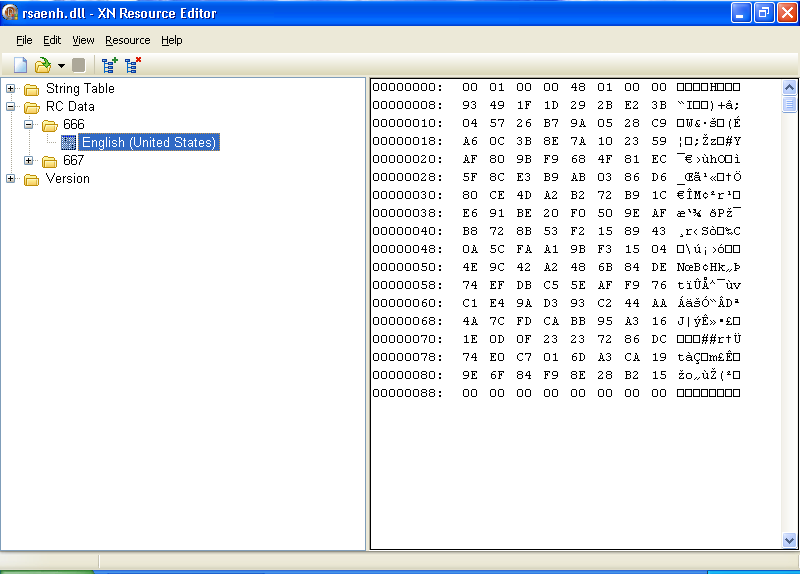
A CSP must also be signed by Microsoft, but the technique is different from AuthentiCode. Microsoft will sign the hash of the CSP. This signature can be stored inside the file as a resource (ID 0x29A or 666) that is 144 bytes long, or inside the registry as a blob of 136 bytes. When I looked at several signatures inside CSPs, I noticed that the first 8 bytes were almost always identical and hence are probably not part of the actual signature (144 – 8 = 136).

Since the length of the signature is constant and very short, it cannot be a certificate. Neither can it be decoded as a certificate. My educated guess is that this signature is nothing more than the cryptographic hash of the file encrypted with a private key kept by Microsoft. Checking the signature is thus done in Windows by calculating the hash of the file, decrypting the signature with the public key and comparing the hash with the decrypted signature. Equality shows that the signature is valid. The use of the cryptographic hash ensures that is virtually impossible to modify the file while keeping the same hash, and the use of the private key guards the hash from forgery.

This is an example of the signature inside CSP rsaenh.dll viewed with the free XN Resource Editor:

666-resource.png

A signature for a CSP can only be obtained by providing documents to Microsoft promising to obey various legal restrictions and giving valid contact information. Thus the goal of the signature is to proof that Microsoft and the CSP author promise to obey the restrictions on cryptography. But I’m not a lawyer, the formulation of this goal is the result of my inadequate legal skills.

I was also told that Microsoft will perform some testing, but I haven’t yet received confirmation or details about this.


Quickpost info


Monday 14 January 2008

Quickpost: GUI vs. CUI

Filed under: Quickpost — Didier Stevens @ 9:47

Sometimes I read the following programmer’s question:

When I launch my program from the command line, I get a new prompt immediately. What API should I call to let my program display a new prompt only when it is done?

This is often related to scripting: calling this kind of program from a BAT file is a problem, because the BAT file will continue executing while the program is still running.

In fact, this behavior is not defined through coding in the program itself, but by a setting in the header of the program. For WIN32 applications, the value of the SUBSYSTEM parameter is 2 (IMAGE_SUBSYSTEM_WINDOWS_GUI) for a GUI application and 3 (IMAGE_SUBSYSTEM_WINDOWS_CUI) for a console application. A programmer can change this setting by selecting the appropriate option for his compiler. And if one can’t recompile the program, just use a binary editor or a PE file editor. It’s important to understand that console applications are not limited to console interaction, and GUI applications are not limited to GUI interaction. A console application can create windows and a GUI application can create consoles.

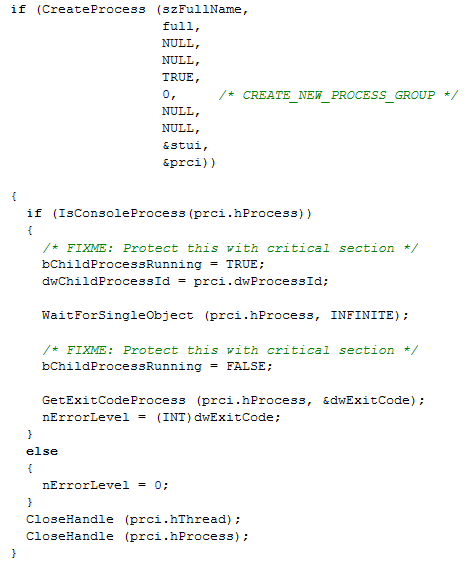
It is the shell (cmd.exe) that decides if it waits for the end of the launched program or not, based on the value of the SUBSYSTEM parameter. Take a look at the source code of cmd.exe for ReactOS (this is Open Source):

reactos-cmd.png

After your program is successfully started (CreateProcess), the shell will check if the new process is a console or GUI application (IsConsoleProcess). If it’s a console application, the shell will wait for the program to terminate (WaitForSingleObject), and then it will set the ErrorLevel to the return code. But if it’s a GUI application, it will not wait and it will set the ErrorLevel immediately to 0. That is why you immediately get a new command prompt when you launch a GUI application from the shell: it’s the shell itself that decides not to wait.

So if a programmer wants cmd.exe to wait for the end of its program, he has to declare it as a console application, even if it uses a GUI. There is a drawback however, because when this program is launched from explorer.exe (and not cmd.exe), a console will be automatically created by Windows. The only trick I found to avoid this is to hide the console programmaticaly (but it will still appear briefly when your program is stared).

You can try the following experiment to better understand the SUBSYSTEM parameter without resorting to programming:

  • take a copy of notepad.exe
  • change the SUBSYSTEM parameter of this copy from 2 to 3
  • launch the copy from Windows Explorer
  • launch the copy from cmd.exe
  • launch the copy from a BAT file

Quickpost info


Tuesday 8 January 2008

Quickpost: Windows Server 2008 UserAssist Keys

Filed under: Forensics,My Software,Quickpost — Didier Stevens @ 21:18

My first post for 2008 has to be about Windows Server 2008.

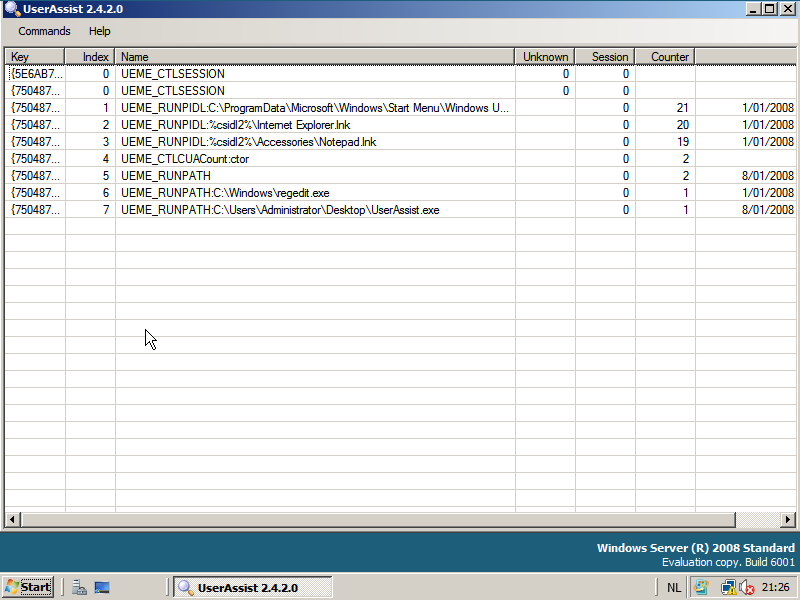
It looks like the UserAssist entries for Windows Server 2008 have the same format as for Windows Vista, my UserAssist tool can also extract the data from Windows Server 2008:

windows-2008-userassist.png

Like Vista, the Windows Server 2008 browserui.dll file (version 6.0.6001.17051) contains only 5 UEME strings:

UEME_RUNPATH
UEME_CTLCUACount:ctor
UEME_CTLSESSION
UEME_RUNPIDL
UEME_RUN


Quickpost info


Sunday 23 December 2007

Quickpost: Retrieving an SSL Certificate

Filed under: Encryption,Quickpost — Didier Stevens @ 9:37

I recently had to inspect the SSL certificate of an e-mail provider (secure POP connection) . Here is a quick HOWTO using the Google Mail website as an example.

Issue this command on a box with openssl:

openssl s_client -connect mail.google.com:443 > google

Then cancel the command with CTRL-C.

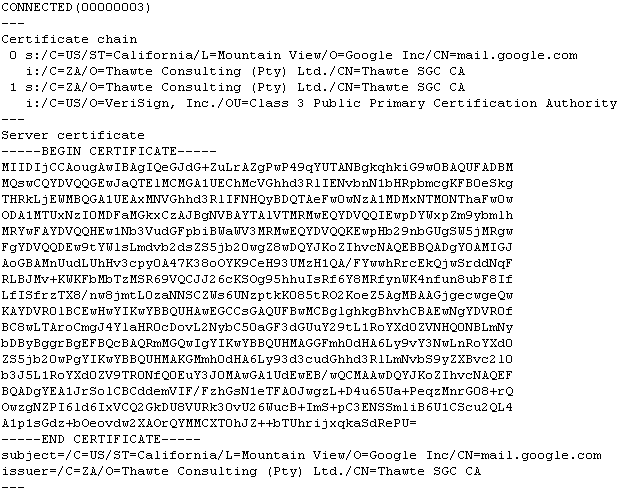
A base64 representation of the web site’s certificate will be included in the output you redirected to the google file:

20071223-openssl-output.png

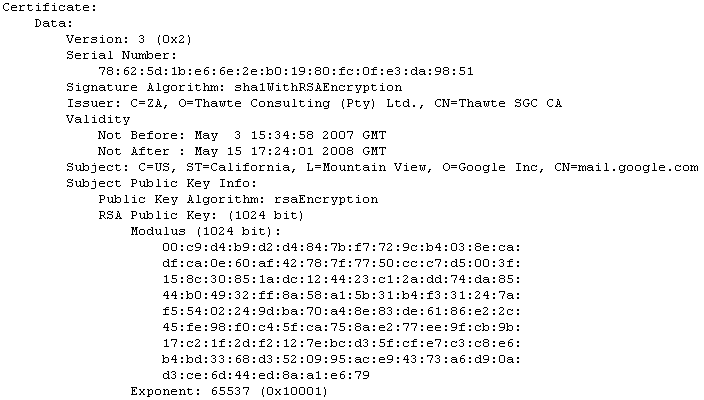
To inspect the certificate with openssl, use this command:

openssl x509 -in google -text

20071223-openssl-text.png

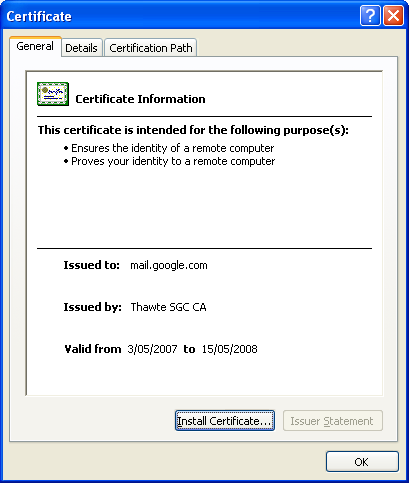
Or convert it to a certificate in DER format and open it on a Windows box:

openssl x509 -in google -outform DER -out google.der

20071223-certificate.png

Wednesday 28 November 2007

Quickpost: DisableAMD & DisableRegistryFools

Filed under: Quickpost — Didier Stevens @ 9:25

Ever started cmd.exe to see this: “The command prompt has been disabled by your administrator”?

It means that a GPO has been set to disable cmd.exe. This is not the same as the Software Restriction Policies. There is a special policy for cmd (and another one for regedit).

When started, cmd.exe checks for the existence of a certain key in the registry and decides to continue execution based on the value of this key. This key is DisableCMD and sits in Software\Policies\Microsoft\Windows\System. For regedit.exe, the key is DisableRegistryTools in Software\Microsoft\Windows\CurrentVersion\Policies\System.

There are many hacks to bypass this technique, depending on what kind of control you have as a user. When you have only control over the content of the programs you execute, use this trick: edit a copy of cmd.exe with a binary editor, search for DisableCMD and change it to something else, like DisableAMD. This copy of cmd.exe will now look for a key that doesn’t exist, and thus continue execution. For regedit, I renamed the key to DisableRegistryFools.

Mark Russinovich has another, elegant hack for this: he starts the program and injects a DLL that intercepts calls to the registry API and filters the return values. Limited users can inject DLLs into their own processes. But since Microsoft bought Sysinternals, his tool (GPdisable) is not available anymore.


Quickpost info


Tuesday 20 November 2007

Quickpost: Another Funny Vista Trick with ASLR

Filed under: Hacking,Quickpost — Didier Stevens @ 8:06

Dave Maynor’s Vista ASLR tricks post got me thinking. And today, after some inspiring presentations at TechEd last week, I took the time to do some testing. Set the appropriate bit (0x4000) in the DLL Characteristics field of the PE header, and you turn on ASLR for your program of choice. So clearing the bit will disable ASLR, but will Windows File Protection prevent you from changing the program? I didn’t think it would, because you’re only touching the PE Header, which is not protected by the Authenticode signature.

Turns out it does work: you can disable ASLR for a given program, like Internet Explorer. And WFP will not restore the file. But for another reason than I thought: with Vista, WFP is actually called Windows Resource Protection. And it works differently: files are protected by Security Descriptors, and are not replaced automatically when deleted or modified. So the neat trick of deleting a system-file in Windows XP (like utilman.exe) only to see it reappear a couple of seconds later, doesn’t work anymore with Vista. Change the Security Descriptor of the file in Vista (taking ownership and giving you delete rights), delete the file, and it’s gone. No more resurrection.

If you want to play with the ASLR toggle, you can use stud_pe to edit the PE Header and Process Explorer to test it.

So why would you disable ASLR? I don’t know, I just think it’s a funny trick 😉 . But maybe you got an idea? Let me know, post a comment.


Quickpost info


Friday 9 November 2007

Quickpost: Checking Gmail on N800 Securely

Filed under: N800,Quickpost — Didier Stevens @ 11:22

Nokia released an application (mnotify) to monitor your Gmail inbox from an N800. Here‘s an installation howto.

Mnotify has a menu command to open your Gmail inbox in the browser (View inbox). It uses HTTP, not HTTPS. So I wondered if the mnotify also used HTTP for mail checking?

It doesn’t. I looked at the traffic with tcpdump, and the mail check is done with HTTPS. So if you’re on a wireless network you don’t trust, it’s safe to let mnotify check your mail, but don’t view your inbox with it. Use HTTPS to view your Gmail inbox.

I’ll use my N800 to connect to an untrusted network next week 😉


Quickpost info


Saturday 3 November 2007

Quickpost: Scanning Scripts

Filed under: Quickpost — Didier Stevens @ 10:32

After reading my zero byte padding post, someone asked me how McAfee intercepted scripts.

The Microsoft VB script and JS script engines are COM objects. Looking at the CLSID registry data for these COM objects, you’ll find this info (Windows XP SP2):

VB Script Language
HKEY_CLASSES_ROOT\CLSID\{B54F3741-5B07-11cf-A4B0-00AA004A55E8}
InprocServer32 -> C:\WINDOWS\system32\VBScript.dll

JScript Language
HKEY_CLASSES_ROOT\CLSID\{f414c260-6ac0-11cf-b6d1-00aa00bbbb58}
InprocServer32 -> C:\WINDOWS\system32\JScript.dll

When McAfee VirusScan with ScriptScan is installed, the InprocServer32 reference for both COM objects is modified: C:\Program Files\Network Associates\VirusScan\scriptproxy.dll

This is how VirusScan intercepts script execution. They install a “proxy” (scriptproxy.dll) that will scan the scripts before they are passed on to the appropriate scripting engine (VBScript.dll or JScript.dll).

One important implication of this mechanism, is that ScriptScan will only protect script execution when the scripts are executed with the MS COM objects, like IE does. But Firefox doesn’t work with COM, it has its own JS engine (SpiderMonkey), so ScriptScan does not scan scripts executed by Firefox.

There are documented cases where scriptscan causes problems on servers, the proposed solution is to remove the proxy: regsvr32 /u scriptproxy.dll

I wonder if there is malware out there using this trick? And one can also write his own proxy DLL to intercept scripts.

Of course, McAfee VirusScan is not the only AV providing protection against malicious scripts, most modern AV provide this. For example, Kaspersky’s Anti-Virus uses the same technique, but their proxy DLL is scrchpg.dll.

Friday 2 November 2007

Quickpost: Installing Kismet on a N800

Filed under: N800,Quickpost,WiFi — Didier Stevens @ 8:37

Update: Since the Kismet package isn’t available anymore, here is Installing aircrack-ng on a N800.

To run Kismet on a N800, you need to be root. Normally, you don’t have root access on a N800, you do need to apply a hack to get it. There are several hacks (flashing, sshd, …) but I prefer the godmode trick.

Here’s how I did it, use at your own risk:

  1. Install Osso Xterm
  2. Install godmode
  3. Install Kismet

Now I did install some other packages between 2 and 3, that’s probably why I didn’t have to install ncurses-base explicitly.

To start Kismet, start Xterm and type these commands:

  1. sudo gainroot
  2. kismet

Quickpost info


« Previous Page

Blog at WordPress.com.