This useless Python program is the result of some lazy Sunday coding. It will create random tweets based on a template file. You could use it to try to protect your privacy on Twitter by disinforming potential data miners.
Will I use it for my Twitter account? No, I don’t need a program to disinform 😉
Each time you run the program, it will post one random tweet. This tweet is generated from a templates file. Each line in the templates file is the template for a tweet. You can use variables (between curly braces, example: {location}) in the templates to increase the number of possible tweets. Variables and their values are also stored in the template file, after the template lines. Your template file must allow the program to generate at least 2 different tweets, because it generates a tweet different from the last tweet.
And you need to create a credentials file (disinformational-tweets.cred) with the Twitter credentials of the account for which the program has to generate random Tweets. The first line of the credentials file has to contain the username, the second line has to contain the password.
A Firefox plugin to generate these tweets would probably be more ‘useful’, but hey, it’s a lazy Sunday.
Here’s an alternate use for your Poken: use it to detect 125 kHz RFID readers. Its led will blink red when you bring it next to a LF RFID reader (125 kHz). It will not react with a 13.56 MHz reader; and I haven’t tested with a 134.2 kHz reader.
This is a beta release of my new version of PDFiD tool because Adobe recommends disabling JavaScript to protect yourself against the new vulnerabilities in JavaScript functions getAnnots() and spell.customDictionaryOpen().
PDFiD version 0.0.6 has several new features which I’ll explain in a later post. Now I want to explain the disarm feature. Disarm will disable JavaScript inside the PDF document.
Command “PDFiD -d document.pdf ” will analyze the PDF document and generate a new version called document.disarmed.pdf.
In this new version, names /AA, /OpenAction, /JS and /JavaScript have their case swapped (/aa, /oPENaCTION, /jsand /jAVAsCRIPT). As the PDF language is case sentitive, these new names have no meaning and therefor the automatic actions and scripts are effectively disabled. All PDF readers I’ve used just ignore unknown names, they don’t generate and error or stop rendering the document.
This substitution trick will not work if the actions and scripts are hidden in object streams (/ObjStm) and could render a document unreadable if encryption is used.
My training by Saumil Shah was excellent! Highly recommended if you want to learn exploit development without reversing.
I didn’t attend a lot of briefings, the subjects were less interesting to me than past years. But I did a lot of networking, I met many interesting people. I had lunch with Moxie Marlinspike, the author of SSLStrip. He has interesting viewpoints: did you know he started to develop SSLStrip in 2002? It’s only because he was done experimenting with it that he decided to disclose! And we share a common interest in CRASS.
Thanks to everybody I met at BH, the networking was excellent! I estimate I distributed 50 of my PDF stickers 😉 . You gave me a lot of ideas that will require even more time to develop. Like past years, I got a new stego idea but this time, I’m reserving it for Brucon‘s hacker challenge. You’ll have to wait for October for the disclosure.
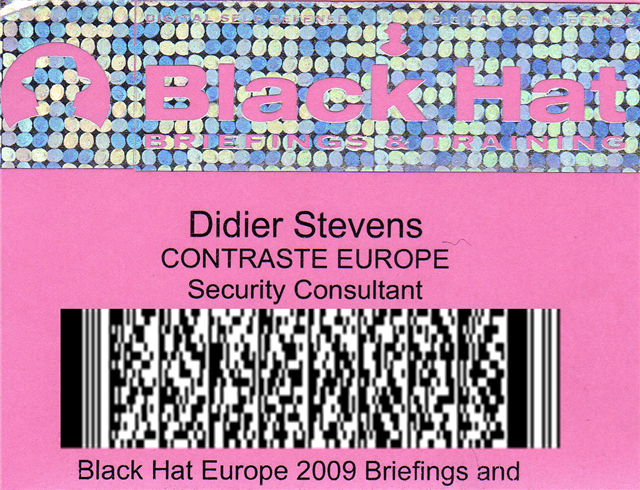
This year was also the first time I had a 2D-barcode on my badge:
The above picture doesn’t actually show my real barcode, but one I made for this post. My real barcode contains my business coordinates. A hint if you want to find out what’s on this one: it’s a PDF417 barcode (this PDF stands for Portable Data File, not Portable Document Format).
My previous blogpost showed how minimal user interaction can still get a malicious PDF document to infect a machine. Remembering F-Secure’s misadventure with .WMF and Google Desktop Search, I took some time to look at Windows Indexing Service. The news is not good. This time, I can get a PoC PDF document to trigger the /JBIG2Decode bug without any user interaction whatsoever. And the bug happens in a process running with Local System rights!
On a Windows XP SP2 machine with Windows Indexing Services started and Adobe Acrobat Reader 9.0 installed, there is absolutely no user interaction required to trigger the /JBIG2Decode vulnerability. When the PoC PDF file is on the disk, it will be indexed by Windows Indexing Services and the buggy /JBIG2Decode code will be executed.
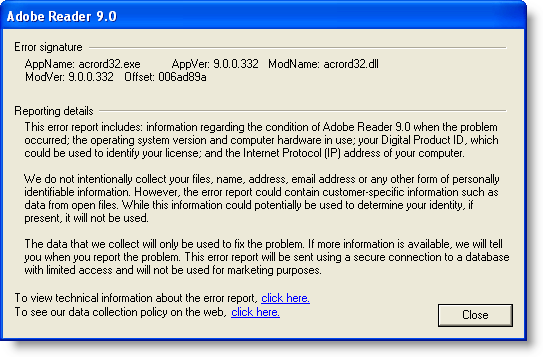
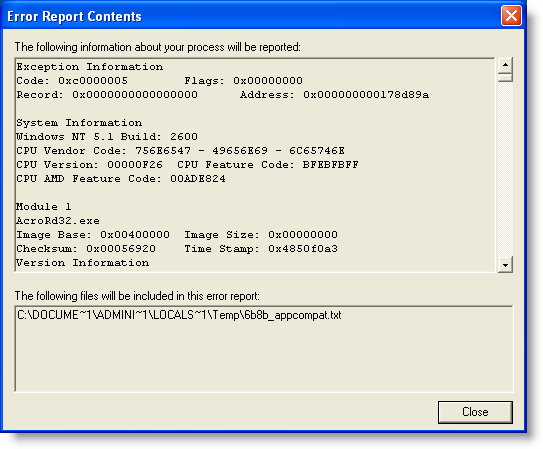
When Adobe Acrobat Reader 9.0 is installed, it also installs an IFilter (AcroRdIF.dll). This COM object extends the Windows Indexing Service with the capability to read and index PDF documents. When the Windows Indexing Service encounters a PDF file, it will index it. The content indexing daemon (cidaemon.exe) calls the Acrobat IFilter (AcroRdIF.dll) which loads the Acrobat PDF parser (AcroRD32.dll). If the PDF document contains a malformed /JBIG2Decode stream object, it will result in an access violation in the instruction at 0x01A7D89A.
In other words, if you’ve a malicious PDF document on a machine with Windows Indexing Services, it can infect your machine. And you don’t need a user to open or select the PDF document.
The good news is that Windows Indexing Services is not started on a default Windows XP SP2 install. Update: Although Windows Indexing Services is not on by default, after you’ve executed a search as local admin, you’ll be asked if you want “to make future searches faster”. If you answer yes, Windows Indexing Services will be automatically started.
The bad news is that Windows Indexing Services runs under the local system account on Windows XP SP2. This results in a privilege escalation.
Consider a Windows machine with Windows Indexing Services running, Adobe Acrobat reader installed and a file sharing service (FTP/IIS/P2P/…). Uploading a specially crafted PDF document to this machine will give you a local system shell.
To disable Windows Indexing Services’ capability to index PDF documents, unregister the IFilter: regsvr32 /u AcroRdIf.dll
My PoC PDF file also triggers in /JBIG2Decode in Windows Desktop Search (I tested version 4.0). But Windows Desktop Search has a better security architecture than Windows Indexing Service. Although the service runs under the Local System account, the actual calling of the IFilters is done in a separate process that runs under the Local Service account (this account has less privileges and can’t take full control of the machine).
I’ve not analyzed other applications using IFilters. If you use ScarePoint (that’s how my wife, who has to work with it, calls it) or another IFilter supporting application and you want to be safe, unregister the Acrobat IFilter.
And don’t forget that, depending on your Windows version and CPU, you’re also protected by technologies like DEP and ASLR.
Google Desktop Search doesn’t use IFilters, unless you’ve installed this plugin to add IFilter support to Google Desktop Search.
Sometimes a piece of malware can execute without even opening the file. As this is the case with the /JBIG2Decode vulnerability in PDF documents, I took the time to produce a short video showing 3 ways the vulnerability can trigger without even opening the PDF document.
The first 2 demos use a “classic” /JBIG2Decode PDF exploit, the third demo uses a new PoC /JBIG2Decode PDF exploit I developed. This PDF document has a malformed /JBIG2Decode stream object in the metadata instead of the page. All PDF documents used have just a malformed /JBIG2Decode stream object, they don’t include a payload (shellcode), neither a JavaScript heap spray.
So how is it possible to exploit this vulnerability in a PDF document without having the user open this document? The answer lies in Windows Explorer Shell Extensions. Have you noticed that when you install a program like WinZip, an entry is added to the right-click menu to help you compress and extract files? This is done with a special program (a shell extension) installed by the WinZIp setup program.
When you install Adobe Acrobat Reader, a Column Handler Shell Extension is installed. A column handler is a special program (a COM object) that will provide Windows Explorer with additional data to display (in extra columns) for the file types the column handler supports. The PDF column handler adds a few extra columns, like the Title. When a PDF document is listed in a Windows Explorer windows, the PDF column handler shell extension will be called by Windows Explorer when it needs the additional column info. The PDF column handler will read the PDF document to extract the necessary info, like the Title, Author, …
This explains how the PDF vulnerability can be exploited without you opening the PDF document. Under the right circumstances, a Windows Explorer Shell Extension will read the PDF document to provide extra information, and in doing so, it will execute the buggy code and trigger the vulnerability. Just like it would when you would explicitly open the document. In fact, we could say that the document is opened implictly, because of your actions with Windows Explorer.
So let me demo 3 circumstances under which a PDF Shell Extension will act and thereby trigger the vulnerability. One important detail before I do this: when the exception occurs in the Adobe Acrobat code, it is trapped by Windows Explorer without any alert. That’s why in the demos, I attached a debugger (ODBG) to Windows Explorer to intercept and visualize this exception. So each time the vulnerability triggers, the view switches to the debugger to display the exception.
In the first demo, I just select the PDF document with one click. This is enough to exploit the vulnerability, because the PDF document is implicitly read to gather extra information.
In the second demo, I change the view to Thumbnails view. In a thumbnail view, the first page of a PDF document is rendered to be displayed in a thumbnail. Rendering the first page implies reading the PDF document, and hence triggering the vulnerability.
In the third demo, I use my special PDF document with the malformed stream object in the metadata. When I hover with the mouse cursor over the document (I don’t click), a tooltip will appear with the file properties and metadata. But with my specially crafted PDF document, the vulnerability is triggered because the metadata is read to display the tooltip…
So be very careful when you handle malicious files. You could execute it inadvertently, even without double-clicking the file. That’s why I always change the extension of malware (trojan.exe becomes trojan.exe.virus) and handle them in an isolated virus lab. Outside of that lab, I encrypt the malware.
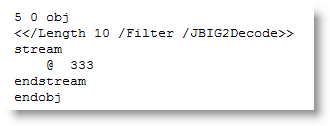
Today I took a closer look at the PDF code of the /JBIG2Decode vulnerability. It doesn’t have to be an XObject, just a stream object with a /JBIG2Decode filter:
This indirect object is all I have to include in my basic PDF document to get a PoC PDF document to crash Adobe Acrobat Reader 9:
On Virustotal, this PoC PDF document is only detected by ClamAV, but it’s no surprise, as most signatures also look for JavaScript and/or a payload. When I use name or stream obfuscation, ClamAV is also bypassed.
You can download my Python program to generate these PoC PDF documents here, it needs the mPDF module of my PDF-tools. Use it to developed better signatures or to test your defenses.
You’re most likely aware of the latest PDF vulnerability in JBIG2 image encoding, more specifically /JBIG2Decode.
Signatures have been released to identify PDF documents exploiting this vulnerability, many of which scan for the /JBIG2Decode string. Remember the canonicalization issue with PDF names I mentioned in a previous PDF post. There are alternate ways to write /JBIG2Decode, for example /JBIG#32Decode is also a valid representation. But many signatures will not match this variant, because the matching engine doesn’t reduce the name to a canonical form (e.g. replace the hexadecimal representation #32 by ASCII character 2) before matching the pattern.
The same PDF document, with /JBIG#32Decode (and some updates to adjust for the increased length), gets 2 detections (SecureWeb-Gateway uses the Avira engine on VT, so both detections are actually from the same engine).
But Avira doesn’t use /JBIG2Decode in its signature (when I replace /JBIG2Decode with /AAAAAAAAA, the PoC still gets detected).
So it looks like the AV engines on Virustotal don’t reduce PDF names to a canonical form.
I asked Steve Riley if he has inside information on the move from ROT13 to Vigenère for the UserAssist keys. It’s part of the beta program, to test upgrades. The final version of Windows 7 and Windows 2008 R2 will use ROT13 for the UserAssist keys, which has been used since Windows 2000.
The binary format of the UserAssist keys has also changed, I’ve decoded most of it.
Here’s Steve’s complete answer, published with permission:
We used ROT-13 to obfuscate UserAssist for its historical Usenet purpose — not to try to secure the data, but to express that the data shouldn’t be tampered with. Sort of like claiming “Don’t peek and definitely don’t modify unless you’re prepared to deal with the consequences. You’ve been warned.” There are times, like this one, where simple obfuscation is technically justified. ROT-13 was never an encryption scheme, everyone fully expects everyone else to recognize ROT-13 on sight, and some people even developed the ability to read it directly. ROT-13 was an easy and inexpensive way to invoke an implicit social contract.
As you know, UserAssist stores the info about your most frequently used applications for display on the Start menu. (Basic principles at http://blogs.msdn.com/oldnewthing/archive/2007/06/11/3215739.aspx.) The data isn’t confidential and doesn’t need to be encrypted — after all, opening the Start menu displays it. However, its stored format is subject to change, and we don’t want applications or people unintentionally changing it. So we ROT-13ed it, in a geeky attempt to convey exactly the same message that ROT-13 signified on Usenet.
In Windows 7 we made some changes to the way the MFU list is maintained and to the data’s storage format in UserAssist. When you upgrade from a previous version of Windows, we clear the MFU list and start anew. We don’t want old data to carry forward into this key. Changing the encoding from ROT-13 to Vigenère makes it easier for us to test that we’re getting the behavior we want — it’s obvious if old data carries over, because ROT-13ed data makes no sense to Vigenère. This is very useful in pre-release builds while we’re shaking the bugs out.
However, there’s no such benefit to using Vigenère in the final release — it doesn’t convey the same message as ROT-13, and since it’s key-based, it’s easy to mistake Vigenère for true encryption. Therefore, in the final release of Windows 7, we’ll revert to using ROT-13 for UserAssist.
Hope this helps clarify the issue. Feel free to post my email on your blog, too. Incidentally, we have plenty of real crypto in Windows 7 — check out the performance improvements to our AES implementation, for example.





 Didier Stevens