Didier Stevens

Friday 30 August 2013

Brucon Hacking PDF Training

Filed under: Announcement,Didier Stevens Labs,PDF — Didier Stevens @ 8:56

When you register before September 7th with discount code MC201305 you will get 5% discount.

What do you want from training? I want to gain knowledge. I designed my “Hacking PDF” training with this goal in mind.

“Hacking PDF” is a 2-day training focusing on the PDF language, not on reversing PDF readers. By attending this training, you will first acquire knowledge about the PDF language. And then we will use this knowledge to analyze malicious PDFs (day 1) and create PDFs for fun and profit (day 2).

Learning to use tools is nice, and learning new skills is interesting. But I want more. I also want to get a deep understanding of the subject. Because with this knowledge, I can develop new tools and invent new techniques.

On day one I explain the fundamentals of the PDF language. We take a look at several features of the language that malware authors use and abuse. And then we start analyzing PDFs. You learn to use my tools pdfid and pdf-parser on 20 simple PDF exercises. The exercise is to find the malicious behavior of the PDF, the goal is to gain understanding of PDF malware. And then we move on to the real deal: analyzing real, in-the-wild PDF malware.
On day two we use our understanding of the PDF language and PDF malware to create our own PDF files and modify existing PDF files. This is done with pure Python tools and other free tools. Adobe products are not used in this training, except to view PDFs. We will learn to do simple and smart fuzzing of PDFs, create PDFs that exploit vulnerabilities in PDF readers, embed files and PDFs, and a lot of other interesting hacks …

You can find a “Hacking PDF” slideshow here.

There are not many pre-requisites for this training:
1)    You don’t need to know anything about PDF, I will teach you what we need to know.
2)    We use Python scripts, but you don’t need to be a Python programmer. We will modify existing scripts, so a bit of programming knowledge like if statements and loops is enough.
3)    Not need to understand assembly or shellcode, we use a shellcode emulator. And I will provide you the shellcode for day 2, you do not need to write it yourself.
4)    You need to be at ease with the command-line
5)    A security mindset is an advantage 😉

When you register before September 7th with discount code MC201305 you will get 5% discount.
Monday 10 June 2013

PDFiD: False Positives

Filed under: My Software,PDF — Didier Stevens @ 8:48

I’m giving a 2-day training on PDF at Brucon 2013. Early-bird price applies til June 15th.

Sometimes PDFiD will give you false positives for /JS and /AA. This happens with files of a couple of MBs or bigger, because it’s statistically very likely that /AA or /JS (only three bytes long) appear inside a stream. And since PDFiD, contrary to pdf-parser, has no notion of pdf objects and streams, it can produce false positives, like this:

PDFiD 0.1.2 CCNPSecurityFIREWALL642617OfficialCertGuide.pdf
 PDF Header: %PDF-1.6
 obj                 6018
 endobj              6017
 stream              1897
 endstream           1897
 xref                   1
 trailer                1
 startxref              1
 /Page                773
 /Encrypt               1
 /ObjStm                0
 /JS                    3
 /JavaScript            0
 /AA                    1
 /OpenAction            0
 /AcroForm              0
 /JBIG2Decode           0
 /RichMedia             0
 /Launch                0
 /EmbeddedFile          0
 /XFA                   0
 /Colors > 2^24         0

And when you search for /AA or /JS with pdf-parser, you will not find objects that have /AA or /JS in their dictionary:

pdf-parser.py -s /AA CCNPSecurityFIREWALL642617OfficialCertGuide.pdf

Up til now, I advised users suspecting false positives, to search the PDF document with a hex editor and see if they found /AA or /JS inside a stream. But now, with the latest version of pdf-parser supporting searching inside a stream, you can do it like this:

pdf-parser.py --searchstream /AA --unfiltered CCNPSecurityFIREWALL642617OfficialCertGuide.pdf
obj 1848 0
 Type: /XObject
 Referencing: 38 0 R
 Contains stream

  <<
     /Length 121194
     /Filter /DCTDecode
     /Width 800
     /Height 600
     /BitsPerComponent 8
     /ColorSpace 38 0 R
     /Intent /RelativeColorimetric
     /Type /XObject
     /Subtype /Image
  >>

Thursday 30 May 2013

pdf-parser: Searching Inside Streams

Filed under: My Software,PDF — Didier Stevens @ 12:38

I’m giving a 2-day training on PDF at Brucon 2013. Early-bird price applies til June 15th.

This new version of pdf-parser comes with options to search inside streams. For example, you can select all objects with the word Linux inside a stream with this command:

pdf-parser.py --searchstream Linux manual.pdf

The search is not case sensitive. To make it case sensitive, use option –casesensitive. Filters are applied to streams (e.g. decompressed) before the search is performed. To search in the raw stream data, use option –unfiltered.

Regular expression searching is done with option –regex. This allows you, for example, to select objects with embedded Flash files. Flash files begin with FWS, CWS or ZWS:

pdf-parser.py --searchstream "^[FCZ]WS" --regex sample.pdf

Regular expression searching has another advantage. You can search for bytes: \xCA\xFE.

 pdf-parser_V0_4_2.zip (https)
MD5: B0C8F02358B386E7924DACB3059F8161
SHA256: E90620320AF6ED8E474B42BF6850E246446391878F87AE34DCDBD1D9945A6671

Wednesday 15 May 2013

Quickpost: Signed PDF Stego

Filed under: Encryption,Hacking,PDF,Quickpost — Didier Stevens @ 14:08

A signed PDF file is just like all signed files with embedded signatures: the signature itself is excluded from the hash calculation.

Open a signed PDF document in a hex editor and search for string /ByteRange. You’ll find something like this:

36 0 obj
<</ByteRange[0 227012 248956 23362 ]            /Contents<308226e106092a864886f7

This indicates which byte sequences  are used for the hash calculation (position and length of each sequence). So in this example, byte sequence 227013-248955 is excluded, because it contains the signature in hex format padded with 0x00 bytes. This padding is not part of the DER signature, you can change it without changing or invalidating the signature.


Quickpost info

Monday 13 May 2013

Adobe Reader and CRLs

Filed under: Encryption,PDF — Didier Stevens @ 18:08

There’s something that I wanted to test out for quite some time, but kept postponing until recently. Adobe Reader will ask confirmation before it retrieves a URL when a PDF document contains an action to do so. But what about the Certificate Revocation List in a signed PDF document?

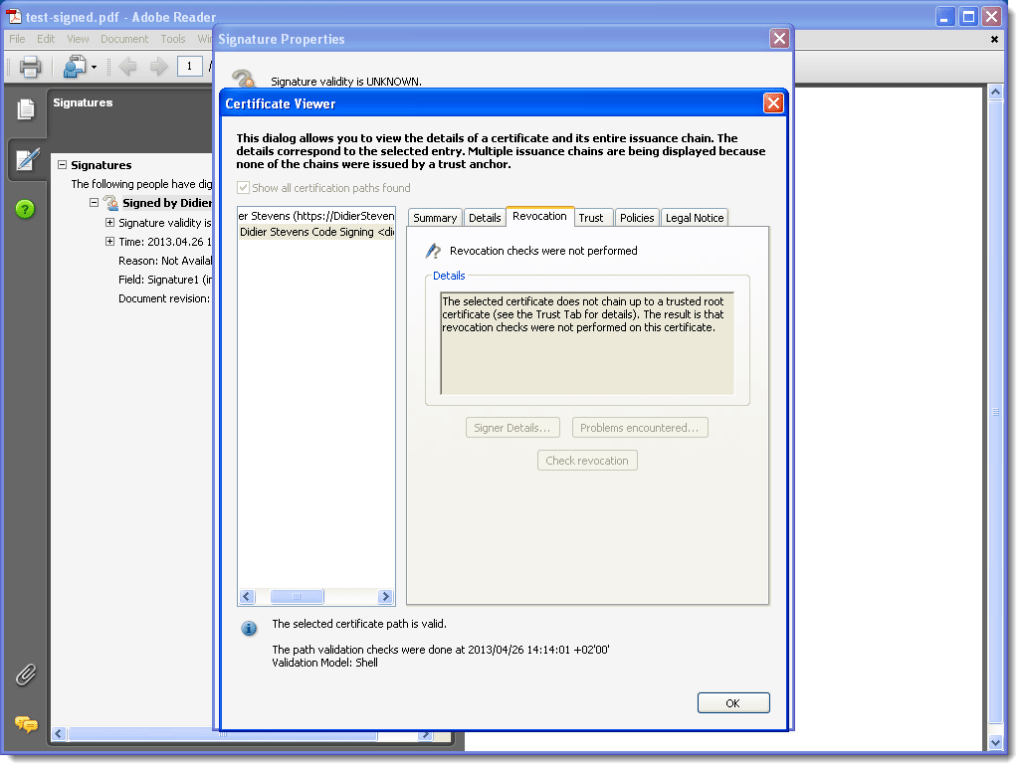
When you open a signed PDF document with Adobe Reader, the signature gets checked automatically. If the signature is not OK, for example because it doesn’t chain up to a trusted root CA, revocations checks are not performed. In other words, the CRL is not downloaded:

20130426-141512

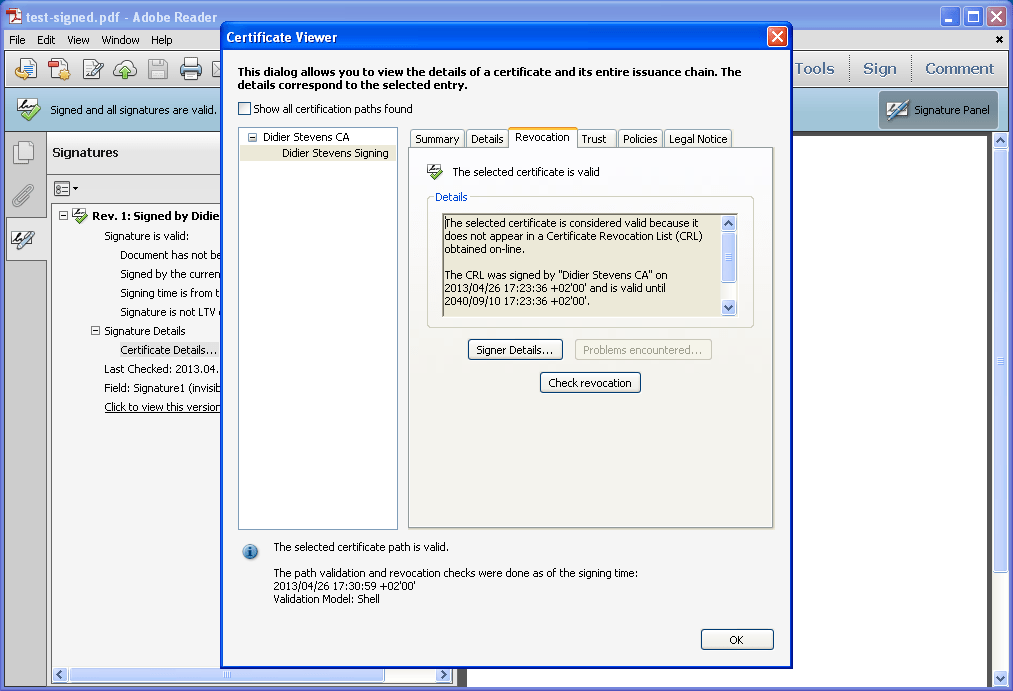
But when I change the settings so that my root CA is trusted, the signature is considered valid and the CRL is retrieved. No warning is given to the user, it happens automatically and silently. Here is the log entry on my server:

192.168.1.1 – – [26/Apr/2013:11:33:35 -0400] “GET /root.crl HTTP/1.1” 200 709 “-” “PPKHandler”

PPKHandler is the User Agent String.

20130426-173447

20130426-173632

The CRL file can’t be an empty file, and must be signed by the root CA, otherwise the signature is considered invalid.

So when you open a signed PDF document with Adobe Reader, the signature is automatically checked and the CRL is silently downloaded. This is done with a request to the webserver of the commercial CA which issued the certificate (crl.adobe.com, crl.geotrust.com, …). You can change automatic checking with Preferences / Signatures / Verification.

A quick check with Foxit Reader reveals it doesn’t check the signature automatically.

Friday 26 April 2013

Howto: Add a Digital Signature to a PDF File – Free Software

Filed under: Encryption,PDF — Didier Stevens @ 12:58

This is an update to my post Howto: Add a Digital Signature to a PDF File, but this time I found free software.

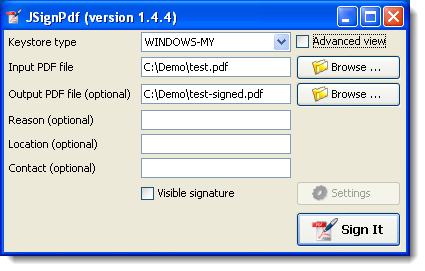
Again we use our certificate which we install (open the .p12 file). Install the free JSignPdf software.

Select the PDF file to sign and select an output file (if you don’t want to overwrite your original):

20130426-140107

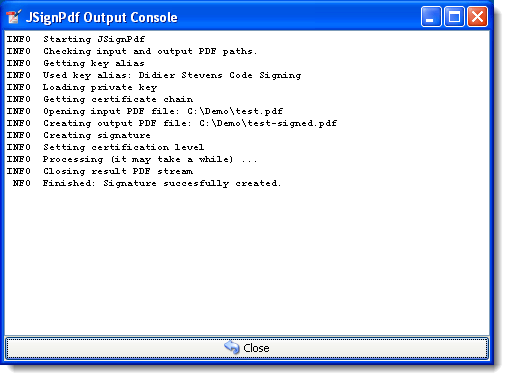
Push Sign It:

20130426-141230

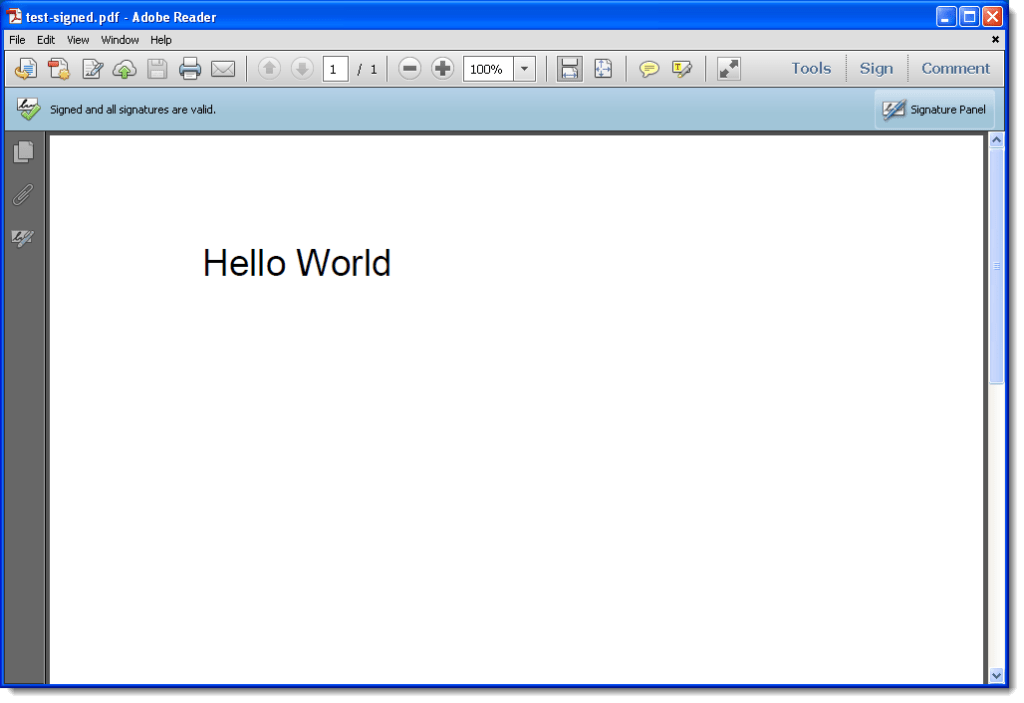
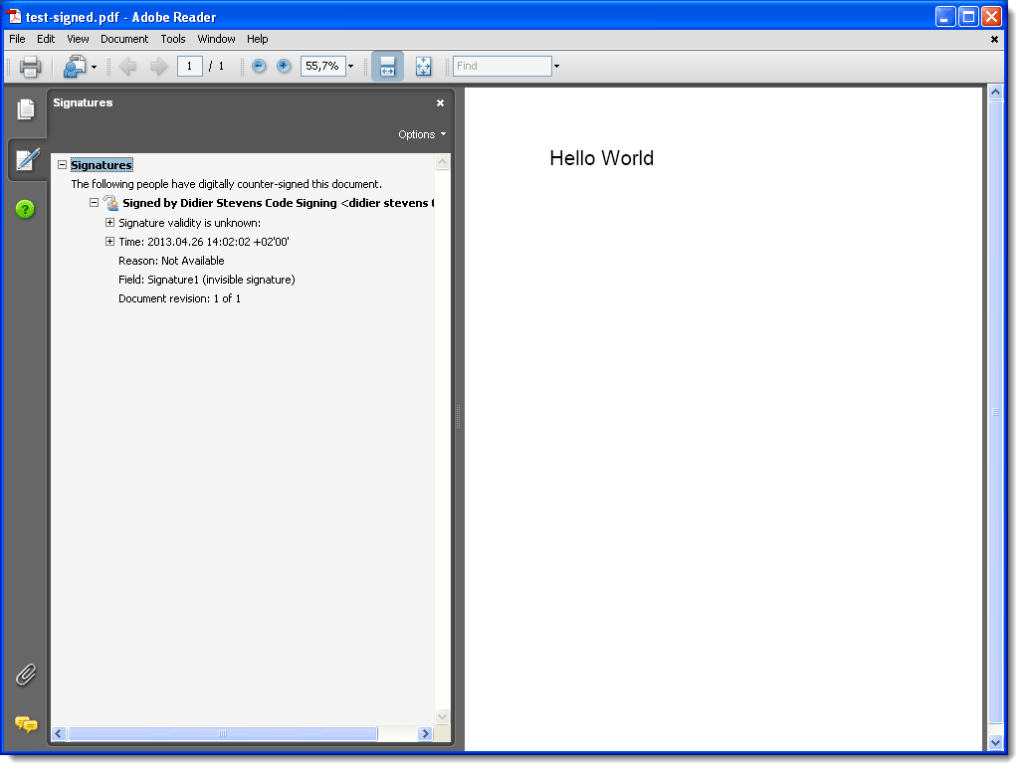
And then you can check the signature with Adobe Reader:

20130426-141337

If you get the following error, make sure you change your PDF version from %PDF-1.1 to %PDF-1.4:

Choosen configuration requires PDF version update, but it’s not possible in the “append” signature mode.

Thursday 21 March 2013

Update: PDFiD Version 0.1.2

Filed under: My Software,PDF,Update — Didier Stevens @ 9:05

This new version is a bugfix version for Python 3 plus I added a new name in the default report: /XFA

pdfid_v0_1_2.zip (https)
MD5: 60FC17757201F014A6ADA0744B74A740
SHA256: 1CF36C50427A2206275C322A8C098CD96A844CAF6077B105ADE9B1974789856F

Wednesday 13 March 2013

Update: pdf-parser Version 0.4.1

Filed under: My Software,PDF,Update — Didier Stevens @ 21:24

From version 0.4.1 on, you can also pass a URL or a ZIP file as argument to pdf-parser:

pdf-parser.py http://example.com/doc.pdf
pdf-parser.py maldoc.zip

When you pass a URL as argument, pdf-parser will download the PDF document and analyze it. The PDF document will not be written to disk. Supported protocols are http and https.

Passing a ZIP file as argument instructs pdf-parser to open the ZIP file and analyze the first file it finds in the ZIP archive. If the ZIP file is password protected, pdf-parser will try to access the compressed file with password infected. Same as with URLs, the PDF file in the ZIP container is not written to disk.

Further changes are: bug fixes, performance improvement and option –content. This option allows you to view the content of an object without stream or with stream but without filters.

pdf-parser_V0_4_1.zip (https)
MD5: A0314C0CD8AAE376C7448E74D4A7472C
SHA256: 633B7400015B2C936103CC64C37435FB333B0F2634B2A6CD3A8949EAB1D18E9B

Thursday 7 March 2013

Update: PDFiD Version 0.1.0

Filed under: My Software,PDF,Update — Didier Stevens @ 5:00

A month before my PDF training at HITB, it’s time to release new versions of my pdf tools.

I start with PDFiD. From version 0.1.0 on, you can also pass a URL or a ZIP file as argument to PDFiD:

pdfid.py http://example.com/doc.pdf
pdfid.py maldoc.zip

When you pass a URL as argument, PDFiD will download the PDF document and analyze it. The PDF document will not be written to disk. Supported protocols are http and https.

Passing a ZIP file as argument instructs PDFiD to open the ZIP file and analyze the first file it finds in the ZIP archive. If the ZIP file is password protected, PDFiD will try to access the compressed file with password infected. Same as with URLs, the PDF file in the ZIP container is not written to disk.

pdfid_v0_1_0.zip (https)
MD5: 6A5FF56C22EF2745C3D78C8FD8ACA01F
SHA256: D72FE8555DC89808EE7BFC9F791AD819A465106A95801C09C31B0FD2644B3977

Wednesday 16 January 2013

ISSA Journal Article ; HITB PDF Training

Filed under: Announcement,Forensics,Hacking,Networking,PDF — Didier Stevens @ 8:39

The ISSA Journal featured my article on Network Device Forensics, making it available to everyone.

And I’m giving a 2-day training on PDF at Hack In The Box Amsterdam 2013.

« Previous PageNext Page »

Blog at WordPress.com.