Didier Stevens

Monday 9 March 2009

Quickpost: /JBIG2Decode “Look Mommy, No Hands!”

Filed under: Malware,PDF,Quickpost,Vulnerabilities — Didier Stevens @ 7:11

My previous blogpost showed how minimal user interaction can still get a malicious PDF document to infect a machine. Remembering F-Secure’s misadventure with .WMF and Google Desktop Search, I took some time to look at Windows Indexing Service. The news is not good. This time, I can get a PoC PDF document to trigger the /JBIG2Decode bug without any user interaction whatsoever. And the bug happens in a process running with Local System rights!

On a Windows XP SP2 machine with Windows Indexing Services started and Adobe Acrobat Reader 9.0 installed, there is absolutely no user interaction required to trigger the /JBIG2Decode vulnerability. When the PoC PDF file is on the disk, it will be indexed by Windows Indexing Services and the buggy /JBIG2Decode code will be executed.

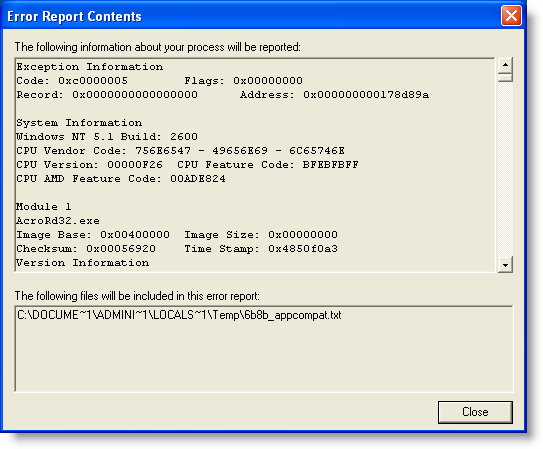
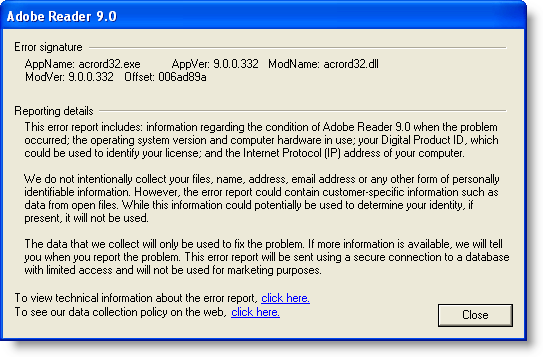
When Adobe Acrobat Reader 9.0 is installed, it also installs an IFilter (AcroRdIF.dll). This COM object extends the Windows Indexing Service with the capability to read and index PDF documents. When the Windows Indexing Service encounters a PDF file, it will index it. The content indexing daemon (cidaemon.exe) calls the Acrobat IFilter (AcroRdIF.dll) which loads the Acrobat PDF parser (AcroRD32.dll). If the PDF document contains a malformed /JBIG2Decode stream object, it will result in an access violation in the instruction at 0x01A7D89A.

In other words, if you’ve a malicious PDF document on a machine with Windows Indexing Services, it can infect your machine. And you don’t need a user to open or select the PDF document.

The good news is that Windows Indexing Services is not started on a default Windows XP SP2 install. Update: Although Windows Indexing Services is not on by default, after you’ve executed a search as local admin, you’ll be asked if you want “to make future searches faster”. If you answer yes, Windows Indexing Services will be automatically started.
The bad news is that Windows Indexing Services runs under the local system account on Windows XP SP2. This results in a privilege escalation.

Consider a Windows machine with Windows Indexing Services running, Adobe Acrobat reader installed and a file sharing service (FTP/IIS/P2P/…). Uploading a specially crafted PDF document to this machine will give you a local system shell.

To disable Windows Indexing Services’ capability to index PDF documents, unregister the IFilter: regsvr32 /u AcroRdIf.dll

But IFilters are also used by other software:

  • Microsoft Search Server 2008
  • Windows Desktop Search
  • SharePoint
  • SQL Server (full-text search)

My PoC PDF file also triggers in /JBIG2Decode in Windows Desktop Search (I tested version 4.0). But Windows Desktop Search has a better security architecture than Windows Indexing Service. Although the service runs under the Local System account, the actual calling of the IFilters is done in a separate process that runs under the Local Service account (this account has less privileges and can’t take full control of the machine).

wds

I’ve not analyzed other applications using IFilters. If you use ScarePoint (that’s how my wife, who has to work with it, calls it) or another IFilter supporting application and you want to be safe, unregister the Acrobat IFilter.

And don’t forget that, depending onĀ  your Windows version and CPU, you’re also protected by technologies like DEP and ASLR.

Google Desktop Search doesn’t use IFilters, unless you’ve installed this plugin to add IFilter support to Google Desktop Search.
Wednesday 4 March 2009

Quickpost: /JBIG2Decode Trigger Trio

Filed under: Malware,PDF,Quickpost,Vulnerabilities — Didier Stevens @ 14:35

Sometimes a piece of malware can execute without even opening the file. As this is the case with the /JBIG2Decode vulnerability in PDF documents, I took the time to produce a short video showing 3 ways the vulnerability can trigger without even opening the PDF document.

The first 2 demos use a “classic” /JBIG2Decode PDF exploit, the third demo uses a new PoC /JBIG2Decode PDF exploit I developed. This PDF document has a malformed /JBIG2Decode stream object in the metadata instead of the page. All PDF documents used have just a malformed /JBIG2Decode stream object, they don’t include a payload (shellcode), neither a JavaScript heap spray.

So how is it possible to exploit this vulnerability in a PDF document without having the user open this document? The answer lies in Windows Explorer Shell Extensions. Have you noticed that when you install a program like WinZip, an entry is added to the right-click menu to help you compress and extract files? This is done with a special program (a shell extension) installed by the WinZIp setup program.

When you install Adobe Acrobat Reader, a Column Handler Shell Extension is installed. A column handler is a special program (a COM object) that will provide Windows Explorer with additional data to display (in extra columns) for the file types the column handler supports. The PDF column handler adds a few extra columns, like the Title. When a PDF document is listed in a Windows Explorer windows, the PDF column handler shell extension will be called by Windows Explorer when it needs the additional column info. The PDF column handler will read the PDF document to extract the necessary info, like the Title, Author, …

This explains how the PDF vulnerability can be exploited without you opening the PDF document. Under the right circumstances, a Windows Explorer Shell Extension will read the PDF document to provide extra information, and in doing so, it will execute the buggy code and trigger the vulnerability. Just like it would when you would explicitly open the document. In fact, we could say that the document is opened implictly, because of your actions with Windows Explorer.

So let me demo 3 circumstances under which a PDF Shell Extension will act and thereby trigger the vulnerability. One important detail before I do this: when the exception occurs in the Adobe Acrobat code, it is trapped by Windows Explorer without any alert. That’s why in the demos, I attached a debugger (ODBG) to Windows Explorer to intercept and visualize this exception. So each time the vulnerability triggers, the view switches to the debugger to display the exception.

In the first demo, I just select the PDF document with one click. This is enough to exploit the vulnerability, because the PDF document is implicitly read to gather extra information.

In the second demo, I change the view to Thumbnails view. In a thumbnail view, the first page of a PDF document is rendered to be displayed in a thumbnail. Rendering the first page implies reading the PDF document, and hence triggering the vulnerability.

In the third demo, I use my special PDF document with the malformed stream object in the metadata. When I hover with the mouse cursor over the document (I don’t click), a tooltip will appear with the file properties and metadata. But with my specially crafted PDF document, the vulnerability is triggered because the metadata is read to display the tooltip…

So be very careful when you handle malicious files. You could execute it inadvertently, even without double-clicking the file. That’s why I always change the extension of malware (trojan.exe becomes trojan.exe.virus) and handle them in an isolated virus lab. Outside of that lab, I encrypt the malware.

YouTube, Vimeo and hires Xvid.


Quickpost info


Monday 2 March 2009

Quickpost: /JBIG2Decode Essentials

Filed under: PDF,Quickpost,Vulnerabilities — Didier Stevens @ 23:11

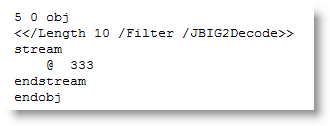
Today I took a closer look at the PDF code of the /JBIG2Decode vulnerability. It doesn’t have to be an XObject, just a stream object with a /JBIG2Decode filter:

20090302-231859

This indirect object is all I have to include in my basic PDF document to get a PoC PDF document to crash Adobe Acrobat Reader 9:

20090302-135943

20090302-140102

On Virustotal, this PoC PDF document is only detected by ClamAV, but it’s no surprise, as most signatures also look for JavaScript and/or a payload. When I use name or stream obfuscation, ClamAV is also bypassed.

You can download my Python program to generate these PoC PDF documents here, it needs the mPDF module of my PDF-tools. Use it to developed better signatures or to test your defenses.


Quickpost info


Sunday 1 March 2009

Quickpost: /JBIG2Decode Signatures

Filed under: PDF,Quickpost,Vulnerabilities — Didier Stevens @ 20:17

You’re most likely aware of the latest PDF vulnerability in JBIG2 image encoding, more specifically /JBIG2Decode.

Signatures have been released to identify PDF documents exploiting this vulnerability, many of which scan for the /JBIG2Decode string. Remember the canonicalization issue with PDF names I mentioned in a previous PDF post. There are alternate ways to write /JBIG2Decode, for example /JBIG#32Decode is also a valid representation. But many signatures will not match this variant, because the matching engine doesn’t reduce the name to a canonical form (e.g. replace the hexadecimal representation #32 by ASCII character 2) before matching the pattern.

I took this JBIG2 PoC exploit from Milw0rm and let Virustotal take a look at it. Now don’t be mislead by the 5/39 ratio, this doesn’t necessarily mean that most AV products will not protect you from this PoC.

The same PDF document, with /JBIG#32Decode (and some updates to adjust for the increased length), gets 2 detections (SecureWeb-Gateway uses the Avira engine on VT, so both detections are actually from the same engine).

But Avira doesn’t use /JBIG2Decode in its signature (when I replace /JBIG2Decode with /AAAAAAAAA, the PoC still gets detected).

So it looks like the AV engines on Virustotal don’t reduce PDF names to a canonical form.


Quickpost info


Sunday 4 January 2009

Howto: Add a Digital Signature to a PDF File

Filed under: Encryption,PDF — Didier Stevens @ 21:47

After signing an executable and a Mozilla add-on, let’s sign a PDF document with our certificate.

I didn’t manage to use a free tool to sign a PDF document with a certificate, so we’ll use a trial version of Adobe Acrobat Professional.

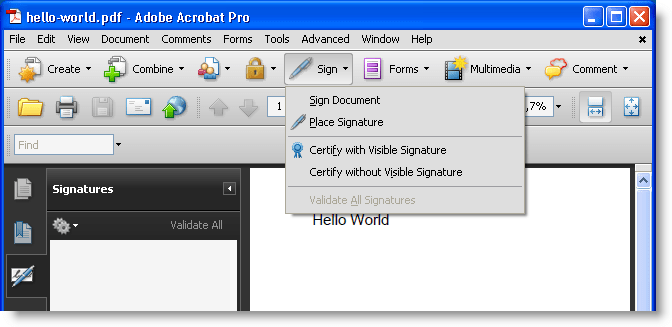
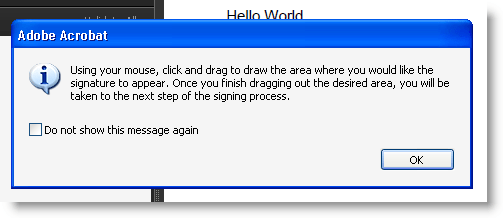
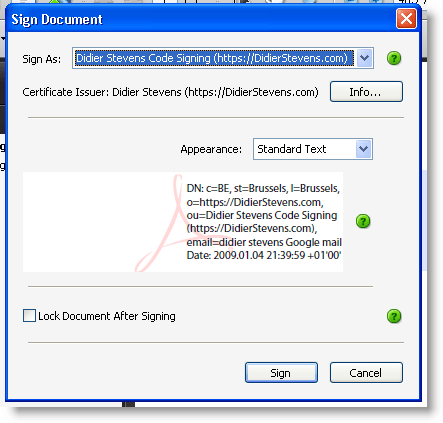
Our PKCS12 file (with keys and signatures) is imported in our certificate store, so let’s open a PDF document and sign it:
20090104-214956

20090104-215128

20090104-215340

After signing, we notice there’s one issue, our identity is not yet trusted:

20090104-215702

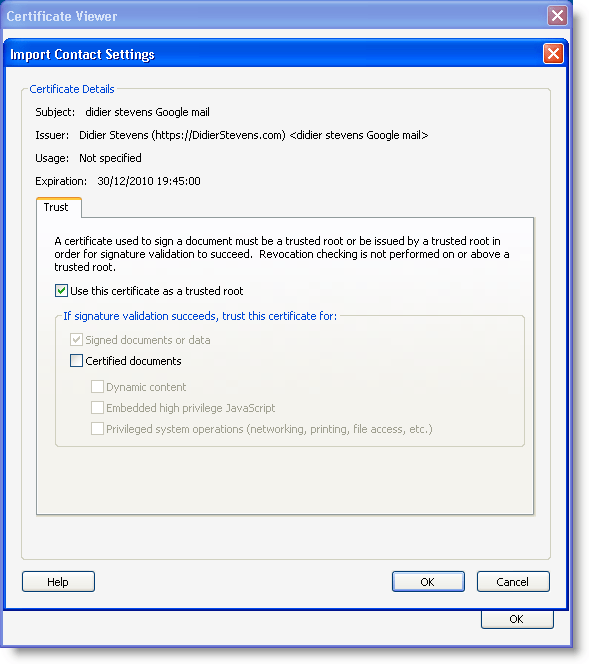
Let’s trust ourself:

20090104-215955

20090104-220023

20090104-220103

20090104-220243

After validation, Adobe Acrobat tells us our signature is valid:

20090104-220644

Tuesday 9 December 2008

Updates: bpmtk and Hakin9; PDF and Metasploit

Filed under: Announcement,Hacking,Malware,My Software,PDF,Update — Didier Stevens @ 21:23

Hakin9 has published my bpmtk article. The article mentions bpmtk version 0.1.4.0; however, this new version has no new features. But it comes with extra PoC code, like a LUA-mode keylogger and “rootkit”. New blogposts will explain this new PoC code.

bpmtk12

And upcoming bpmtk version 0.1.5.0 contains a new feature to inject shellcode. Just have to update the documentation.

On the PDF front: I’ve produced my first Ruby code ;-). I worked together with MC from Metasploit to optimize the PDF generation code in this util.printf exploit module. It uses some obfuscation techniques I described 8 months ago.

Tuesday 18 November 2008

My ISSA / OWASP Talk “Risky PDF”

Filed under: PDF — Didier Stevens @ 18:34

For those of you who attended my ISSA / OWASP talk Risky PDF, thanks for your interesting and challenging questions! I’m very pleased with the feedback I got.

You can download the presentation and demo files here. All my PDF blogpost can be found usingĀ  category PDF.

A recurring remark I received afterward is about claiming not to be a PDF expert, while my presentation (and research) clearly shows otherwise.

I didn’t express myself clearly. When I started my presentation by stating that I’m not a PDF expert, I meant that I don’t know how to produce a PDF document with a nice layout, a content table, an index, captivating graphics, … I don’t even know how to use Adobe Professional to create a PDF document with embedded JavaScript. So don’t ask me questions about producing ā€œbenignā€ PDF documents, because I don’t have a clue.

But I do have build-up expertise in malicious PDF documents. I’ve become an expert in analyzing PDF malware. I know how to create a PDF document with embedded JavaScript from scratch, just using a text editor (and I’ve build tools to automate this). And I can perform a forensic analysis of PDF documents.

My PDF expertise is limited to malicious usage and forensics. Outside of the IT security field, people with my expertise are not considered PDF experts. It wasn’t intended as false modesty, I just can’t help you troubleshoot ā€œbenignā€ PDFs šŸ˜‰

Monday 10 November 2008

Shoulder Surfing a Malicious PDF Author

Filed under: Forensics,Malware,PDF — Didier Stevens @ 21:32

Ever since I read about the incremental updates feature of the PDF file format, I’ve been patiently waiting for a malicious PDF document with incremental updates to come my way. Thanks to Bojan, that day has finally arrived.

The 2 malicious PDF documents I received (data.pdf and info.pdf) both exploit the same Acrobat JavaScript util.printf vulnerability.

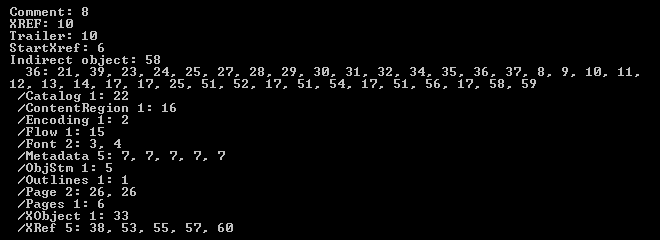
data.pdf is very interesting to me: it’s one PDF file containing 5 incremental updates, essentially bringing us an archeological record of the malware author’s trial-and-error session. So let’s start uncovering what the malware writer has been up to.

Looking at the type of objects inside data.pdf (with my PDF parser), we can see many startxref and xref objects:

20081110-202238

The metadata of data.pdf reveals that the guy (from personal experience, I know that most bad programmers are males šŸ˜‰ ) used Adobe Acrobat 8.1.0 to create this document in the early hours of Thursday November 6th 2008, and that his machine has timezone setting +01:00.

It took 52 minutes 32 seconds to create the first version of data.pdf. This version contains everything to execute a JavaScript script upon opening of the document, but the script to be executed is empty.

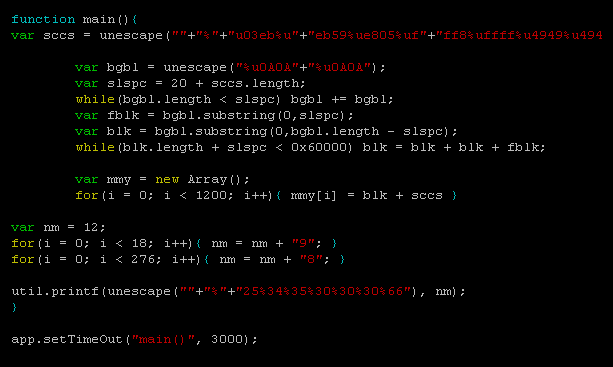
44 seconds later, a second version is created, containing this script:

20081110-185852

This script performs a heap spray (the most indented section of function main) of shellcode (contained in variable sccs) and then exploits the util.printf format string bug. This exploit is contained in function main, which should be triggered by app.setTimeOut after 3 seconds. However, the use of setTimeOut in this script is buggy (details can be found in Adobe’s JS API Reference), and main() will never execute.

After 44 seconds, another version is created to try to get this exploit to work. He modified the call to setTimeOut like this:

20081110-185933

This is completely wrong, so after 4 minutes and 12 seconds (probably spend Googling for an answer as to why this doesn’t work), he returns to the previous call, but now hopes that 5 seconds will do better than 3 seconds.

20081110-190004

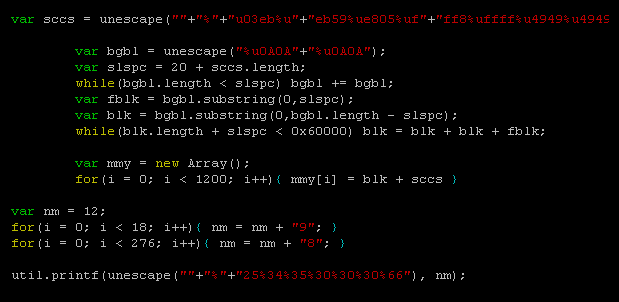
Of course, it doesn’t. After one minute and a half, he gives up, and modifies the script to execute his exploit without delay:

20081110-190045

I can’t say he’s a sharp programmer or tenacious, but at least, he’s result-driven…

Let’s turn our attention to the second malicious PDF (info.pdf) I received. This file contains no incremental updates, but it’s still interesting because it has the same origin as data.pdf. This file was created at exactly the same time, and contains the same identification (/ID[<DD95D438BE408D4FB12AC2FE7ED5E6C6><14FA8F4917ED8449B59BF6CFA41C39BD>]) as data.pdf. Most PDF applications add a unique ID to the trailer of every PDF document they create. info.pdf was saved a day later (about 37 hours later), and contains the same exploit script as data.pdf, but with an extra layer of JavaScript obfuscation.

Bojan confirmed he was the first to submit these files to Virustotal. I calculated the MD5 hashes for the different versions of data.pdf, but none were submitted to VT, so our guy didn’t use VT for QA.

It was an interesting experience, “spying” on this malware author. Let’s hope they don’t stop using incremental updates, and that some of them will be careless enough to leave personal data hidden in their malicious PDF documents.

data.pdf MD5 1A8E5242F21727959683FA8CC7AA94AD

info.pdf MD5 23F31C83EE658BB5C2635BEFDE56199A

Sunday 9 November 2008

Creating PDF Test-Files

Filed under: My Software,PDF — Didier Stevens @ 12:56

As promised, I’m releasing a couple of my PDF tools as a warm-up to my ISSA Belgium and OWASP Belgium talk.

After having manually created some PDF test-files (just using a text editor), I stepped up to the next level and wrote a quick-and-dirty Python module to generate PDF documents by assembling fundamental PDF elements.

My mPDF.py module contains a class with methods to create headers, indirect objects, stream objects, trailers and XREFs. One of the programs I wrote based on this module is make-pdf-javascript.py. This Python program allows me to create a simple PDF document with embedded JavaScript that will execute upon opening of the PDF document. Program details and download here.

An example: to create a PDF document exploiting the util.printf Adobe Reader vulnerability in its simplest form (e.g. no shellcode and no heap spray), issue the following command:

20081109-121930

Here it crashes Adobe Reader 8.1.2 on Windows XP SP2:

20081109-130302

Saturday 1 November 2008

Quickpost: Fingerprinting PDF Files

Filed under: Malware,PDF,Quickpost — Didier Stevens @ 11:57

Per request, a more detailed post on how I use my pdf-parser stats option.

I have two malicious PDF files with a different title, different size (100K and 700K) and different content. But they share an identical internal PDF structure, because they have exactly the same number and type of fundamental elements:

These statistics were generated with the following command:

pdf-parser.py --stats malware.pdf

As both malicious PDF files produce identical stats (or fingerprint), I can assume they share the same origin.


Quickpost info


« Previous PageNext Page »

Blog at WordPress.com.