ZIPEncryptFTP is a program I developed to make off-site backups of important data. Like its name suggests, it ZIPs one or more directories, Encrypts the ZIP file with AES and uploads it to a FTP server.
Find the details here.
ZIPEncryptFTP is a program I developed to make off-site backups of important data. Like its name suggests, it ZIPs one or more directories, Encrypts the ZIP file with AES and uploads it to a FTP server.
Find the details here.
I’ve updated XORSearch:
I noticed that USBVirusScan will also trigger when a network drive is mounted (Map Network Drive, or net use …).
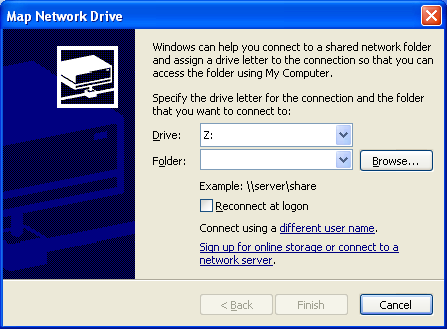
This new version ignores mounting of network drives.
A colleague of mine is getting married and her friends gave her a bunch of puzzles to solve. One puzzle is about the Enigma cipher machine, that’s why she asked me for help.
She has to go to this page (a flash simulation of the Enigma cipher machine) and solve this puzzle: If ANSWER is YRKRHL, then insert ENIGMA into enigma to find the answer…
It was immediately clear to me that we were dealing with a KPA: find the key (Enigma cipher machine configuration) that encrypts ANSWER into YRKRHL, and then we’ll be able to find the encrypt ENIGMA.
I quickly wrote a C# program to brute force all the starting positions (AAA – ZZZ), based on this article. At first my program didn’t find a solution, so I added brute forcing of the rotors and steckers configuration. By then my colleague had received a hint from her friends, which allowed us to set the correct configuration of the rotors, starting positions and steckers.
The funny thing is that my program found several other solutions:
Solution: rotor 243 key JRP steckers ACLX cleartext ANSWER ciphertext YRKRHL
cleartext2 ENIGMA ciphertext2 JRHSCB
Solution: rotor 513 key TJB steckers ADNT cleartext ANSWER ciphertext YRKRHL
cleartext2 ENIGMA ciphertext2 IRLHUN
Solution: rotor 234 key UHH steckers AGJS cleartext ANSWER ciphertext YRKRHL
cleartext2 ENIGMA ciphertext2 XRNBIK
Solution: rotor 234 key UHH steckers AGKU cleartext ANSWER ciphertext YRKRHL
cleartext2 ENIGMA ciphertext2 XRNBIU
Solution: rotor 321 key ESM steckers AHFY cleartext ANSWER ciphertext YRKRHL
cleartext2 ENIGMA ciphertext2 BRDHAQ
Solution: rotor 125 key HMH steckers AHRU cleartext ANSWER ciphertext YRKRHL
cleartext2 ENIGMA ciphertext2 QRYFNZ
…
Download:
MD5: A9FEBBABA207E7C3790D075FD3A3D22B
This new version has a new command line option -e. This will disable the Exit command in the pop-up menu.
Thanks to Earl Yeo for the suggestion.
The new version (1.1) of my USBVirusScan program has 2 new placeholders:
The volume serial number is assigned by the operating system when a hard disk is formatted. It is not the serial number assigned by the manufacturer. See function GetVolumeInformation for details.
The volume name and volume serial number allow me to script different actions for the different USB drives I plug into my system. For example, when I insert my USB drive with my TrueCrypt protected data on it, my script automatically launches the TrueCrypt program to mount the drive, I just have to type the pass-phrase. Or when I insert my MP3 player, the script opens the folder with queued-up podcasts.
And for all other drives, I start a virus scan.
EICARgen is a trivial tool I developed to generate the EICAR Anti-Virus test file.
I’ve released a bugfix for my OllyDbg plugin OllyStepNSearch.
Thanks to Ngan Truong for finding and reporting bugs in the help function. My program worked with an uninitialized pointer, shame on me.
Challenger is a small program I’ve used in reverse-engineering challenges (without success ;-)). It performs dictionary and brute-force attacks on the reverse-engineering challenge program.
The programs used in reverse-engineering challenges are usually console programs. You start the program, it asks for the password (standard output), you type the password (standard input), the program responds and ends.

Challenger automates this process: it runs the program against a list of passwords (dictionary) or it tries out all combinations (brute-force).
Challenger is also a console program taking command-line arguments.
Here is an example where I use my program on F-secure’s Khallenge level 1 program with a tiny wordlist from Openwall. Since I don’t know the output produced by the program when a correct password is entered, I don’t use the search argument: challenger /executable:level1.exe /dictionary:lower.lst /log:log.txt
Here is the result:
Start > 2/11/2006 21:49:45
Start     > Challenger v1.0.0.0 (https://DidierStevens.com)

Config    > dictionary

Config    > file: lower.lst

Config    > executable: level1.exe

Config    > arguments:

Config    > timeout: 100

Config    > heartbeat: 1000

Config    > search: not enabled

Config    > log: log.txt

New output> a -> ASSEMBLY'06 REVERSE ENGINEERING CHALLENGE
*** LEVEL 1 *** Challenge Copyright (c) 2006 F-Secure Corporation
For more information, please see http://www.f-secure.com/weblog/asm.htm
Enter the password:
Try another one.
Heartbeat > 2/11/2006 21:49:58 counter: 1000 password: anonymity

Heartbeat > 2/11/2006 21:50:11 counter: 2000 password: barge

Heartbeat > 2/11/2006 21:50:23 counter: 3000 password: brass

Heartbeat > 2/11/2006 21:50:34 counter: 4000 password: cement

Heartbeat > 2/11/2006 21:50:45 counter: 5000 password: compendia

Heartbeat > 2/11/2006 21:50:57 counter: 6000 password: cuisine

Heartbeat > 2/11/2006 21:51:10 counter: 7000 password: disavow

Heartbeat > 2/11/2006 21:51:21 counter: 8000 password: emergency

Heartbeat > 2/11/2006 21:51:34 counter: 9000 password: feeble

Heartbeat > 2/11/2006 21:51:45 counter: 10000 password: g

Heartbeat > 2/11/2006 21:51:58 counter: 11000 password: handbarrow

Heartbeat > 2/11/2006 21:52:11 counter: 12000 password: identical

Heartbeat > 2/11/2006 21:52:23 counter: 13000 password: ion

Heartbeat > 2/11/2006 21:52:35 counter: 14000 password: lev

Heartbeat > 2/11/2006 21:52:47 counter: 15000 password: meatball

Heartbeat > 2/11/2006 21:53:00 counter: 16000 password: naivete

New output> obvious -> ASSEMBLY'06 REVERSE ENGINEERING CHALLENGE
*** LEVEL 1 *** Challenge Copyright (c) 2006 F-Secure Corporation
For more information, please see http://www.f-secure.com/weblog/asm.htm
Enter the password:
Yup, thats it!
To continue, send an email to: level1-solution_was_obvious@khallenge.com
Heartbeat > 2/11/2006 21:53:13 counter: 17000 password: orthograph

Heartbeat > 2/11/2006 21:53:26 counter: 18000 password: pestle

Heartbeat > 2/11/2006 21:53:39 counter: 19000 password: presume

Heartbeat > 2/11/2006 21:53:51 counter: 20000 password: recount

Heartbeat > 2/11/2006 21:54:04 counter: 21000 password: sandy

Heartbeat > 2/11/2006 21:54:16 counter: 22000 password: sis

Heartbeat > 2/11/2006 21:54:29 counter: 23000 password: stomp

Heartbeat > 2/11/2006 21:54:42 counter: 24000 password: tenor

Heartbeat > 2/11/2006 21:54:54 counter: 25000 password: tunisia

Heartbeat > 2/11/2006 21:55:07 counter: 26000 password: venerate

Heartbeat > 2/11/2006 21:55:19 counter: 27000 password: withhold
For the first password (a), the challenge program outputs “Try another one.”. The challenge program outputs this for every password in the list, until the password “obvious” is tested. When obvious is entered as the password, the output of the challenge program is “Yup, thats it!”, allong with the e-mail address. Since no /search argument was provided, the Challenger program continues until the wordlist is exhausted.
The “New output>” line lists the exact output produced by the tested program, except that all newlines are replaced by a space character to make it fit on one line (for clarity, I’ve added the newlines back in this example).
Had I known that the level 1 program outputed “Yup, thats it!” when the correct password is entered, I could have issued this command: challenger /executable:level1.exe /dictionary:lower.lst /log:log.txt /search:Yup
And the program would stop once the correct password was found:
Found > counter: 16663 password: obvious ASSEMBLY’06 REVERSE …
It’s also possible to start a brute-force attack, like this: challenger /executable:level1.exe
This will start with password ‘a’ and try all alphanumeric combinations.
During the reversing of the level 3 challenge of F-Secure’s Khallenge, I discovered that only characters 2, 4, 6 and 8 were used in the password. So I used my Challenger program to try all combinations, while I continued reversing:
challenger /executable:level3.exe /bruteforce:2 /characters:2468 /log:log.txt
Output:
Start     > 2/11/2006 22:09:25

Start     > Challenger v1.0.0.0 (https://DidierStevens.com)

Config    > brute force

Config    > start: 2

Config    > characters: 2468

Config    > executable: level3.exe

Config    > arguments:

Config    > timeout: 100

Config    > heartbeat: 1000

Config    > search: not enabled

Config    > log: log2.txt

New output> 2 -> ASSEMBLY'06 REVERSE ENGINEERING CHALLENGE
*** LEVEL 3 *** Challenge
Copyright (c) 2006 F-Secure Corporation
For more information, please see http://www.f-secure.com/weblog/asm.htm
Enter password:
Nope.

Heartbeat > 2/11/2006 22:09:40 counter: 1000 password: 66428

Heartbeat > 2/11/2006 22:09:53 counter: 2000 password: 264868

Heartbeat > 2/11/2006 22:10:06 counter: 3000 password: 464628

Heartbeat > 2/11/2006 22:10:20 counter: 4000 password: 664268

Heartbeat > 2/11/2006 22:10:34 counter: 5000 password: 862828

Heartbeat > 2/11/2006 22:10:48 counter: 6000 password: 2262468

Heartbeat > 2/11/2006 22:11:02 counter: 7000 password: 2462228
...
But I found the correct password through reversing before my Challenger program found it with brute-force: the password was so long that my program would take too long…
Challenger is written in C# with Microsoft Visual C# 2005 Express Edition.
Download:
MD5: FC71CAA3F99CB6EE9094098D60B7E4C3

 Didier Stevens