Didier Stevens

Monday 14 July 2008

A New Version of WhoAmI? and Another Little Puzzle

Filed under: My Software,Update — Didier Stevens @ 0:57

I’ve updated my WhoAmI? Firefox add-on for version 3.

You can download it here or get it from the Mozilla site. It has remained in the Sandbox since my first post, but now I’ve nominated to leave the Sandbox. If you use it, please post a review on the Mozilla page to help it on its way out of the the Sandbox (or keep it there if it’s too buggy).

And now for the little puzzle: what is special about this other version of my WhoAmI? add-on?

So don’t get confused by these 2 versions:

  • The real version of WhoAmI? is here
  • Download this other version only if you’re interested in a little puzzle

Thursday 3 July 2008

bpmtk: A New Version With bpmtk.dll Included

Filed under: Hacking,My Software — Didier Stevens @ 8:41

Here is a new version of the Basic Process Manipulation Tool Kit (bpmtk).

Some noteworthy changes:

  • bpmtk.dll has been added
  • for ASCII: and UNICODE:, now you can specify a string with spaces by enclosing it in double quotes (ASCII:”My Name”)
  • write and search-and-write use VirtualProtectEx to change the virtual page protection when a write fails

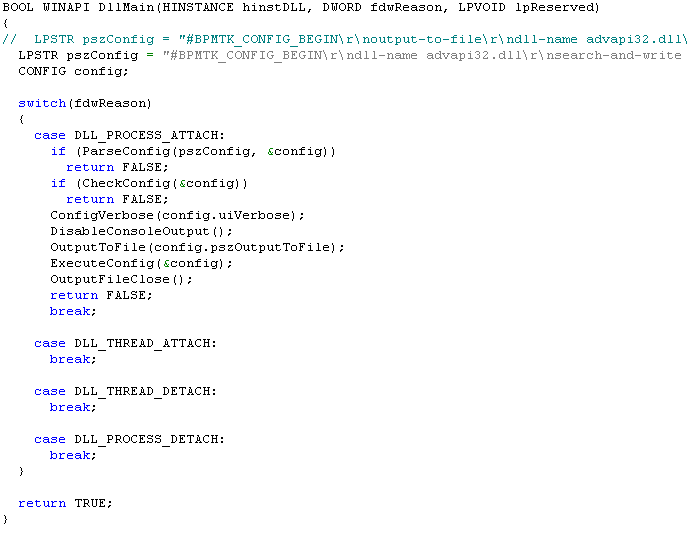
So now you can also load the bpmtk as a DLL in a process and it will execute its configuration. The configuration is embedded in the DLL as an ASCII string. To change the configuration, you’ve 2 options:

  1. edit the source code and recompile the DLL
  2. binary edit bpmtk.dll and insert your config between the strings #BPMTK_CONFIG_BEGIN\r\n and #BPMTK_CONFIG_END\r\n. Terminate all lines of your config with CRLF

Wednesday 25 June 2008

bpmtk: Bypassing SRP with DLL Restrictions

Filed under: Hacking,My Software — Didier Stevens @ 6:51

In my last bpmtk post, I argued that although whitelisting DLLs (supplementary to whitelisting EXEs) prevents my Excel macro from loading the embedded DLL, it would be far too difficult to build and maintain such a whitelist of DLLs. However, Cd-MaN commented with a technique to add DLL restrictions to the Software Restriction Policies without building an exhaustive DLL whitelist, the details are in his excellent blogpost (step 3).

In a nutshell, Cd-MaN configures SRP to restrict allowed DLLs to those found in the Windows and Programs Files directories (a restricted user is not allowed to write to these directories).

To bypass this SRP configuration with my Excel macro, I had to update it so that it would perform the process manipulation directly, in stead of doing this manipulation from within the embedded DLL. And here his how I did it:

The trick is to call WriteProcessMemory directly from within the script to disable SRP. Because I didn’t want to recode my search-and-write function from C to VBscript, I hardcoded the addresses to write to (this will only work for the specified version of advapi32.dll). The effect of these 2 WriteProcessMemory calls is to patch advapi32.dll inside the Excel process, thereby disabling SRP so that the embedded DLL is allowed to load (of course, now that SRP is disabled for Excel, I can also just start another program).

A new version of my bpmtk utility (with the DLL version of bpmtk.exe) will be posted soon.

Tuesday 24 June 2008

Quickpost: WiFi Probe Request Logging with an AirPcap Adapter

Filed under: My Software,Quickpost,WiFi — Didier Stevens @ 9:10

As promised in my previous post, here is another Python program for the AirPcap adapter.

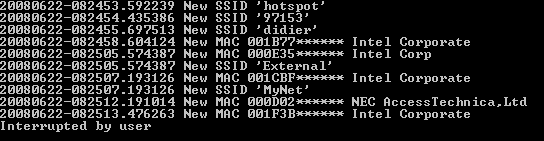
apc-pr-log parses the WiFi packets captured by the AirPcap adapter and logs all probe requests with a SSID. If you start the program without any option, it starts displaying every new MAC address (source address) and SSID captured while channel hopping:

(BTW, the MAC addresses and SSIDs in this screenshot are fake)

Every probe request is logged to file apc-pr-log.txt, except if the –nolog option is provided. A summary report is written to file apc-pr-log-report.txt for every full channel hopping cycle, and when the program is interrupted (CTRL-C). The channel hop interval is 0.5 seconds, and can be changed with the –interval option.

When the program is interrupted, the internal data is persisted to file apc-pr-log.pkl. The program can be resumed with the –resume option (this will read the previously persisted internal data from file apc-pr-log.pkl).

If you don’t want to see new MAC addresses displayed in the console, provide option –nonewclients. Likewise, use option –nonewssids to keep quiet about new SSIDs.

The last option is –exclude, this allows you to provide a list of MAC addresses and OUIs (as a text file) that should be excluded from displaying and reporting.

If you store the oui.txt file in the same directory as the apc-pr-log.py program, the program will use the OUI.txt file to display the organisations linked to the OUI.

Summary of the options:

  --version             show program's version number and exit
  -h, --help            show this help message and exit
  -e, --nonewssids      don't print new SSIDs
  -c, --nonewclients    don't print new clients
  -r, --resume          resume logging
  -l, --nolog           don't log each probe request
  -x EXCLUDE, --exclude=EXCLUDE
                        file with clients/OUIs to exclude from display and
                        report
  -i INTERVAL, --interval=INTERVAL
                        interval in seconds between channel hops

Quickpost info


Tuesday 10 June 2008

Quickpost: WiFi Channel Hopping with an AirPcap Adapter

Filed under: My Software,Quickpost,WiFi — Didier Stevens @ 9:26

Here is a Python program to do WiFi channel hopping with an AirPcap adapter.

The program (apc-channel.py) takes 3 options:

  • –interval sec to set the interval between hops (default is 0.5 sec)
  • –step increment to specify the size of the channel hop (default is 5)
  • –quit to prevent the program from displaying each channel hop

The program also serves as an example on how to use the AirPcap dll from a Python program.

I’ve a couple of other AirPcap programs written in Python (like one to monitor probe requests). If there’s enough interest, I’ll clean up the code and publish it. Be aware that you need an AirPcap adapter for all these programs.


Quickpost info


Monday 9 June 2008

Quickpost: Embedding an Executable in a VBscript

Filed under: My Software,Quickpost — Didier Stevens @ 11:53

My latest bpmtk post got some people to ask me for the VBscript. I’ll do better, I’m posting the Python program I wrote to generate the script. You can download it here.

You have to provide it 2 arguments: the name of the executable to embed and the name of the VBscript to generate, like this:

file2vbscript cmd.exe cmd.vbs

This will generate a VBscript that will write cmd.exe to the current directory and execute it (create a new process). If you want to load a DLL in stead of executing an EXE, use the -l option:

file2vbscript -l mydll.dll mydll.vbs

And to use it in an Office application (Office VBA doesn’t take long subs), use the option -o:

file2vbscript -ol mydll.dll mydll.vbs

This will split the embedded file over several subs, to accommodate for the size limitation of Office VBscripts.


Quickpost info


Thursday 5 June 2008

bpmtk: How About SRP Whitelists?

Filed under: Hacking,My Software — Didier Stevens @ 13:44

After having showed you how my Basic Process Manipulation Tool Kit can be used to bypass Software Restriction Policies, I wanted to follow this with a post showing how SRP whitelisting can prevent this. However, while preparing this new post, I got an idea how I could bypass SRP whitelists (under certain conditions), but I’ve no idea how to prevent this. I finally decided to post this without a solution, maybe you’ll come up with one.

With a SRP whitelist, starting a program is denied by default:

As an administrator, you’ve to explicitly specify the programs that are allowed to be executed by your users (if there are many programs, maintaining this whitelist becomes time consuming). Because of this whitelist, tools like gpdisable or bpmtk can’t be executed to disable SRP. However, if I can execute these tools without starting a new process, SRP will not block them …
Applications with embedded scripting can also be used to manipulate processes. For example, the scripting features of Microsoft Office allow you to call the system APIs I’ve been using in my bpmtk. It’s often not easy (even impossible) to convert a C program to VBscript, but I’ve a workaround.

First, we adapt our C program from an EXE to a DLL (entrypoint DllMain in stead of main), because VBscript can load a DLL.

We’ll use Excel’s scripting features. I’ve created an Excel spreadsheet that embeds a DLL that can be executed with a mouse-click:

The MyDLL dialog is displayed by the embedded DLL.

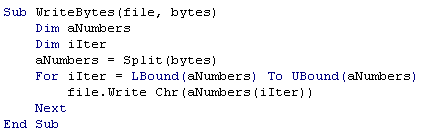
The DoIt button starts this Sub:

DoIt will create a temporary file (in the user’s temporary file folder), write the embedded DLL to it (DumpFile), and then load the DLL (LoadLibrary).

Generating the temporary filename:

Writing the embedded DLL to the temporary file:

Each DumpFileX sub writes bytes to the temporary file (the DLL is embedded in these subs by including the hex dump in strings). It’s necessary to split this over several subs, because of the sub size limitation.

Once the DLL is stored in the temporary file, we call LoadLibrary to load our library in the Excel process. And this executes our code inside the Excel process. Because of this, SRP will not deny it, and our code can disable SRP.

Creating temporary files and loading libraries is normal behavior for programs, SRP will not block this. Even most HIPS will not block this, because loading a library is not the same as injecting a DLL (injecting a DLL is loading a library inside another process). The only thing that might be considered abnormal by the HIPS, is that a temporary file is mapped into memory, but there are also legitimate programs that do this.

SRP has an option to whitelist DLLs, but then you’re facing the huge task of identifying and specifying all DLLs your programs use!

If you implement a SRP whitelist because you absolutely want to control the programs executed by your users, take some time to reflect on your users and the scripting capabilities of your whitelisted applications. And if you really have to prevent the technique I show here, you’ll have to find another solution than SRP whitelists. Unfortunately, I’ve not found one yet… If you’ve an idea, post a comment (banning applications with embedded scripting or disabling scripting is not an option).

Tuesday 3 June 2008

Quickpost: bpmtk Config File Embedding

Filed under: Hacking,My Software,Quickpost — Didier Stevens @ 5:59

After a rather long detour in PDF file format land, let’s pick up where we left the bpmtk.

My Basic Process Manipulation Tool Kit requires a configuration file with instructions to manipulate processes, like this one to start cmd.exe in a restricted environment:

start cmd.exe
search-and-write module:. unicode:DisableCMD hex:41

Save this configuration in a text file, for example start-cmd.txt. And then start bpmtk with this file:

bpmtk start-cmd.txt

You can also embed this configuration file inside the bpmtk executable, like this:

bpmtk start-cmd.txt bpmtk-cmd.exe

This will create a copy of bpmtk.exe, called bpmtk-cmd.exe, with start-cmd.txt embedded as a resource (called BPMTK).
When you execute bpmtk-cmd.exe (without any arguments), the embedded script will be executed. Use this
trick if you often have to execute the same command, or if you have to execute bpmtk in an environment where you cannot provide an argument.


Quickpost info


Tuesday 15 April 2008

Update: Disitool V0.2

Filed under: My Software — Didier Stevens @ 8:25

Ero Carrera’s latest version of pefile has extra methods to handle the checksum of the PE header. My new disitool version uses these methods to correct the checksum when the signature is changed by disitool.

Wednesday 19 March 2008

bpmtk: Spying on IE

Filed under: Hacking,My Software — Didier Stevens @ 11:07

I was asked if it’s possible to intercept IE’s HTTPS requests. It is, it’s not difficult, and you don’t need admin rights to do it on your own processes. In other words, a malware doesn’t even need admin rights to spy on your IE process, if said malware is also running under your user account.

We need to hook the API calls to WinINet functions, like HTTPOpenRequest. We can do this by patching the Delayed Import Address Table of executables calling WinINet functions. In our case, to spy on IE, we need to patch the DIAT of urlmon.dll. One simple way to hook these API calls, is to develop a DLL that will patch the DIAT, diverting the calls to our own functions. Our functions will just call the original functions while intercepting the data.

Here is an example for HTTPOpenRequest:

wininet1.png

HookHTTPOpenRequestA is our hook function for HTTPOpenRequest. It will just output the flags, verb and objectname parameters to the debugger, and then call the original HTTPOpenRequest function with unmodified arguments (which we saved in variable OriginalHTTPOpenRequestA). BTW, if the declaration and use of OriginalHTTPOpenRequestA looks confusing to you, read the explanation of function pointers in C.

Patching the DIAT is easy, use the PatchDIAT function that I provide with my Basic Process Manipulation Tool Kit (it’s in iat.c).

wininet2.png

PatchDIAT needs the name of the executable we want to patch (urlmon.dll), the name of the API to patch (wininet.dll), the name of the function to patch (HttpOpenRequestA), the address of our hooking function (HookHttpOpenRequestA) and a variable to store the address of the original function (OriginalHttpOpenRequestA). PatchDIAT returns S_OK when patching was successful.

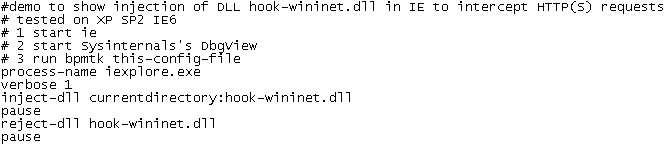
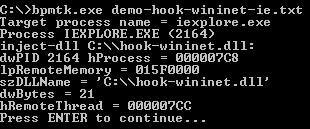
We package everything in a DLL, while hooking some other functions, like InternetReadFile (to intercept actual data), and then inject this DLL in IE with my toolkit:
wininet6.png

wininet7.png

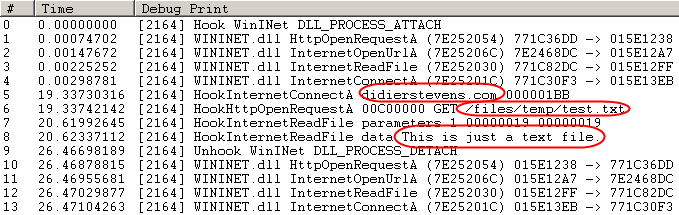
I’ve stored a test file on my server: https://DidierStevens.com/files/temp/test.txt. When you browse to this test file with the patched IE, you’ll see this in Sysinternal’s DebugView:
wininet5.png

Lines 0 to 4 indicate the patching IE was successful.

Line 5 shows IE opening a connection to didierstevens.com on port 443 (that’s 1BB in hexadecimal).

Line 6 shows the preparation of an HTTPS GET request to file /files/temp/test.txt. Flags 00C00000 indicate HTTPS and keep-alive.

Line 7 shows that the call to InternetReadFile was successful and read 25 bytes (0x19).

Line 8 shows the actual data retrieved by IE: This is just a text file.

The next lines indicate we unloaded our DLL with success (thus undoing the patch).

As you can see, we can intercept data before it is encrypted by the HTTPS connection (/files/temp/test.txt) and after it is decrypted (This is just a text file.). This works because we patch the executable before it calls API functions that handle the encryption/decryption, so we get access to the unencrypted data.

I kept my demo DLL very simple to show you the basic principles. A complete spying program would have to hook more functions and tie all the data together to present it in a user friendly way.

It’s also simple to adapt my IE spying DLL to tamper with the data. For example, it could redirect IE to another web site by changing the lpszServerName argument before it calls the original InternetConnect function.
« Previous PageNext Page »

Blog at WordPress.com.