Didier Stevens

Thursday 26 March 2009

Poken Peek

Filed under: Encryption,My Software,RFID — Didier Stevens @ 7:35

OK, after getting side-tracked by /JBIG2Decode PDFs, let’s get back on the smartcard and RFID track.

The Poken is a little USB stick you keep on your keychain. You link it to your online identities. To befriend other Poken owners, you just have to hold your Pokens together for a second, and they’ll exchange IDs through RFID. The Poken is popular in The Netherlands, not only among children, but adults too. No more need to exchange business cards.

My 2 guinea pig Pokens were delivered last week. If you want to meet them in person, come to Brucon for my workshop.
20090325-175438

When plugged into a PC, the Poken simulates a USB memory stick containing 3 files:

  • autorun.inf
  • help.txt
  • Start_Poken.html

Start_Poken.html (started by autorun.inf or by you) will navigate to the Poken website and automatically login to your Poken account. It contains a URL with the necessary data to identify you to the Poken website. Having your Poken lost or stolen is an issue (as explained in the Poken FAQ), because of the auto-login feature.

But loosing physical control over your Poken is not the only way to get your account compromised. The URL is actually the only thing needed to gain access to your account. And because this URL uses the HTTP protocol (the Poken site doesn’t support HTTPS), it’s easy to intercept on insecure networks. Insecure networks are not the only issue. Because all the data is in the URL, it will also leave a copy of the URL in different systems on a network, for example in proxy logs.

To prevent unwanted access to your account, disable auto-login for your account (it was enabled by default for my account).

20090325-180505

I was told by the Poken help-desk that they will support HTTPS in the future. But the current Pokens are hard-coded to use HTTP.

When I read the Poken FAQ stating that your data is protected by a “very advanced encryption method” (sic), I interpret that all the data is encrypted with a cipher like AES.
But this isn’t the case. Not all the data is encrypted. Your Poken ID (a 4-byte integer that uniquely identifies your Poken) is not encrypted. And neither are the IDs of the Pokens you befriend. Your personal account data entered on the Poken site is not stored on your Poken. The link between a Poken ID and an account is kept in the database of the Poken web site and is visible for its owner.

The data of a Poken is stored in the URL in file Start_Poken.html:

    URL=http://p.poken.ch/u/ABCDEFGH...

The path (ABCDEFGH…) is encoded in BASE64 (more precisely, a BASE64 variant compatible with URL encoding). I’ve identified the purpose of some of the first 96 bytes of data. It contains your Poken ID and various counters. 2 4-byte integers are changing with each use and appear to be random. These could be a (cryptographic) hash to guarantee the authenticity of the Poken data.
The rest of the data is used to store the IDs of the Pokens you befriended. There is room for 64 records (friends) of 16 bytes each. If you befriend more than 64 Pokens without connecting to the Poken site, the old records get overwritten by new records (like in a circular buffer) and you lose friends.

I’ve a tip for you: if you can’t connect to the Poken web site while befriending more than 64, connect your Poken to your laptop and backup file Start_Poken.html. Later, when you’ve access to the Poken site, open the backuped files in the order you backed them up. Each file will update your data. And after that, use your Poken.

The 16 byte record contains the befriended Poken ID, a status byte (discreet befriending), 3 bytes that look like a timestamp and 8 bytes that appear to be random. These 8 bytes could be a (cryptographic) hash to guarantee the authenticity of befriended Poken data and prevent spoofing or replaying.
So not all the data is encrypted: the Poken IDs are in cleartext. As the link between a Poken ID and the account is safely protected by the Poken web site, even if your data is stolen or intercepted, not much would be disclosed. Traffic analysis could be applied if data of several Pokens is intercepted during an event. Since most people make their friend list public, they shouldn’t care about the interception of the Poken IDs they befriended anyways.

And how about the strenght of the encryption? Well, contrary to what is stated in the Poken FAQ, I don’t believe it is state of the art. Modern, secure ciphers like AES work with blocks of at least 128 bits (16 bytes). In the Poken data, we have blocks of maximum 64 bits (8 bytes). 64 bit encryption is not state of the art anymore. For comparison, DES (and 3DES) work on 64 bits block. You shouldn’t use DES anymore, because it can be brute-forced, although that’s still not trivial to do.

Conclusion: the biggest risk of using a Poken is getting your account compromised, but this can be mitigated. And the encryption of the data on a Poken is not designed to protect your data, but to prevent fraud with the befriending process. The cipher isn’t AES or an equivalent cipher. Yet it is possible to build a small USB device that uses AES to encrypt all data: the YubiKey does it.

20090325-175502

Tuesday 9 December 2008

Updates: bpmtk and Hakin9; PDF and Metasploit

Filed under: Announcement,Hacking,Malware,My Software,PDF,Update — Didier Stevens @ 21:23

Hakin9 has published my bpmtk article. The article mentions bpmtk version 0.1.4.0; however, this new version has no new features. But it comes with extra PoC code, like a LUA-mode keylogger and “rootkit”. New blogposts will explain this new PoC code.

bpmtk12

And upcoming bpmtk version 0.1.5.0 contains a new feature to inject shellcode. Just have to update the documentation.

On the PDF front: I’ve produced my first Ruby code ;-). I worked together with MC from Metasploit to optimize the PDF generation code in this util.printf exploit module. It uses some obfuscation techniques I described 8 months ago.

Sunday 9 November 2008

Creating PDF Test-Files

Filed under: My Software,PDF — Didier Stevens @ 12:56

As promised, I’m releasing a couple of my PDF tools as a warm-up to my ISSA Belgium and OWASP Belgium talk.

After having manually created some PDF test-files (just using a text editor), I stepped up to the next level and wrote a quick-and-dirty Python module to generate PDF documents by assembling fundamental PDF elements.

My mPDF.py module contains a class with methods to create headers, indirect objects, stream objects, trailers and XREFs. One of the programs I wrote based on this module is make-pdf-javascript.py. This Python program allows me to create a simple PDF document with embedded JavaScript that will execute upon opening of the PDF document. Program details and download here.

An example: to create a PDF document exploiting the util.printf Adobe Reader vulnerability in its simplest form (e.g. no shellcode and no heap spray), issue the following command:

20081109-121930

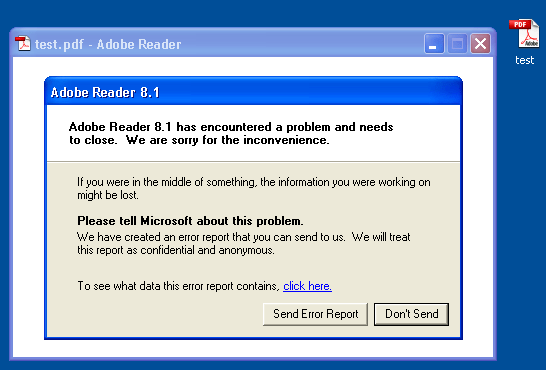
Here it crashes Adobe Reader 8.1.2 on Windows XP SP2:

20081109-130302

Thursday 30 October 2008

pdf-parser.py

Filed under: My Software,PDF — Didier Stevens @ 17:19

I’m publishing my pdf-parser tool featured in my last video. Details and download here.

Tuesday 26 August 2008

wsrradial

Filed under: My Software,Puzzle,WiFi — Didier Stevens @ 0:06

My search for a radial WiFi plotting tool was unsuccessful, so a coded my own: wsrradial.py.

It’s easy to record activity in the 2.400–2.500 GHz ISM spectrum with a Wi-Spy adapter and a directional antenna. Here’s my 9 dBi Yagi antenna:

One low-tech way to quantify the electromagnetic radiation around you goes like this: point the Yagi antenna in one direction for 1 minute, then turn it 45° and repeat the procedure, until you’ve completed a full circle. Use wsrradial to generate radial plots of the recording made with Chanalyzer. It’s configured by default for 8 measurements (360° divided by 45°) of 1 minute each, but command-line options allow you to choose your own parameters.

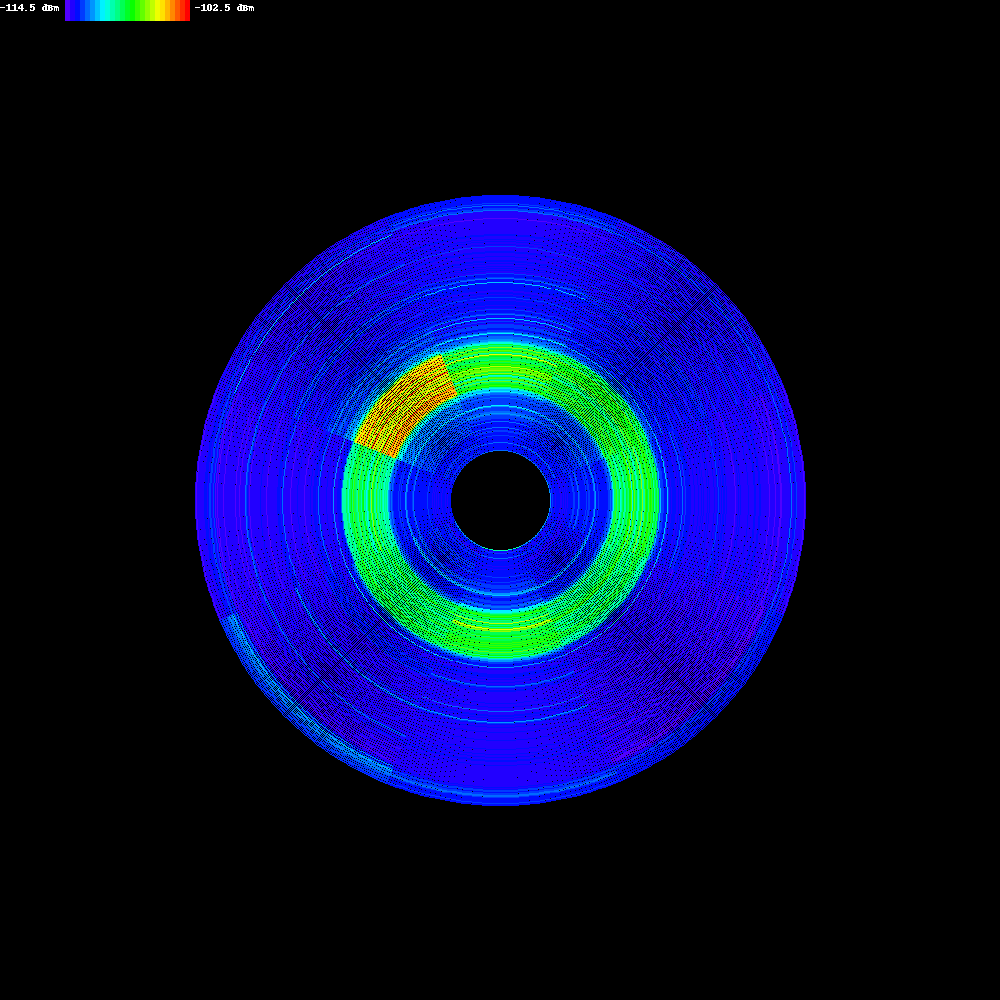
The following radial plot shows the average amplitude for each sampled frequency. The frequency is set out on the radial axis (the lowest frequency is closest to the center, the highest is the most distant), the angular coordinate is just the orientation of the directional antenna. Amplitude is hue color-coded.

This was recorded a couple of meters away from an active access point operating at 2.432 GHz. You can clearly see that the access point is situated in the upper-left corner.

The second plot generated by wsrradial shows the maximum amplitude instead of the average amplitude. I believe this plot gives a better picture of nearby transmitters.

I tried to use matplotlib to generate the charts, but was only able to generate the same charts Chanalyzer produces. So I coded my own chart plotting routines with the Python Image Library. If you know how to use matplotlib to make radial spectrum plots, let me know.

FYI: my latest little puzzle showed an average amplitude plot of the same recording, but with an older version of my program featuring an easier to code color map.

Tuesday 19 August 2008

A Third SpiderMonkey Trick

Filed under: Malware,My Software,Reverse Engineering — Didier Stevens @ 22:51

This escaped my attention, but SpiderMonkey 1.7 has been released for some time now.

I patched this new version (download on my SpiderMonkey page), and decided to add another small trick: implement the window object with the navigate method:

Sunday 10 August 2008

Sampling a Malicious Site

Filed under: Malware,My Software — Didier Stevens @ 21:59

Fake CNN alerts galore!

I seize the opportunity to publish a new video (warning: 8 minutes of command-line staring) (hires XviD version here) showing you how to use my tools to retrieve malware samples hosted on a website. If you just visit an infected website with Internet Explorer, you run the risk of infecting your machine. The safe way to retrieve samples is to work in a low-risk environment (e.g. non-root account on a Linux VM) and use tools that are unlikely to be the target of exploits hosted on said website.

The following tools are featured in the video:

The file numbering trick (01., 02., 03., …) allows me to document exactly how I obtained the sample.

Since I recorded the video, the malware seems to have been removed from the site. But be careful, it’s not uncommon that compromised websites get reinfected.

Thursday 7 August 2008

Update: USBVirusScan 1.7.2

Filed under: My Software,Update — Didier Stevens @ 8:40

I release USBVirusScan version 1.7.2.

Two new features:
-s scan available removable drives when USBVirusScan is started
-r also start the command at drive removal, parameter %e indicates drive arrival ‘A’ or drive removal ‘R’

Download:

USBVirusScan_V1_7_2.zip (https)

MD5: BDEF7BAE13C10B2B6CD650A89FD910ED

SHA256: 0090C73D6A3725E75C3388387A7A9E869C5D6BEA83E0D4D612E1CB25458163F3

Monday 4 August 2008

Update: wsrtool

Filed under: My Software,Update,WiFi — Didier Stevens @ 6:54

Ryan Goodings suggested I modify the header (starting_frequency and readings_per_sweep) of a band-pass filtered wsr file, to have Chanalyzer scale the filtered section. Here is the new version (use option –reduce), and this is the result:

Friday 1 August 2008

wsrtool

Filed under: My Software,WiFi — Didier Stevens @ 9:31

Another WiFi program: wsrtool.py This Python program allows you to process wsr files (capture files of the ISM spectrum, created by Chanalyzer with a Wi-Spy adapter).
The tool filters out selected frequencies or amplitudes (band-pass and band-stop filter).

You need to install the Python module Construct.

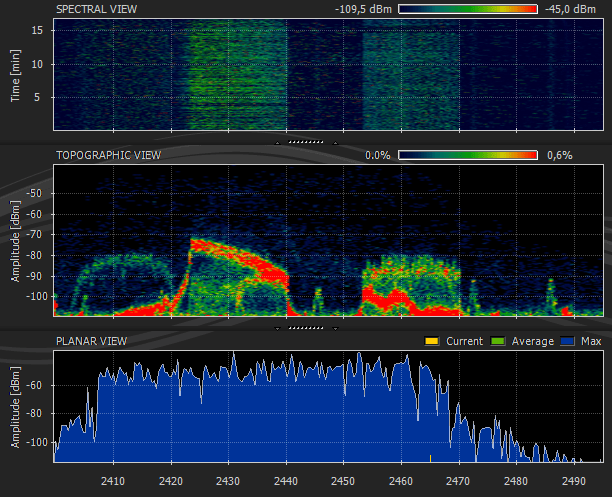
Here’s an unfiltered capture:

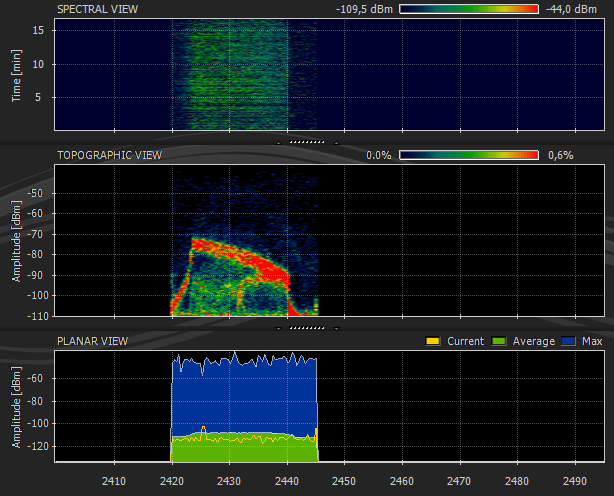
And here I used a band-pass filter with cutoff frequencies 2420 MHz and 2445 MHz:

« Previous PageNext Page »

Blog at WordPress.com.