I’ve debugged the issues some people had with my Nokia time lapse Python script, you can find a new version here.
Friday 21 August 2009
Tuesday 11 August 2009
Update: UserAssist Tool Version 2.4.3
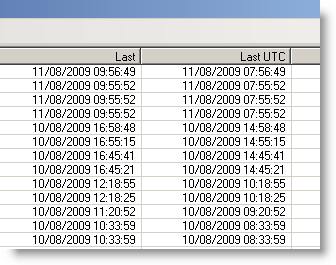
I had an interesting discussion with Hans Heins concerning the timestamp displayed by my UserAssist tool.
The first version of the UserAssist tool would only decode the UserAssist registry keys of the account under which it was running. And thus it made sense to display the timestamp in local time format, even if the entry is stored in UTC.
I added a warning about the time zones when I added registry file import functions, but this was confusing.
This new version of the UserAssist tool adds an extra column, with the timestamp in UTC:
And I’ll be posting a new version to support the new UserAssist registry key format of Windows 7 and Windows 2008 R2.
Download:
MD5: A5244C7F83E0DE70600E27F5D3B8AD7D
SHA256: 7E2D107BE84FBBF7E79F1BD11703401A374B5138B2F77E4FF8AFE1A3E749CCDA
Thursday 6 August 2009
Update: pdf-parser Version 0.3.5
After PDFiD, it’s pdf-parser’s turn to get updated.
The major change is support for /Names obfuscation through canonicalization. Now that these obfuscation techniques are found in in-the-wild samples, this feature became a necessity. For example, searching for /JavaScript when the PDF document contains /Java#53cript will also retrieve this obfuscated instance.
And if you need to see the obfuscated names like they are, use option –nocanonicalizedoutput
Support for filter ASCII85Decode has been added.
And option –hash displays the MD5 hash value of objects, making it easier to compare 2 PDF documents.
Download:
MD5: 07EA2C47766ADF248102E378C65D03F3
SHA256: 5EAD0F9BE9693EF836CF67FF2B796324ED5E7053D34BF4FA588D250A7DA2E761
Wednesday 5 August 2009
Update: PDFiD Version 0.0.8
PDFiD is updated.
Changes:
- It detects Flash in PDF (/RichMedia)
- Actions launched by Forms (/AcroForm)
- Less stringent %PDF header checking, because I saw some samples designed to bypass pddfid
- Updated the date format
- New option –force: force the scanning of a file, even if no valid %PDF header was found
- Accepts stdin for pipes, example: pdf-parser.py –filter –type /ObjStm flash.pdf | pdfid.py –force
This will scan objects “hidden” in object streams (/objStm)
Download:
MD5: 9769FB96899F3AD15510C903A4FB29EF
SHA256: 542734C2613439851AF99B59725B1607F96A6E9396B447C5BD3AF197AABB0231
Wednesday 22 July 2009
The Ultimate Disaster Recovery Plan
The ultimate disaster recovery plan is not a corporate plan.
This plan is for your family, to help them take over from you, when you’re not able to take up your role in the family. Hopefully, this will only be a temporary situation, but you have to plan for the worse too: your demise.
List all critical tasks you perform for your family. Think about the information a family member needs to take over your tasks. Document this. Communicate this to your family members.
Most of this documentation is private but not confidential. You don’t want an outsider to read it, but it contains no real secrets. You’ll only want to use encryption for the real secrets, and communicate the key and decryption procedure to your family members and/or lawyer (or another trustworthy outsider). You don’t have to trust a single person with your key if you don’t want to, you can split it over several persons, like Cory Doctorow did.
2 years ago, a very good friend of mine died suddenly. That’s what motivated me to develop a html/javascript page with AES encryption to record and encrypt my will. The advantage of html/javascript is that it’s standalone and very portable.
When you open my Virtual Will page, it will detect that it contains no encrypted content, and display the following dialog:
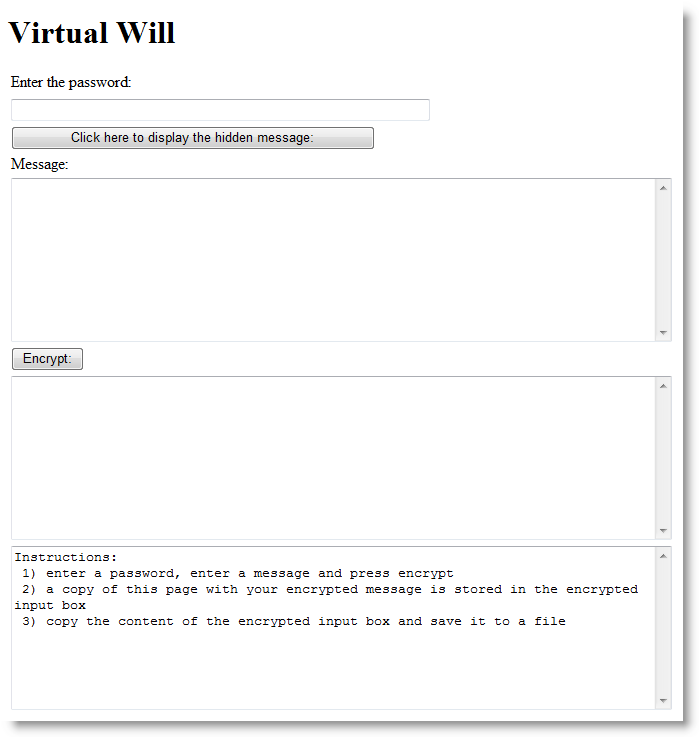
Use this dialog to create and encrypt your message.

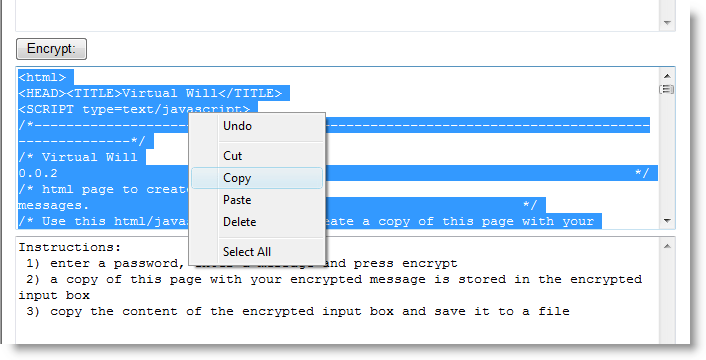
Copy all html code from the encrypt textbox, and save it as an html file. This html file is identical to the original, but it also contains your message encrypted with AES.
Provide this document to your family members, together with the (partial) key. For example, you could burn it to a CD-ROM and use autorun to open the page automatically.
To decrypt it, open the html file:

and enter the password:

You can also use a Virtual Will page with ciphertext to create a new page or update your will: type encrypt in the password field, and you’ll see the encryption fields appear.
I obtained the JavaScript AES code from Chris Veness.
Some limitations:
- Chris’ implementation doesn’t use a standard key derivation algorithm (and is limited to first 32 characters of the password)
- the ciphertext is not compatible with the openssl format
- it works with many browsers on different operating systems, but not on my S60 Nokia
- get the enter key to work correctly
I’ll improve these limitations if my software proves to be useful.
Of course, you can use this html page to encrypt anything and then pass it along, it doesn’t have to be a disaster recovery plan.
Download: virtualwill.html
Tuesday 21 July 2009
Quickpost: More Picture-Taking with Python
Per @TimelessP’s request, here’s so more Python code that can be used for time-lapse photography.
It’s code I wrote to take surveillance pictures from IP-cameras:

You have to update 2 config files with the data of your IP-cameras: vs.config and credentials.config. Fields in the config files are tab-separated.
vs.config contains the IP cameras, example:
Hall.jpg http://192.168.1.1/IMAGE.JPG -
First field is the prefix for the name when saving the picture (suffix is a timestamp). Second field is the URL to access the picture on the IP camera (depends on the model your using). Third field is a fixed name for the picture, use a hyphen (-) if not used.
credentials.config contains the passwords to access the IP-cameras, example:
192.168.1.1 admin password
Download:
MD5: DB806B49705D544F4B928A8F76622125
SHA256: 042FA2CE1F5AEBD433D59B9D4755783E6CE58014FE59086C6A2A8E8781C63B45
Wednesday 1 July 2009
Embedding and Hiding Files in PDF Documents
My corrupted PDF quip inspired me to program another steganography trick: embed a file in a PDF document and corrupt the reference, thereby effectively making the embedded file invisible to the PDF reader.
The PDF specification provides ways to embed files in PDF documents. I’m releasing my Python program to create a PDF file with embedded file (I used make-pdf-embedded.py to create my EICAR.pdf).
Here’s how a PDF document with an embedded file looks like:

/EmbeddedFiles points to the dictionary with the embedded files:
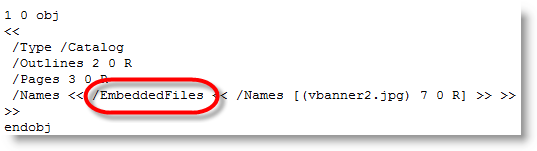
As names defined in the PDF specification are case sensitive, changing the case changes the semantics: /Embeddedfiles has no meaning, and thus the PDF reader ignores it and doesn’t find the embedded file.

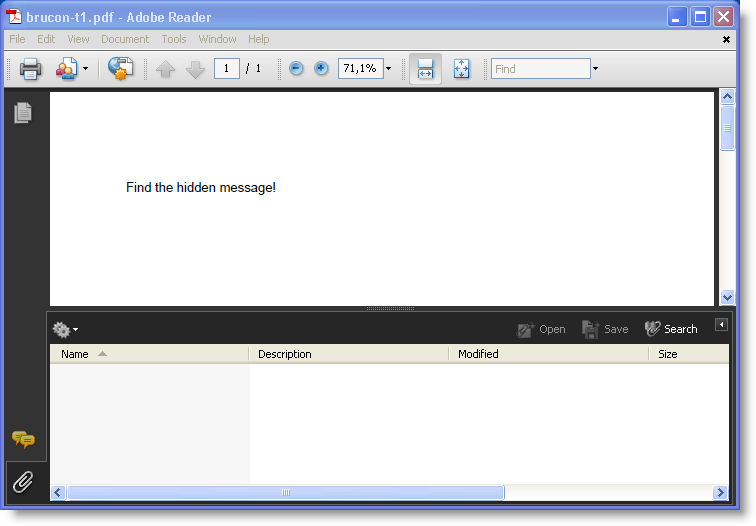
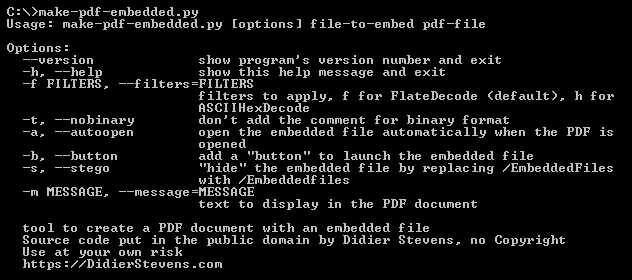
Actually, I used this trick in my Brucon puzzle. I used the –stego option of make-pdf-embedded.py:
Of course, once you know the stego trick, it’s easy to recover the embedded file: edit the PDF document with an hex editor and change the case back to /EmbeddedFiles.
But if you want to make it harder to detect, use PDF obfuscation techniques. Or embed the file twice with incremental updates. First version is the file you want to hide, second version is a decoy…
The PDF language offers so many features to hide and obfuscate data!
Download:
MD5: 305D57692C27DD3CD91D8C85A3932948
SHA256: A030BBCB8B54137D8047A4CB5C350725599383A4B113CABBA8871AC221378C5B
Tuesday 30 June 2009
MessageBox Shellcode
Per request, I release my assembly code I’ve used in my previous blogposts to display a message box when the injected shellcode gets executed. It’s nothing special, but it will save you some time when you need a similar program.
Assemble the code with nasm like this:
nasm -o sc-mba-hello.bin sc-mba-hello.asm
I use the DLL locating code published in The Shellcoder’s Handbook, you can find it in the include file sc-api-functions.asm. MessageBoxA is located in user32.dll, this dll has to be loaded in the process you’re injecting with sc-mba-hello.
sc-ods.asm is a similar program, calling OutputDebugStringA in stead of MessageBoxA.
Download:
my-shellcode_v0_0_1.zip (https)
MD5: F215B29BA3C8F24CFBA5C24BED65B68A
SHA256: EA1DB8028954CEB18B8AD2EB37CA6BA0CD7CDC6B9A64F10561382152701C013F
The shellcode:

Monday 29 June 2009
Quickpost: Time Lapse Photography With a Nokia Mobile
Did you know Nokia mobile phones with the S60 platform can be programmed in Python? During my last holiday, I wrote a small program for time lapse photography with my mobile. Here is the result, showing tidal ebbs and flows in Saint-Vaast-la-Hogue and Cancale:
This is the Python program I wrote to take a picture every minute:
#!/usr/bin/python

__description__ = 'Tool to take pictures with a Nokia phone at regular intervals'
__author__ = 'Didier Stevens'
__version__ = '0.1.1'
__date__ = '2009/06/22'

"""

Source code put in public domain by Didier Stevens, no Copyright
https://DidierStevens.com
Use at your own risk

History:
 2009/06/17: start
 2009/06/22: refactoring

Todo:
 Get Threading to work
"""

import camera
import time
import os

timelapseFolder = 'e:\\timelapse\\'
sleepTime = 57

def TakeAndSavePicture():
    global timelapseFolder

    now = '%04d%02d%02d-%02d%02d%02d' % time.localtime()[0:6]
    pic = camera.take_photo()
    pic.save(os.path.join(timelapseFolder, now, '.jpeg'))
    print 'Picture taken: %s' % now

def Main():
    global timelapseFolder
    global sleepTime

    print 'Timelapse photography started'
    if not os.path.isdir(timelapseFolder):
        os.mkdir(timelapseFolder)
        print 'Timelapse folder created: %s' % timelapseFolder
    print 'Wait between pictures %d' % sleepTime
    while True:
        TakeAndSavePicture()
        time.sleep(sleepTime)

if __name__ == '__main__':
    Main()
And then I use Avisynth to combine the jpeg pictures in a movie like this (I join pictures 00001.jpg through 00197.jpeg, 5 per second and produce a 25 fps movie):
ImageSource("%05d.jpeg", 1, 197, 5).ChangeFPS(25)
Thursday 25 June 2009
bpmtk: Injecting VBScript
Here’s a new trick: injecting VBScript in a process. I’ve developed a DLL that will create a COM instance of the VBScripting engine and let it execute a VBScript. Injecting this DLL in a running program results in execution of the VBScript in the context of the running program. Here’s an example where I wrote a VBScript to search and replace a string in the memory of the notepad process:
Here is part of the VBScript I developed to search and replace inside the memory of a process. It uses custom methods like Peek, Poke and Output that I’ve added to the scripting engine:

I’ll provide more details in an upcoming blogpost on bpmtk version 0.1.5.0, but you can already download it here.
YouTube, Vimeo and hires Xvid.

 Didier Stevens