Didier Stevens

Tuesday 17 April 2012

InteractiveSieve

Filed under: .NET,My Software — Didier Stevens @ 11:33

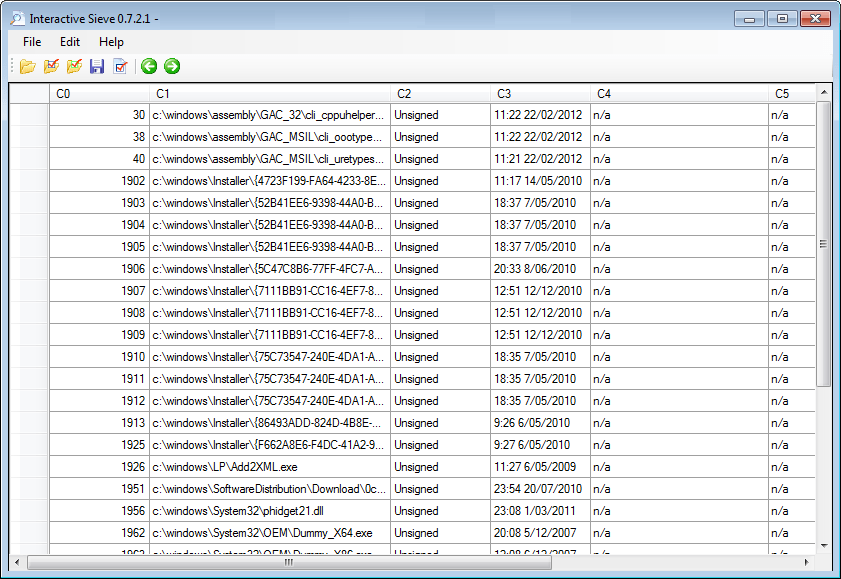
Interactive Sieve is a program I developed to help you analyze log files and other data in tabular form. It’s designed to help you when you don’t know exactly what you’re looking for. You sift through the data by hiding or coloring events (or data) that are not relevant.

I started writing this program in 2007 and use it often. But there is a problem I’ve not been able to fix: when you hide a lot of rows, it takes a long time, probably because of the redraw operation that takes place for each hidden row. Maybe someone will find a solution.
Update: big thanks to @woanware for fixing the redraw performance problem!

For more details on how to use the program, select Help / About.

InteractiveSieve_V_0_7_3_0.zip (https)
MD5: F36B245584DE143A15F484AA6220D67F
SHA256: AE0804EA739AEDC5FA32B7F6FD99AB99A35F7742B98953A653E0C24725E0FE6F

Thursday 29 March 2012

Update: SE_ASLR Version 0.0.0.2

Filed under: My Software,Update — Didier Stevens @ 9:14

I added Bottom Up Randomization to my SE_ASLR tool.

In this source code, I use a Windows Cryptographic Service Provider to generate random numbers.

SE_ASLR_V0_0_0_2.zip (https)
MD5: C835D1DDB64A68A1CD48CCF87AE03D18
SHA256: 1560BEE96CFC956A5E8954FEFD92ED227293418B19FE6B06D4ED703B6C50F4AC

Monday 12 March 2012

NAFT Release

Filed under: My Software,Networking — Didier Stevens @ 19:41

You can find a first release of my Network Appliance Forensic Toolkit here. This first release contains a tool for generic network appliances, but also works on memory dumps of PC operating systems like Windows.

Monday 5 March 2012

Update: TaskManager.xls V0.1.2

Filed under: My Software,Update — Didier Stevens @ 12:03

This is a new version of TaskManager.xls with memory usage statistics, with code given to me by sciomathman.

I updated the code for 64-bit and edge cases.

TaskManager_V0_1_2.zip (https)
MD5: DEDB20DA6EE1A622DD3C234D07F5FE08
SHA256: 23EC10C7206BA43B56EF185E7C18EF528FD551FC0B34FFF9E4E183C37A114FF8

Monday 27 February 2012

Teensy PDF Dropper Part 2

Filed under: Hacking,My Software,PDF — Didier Stevens @ 0:00

Last year I showed how to use a Teensy micro-controller to drop a PDF file with embedded executable. But I was limited to a file of a few kilobytes, because of the Arduino programming language I used for the Teensy.

In this post, I’m using WinAVR and I’m only limited by the amount of flash memory on my Teensy++.

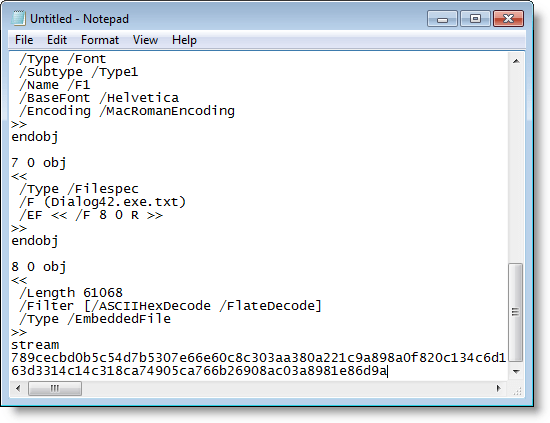
First we use a new version of my PDF tools to create a PDF file with embedded file:

Filter i is exactly like filter h (ASCIIHexDecode), except that the lines of hex code are wrapped at 512 hex digits, making them digestible to our C compiler.

Another new feature of my make PDF tools is Python 3 support.

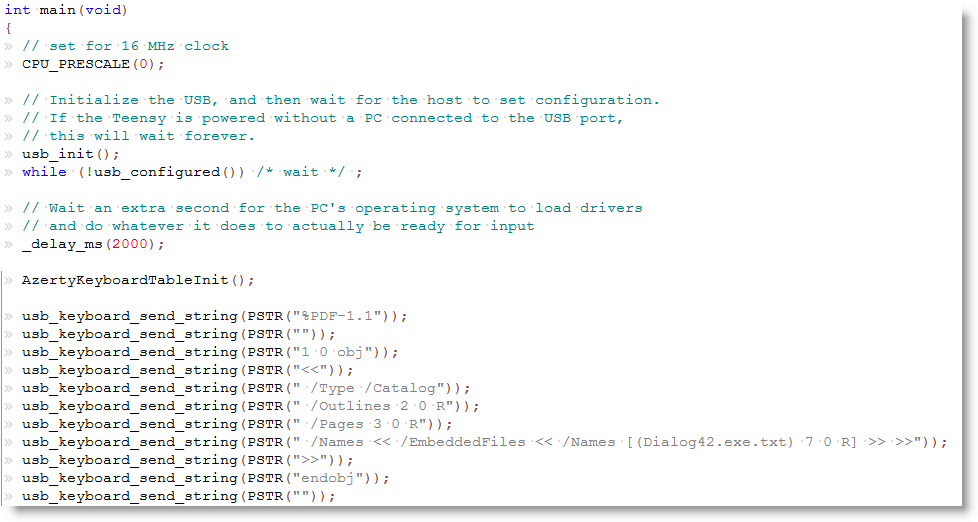
Here is a sample of our C code showing how to embed each line of the pure-ASCII PDF document as strings:

Macro PSTR makes that the string is stored in flash memory. The embedded executable is 57KB large, but still only takes half of the flash memory of my Teensy++.

After programming my Teensy++, I can fire up Notepad and let my Teensy++ type out the PDF document:

You can download my example for the WinAVR compiler here:

avr-teensy-pdf-dropper_V0_0_0_1.zip (https)
MD5: EA14100A1BEDA4614D1AE9DE0F71B747
SHA256: 2C9A5DF1831B564D82548C72F1050737BCF17E5A25DCDC41D7FA4EA446A8FDED

Monday 20 February 2012

Peeking at NAFT

Filed under: My Software,Networking — Didier Stevens @ 20:02

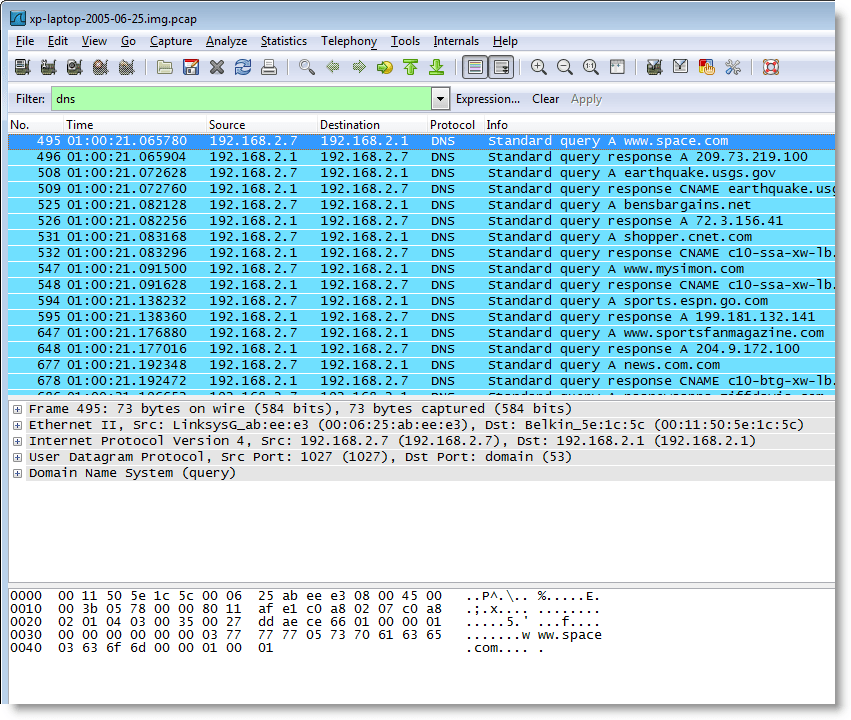
Here are DNS queries issued by a Windows XP machine:

And here is a command history of a Cisco router:

What do these results have in common?

Both were produced by analyzing RAM dumps with a new forensic toolkit I’m developing, the Network Appliance Forensic Toolkit, or NAFT.

More to be published soon.

But if you want a beta version now, provide me a Cisco core dump in exchange 😉

Thursday 2 February 2012

x64 Windows Shellcode

Filed under: My Software,Shellcode — Didier Stevens @ 20:00

Last year I found great x64 shellcode for Windows on McDermott’s site. Not only is it dynamic (lookup API addresses), but it even handles forwarded functions.

But it’s written for MASM, and I prefer to use NASM. Hence I translated it, but also normalized it to adhere to the x64 calling convention and fixed a bug in the error handling.

And I modularized it so you can use it like my 32-bit shellcode.

Here’s the classic MessageBox example:

; x64 shellcode to display a "Hello from injected shell code!" MessageBox, then return to caller
; Written for NASM assembler (http://www.nasm.us) by Didier Stevens
; Source code put in public domain by Didier Stevens, no Copyright
; https://DidierStevens.com
; Use at your own risk
;
; History:
;   2011/12/27: Refactored functions to include file sc-x64-api-functions.asm

%include "sc-x64-macros.asm"

INDEX_KERNEL32_LOADLIBRARYA        equ 0 * POINTERSIZE + STACKSPACE
INDEX_MESSAGEBOXA                            equ 1 * POINTERSIZE + STACKSPACE
APIFUNCTIONCOUNT                            equ 2

segment .text

; Setup environment
sub rsp, STACKSPACE + ROUND_EVEN(APIFUNCTIONCOUNT) * POINTERSIZE        ;reserve stack space for called functions and for API addresses

LOOKUP_API KERNEL32DLL, KERNEL32_LOADLIBRARYA, INDEX_KERNEL32_LOADLIBRARYA

lea rcx, [rel USER32DLL]
call [rsp + INDEX_KERNEL32_LOADLIBRARYA]

LOOKUP_API USER32DLL, USER32_MESSAGEBOXA, INDEX_MESSAGEBOXA, INDEX_KERNEL32_LOADLIBRARYA

; Display MessageBox
xor r9, r9
lea r8, [rel TITLE]
lea rdx, [rel HELLO]
xor rcx, rcx
call [rsp + INDEX_MESSAGEBOXA]

add rsp, STACKSPACE + ROUND_EVEN(APIFUNCTIONCOUNT) * POINTERSIZE
ret

%include "sc-x64-api-functions.asm"

KERNEL32DLL                            db    "KERNEL32.DLL", 0
KERNEL32_LOADLIBRARYA        db    "LoadLibraryA", 0

USER32DLL                                db    "USER32.DLL", 0
USER32_MESSAGEBOXA            db    "MessageBoxA", 0

HELLO                                        db    "Hello from injected shell code!", 0
TITLE                                        db    "Message", 0

Here’s what I changed exactly from the original MASM code:
1) non-volatile registers are preserved (by storing them on the stack)
2) building the DLL name for forwarded functions is done with a variable on the stack frame of lookup_api, and not of the caller
3) the address of LoadLibraryA is passed via r9, and no longer r15
4) lookup_api not only returns the function address in rax, but also stores it in memory at an address provided in r8
5) fixed the error handling bug (stack restoration)
6) added some EQUs to make it easier to use this code as a “library” (include)

You can get the code from my shellcode page. Look for filenames starting with sc-x64 in the zip file.
Friday 9 December 2011

LoadDLLViaAppInit with FORCE_INTEGRITY

Filed under: My Software,Windows 7 — Didier Stevens @ 12:46

In Windows 7 and Windows Server 2008 R2, Microsoft added a feature to the AppInit_DLLs mechanism. When the REG_DWORD RequireSignedAppInit_DLLs is set to 1, the DLLs to be loaded via AppInit_DLLs have to be signed.

You can find properly signed versions of LoadDLLViaAppInit here:
LoadDLLViaAppInit_FI.zip (https)
MD5: 2867B6AADF6C9FFA224D2D6A0153AD91
SHA256: E732451401B37087FAC619BD500E370FE3C21FB764F2E2E99C76EDBADEC86204

Nothing has changed to these DLLs, I’ve not changed the version number. I only set the FORCE_INTEGRITY flag and signed them.

Wednesday 30 November 2011

Signed TaskManager

Filed under: My Software — Didier Stevens @ 19:44

This new version 0.1.1 of my TaskManager spreadsheet is exactly the same as version 0.1.0, except that it is digitally signed.

A signature allows you to use it on systems that require VBA macros to be signed.

TaskManager_V0_1_1.zip (https)
MD5: 57D0ED69E034872DE7DF217DD491B732
SHA256: 08FD64B90E34150BD48A54904F04905D84249E7042BF31E6A5AA642B2B855D91

Wednesday 2 November 2011

Ariad 64-bit

Filed under: My Software,Windows 7 — Didier Stevens @ 19:33

You can now download a 64-bit version of my Ariad driver.

I’ve been using this driver on my x64 Windows 7 test machine only for a couple of days, so this is still beta software.

As for the installation and configuration, it’s exactly the same as the 32-bit version: you need to download the 32-bit version for the .inf files and the GUI.

« Previous PageNext Page »

Blog at WordPress.com.