Help Net Security recorded a video with me speaking about EMET and HeapLocker at Hack In The Box Amsterdam 2012.
Wednesday 8 August 2012
Friday 3 August 2012
Prefetch File 010 Template
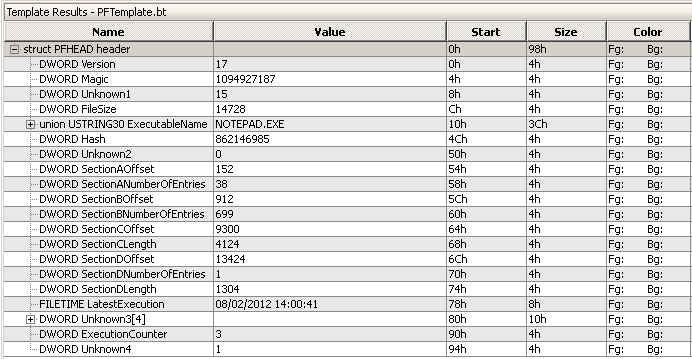
I had some problems with a Windows XP prefetch file, so I wrote a 010 Editor template using the Forensics Wiki’s information on prefetch files.

PFTemplate.zip (https)
MD5: 11F6BB8EC0D29CBCC7C2F269E9900AF0
SHA256: 4429380778C94E47427C1753BAF91E0D8AF78985AA9F3868CF3FC07456F7BAFA
Friday 27 July 2012
My BlueHat Prize Entry: CounterHeapSpray
Congratulations to the winners of the BlueHat Prize contest.
My entry was CounterHeapSpray:
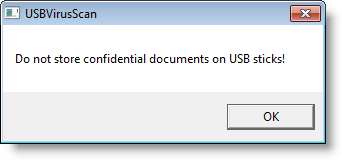
CounterHeapSpray monitors the private memory usage of an application to guard against heap sprays. When the private memory usage of the application exceeds a predefined threshold, CounterHeapSpray assumes that a heap spray is ongoing and will pre-allocate virtual memory pages and populate these pages with its own shellcode. When the heap spray terminates and the exploit executes, code execution will transfer to CounterHeapSpray’s own shellcode. This shellcode will suspend all threads and display a warning message for the user. When the user clicks OK, CounterHeapSpray’s shellcode terminates the application.
By planting its own shellcode before the heap spray can fill the heap with malicious shellcode, CounterHeapSpray not only prevents execution of this malicious shellcode but is able to suspend the process and to inform the user of the attack.
CounterHeapSpray.zip (https)
MD5: 1947380F935AE0B1A8828DE79621F82F
SHA256: CA0BF635655EE05ABED117C858BC86ECDF3EBB4C39544D7D0C396D7C457F1BBC
Thursday 19 July 2012
UserAssist Windows 2000 Thru Windows 8
I finally took the time to merge UserAssist version 2.4.3 and UserAssist version 2.5.0 (Windows 7) into UserAssist version 2.6.0.
Thus version 2.6.0 supports all versions of Windows starting with Windows 2000 up to Windows 8. Support for Windows 8 is experimental.

UserAssist_V2_6_0.zip (https)
MD5: 04107FE15FC676B7A701760C9C6D2F81
SHA256: F6F73F4E00905A7727ED4136DE875DD1FBCF4B90FFEE4B93D4A46E58C0314D45
Friday 13 July 2012
InstalledPrograms.xls
Here is a new spreadsheet that lists all installed programs. It does this by enumerating registry key HKLM\SOFTWARE\Microsoft\Windows\CurrentVersion\Uninstall.

This spreadsheet works on 32-bit and 64-bit Excel.
InstalledPrograms_V0_0_1.zip (https)
MD5: 0BF27B9D4B6316381E0AADC1777B7F8F
SHA256: 60AF8234BD10E12221CAD3D2544222819CB0CC0834E339084590860F30E0D580
Thursday 5 July 2012
Nmap McAfee ePO Agent Script
I’ve worked together with Daniel Miller (@bonsaiviking) on an Nmap version script to identify the McAfee ePO Agent. By default, this agent listens on port 8081 and replies to HTTP requests.
You can find the script here on the nmap site.
PORT STATE SERVICE VERSION 8081/tcp open http McAfee ePolicy Orchestrator Agent 4.5.0.1852 (ePOServerName: EPOSERVER, AgentGuid: D2E157F4-B917-4D31-BEF0-32074BADF081) Service Info: Host: TESTSERVER
Wednesday 27 June 2012
Entropy.1sc
Here is a new 010 Editor script to calculate the entropy of a file or a selection: Entropy.1sc.
Tuesday 19 June 2012
_nomap, _nomap, _nomap, …
About three years ago I released a Python program to send out WiFi beacon frames with an AirPCap adapter. During my last holiday, I took some time to add a new feature to apc-b.py: option nomap.
When you start apc-b.py with option nomap, it first listens for 60 seconds and records all ESSIDs in finds in beacon frames. Then it starts to broadcast beacon frames for these ESSIDs, but with string _nomap appended to each ESSID.

apc-b_v0_2_0.zip (https)
MD5: 849DE418A1F325B9DC133DBE2E7CC501
SHA256: C3F28DCEFE6FF747780E384E49BB4D373BC983518C592E1BB18E8455F78E7F95
Monday 11 June 2012
Update: vs.py Version 0.5
I’ve updated my Python program to take surveillance pictures from IP-cameras. This updated version can take action after a picture is taken. For each picture to retrieve, you can specify a optional program to be executed; this program receives the picture as argument.
Each line in vs.config can have a 5th parameter now: the name of the program to execute:
Hall.jpg http://192.168.1.1/IMAGE.JPG - Thread1 image-compare.py
I use it to start a program that compares the new picture with the previous picture, and warns me if they are significantly different.
vs_v0_5.zip (https)
MD5: 83B6DE93E6E26B510E2FBC80C0FF3C17
SHA256: DE3D4DC8D00692BE57F4A8B0A13BB4E3FAE9564ECE444EA04A890B65EED2D538
Wednesday 30 May 2012
Update: virustotal-search
I didn’t expect my virustotal-search program to be that popular, so here is a new version with new features and a few fixes (version 0.0.1 contained a buggy experimental feature I hadn’t planned to release then).
What I didn’t explain in my first post, is that virustotal-search builds a database (virustotal-search.pkl) of all your requests, so that recurring requests are served from that local database, and not from the VirusTotal servers. I’ve added a field (Requested) to indicate if the request was send to VirusTotal or served from the local database.
If you want all requests to be send to VirusTotal, regardless of the content of the local database, use option –force.
And if you don’t want to include your API key in the program source code, you have two alternatives:
- use option –key and provide the API key on the command line
- define environment variable VIRUSTOTAL_API2_KEY with the your API key
virustotal-search_V0_0_3.zip (https)
MD5: 89D48483B8CF48A11A26314CC3A7631C
SHA256: A66A264A772CB9AEE356E1CF902E93FCA8CDE77233A09DB4999BCF15FA45EDF9