Didier Stevens

Tuesday 16 April 2013

shift.1sc

Filed under: 010 Editor,My Software — Didier Stevens @ 0:00

As a thank you to those who nominated me for the European Security Bloggers Awards, I’m going to release some new scripts this week. Here’s the first one.

shift.1sc is a 010 Editor script that allows you to shift bytes in a file or selection.

shift_v0_0_1.zip (https)
MD5: 0E98DD182D12839FD86A30E696414E0A
SHA256: 07D849E9E898AFA705E57474FADFF001C9CAF9DB1D51AD8C9EB7E9A2A765D714

Monday 15 April 2013

New Tool: XORStrings

Filed under: Forensics,My Software,Reverse Engineering — Didier Stevens @ 0:00

XORStrings is best described as the combination of my XORSearch tool and the well-known strings command.

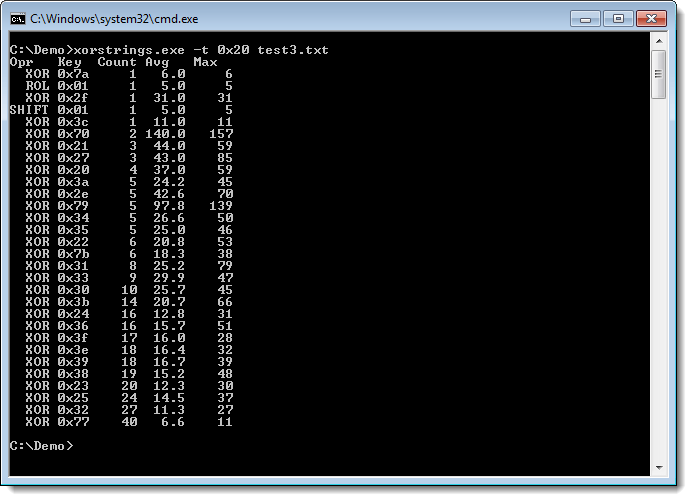
XORStrings will search for strings in the (binary) file you provide it, using the same encodings as XORSearch (XOR, ROL, ROT and SHIFT). For every encoding/key, XORStrings will search for strings and report the number of strings found, the average string length and the maximum string length. The report is sorted by the number of strings found, but can also be sorted by the maximum string length (use option -m). By default, the string terminator is 0x00, but you can provide your own with option -t, like the space character (0x20) in this example:

20130308-213053

I’ve used XORStrings to identify the encoding used in TeamViewer traffic.

There are more options than the ones I mentioned here. I’ll create a dedicated page for this tool, but for now, I invite you to discover the options yourself.

XORStrings_V0_0_1.zip (https)
MD5: 27DA0B3BC5296179CB58181BDFF99F8D
SHA256: 5EA7E063A41E38E9E6277F1CD73FCEA2AEF50C33C44D75C226900314FF84A1B5

Thursday 21 March 2013

Update: PDFiD Version 0.1.2

Filed under: My Software,PDF,Update — Didier Stevens @ 9:05

This new version is a bugfix version for Python 3 plus I added a new name in the default report: /XFA

pdfid_v0_1_2.zip (https)
MD5: 60FC17757201F014A6ADA0744B74A740
SHA256: 1CF36C50427A2206275C322A8C098CD96A844CAF6077B105ADE9B1974789856F

Wednesday 13 March 2013

Update: pdf-parser Version 0.4.1

Filed under: My Software,PDF,Update — Didier Stevens @ 21:24

From version 0.4.1 on, you can also pass a URL or a ZIP file as argument to pdf-parser:

pdf-parser.py http://example.com/doc.pdf
pdf-parser.py maldoc.zip

When you pass a URL as argument, pdf-parser will download the PDF document and analyze it. The PDF document will not be written to disk. Supported protocols are http and https.

Passing a ZIP file as argument instructs pdf-parser to open the ZIP file and analyze the first file it finds in the ZIP archive. If the ZIP file is password protected, pdf-parser will try to access the compressed file with password infected. Same as with URLs, the PDF file in the ZIP container is not written to disk.

Further changes are: bug fixes, performance improvement and option –content. This option allows you to view the content of an object without stream or with stream but without filters.

pdf-parser_V0_4_1.zip (https)
MD5: A0314C0CD8AAE376C7448E74D4A7472C
SHA256: 633B7400015B2C936103CC64C37435FB333B0F2634B2A6CD3A8949EAB1D18E9B

Thursday 7 March 2013

Update: PDFiD Version 0.1.0

Filed under: My Software,PDF,Update — Didier Stevens @ 5:00

A month before my PDF training at HITB, it’s time to release new versions of my pdf tools.

I start with PDFiD. From version 0.1.0 on, you can also pass a URL or a ZIP file as argument to PDFiD:

pdfid.py http://example.com/doc.pdf
pdfid.py maldoc.zip

When you pass a URL as argument, PDFiD will download the PDF document and analyze it. The PDF document will not be written to disk. Supported protocols are http and https.

Passing a ZIP file as argument instructs PDFiD to open the ZIP file and analyze the first file it finds in the ZIP archive. If the ZIP file is password protected, PDFiD will try to access the compressed file with password infected. Same as with URLs, the PDF file in the ZIP container is not written to disk.

pdfid_v0_1_0.zip (https)
MD5: 6A5FF56C22EF2745C3D78C8FD8ACA01F
SHA256: D72FE8555DC89808EE7BFC9F791AD819A465106A95801C09C31B0FD2644B3977

Monday 25 February 2013

Looking Up Hosts and IP Addresses: Yet Another Tool

Filed under: My Software,Networking — Didier Stevens @ 19:30

One last thing regarding my TeamViewer research: I had to resolve a bunch of hostnames and IP addresses, so I quickly wrote a Python program that did just that. Later I took the time to make some generic and versatile programs: lookup-hosts.py and lookup-ips.py.

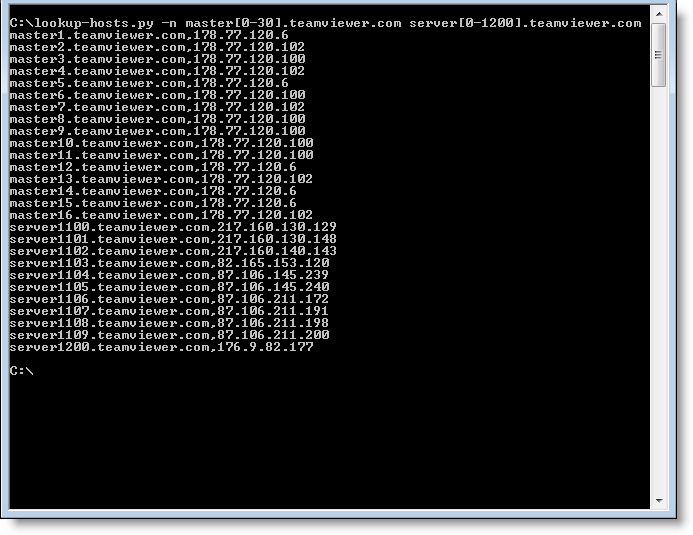
lookup-hosts.py takes hostnames or files with hostnames via arguments or stdin, and then uses getaddrinfo to lookup the IP addresses. And you can use a counter if you need to lookup sequentially numbered hosts, like this: master[0-20].teamviewer.com. This will instruct the program to lookup master0.teamviewer.com, master1.teamviewer.com, … and master20.teamviewer.com. If you need a leading zero, use this syntax: master[0-20:2].teamviewer.com

The programs take options, use the -h option to explore them.

As it names implies, lookup-ips.py does the opposite of lookup-hosts.py by using gethostbyaddr. You provide it IP addresses and/or subnets (like X.X.X.X/24).

20130225-194749

lookup-tools_V0_0_1.zip (https)
MD5: EB9C5BEF25EC5ED0F44297AA8A04679E
SHA256: 755E98BA0BC09C31E58ED4BF7B08CD42467BBF9B129C77DD6D558FD6B6E27124

Wednesday 20 February 2013

Update XORSearch V1.8.0: Shifting

Filed under: My Software,OSX,Reverse Engineering,Update — Didier Stevens @ 21:32

This new version of XORSearch comes with a new operation: shifting left.

It comes in handy to reverse engineer protocols like TeamViewer’s remote access protocol.

Here’s an example. When you run TeamViewer, your machine gets an ID:

20-02-2013 22-11-39

We capture some TeamViewer traffic with Wireshark, and then we use XORSearch to search for TeamViewer ID 441055893 in this traffic:

20130216-231230

And as you can see, XORSearch finds this ID by left-shifting the content of the pcap file with one bit.

Thursday 20 December 2012

ListModules V0.0.0.1

Filed under: My Software — Didier Stevens @ 0:00

ListModules is a new tool to analyze PE files, like my AnalyzePESig tool. In stead of analyzing all files you point it to, it takes a snapshot of all processes, and analyses the modules (.exe, .dll, …) loaded in these processes. The output is very similar to AnalyzePESig’s output.

Sysinternal’s tool ListDLLs is a similar tool, but ListModules provides more info and is open source.

It helped me a couple of times to find malicious DLLs loaded inside processes that the AV would not catch.

ListModules_V0_0_0_1.zip (https)
MD5: 56D6BD9479915E6FF1C29A9D9F8F7950
SHA256: 43DFAD3F18C2F317E283BCDD453311BB17F6216C6748C25D102778DF63021069

Tuesday 4 December 2012

Authenticode Tools Page

Filed under: Announcement,My Software — Didier Stevens @ 13:53

I’ve added a new page to document my Authenticode Tools like AnalyzePESig.

It has a small explanation for each field found in the output of AnalyzePESig. For example, the fields Issuer Unique ID and Subject Unique ID should always be 0. In the case of the Flame certificate, they are not, because the Issuer Unique ID field was used to help produce the MD5 collision:

Filename:                       WuSetupV.exe.vir
MD5:                            1f61d280067e2564999cac20e386041c
Entropy:                        6.79663
...
Issuer unique ID chain:         887
Issuer unique ID chain:         0

I also use this tool to periodically review new executables on my machines.

Friday 30 November 2012

Nmap 6.25 With McAfee ePO Agent Script

Filed under: My Software,Networking — Didier Stevens @ 13:04

This new release of Nmap includes the McAfee ePO Agent Script I blogged about.

« Previous PageNext Page »

Blog at WordPress.com.