Didier Stevens

Tuesday 22 December 2015

MIME File With “Header”

Filed under: maldoc,My Software — Didier Stevens @ 0:00

I’m providing a 2-day training at Brucon Spring Training 2016: “Analysing Malicious Documents“.

Malicious MS Office documents are also distributed as MIME files. A blog reader asked for help with a MIME file that gave him problems: f67aa5a3ede3d31c5a68494c0678e2ee.

Accoring to emldump.py, the file is just text (not a multipart file):

20151221-175808

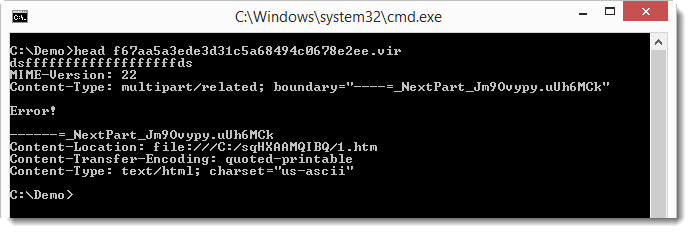
But if you look at the file, you’ll notice a line preceding the MIME-Version line:

20151221-180149

You can instruct emldump to skip this line with option -H:

20151221-180326

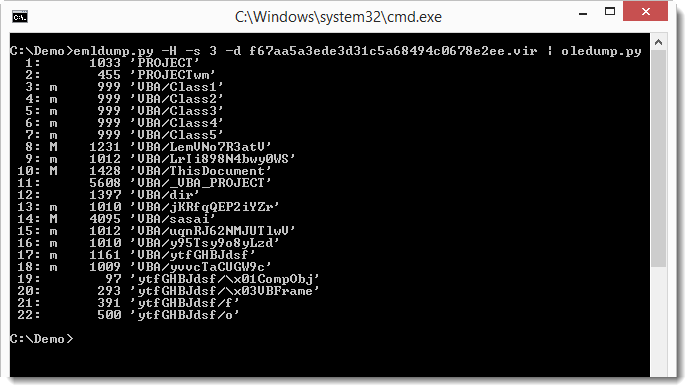
Now emldump is able to analyze the multipart MIME file, and detect the MSO file (part 3). oledump can analyze MSO files:

20151221-180513

Monday 21 December 2015

Update: oledump.py Version 0.0.22

Filed under: maldoc,My Software,Update — Didier Stevens @ 16:27

Some changes when you use the –raw option. Now plugins can also be used when the VBA code is corrupted.

oledump_V0_0_22.zip (https)
MD5: CA91850BBC92E82D705F707704000F82
SHA256: 16763BCF15BFB3301FFAE0BDA26F18EE2946EDD7478994B798127DBBEF5FF9E7

Sunday 13 December 2015

Windows Backup Privilege: CMD.EXE

Filed under: Forensics,My Software — Didier Stevens @ 0:00

You probably encountered the situation where you could not access a file, even as an administrator. For example hiberfil.sys.

There is a way in Windows to read any file regardless of DACLs: the backup privilege.

I updated ReactOS’ cmd.exe shell to use the backup privilege.

I added a new command: privilege. This command enables the backup privilege. To be able to enable a privilege, you need to have the privilege: you have the backup privilege if you’re an administrator and elevate the process (cmd.exe).

And I updated the copy and type command to make use of the enabled backup privilege.

Finally, there’s yet another new command: info. This command gives the MAC timestamps, file attributes and SDDL of the given file/folder.

cmd-dll_v0_0_4.zip (https)
MD5: D9D75A10F2C328B708303F9BD24B9AD3
SHA256: 952CFB833D4F22093D7DF837372239A1199C1738FFFFED76124AF8668F4D3877

Sunday 29 November 2015

Update: oledump.py Version 0.0.21

Filed under: My Software,Update — Didier Stevens @ 11:15

A small change in this new version: the second term of the cut-expression can also be a negative number now. A negative number allows you to cut bytes from the end of the file. Example: cut-expression :-0x100 select the whole stream except the last 256 bytes.

oledump_V0_0_21.zip (https)
MD5: F72CBB797CE8FB810ACE5E54DC832129
SHA256: 016C772575DF381C274F6408B242945DE35679904B7C8B1B693ABFB2B3C023FB

Saturday 28 November 2015

Update: virustotal-search.py Version 0.1.3

Filed under: My Software,Update — Didier Stevens @ 9:29

A small update: I added option -s (separator) so that you can choose your CSV separator.

virustotal-search_V0_1_3.zip (https)
MD5: 6D93F6CCE56AA74C830D66F9AE2E88C0
SHA256: 09D3BA6BCE1A69E8292AD0D44FB216FBCBF5686EA3C64DCD5FC877E91D4141F4

Sunday 22 November 2015

Update: emldump.py Version 0.0.5

Filed under: My Software,Update — Didier Stevens @ 0:00

A small change in this new version: the second term of the cut-expression can also be a negative number now. A negative number allows you to cut bytes from the end of the file. Example: cut-expression :-5 select the whole file except the last 5 bytes.

emldump_V0_0_5.zip (https)
MD5: 5FAEDF1459114306D57FEABEF3CDDEFD
SHA256: B3D08E1768E1211C44680DD502AC096A324FF209330657F4ABC0CD09B888254C

Saturday 21 November 2015

Update: nsrl.py Version 0.0.2

Filed under: My Software,Update — Didier Stevens @ 0:00

A small update to my nsrl.py program: the CSV output now includes the ApplicationType.

nsrl_V0_0_2.zip (https)
MD5: 816DD5BEF94D289F489399A95824083D
SHA256: 65C4AF8F139651942062EB78D820AD3BE5DBEE2C4331B3105BAE62B220CD4F44

Sunday 15 November 2015

Update: find-file-in-file.py Version 0.0.5

Filed under: My Software,Update — Didier Stevens @ 0:00

A very small change to find-file-in-file:

find-file-in-file.py contained containing
0x00000000 0x00000014 (50%) (End of containing file)
Remaining 20 (50%)

When the tool reaches the end of the containing file, a message is printed to signal this: (End of containing file)

And I also added option -r (regular): to handle a ZIP file as a regular file.

find-file-in-file_v0_0_5.zip (https)
MD5: 1463DBAB808BBE40AC7919BC9A77303D
SHA256: C269B1995B61F0EDE24E4E9C64D5DD64E79B5ED6DD2126E94AF52E15D90C427F

Saturday 14 November 2015

Update: cut-bytes.py Version 0.0.2

Filed under: My Software,Update — Didier Stevens @ 8:50

A small change in this new version: the second term of the cut-expression can also be a negative number now. A negative number allows you to cut bytes from the end of the file. Example: cut-expression :-5 select the whole file except the last 5 bytes.

 cut-bytes_V0_0_2.zip (https)
MD5: B70F851CE74859B38AC3ABA9688593EB
SHA256: 1A0BD64334DA90B21888020B383004A18C3BAEE211D24AA91FF12719F8581AE9

Friday 13 November 2015

Update: emldump.py Version 0.0.4

Filed under: My Software,Update — Didier Stevens @ 0:00

I’m adding the new -E option to my dump tools, this time it’s emldump’s turn. As announced with version 0.0.20 of oledump, option -E (extra) allows the user to specify which extra info needs to be displayed.

I’ve also made a video for oledump (the -E option is the same across my dump tools):

emldump_V0_0_4.zip (https)
MD5: 79DF66048849439E6034F082606A37A1
SHA256: B4AFDE89B6F3B025595A6FD1ACC5F60498BF900D18E624F134F618115DAC0E08

« Previous PageNext Page »

Blog at WordPress.com.