This new version of re-search.py adds a regex for UNCs to the library and has a Python 3 fix.

MD5: 294DD5D4027F0AFD0A2DE6432FE4552D
SHA256: B818CE4F7E217B381128550A3A36B40B6D07CC687CE4CF5AFF3C70EC0D3EEAD2
This new version of re-search.py adds a regex for UNCs to the library and has a Python 3 fix.
This update brings an update to plugin plugin_vba_dco.py.
This is a plugin that scans VBA source code for keywords (Declare, CreateObject, GetObject, CallByName and Shell), extracts all lines with these keywords, followed by all lines with identifiers associated with these keywords.
For example, if the result of a CreateObject call is stored in variable oXML, then all lines with this oXML identifier are selected.
I updated this plugin with two options -g (–generalize) and -a (–all).
Option -g generalize will replace all identifiers (like variable & functions names) with a general name: Identifier#### where #### is a numeric counter.
I added this option to analyze a sample where almost all identifiers where completely unreadable, as they consisted solely out of characters that are between byte values 128 and 255 (e.g., non-ASCII).
Here is the output for that sample, without using any plugin option:
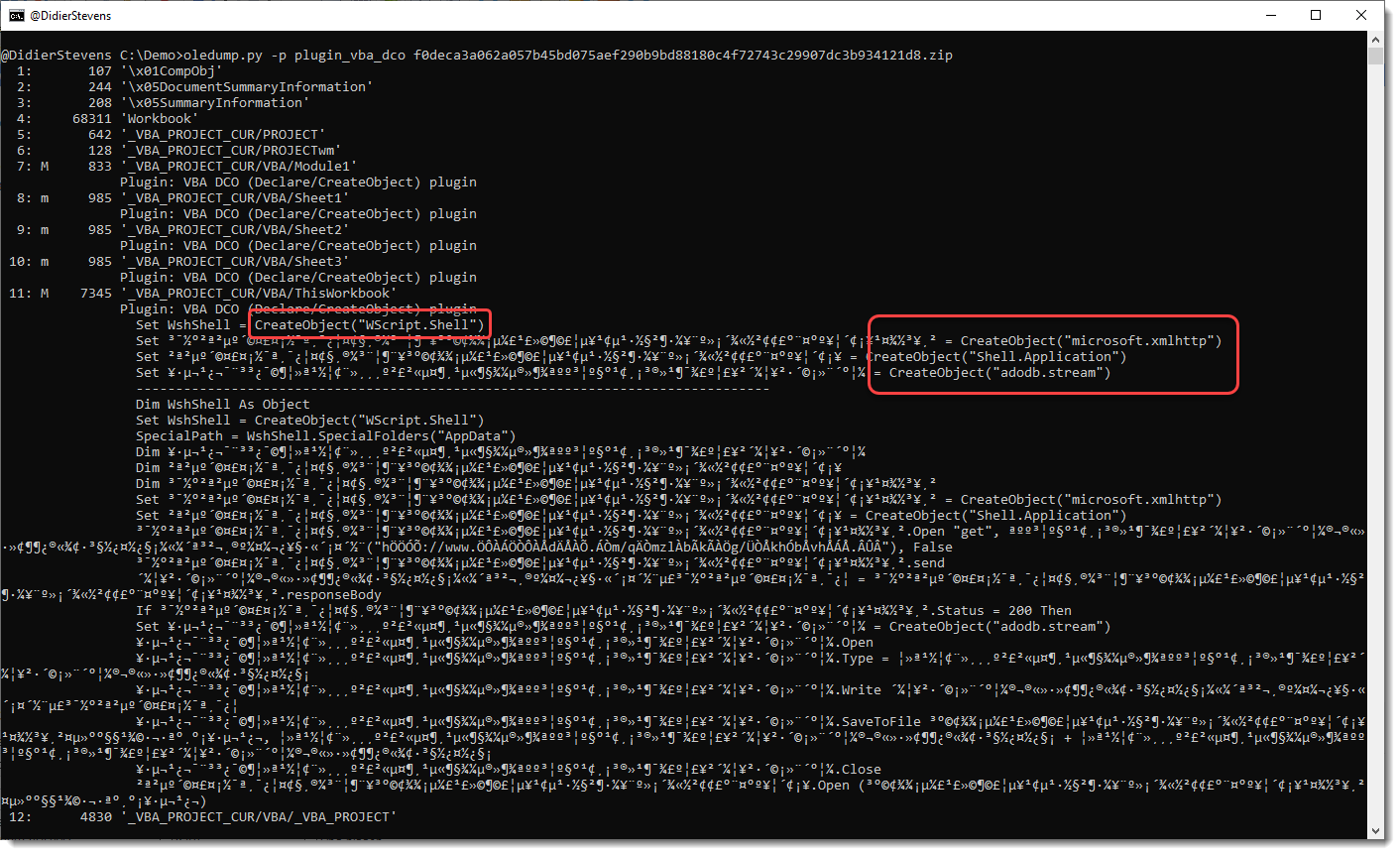
You can see the CreateObject functions, but appart from the WshShell identifier, the other identifiers don’t have letters and are hard to trace in the code.
This changes when you use option -g:
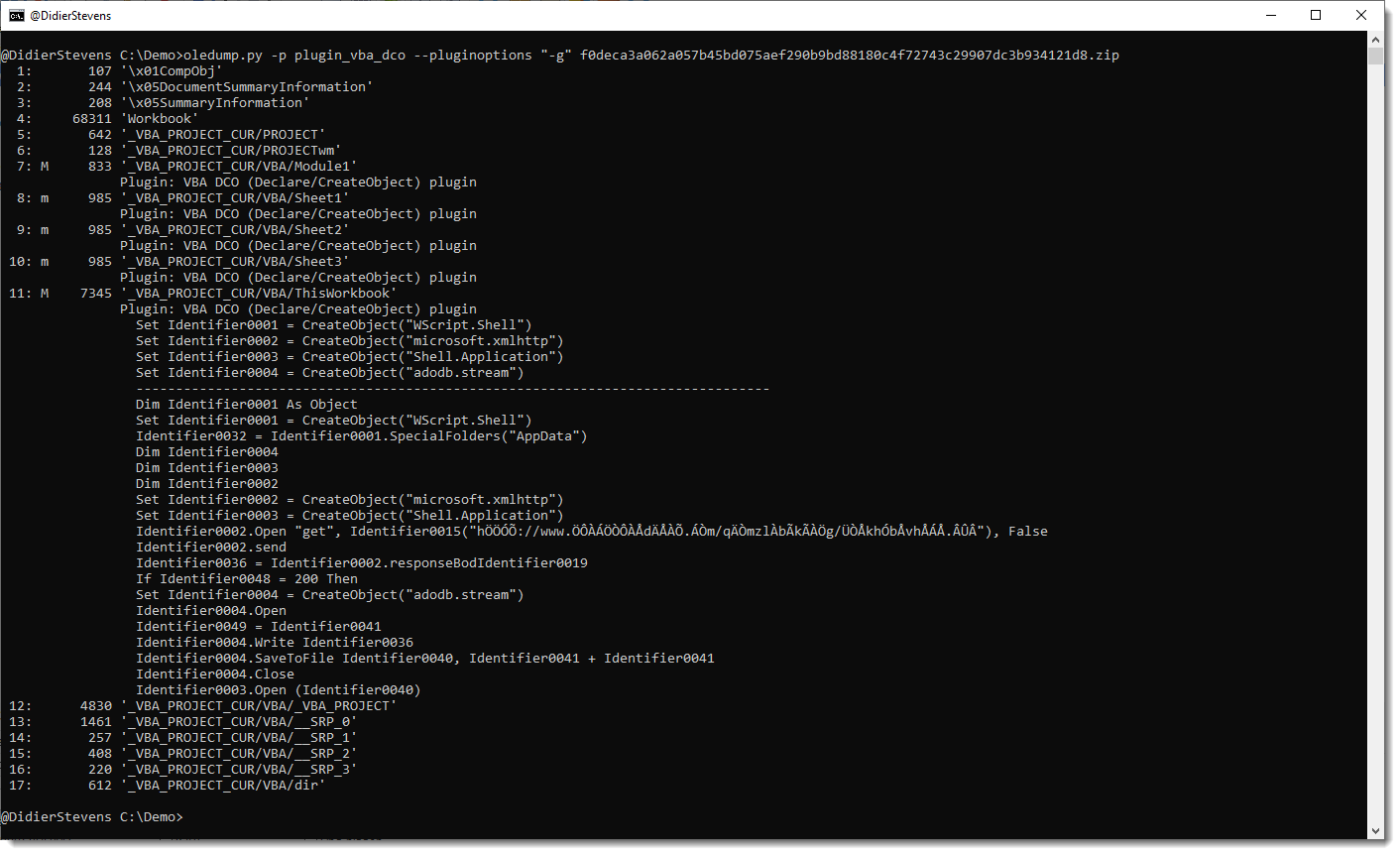
All identifiers have been generalized to names like Identifier0001, Identifier0002, …
To view all generalized code (and not only the lines with keywords), use option -a:
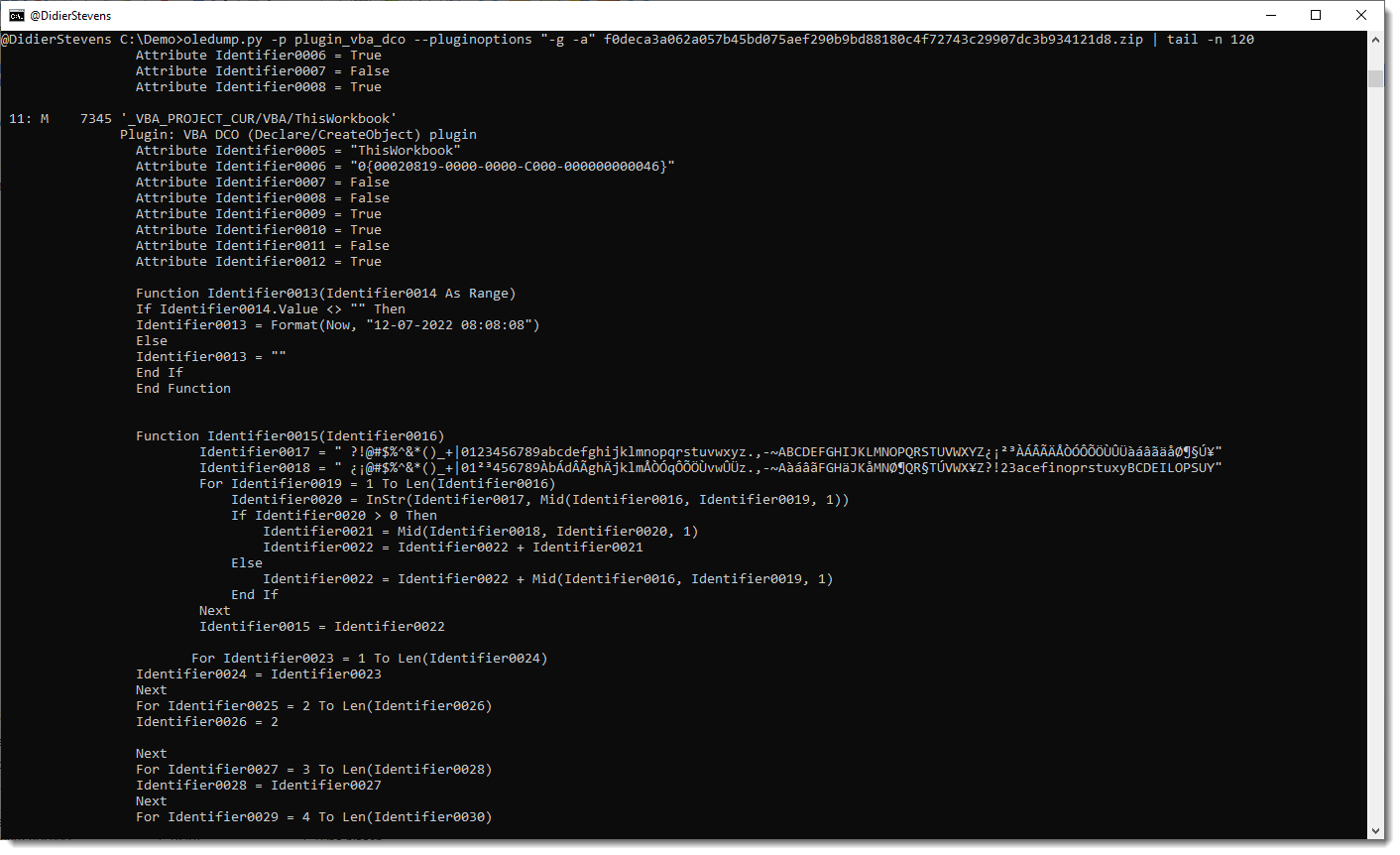
Remark that this plugin is not a VBA parser: it uses some simple scans and regexes to find identifiers. For example, it handles line comments like any other lines.
oledump_V0_0_69.zip (http)This new version adds JSON input support, allowing,for example, to detect encoded payloads inside the registry:
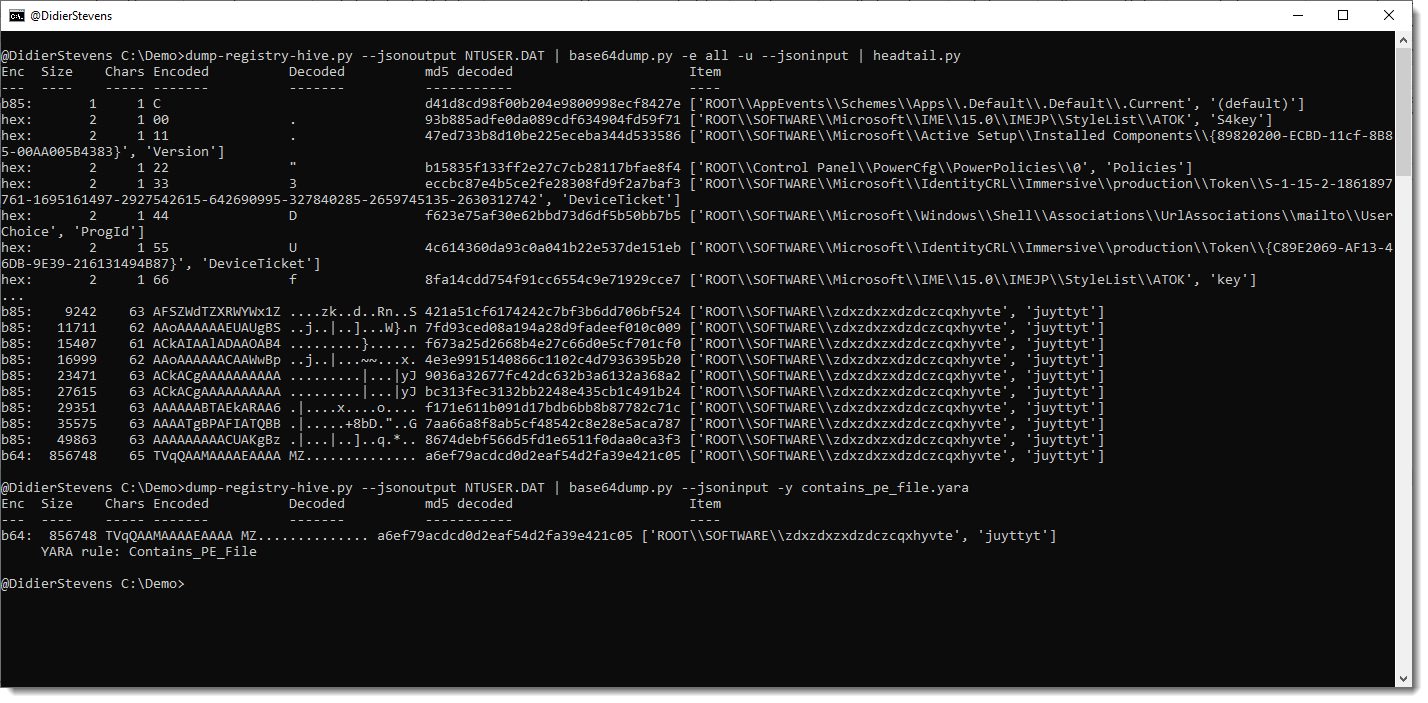
More info in an upcoming blog post.
base64dump_V0_0_23.zip (http)This is the release of simple_listener.py, a Python program that can accept TCP and UDP connections and react according to its configuration. It has evolved from my beta program tcp-honeypot.py, that I will no longer maintain.
Everything you could do with tcp-honeypot, can be done with simple_listener.
I use simple_listener now whenever I need a server that listens for incoming TCP and/or UDP connections. For example, I have a configuration that can accept connections from Cobalt Strike beacons using leaked private keys.
simple_listener has a full man page, explaining all configuration items and options.
simple_listener_v0_1_2.zip (http)This new version of format-bytes.py adds a feature to search for a range of integers:

#iv5#6080 means: look for an integer (i) equal to 6080 with a variation of 5 (v5), e.g., look for integers between 6075 and 6085.
format-bytes_V0_0_14.zip (http)This new version contains a Python 3 fix.
cut-bytes_V0_0_15.zip (http)sortcanon.py is a tool to sort text files according to some canonicalization function. For example, sorting domains or ipv4 addresses.
This is actually an old tool, that I still had to publish. I just updated it to Python 3.
This is the man page:
Usage: sortcanon.py [options] [files]
Sort with canonicalization function

Arguments:
@file: process each file listed in the text file specified
wildcards are supported

Valid Canonicalization function names:
 domain: lambda x: '.'.join(x.split('.')[::-1])
 ipv4: lambda x: [int(n) for n in x.split('.')]
 length: lambda x: len(x)

Source code put in the public domain by Didier Stevens, no Copyright
Use at your own risk
https://DidierStevens.com

Options:
  --version             show program's version number and exit
  -h, --help            show this help message and exit
  -m, --man             Print manual
  -c CANONICALIZE, --canonicalize=CANONICALIZE
                        Canonicalization function
  -r, --reverse         Reverse sort
  -u, --unique          Make unique list
  -o OUTPUT, --output=OUTPUT
                        Output file

Manual:

sortcanon is a tool to sort the content of text files according to some
canonicalization function.
The tool takes input from stdin or one or more text files provided as argument.
All lines from the different input files are put together and sorted.

If no option is used to select a particular type of sorting, then normal
alphabetical sorting is applied.

Use option -o to write the output to the given file, in stead of stdout.

Use option -r to reverse the sort order.

Use option -u to produce a list of unique lines: remove all doubles before
sorting.

Option -c can be used to select a particular type of sorting.
For the moment, 2 options are provided:

domain: interpret the content of the text files as domain names, and sort them
first by TLD, then domain, then subdomain, and so on ...

length: sort the lines by line length. The longest lines will be printed out
last.

ipv4: sort IPv4 addresses.

You can also provide your own Python lambda function to canonicalize each line
for sorting.
Remark that this involves the use of the Python eval function: do only use this
with trusted input.
This new version of base64dump.py adds some extra info for the encoded strings.
In -e all mode, a new column Chars tells you how many unique characters are used for that encoded string:
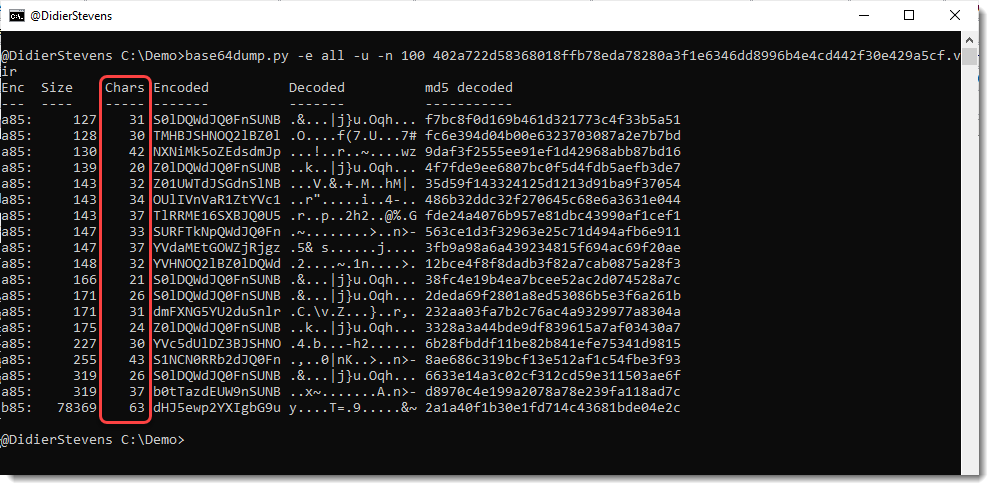
For example, the last line is recognized as a syntactically valid variant of BASE85 (b85), but it uses only 63 unique characters (85 unique characters is the maximum). So this is probably not b85, or else the encoded data has low entropy.
And there is also new info when you select a string for info:

dns-query-async.py is a tool to perform DNS queries in parallel.
This is the man page:
Usage: dns-query-async.py [options] command file
Program to perform asynchronous DNS queries

accepted commands: gethost,getaddr

Source code put in the public domain by Didier Stevens, no Copyright
Use at your own risk
https://DidierStevens.com

Options:
  --version             show program's version number and exit
  -h, --help            show this help message and exit
  -m, --man             Print manual
  -o OUTPUT, --output=OUTPUT
                        Output to file (# supported)
  -s NAMESERVERS, --nameservers=NAMESERVERS
                        List of nameservers (,-separated)
  -n NUMBER, --number=NUMBER
                        Number of simultaneous requests (default 10000)
  -t TRANSFORM, --transform=TRANSFORM
                        Transform input (%%)

Manual:

This tool performs asynchronous DNS queries. By default, it will perform 10000
queries simultaneously.

The first argument is a command. There are 2 commands for the moment: gethost
and getaddr
The second argument is a filename: a text file containing the items to resolve.

Use command getaddr to lookup the IP address of the hostnames provided in the
input file.
Example:
 dns-query-async.py getaddr names.txt
Result:
 didierstevens.com,1,96.126.103.196
 didierstevenslabs.com,1,96.126.103.196
 Duration: 0.20s

Use command gethost to lookup the hostnames of the IP addresses provided in the
input file.
Example:
 dns-query-async.py gethost ips.txt

Use option -s to provide the name servers to use (comma separated list).

Use option -n to change the number of asyncio workers (10000 default).

Use option -t to transform the input list and perform lookups.
For example, take list of subdomains/hostnames https://github.com/m0nad/DNS-
Discovery/blob/master/wordlist.wl
Issue the following command:
 dns-query-async.py -t %%.example.com getaddr wordlist.wl
Result:
 0.example.com,0,Domain name not found
 009b.example.com,0,Domain name not found
 01.example.com,0,Domain name not found
 02.example.com,0,Domain name not found
 03.example.com,0,Domain name not found
 1.example.com,0,Domain name not found
 10.example.com,0,Domain name not found
 101a.example.com,0,Domain name not found

The %% in %%.example.com is replaced by each hostname/subdomain in wordlist.wl
and then resolved.

Use option -o to write the output to a file.
This new version adds option -l to provide a short list via an option, in stead of using a file. And there’s a Python 3 bug fix.
python-per-line_V0_0_8.zip (http)
 Didier Stevens