This is a small update, to add extra statistical information for decoded items.
base64dump_V0_0_24.zip (http)MD5: 47FDC47A9235CEF2DF95D1FC12BC166E
SHA256: FAF376E267CE6937BAB7544EA4AF9DD40499886992E7DA3855C16C73C02276B1
This is a small update, to add extra statistical information for decoded items.
base64dump_V0_0_24.zip (http)This new version of rtfdump, my tool to analyze RTF files, brings json output for options -O and -F.
rtfdump_V0_0_11.zip (http)Here’s a new beta version of my tool pngdump.py, a tool to analyze PNG files.
I took a look at all files on MalwareBazaar with a PNG tag, and made updates to pngdump.py to handle them.
I found 3 types of “PNG” files.
First, files spoofing PNG files: files that are not PNG files, but have a .png extension.
Like .exe and .rar files:


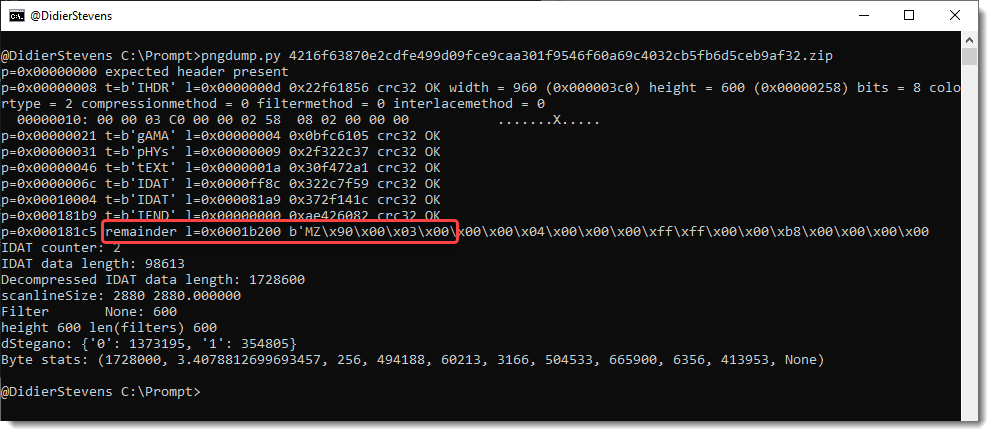
Second, valid PNG files with an appended payload:

Third, invalid PNG files. For example, PNG files with the right record structure, but where the Zlib compressed image is replaced by an RC4 encrypted payload (IcedID):

I also have other samples, but that’s for another blog post.
Beta version 0.0.3 is available on GitHub.
This update adds the option –trim to template process-text-files.py.
python-templates_V0_0_8.zip (http)This version of my strings.py program adds option -N to select strings that end with a NUL character (C-strings).
strings_V0_0_8.zip (http)split-overlap.py is a tool to split a binary file in parts of a given size.
For example: split-overlap.py 1000 test.data
When test.data is a binary file with size 2500 bytes, the above command will create 2 files of 1000 bytes and one file of 500 bytes.
It’s also possible to split a file with some overlap. Like this:
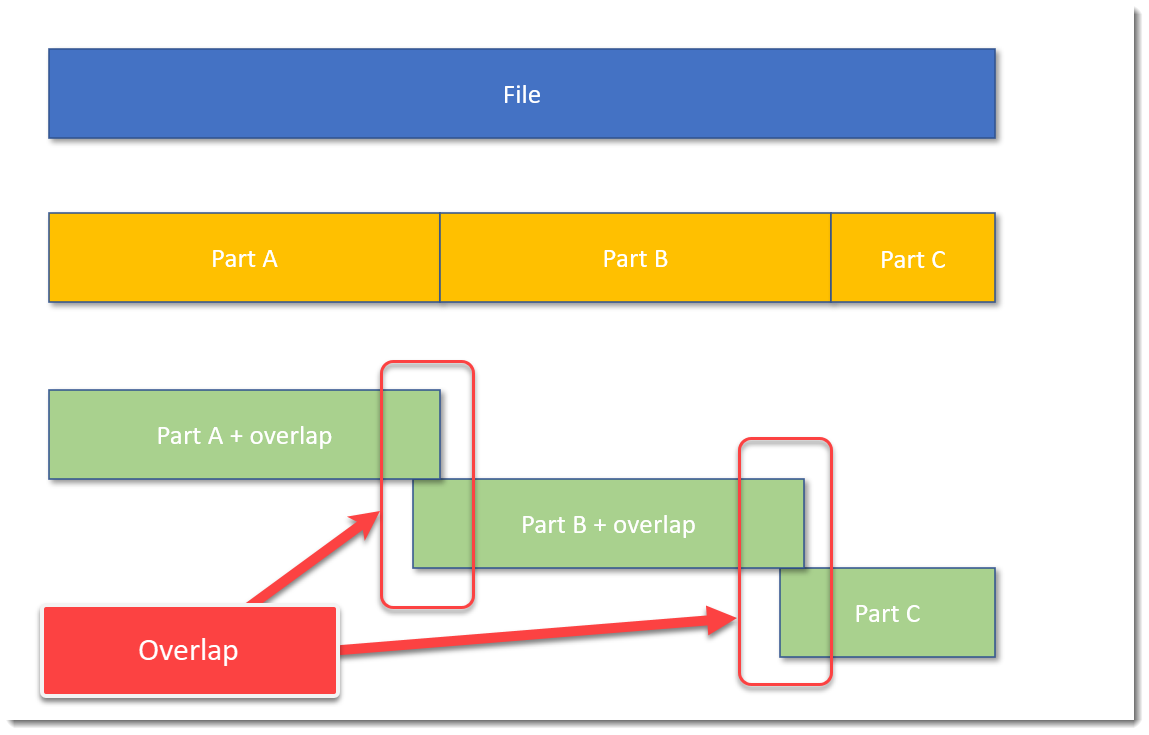
The blue block represents the original file, the yellow blocks are parts of the original file without overlap, and the green blocks represent parts of the original file with some overlap.
A command to achieve this, is, for example: split-overlap.py 100M+1M dump
This will create parts of 101 MB in size, with a overlap of 1 MB.
The main reason I developed this tool, is to be able to handle very large files, like memory dumps, by tools who can not handle such large files.
Splitting up a file in smaller, equal parts is a solution, but then you run the risk (a small risk) that the pattern you are looking for, is just at the “edge”: that the file is split in such a way, that one part contains the beginning of the pattern, and the next part contains the rest of the pattern. Then your tools are unlikely to find the pattern.
I solve this with my tool by using an overlap. You just have to make sure that the size of the overlap, is larger than the pattern you are looking for.
If you want to know more, read the man page: split-overlap.py -m
split-overlap_V0_0_1.zip (http)A new option was added to limit the amount of requests: -l (–limitrequests).
virustotal-search_V0_1_7.zip (http)When I record maldoc analysis videos, I have already analyzed the maldoc prior to recording, and I rehearse the recording.
This time, I also recorded the unrehearsed analysis: when I take the first look at a maldoc I’ve not seen before.
All in this video:
This is a small update: when non-hexadecimal characters are found, they are listed before an exception is raised.
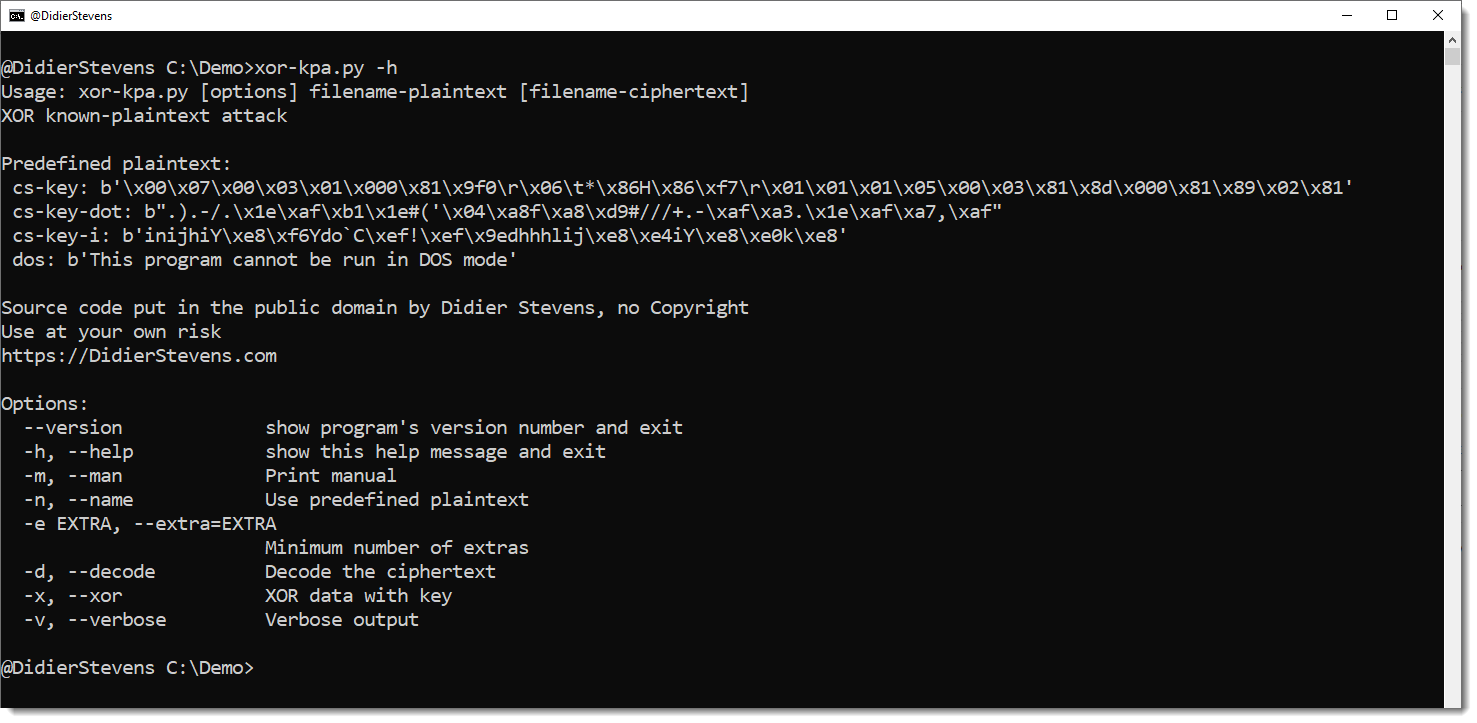
hex-to-bin_V0_0_6.zip (http)This is an update for my tool to perform XOR known plaintext attacks: xor-kpa.py.
The tool has been updated for Python 3, and 3 new plaintext have been added, all for Cobalt Strike configurations.
cs-key is the header of the configuration entry for the public key.
cs-key-dot is the header of the configuration entry for the public key XORed with value 0x2E (a dot).
cs-key-i is the header of the configuration entry for the public key XORed with value 0x69 (letter i).