There was another virus run today, it inspired me to make a Season’s Greetings video.
The movie is hosted here on YouTube, and you can find a hires version (XviD) here.
XORSearch is a new tool.
Happy New Year!
There was another virus run today, it inspired me to make a Season’s Greetings video.
The movie is hosted here on YouTube, and you can find a hires version (XviD) here.
XORSearch is a new tool.
Happy New Year!
While downloading a malware this evening, I realized I never blogged about my Virus lab.
How do I download a malicious file from an (infected) website without infecting my Windows box?
I use a hosted shell account on a FreeBSD system to download the file. There are not many viruses that will infect a FreeBSD system. Connecting to my shell account requires SSH, so how do I browse the Internet in a text-only shell? With Links! Links is like Lynx, a text-only browser I used in the early 1990s (I started on the Internet with Gopher, mailx and tin on a Unix box 😉 )
But when I have the exact URL of the file I want to download, I can use wget instead of Links.
Once I have the file on my shell account, I want to transfer it to my virus lab for analysis. To avoid infecting my Windows box or deletion of the file by my AV software when I transfer the file, I encrypt it first with Ncrypt (I chose Ncrypt because it ‘s one small executable that doesn’t require installation, it encrypts and decrypts and it compiles for Windows, Linux and FreeBSD).
BTW, I had a problem compiling Ncrypt on my FreeBSD account (error: elements of array `long_options’ have incomplete type). I solved this by including the line #include “getopt.h” in file ncrypt.c.
Some anti-virus software has a feature to customize the alert message when a virus is detected. The administrator can use this feature to instruct the user to contact the help-desk.
But most of the time, you cannot customize the message to the extend that it changes according to the type of alert. For example, an alert in the Temporary Internet Files folder is generated when a user browses a malicious website with IE. You want the custom message to tell him to “get the hell out of there”, in a politically correct way.
I wrote a quick C# PoC program that monitors the event log for virus alerts and displays customized messages for the user. Monitoring the event log is really easy with .NET:
   EventLog myLog = new EventLog("Application");
   myLog.EntryWritten += new EntryWrittenEventHandler(OnEventAdded);
   myLog.EnableRaisingEvents = true;
The OnEventAdded function will be called each time an event is added to the Application event log.
   private void OnEventAdded(object source, EntryWrittenEventArgs e)
   {
      if (e.Entry.Source == "Alert Manager Event Interface")
      {
         Regex regexVirus = new Regex(@"VirusScan Enterprise\: The file (.+) is infected with the (.+)\. ");
         Match matchVirus = regexVirus.Match(e.Entry.Message);

         if (matchVirus.Success)
         {
            String fileName = matchVirus.Groups[1].Value;
            String virusName = matchVirus.Groups[2].Value.Substring(0, matchVirus.Groups[2].Value.IndexOf(". "));
            // the rest of the code comes here
         }
      }
   }
I test if the source is “Alert Manager Event Interface” (this is the case when you use McAfee VirusScan Enterprise), and then I parse the event message with regular expression to extract relevant data.
Example of a customized alert:
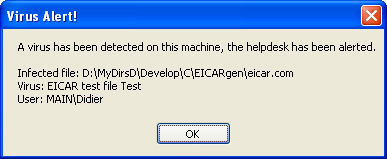
Example of a customized alert for IE:

PoC source code available here.
A few days ago I Googled again for Vanderelst Chauffagiste (Google and the Drive-by Download), I noticed the Spamdexing “R” Us site has disappeared from the SERPs. But it still exists.
Still wondering how likely is it to land on a drive-by download page when doing a (Google) search, I analyzed the infamous AOL search data to try to answer this question.
Conclusion: for every 2800 click throughs, 1 landed on a spamdexing site. 1% of the AOL users clicking through landed on a spamdexing site.
The AOL search data was collected over a period of 3 months (01 March, 2006 – 31 May, 2006), it contains 19,442,629 user click through events. A click through event is an entry in the database indicating that the AOL user clicked on the link presented in a Search Engine Result Page (SERP). These are the fields of a click-trough event entry:
Of the 19,442,629 user click through events, 15,066 events have a URL of the following format: digits.alphanums.info.
Expressed as a Perl regular expression, this format is: %\d+\.\w+\.info$ (\w is not strictly limited to alphanumerical characters, the underscore character is also included).
I search for URLs of this format because it was used by the original drive-by download I discovered.
Extracting the main domain (alphanums.info) of the URL of these 15,066 click through events produces a list of 1099 unique domains.
I wrote a script to retrieve and analyze one page for each these 1099 domains. 874 of these pages have the same look and feel as the original drive-by download page:
This leads me to believe that these 874 domains form a network of sites that use spamdexing techniques to rank high in SERPs. They use
From now on, I’ll refer to these sites as Spamdexing “R” Us.
These domains are used now (October 2006) for spamdexing, and I assume they were also used for spamdexing 6 months ago (time frame of the AOL data).
Of the 19,442,629 user click through events, 6,988 events landed on a Spamdexing “R” Us site (i.e. one of the 874 domains I identified). This is 0,04%, or around 1 hit per 2800 SERP click throughs! According to some people I talked with, this is an excellent result for Spamdexing “R” Us: for every 2800 SERP click throughs the AOL users executed, 1 landed in their spider web.
Spamdexing “R” Us rank high on the SERPs:
| Rank | Click throughs | |
|---|---|---|
| 1 | 1313 | 19% |
| 2 | 836 | 12% |
| 3 | 710 | 10% |
| 4 | 553 | 8% |
| 5 | 542 | 8% |
| 6 | 438 | 6% |
| 7 | 376 | 5% |
| 8 | 390 | 6% |
| 9 | 366 | 5% |
| 10 | 384 | 5% |
41% of the traffic comes from the 3 highest ranking click troughs.
How do Spamdexing “R” Us sites compare to the other click through sites in the AOL search data? Ranking all the click throughs per URL shows that Spamdexing “R” Us sites rank high: 142th place. As a side note, it’s interesting to mention that the number 1 in the ranking is http://www.google.com, with 366,623 click throughs.
Here’s a selection of some well-known sites that are in the same click through range as the Spamdexing “R” Us sites:
| Rank | URL | Click throughs |
|---|---|---|
| 87 | http://www.flickr.com | 9369 |
| 101 | http://www.mtv.com | 8760 |
| 102 | http://www.bbc.co.uk | 8739 |
| 116 | http://www.apple.com | 7998 |
| 120 | http://www.facebook.com | 7771 |
| 128 | http://www.washingtonpost.com | 7465 |
| 133 | http://www.usatoday.com | 7300 |
| 142 | Spamdexing ‘R Us | 6988 |
| 144 | http://www.download.com | 6929 |
| 160 | http://www.youtube.com | 6259 |
| 161 | http://www.playboy.com | 6241 |
The AOL search data contains 657,426 unique user ID’s. 521,694 users clicked on links in the SERPs, and 4,952 users landed on Spamdexing “R” Us sites. That’s about 1 AOL user per 100 (0,95%) in a 3 month period.
Some caveats / remarks concerning this research:
This is an unexpected result of my post Google and the Drive-by Download:
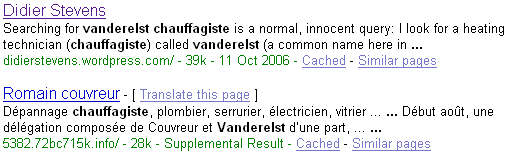
At the end of my post Google and the Drive-by Download, I wondered how prevalent such query results were.
This is an attempt to answer this question.
Here’s a Perl script that will execute Google queries and look for suspect URLs in the first page with a regular expression (remember, suspect URLs are of the form 123.1a2b3c.info). If you want to use the script on your Windows machine and don’t have a Perl interpreter, you can use ActiveState’s free ActivePerl.
Since I have no list of common Google queries used here in Belgium, I included a simple algorithm in my program to generate its own queries. They look like this: name profession. I feed my program with a list of frequently occurring last-names in Belgium and a list of professions you might want to search for (like a plumber).
Here’s the output of my program:
Suspect queries:

613.6x2q1y.info http://www.google.be/search?hl=fr&q=Thys+Blanchisseur

4859.4rhw0hk.info http://www.google.be/search?hl=fr&q=Gerard+Plombier

Suspect URLs:

4859.4rhw0hk.info

613.6x2q1y.info

2 suspect queries out of 2322 queries (0.0861326442721792%).
About 1 out of 1000 queries (looking for a profession) list a drive-by download site on the first result page. That’s not too bad, but still a surprising result to me.
I’ve encountered an interesting Drive-by Download and made a movie of a Windows XP SP2 machine getting infected.
Drive-by downloads are nothing new, but it’s the first time I see one were you are directed to the drive-by download site by a normal, innocent Google query.
These are the steps to get infected:
Searching for vanderelst chauffagiste is a normal, innocent query: I look for a heating technician (chauffagiste) called vanderelst (a common name here in Belgium).
Here is a post of someone (joy) experiencing the same thing when looking for a dentist in Illinois. But apparently joy doesn’t get infected.
I won’t explain how this drive-by download works. My point is rather that spyware makers have found ways to get their infected websites highly ranked by Google when you execute a normal, innocent query. We know that you’re likely to get infected when you look for keygens or cracks, but not when you’re searching for a local dentist.
My Search Engine Optimisation knowledge is very limited, I cannot explain you how they got their sites top listed by Google. According to joy, it has something to do with the fake Google result page they host (see the movie).
The movie is hosted here on YouTube, and you can find a hires version (XviD) here.
First I show that there’s no service32.exe file in the c:\windows directory. You can see that I’m running as local admin, which is a bad idea, but please bear with me.
Next I search for my heating technician with Google and click on the first link (you’ll notice the strange URL of the .info TLD with random subdomains).
The free Kerio Personal Firewall alerts me of programs (spywares) that are being started. I installed the firewall to visualize the infection in action. And I’m feeling stupid today, so I click on Permit.
Notice that the page looks like a Google search result page, but that all entries point to .info sites that are probably also drive-by download sites.
There’s a half minute of inactivity after 1:30 minutes, be patient and you’ll see other programs being started and the service32.exe file appearing in the Windows directory.
Finally, I go to the Virustotal site to get some files scanned by 20+ virus scanners. This part of the movie is rather boring, but I didn’t want to spend much time editing it, feel free to fast forward. The point is that most virus scanners don’t detect the infected files.
I also used Lavasoft’s Ad-Aware SE Personal (freeware) anti-spyware program to scan the machine: no files were detected.
It should be interesting to know how prevalent these sites are in Google query results.
Aditya Kapoor blogged on the McAfee Avert Labs Blog about a trojan using EFS to protect itself.
To understand more of this, I did some tests during the weekend.
I developed a service that runs under a dedicated account and writes the EICAR test virus file every 5 seconds to an encrypted file.
You can find the this service here (source code & EXE), you can compile it with Borland’s free C++ 5.5 compiler. Be warned, this service will write the EICAR test virus file to your c:\ folder and your anti-virus will detect this. EICAR is not a virus, it’s an anti-virus test file.
Procedure:
This service writes debug information, you can view this with Sysinternals‘s DebugView.
Your anti-virus should detect the encrypted c:\eicar.exe file that is written to the disk every 5 seconds.
This is normal, even for encrypted files, because a modern anti-virus installs a file system filter driver that analyzes all data read from & written to disk before encryption (screenshot of DeviceTree):

McAfee VirusScan 8.0i detected & deleted this EFS encrypted “virus” without problems.
But I also wanted to know if the service itself, if it was a virus, could avoid detection.
The problem was that I could not modify my service to get it detected as a virus by McAfee. Including the EICAR string is not a solution, because the EICAR anti-virus test file specifications states that the EICAR string must be detected only if it’s in a file that contains nothing more than the EICAR string. I ended-up replacing the DOS header in the PE-structure (the stuff that says “This program cannot be run in DOS mode.”) by a byte sequence of an old DOS virus. McAfee would not detect this “fake” virus, but AVG does (I tested this with VirusTotal, without distributing the file).
I replaced McAfee with AVG Anti-Virus Free on my test machine. At first AVG didn’t even detect the EICAR virus, I found this very strange, because AVG also uses a file system filter driver:

But then I activated the “on-close scanning” option:

and the EICAR anti-virus test file was detected:
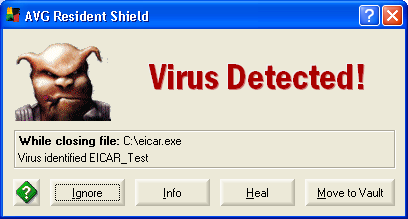
But AVG failed to detect the “infected” service, even when I instructed AVG to scan the file. Only when I stopped the service (making the file accessible) did AVG detect the “virus”.
However, AVG will detect the “virus” when booting, preventing the service from starting.
So it seems that this EFS trick can fool some anti-virus products some of the time. I will continue trying to make McAfee detect my service as a virus, to see how it behaves.
Malicious Cryptography, the inspiration for the title of my post, is a very interesting read for anti-virus specialists.
Your Windows PC is infected with a new virus. I mean, really infected, the virus was executed and installed itself permanently. You update your antivirus product (AV) and start a scan. It detects the virus and cleans your machine: it kills the process, it deletes the files and removes the startup registry keys (like the Run keys). But is your PC really cleaned? Is everything the virus did undone? Who knows?
Malware can carry a very destructive payload that no AV can undo.
Take the W32/Bagle.fb virus. It deletes the SafeBoot key, only a couple of assembly lines are needed to wipe your Safe Mode configuration:
PUSH raehtvlv.00415AE8    ;  ASCII "SYSTEMCurrentControlSetControlSafeBoot"
PUSH 80000002
CALL raehtvlv.00409024    ;  JMP to shlwapi.SHDeleteKeyA
But this is not easy to correct. No AV product will do this for you. It will delete the files (this bagle doesn’t only install itself, but also a rootkit, m_hook.sys, to hide itself) and remove the startup entries from the registry, but it will not reconstruct your SafeBoot key.
This Bagle also disables an enormous amount of security related Windows services, like the AV your running. It uses this subroutine to disable a service:
00404583  /$ 55             PUSH EBP
00404584  |. 8BEC           MOV EBP,ESP
00404586  |. 81C4 4CFFFFFF  ADD ESP,-0B4
0040458C  |. C785 4CFFFFFF >MOV DWORD PTR SS:[EBP-B4],94
00404596  |. 8D85 4CFFFFFF  LEA EAX,DWORD PTR SS:[EBP-B4]
0040459C  |. 50             PUSH EAX
0040459D  |. E8 7A490000    CALL raehtvlv.00408F1C      ;  JMP to kernel32.GetVersionExA
004045A2  |. 83BD 50FFFFFF >CMP DWORD PTR SS:[EBP-B0],5
004045A9  |. 72 62          JB SHORT raehtvlv.0040460D
004045AB  |. 68 3F000F00    PUSH 0F003F
004045B0  |. 6A 00          PUSH 0
004045B2  |. 6A 00          PUSH 0
004045B4  |. FF15 5DF64100  CALL DWORD PTR DS:[41F65D]  ;  advapi32.OpenSCManagerA
004045BA  |. 8945 FC        MOV DWORD PTR SS:[EBP-4],EAX
004045BD  |. 0BC0           OR EAX,EAX
004045BF  |. 75 04          JNZ SHORT raehtvlv.004045C5
004045C1  |. C9             LEAVE
004045C2  |. C2 0400        RETN 4
004045C5  |> 6A 22          PUSH 22
004045C7  |. FF75 08        PUSH DWORD PTR SS:[EBP+8]
004045CA  |. FF75 FC        PUSH DWORD PTR SS:[EBP-4]
004045CD  |. FF15 61F64100  CALL DWORD PTR DS:[41F661]  ;  advapi32.OpenServiceA
004045D3  |. 0BC0           OR EAX,EAX
004045D5  |. 74 2D          JE SHORT raehtvlv.00404604
004045D7  |. 50             PUSH EAX
004045D8  |. 8D55 E0        LEA EDX,DWORD PTR SS:[EBP-20]
004045DB  |. 52             PUSH EDX
004045DC  |. 6A 01          PUSH 1
004045DE  |. 50             PUSH EAX
004045DF  |. FF15 65F64100  CALL DWORD PTR DS:[41F665]  ;  advapi32.ControlService
004045E5  |. 8B1424         MOV EDX,DWORD PTR SS:[ESP]
004045E8  |. B9 07000000    MOV ECX,7
004045ED  |> 6A 00          /PUSH 0
004045EF  |.^E2 FC          LOOPD SHORT raehtvlv.004045ED
004045F1  |. 6A FF          PUSH -1
004045F3  |. 6A 04          PUSH 4
004045F5  |. 6A FF          PUSH -1
004045F7  |. 52             PUSH EDX
004045F8  |. FF15 69F64100  CALL DWORD PTR DS:[41F669]   ;  advapi32.ChangeServiceConfigA
004045FE  |. FF15 6DF64100  CALL DWORD PTR DS:[41F66D]   ;  advapi32.CloseServiceHandle
00404604  |> FF75 FC        PUSH DWORD PTR SS:[EBP-4]
00404607  |. FF15 6DF64100  CALL DWORD PTR DS:[41F66D]   ;  advapi32.CloseServiceHandle
0040460D  |> C9             LEAVE
0040460E  . C2 0400        RETN 4
In a nutshell:
1. this subroutine is called with the name of the service to disable on the stack
2. it checks if it’s running on Windows XP, and returns if not
3. it opens the service manager, and returns if this fails
4. it opens the service to disable, and returns if the service doesn’t exist
5. it disables the services (sets the start parameter to disabled)
6. it closes the service
7. it closes the service manager
This subroutine is called for each entry in a long table of security products:
wuauserv
Aavmker4
ABVPN2K
ADBLOCK.DLL
ADFirewall
AFWMCL
Ahnlab task Scheduler
alerter
AlertManger
AntiVir Service
…
BTW, wuauserv is the Windows Update service.
As a developer, I’m not impressed with the quality of this code:
And if I were a malware developer, my routine would be more destructive. The ChangeServiceConfig system call is called with mostly null arguments:
hService = 0015D840
ServiceType = SERVICE_KERNEL_DRIVER|SERVICE_FILE_SYSTEM_DRIVER|SERVICE_ADAPTER|SERVICE_RECOGNIZER_DRIVER|SERVICE_WIN32_OWN_PROCESS|SERVICE_WIN32_SHARE_PROCESS|SERVICE_INTERACTIVE_PROCESS|FFFFFEC0
StartType = SERVICE_DISABLED
ErrorControl = SERVICE_NO_CHANGE
BinaryPathName = NULL
LoadOrderGroup = NULL
pTagId = NULL
pDependencies = NULL
ServiceStartName = NULL
Password = NULL
DisplayName = NULL
This means that those parameters remain unchanged. Take the BinaryPathName argument, it sets the service parameter that points to the executable and often contains command line arguments. Without this information, the service manager doesn’t know which program to start. Setting BinaryPathName to a string, e.g. “wiped”, will overwrite this information and you’ll have a very hard time correcting this…
By now you should be convinced that this Bagle is nasty, that it could easily be made nastier, and that your AV will not restore your OS to its former glory and that you’ll have a hard time fixing everything. And this is “just” a mass mailer virus. Spyware is notoriously harder to clean.
Removing the infection is one step, and your AV should do this, but restoring your computing environment is another essential step, and your AV doesn’t help you with this.
That’s why I advise to rebuild an infected machine: format the disks and reinstall the OS, the applications and the data.
But I only advise this in case of a “real” infection (the malware was executed) and when it ran with local admin privileges.
If you’re sure the malware wasn’t executed (e.g. it was in a ZIP file and the AV detected and deleted the ZIP file when it was downloaded), there’s no damage done.
If it was executed with the authority of a normal user (not a power user or local admin), it will be easier to clean up, because it cannot modify the OS or the security products (privilege escalation aside and provided your security products are protected). Scanning the user’s profile and data, and checking the user’s startup entries is enough to remove the infection, and the computing environment doesn’t need restoring.
But if the malware ran with local admin privileges, all bets are off. It can do anything to your system, you can never be 100% sure what it did. Do you trust the malware descriptions of your AV product for 100%? Do they list everything in detail? If they omit something, you will not know about it and cannot fix it. For example, not all AV vendors did mention the deletion of the SafeBoot key for this Bagle virus.
And if the infection was a downloader (a program that downloads several other malwares from the Internet and installs them), not even the AV company can tell you what the malware did. Because nobody can tell you what was downloaded and executed. Even if you obtain the URL, download the malware and analyze it, you cannot be sure you downloaded the same malware.
Reinstalling a machine can be costly, especially if you’re not organized and prepared for it. You can decide that reinstalling is more costly than cleaning, and accept the risk of using a corrupted machine. It all depends on the risks you’re running, i.e. what you use your computer for.
Let’s assume you can wipe out the infection completely. Then you still need to ask yourself if your OS and security applications have not been tampered with and if you’re willing to trust them.
Consider this:
I’m prepared for an infection:
You’re probably thinking that the cost of these mitigating actions is higher than the cost of dealing with a real infection, and you’re probably right. Except that these actions also mitigate other risks that I run, like data loss, disasters …
And cost is not only expressed in money and time, but there’s also the “sentimental” cost a person can incur. I’ve taken more than 10,000 digital pictures over a decade, and they’re priceless.

 Didier Stevens