I appreciate a good joke:
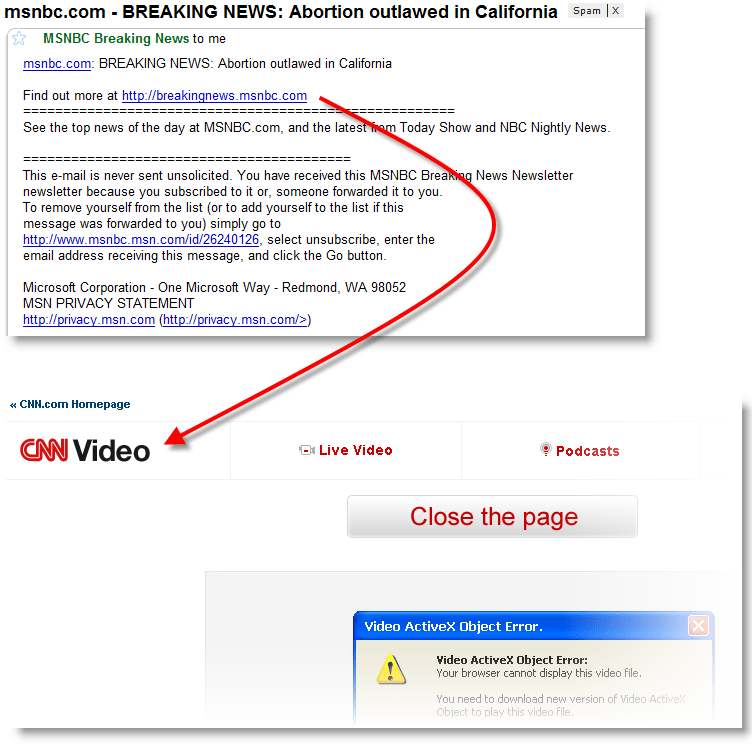
I appreciate a good joke:
Gmail identified the Fake CNN Alerts as SPAM from the beginning, but now warns against phishing too:
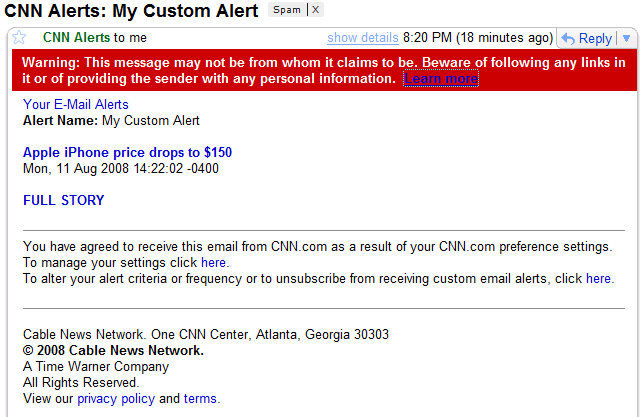
Fake CNN alerts galore!
I seize the opportunity to publish a new video (warning: 8 minutes of command-line staring) (hires XviD version here) showing you how to use my tools to retrieve malware samples hosted on a website. If you just visit an infected website with Internet Explorer, you run the risk of infecting your machine. The safe way to retrieve samples is to work in a low-risk environment (e.g. non-root account on a Linux VM) and use tools that are unlikely to be the target of exploits hosted on said website.
The following tools are featured in the video:
The file numbering trick (01., 02., 03., …) allows me to document exactly how I obtained the sample.
Since I recorded the video, the malware seems to have been removed from the site. But be careful, it’s not uncommon that compromised websites get reinfected.
Here’s a new social engineering trick I hadn’t seen in my spam mail before:
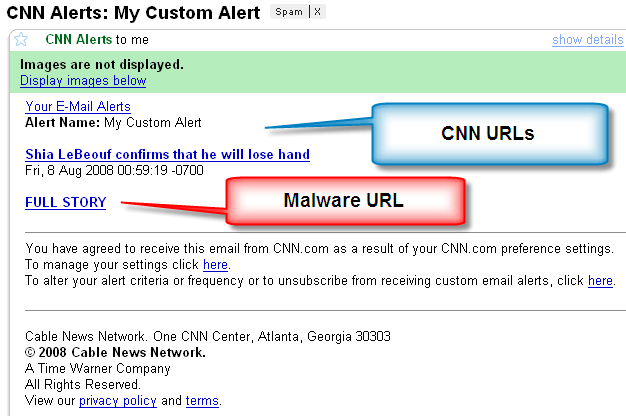
The Shia link actually points to a real CNN article about the olympics & terrorism. So you might be inclined to click on the full story link.
Like the CNN Top 10 malware, it has a fake Flash update:

Which happens to be malware.
My first and second little poll lead up to this post.
I’ve been quite surprised that the most downloaded file from my site is SafeBoot.zip. Since I published it more than a year ago, there have been 20,000+ downloads. And I’m also under the impression that the number of downloads per day is steadily increasing. One would be tempted to conclude from this that the number of malware infections that disable Safe Mode is on the rise, but this is indirect evidence.
First of all, I believe the increase is due to search engines. As more and more sites link to the Safeboot blogpost, the page will rise in the ranking of search results. One can argue that visiting the Safeboot blogpost and downloading the SafeBoot.zip file are two different things: you can land on the page just out of curiosity, but if you download the registry fix file, then you’re surely infected with a Safe Mode disabling virus.
Well, not necessarily. From my interactions with people using my registry fix, I’ve observed that some of them apply this fix even if their Safe Mode keys are intact. They just have another PC problem (for example the CD drive doesn’t work anymore), and they hope that my fix will fix this too.
So I’m not sure that Safe Mode disabling malware is on the rise, but I do know that it’s becoming more sophisticated. As the first virus I analyzed would only delete the Safe Mode keys once, now there are viruses that delete the Safe Mode keys and monitor them, deleting them again if they are restored.
Ironically, another large group of people that visit my site are not in search of a solution to a malware infection, but are looking for malware! Here are some of the most popular search terms that lead to my blog:
The reason that search engines direct users to my site when they search for a virus, is an unfortunate side-effect of my Google Adwords post. This is my most popular blogpost by far, and has been linked to by countless sites. Although I have offer no malware to download, this Adwords blogpost contains the words of the search terms and is highly referred to, so it ranks high in search engine results.
So if you’re landing on my blog via a search engine, it’s very likely you’re an infectee or an infector. 😉

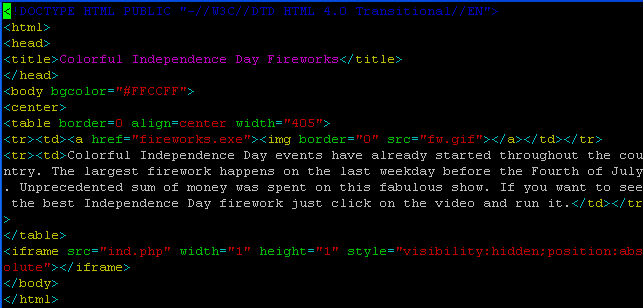
VirusTotal coverage: 17/33 (Caveat emptor)
Let me draw your attention to VirusTotal’s Hash Search function:
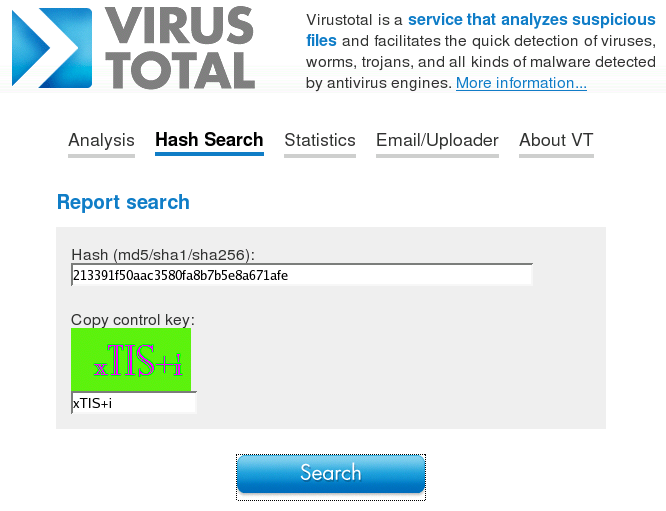
The MD5 of the malware I uploaded is: 213391f50aac3580fa8b7b5e8a671afe
A PDF stream object is a sequence of bytes. There is a virtually unlimited number of ways to represent the same byte sequence. After Names and Strings obfuscation, let’s take a look at streams.
A PDF stream object is composed of a dictionary (<< >>), the keyword stream, a sequence of bytes and the keyword endstream. All streams must be indirect objects. Here is an example:

This stream is indirect object 5 version 0. The stream dictionary must have a /Length entry, to document the length of the (encoded) byte sequence. The stream and endstream keywords are terminated with the EOL character(s). In this example, the byte sequence is a set of instructions for the PDF reader to render the string Hello World with a given font at a precise position. It’s precisely 42 bytes long.
In this example, the byte sequence is represented literally, but it’s possible (and usual) to encode the byte sequence. This is done with a stream filter. A stream filter specifies how the sequence of bytes has to be decoded. Let’s take the same example, but with an ASCII85 encoding:

The /Filter entry instructs the PDF reader how to decode the byte sequence (/ASCII85Decode). Notice the change of the length value. There are many encoding schemes (ASCII filters and decompression filters), here is a list:
This list is not so long, so why do I claim an almost limitless number of ways to encode a stream? I have 2 reasons:
Here is our example, where the stream is encoded twice, first with ASCII85 and then with plain HEX (I know, this is rather pointless, but it yields simple and readable examples):

Cascading filters also inspired me to create a couple of test PDF documents. For example, I’ve created a 2642 bytes small PDF document that contains a 1GB large stream (a ZIP bomb of sorts). Some PDF readers will choke on this document.
I’m quite pleased with the feedback I received for my Little PDF Puzzle, thanks all.
As promised, I’m posting the solution now, but first be sure you understand the basic structure of a PDF file.
The PDF file format supports Incremental Updates, this means that changes to an existing PDF document can be appended to the end of the file, leaving the original content intact. When the PDF file is rendered by a PDF reader, it will display the latest version, not the original content. Remember that the basic structure of a PDF file (one without incremental updates) consists of 4 parts:
A PDF file with one incremental update has the following structure:
Every object that has been modified can be found twice in the PDF file. The unmodified object is still present in the original content, and the edited version of the same object can be found in the updated content.
The cross reference table of the updated content indexes the updated objects, and the trailer of the updated content points to both cross reference tables.
When a PDF reader renders a PDF document, it starts from the end of the file. It reads the last trailer and follows the links to the root object and the cross reference tables to build the logical structure of the document it is about to render. When the reader encounters updated objects, it ignores the original versions of the same objects.
Let’s open our PDF Puzzle with a PDF reader:

And let’s also open it with Notepad:

With Notepad, it becomes clear that I’ve created a PDF document with an incremental update (original document in red, update in blue). If you delete the updated content (the blue part, or everything after the first occurrence of %%EOF), you’ve actually recovered the original version. Save it and open it with your PDF reader:

In the original PDF document, I stored the sentence “The passphrase is Incremental Updates” in indirect object 5 (to make the puzzle a bit more challenging, I used an ASCII85 encoded stream, otherwise you could just read the solution with Notepad). Next, I updated the sentence to “The passphrase is XXXXXXXXXXXXXXXXXXX” by creating a new version of object 5 and appending this at the end of the original PDF document. To finalize the updated document, I added a new cross reference table (just indexing the new version of object 5) and a new trailer (referencing the new and the old cross reference tables).
If you produce PDF documents with a PDF editor that supports incremental updates, be aware that previous versions of your document could be included in the final document, and that this could lead to information disclosure. Most office applications that support export to PDF do not use incremental updates (because they save the document in their own native format, not PDF).
If you conduct forensic investigations or do malware research, don’t limit your analysis to the final version of a PDF document. You can easily identify incrementally updated PDF documents by looking for multiple instances of cross reference tables and trailers. But don’t get confused by Linearized PDF documents, they too have more than one cross reference table and trailer (linearized PDF documents start with an indirect object sporting a /Linearized name).
You can find interesting information in the different versions included in an incremental PDF file. For example, I have a malicious PDF sample that has been created in February 2008, updated in March 2008 to add the malicious payload (it took the author about 20 minutes) and, not surprising, that this was done on a machine with the timezone set to GMT+08.
A final detail: to allow you to edit the PDF puzzle with Notepad, I produced an ASCII-only PDF file (that’s one of the reasons I used ASCII85 encoding for the stream of indirect object 5). But most PDF documents contain non-ASCII characters, so be sure to use an editor that will support this (and that won’t convert 0x0A or 0x0D to 0x0D0A).
In this post, I show how basic features of the PDF language can be used to generate polymorphic variants of (malicious) PDF documents. If you code a PDF parser, write signatures (AV, IDS, …) or analyze (malicious) PDF documents, you should to be aware of these features.
Official language specifications are interesting documents, I used to read them from front to back. I especially appreciate the inclusion of a formal language description, for example in Backus–Naur form. But nowadays, I don’t take the time to do this anymore.
While browsing through the official PDF documentation, I took particular interest in the rules to express lexemes. There are many ways to write the same token, offering opportunities to evade known-pattern recognition systems, like AV and NIDS.
Building a test file
Before I show some examples, let’s build a test PDF file that will start the default browser and navigate to a site each time the document is opened.
Opening a web page from a PDF file can be done with an URI action, like this:

This is the same type of object used in the malicious mailto PDF files.
An action must be triggered by an event, examples of such triggers are the association of an action to the display of a page or the opening of the PDF document. We will use the OpenAction to trigger our URI action object each time our test PDF document is opened:

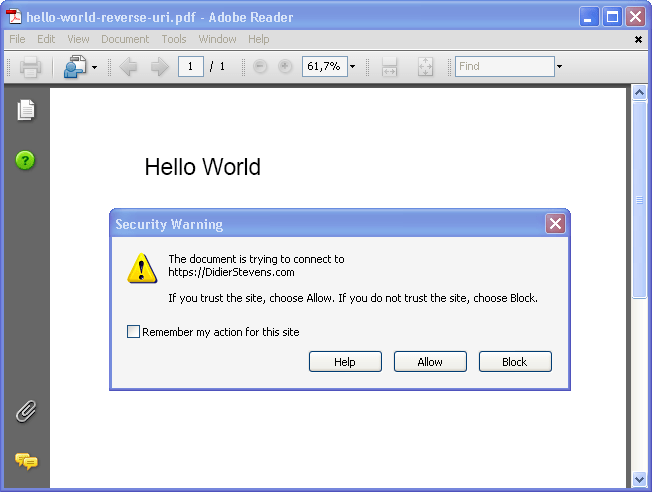
I add the URI action object and the OpenAction event to the hello world PDF file I used in a previous post, to build our test PDF. You can download all examples here. Opening the test PDF document launches IE:
Now that we have our test PDF, let’s look at the ways we can change its representation without changing its rendering. This is what I’m covering (this list is not exhaustive):
Name representation
The tokens preceded by a / (slash) in the URI action object are called Names in the official PDF description. Names are case-sensitive. The characters used in a Name are limited to a specific set, but since PDF specification version 1.2, a lexical convention has been added to represent a character with its hexadecimal ANSI-code, like this #XX.
This allows use to rewrite the /URI name in several ways, for example: #55RI.

Or #55#52#49
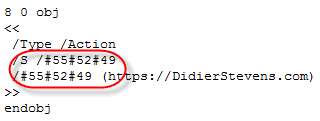
Pattern matching algorithms must take into account these different representations to successfully match a pattern. A standard way to deal with this is canonicalization. First, the token is reduced to a canonical form (e.g. replace all #xx representations by the character they stand for), and second, pattern matching is performed on the canonical form.
String representation
Strings too can be represented in many forms. One way to represent strings, is to type the text between parentheses:

Splitting strings over several lines can be done by adding a backslash (\) at the end of each line:

Of course, we are not limited by the numbers of lines, we can add a backslash after each character:

A character in a string can be represented by its octal code, like this:

And this can be done for every character in the string:

One more way to represent a string, is hexadecimal:

You’re allowed to put whitespace between the hex digits:

And you’re not limited in the amount of whitespace you use:
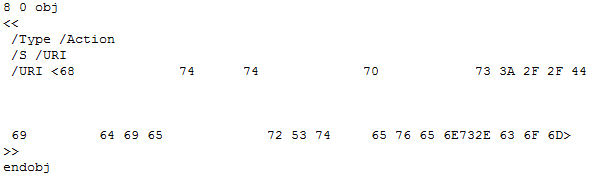
This whitespace usage reminds me of the IE zero-byte trick in html.
I want to finish this long list of examples with PDF encryption. One more way to change the representation of a PDF document is encryption. PDFs can be encrypted without requiring the user to provide a password to view the encrypted document, this form of encryption is used for DRM. Ever had a PDF with printing or text copy disabled? That’s an encrypted PDF.
When a PDF is encrypted, only the strings and streams are encrypted, the objects themselves are not encrypted. Encrypted strings are one more way to change the representation of a string.
Here’s an example:
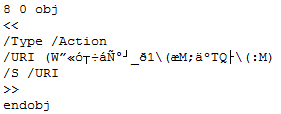
I know that PDF encryption has already been used to mislead SPAM filters.
Final thoughts
These many features of the PDF language providing flexibility in representation of names and strings, can also be used to generate polymorphic forms of the same malicious PDF. If you need to scan PDF documents, you need to be aware of all these features and have tools that support them.
There are indications that most AV products don’t canonicalize PDF documents prior to signature matching. I did some tests with a malicious mailto PDF document, and changing the string representation of the mailto URI action using the hexadecimal forms allows AV detection evasion. Adding whitespace wasn’t necessary, switching to hex was enough. The ClamAV source code for PDF documents has more evidence of PDF canonicalization issues in AV software, here is a string compare for the Length name without canicalization:

This will not match if hex codes are used (#).
I tested all my examples with Adobe Acrobat Reader 8.1.2 and Foxit Reader 2.2 without problems. But Foxit Reader 2.2 gave me an unpleasant surprise, more on this in a next post.
I wonder if malicious PDF samples will be used in the Race to Zero.


 Didier Stevens