Didier Stevens

Friday 1 January 2010

The Undeletable SafeBoot Key

Filed under: Malware,My Software — Didier Stevens @ 12:53

I present you a new program to create the SafeBoot registry key with special permissions protecting it from deletion. After using this new program, you’ll be able to restore the SafeBoot registry keys with my .REG files.

Many malware deletes the SafeBoot registry key to prevent you from booting into Safe Mode. I provide a registry fix to restore these keys.

But there exists malware that goes even further and actively monitors the registry to thwart every attempt to restore the keys by deleting them as soon as they are restored. Untill now, I recommended to use a Live CD to restore the keys in such a case (this is a complex procedure). This way, the malware is not running while you restore the SafeBoot keys.

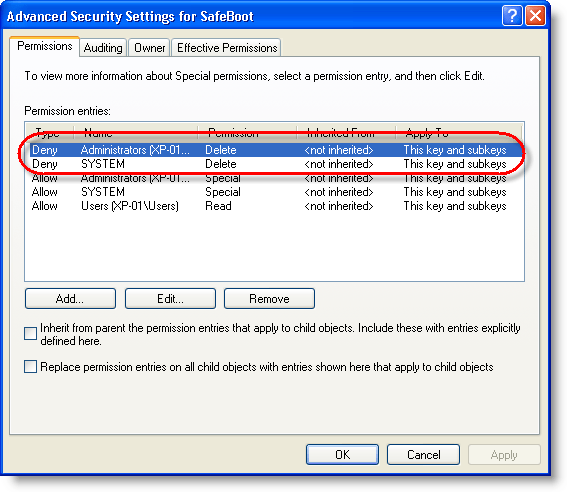
Now I developed another solution: a program to create the SafeBoot registry key with permissions to deny Administrators and System accounts to delete the key. This way, the malware can’t delete the keys because it lacks the permissions to do so.

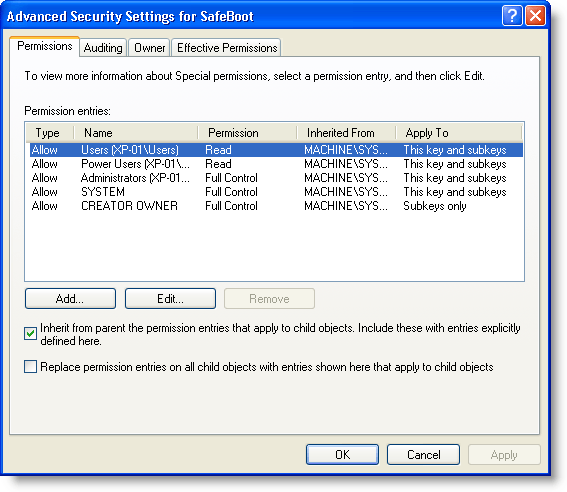
Here are the SafeBoot permissions on a default Windows XP install:
And here are the permissions of the SafeBoot key created with my new program:
I designed my program to create the SafeBoot key only when it is missing, and to set the special permissions while it is created:

My program will not set the special permissions when the key exists. If the SafeBoot keys exists and you can’t boot into Safe Mode, you’re dealing with another issue than a Safe Mode disabling malware (probably a buggy driver).

The program is a console program, but it will pause at the end so you can read its output, even when you launch it from Windows Explorer (i.e. double-click it). If you want to use it in a script and prevent the prompt from appearing, use option -n.

If the SafeBoot key exists, my program will tell this (SYSTEM\CurrentControlSet\Control\SafeBoot exists.) and it will leave the permissions unchanged. If your system is clean but you want to protect the SafeBoot keys, I recommend you change the permissions manually using RegEdit.

My program creates only registry key SYSTEM\CurrentControlSet\Control\SafeBoot, and not the subkeys. To restore the subkeys, you just need to use the appropriate .REG file.

Having read this, you might have thought that malware authors could bypass this protection by changing the permissions before deleting the keys. You’re right. I don’t deny Administrator and System accounts the permission to change the permissions, because I don’t expect there is malware in the wild that changes permissions of the SafeBoot key. I’ll deal with it when it eventually appears.

Download:

UndeletableSafebootKey_V0_0_0_1.zip (https)

MD5: 2FAC291AD547657E31B157B8581D4601

SHA256: 7A1E42A57BBF8E804491318671AE992947C82DCC9C2001E3033B45E4AEAB2DDE
Monday 5 October 2009

Preventing Applications From Starting (Malicious) Applications

Filed under: bpmtk,Malware,My Software,PDF,Vulnerabilities — Didier Stevens @ 0:00

Another very effective way to prevent malicious documents from infecting PCs, is to prevent vulnerable applications from starting other applications. As almost all shellcode found in malicious documents in-the-wild (again, I’m excluding targeted attacks) will ultimately start another process to execute the trojan, blocking this will prevent the trojan from executing.

This is an old idea you’ll find implemented in many sandboxes and HIPS. I added a new DLL to my basic process manipulation tool kit to prevent applications from creating a new process. Loading this DLL inside a process will prevent this process from creating a new process. I’ll explain the technique used in my DLL and how to load it in vulnerable applications in upcoming blogposts, but I want to start with showing how it prevents malicious documents from infecting a PC.

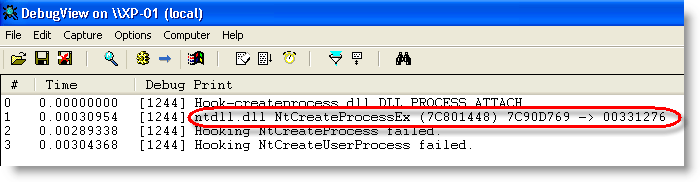
When the DLL is loaded inside a process, it will patch the Create Process API to intercept and block calls to it:

hook-createprocess-010

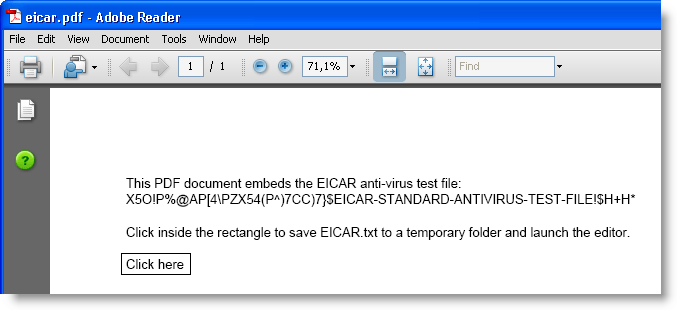
As a first test, we’ll use my eicar.pdf document.

hook-createprocess-009

Clicking the button will save the eicar.txt file to a temporary folder and launch the editor.

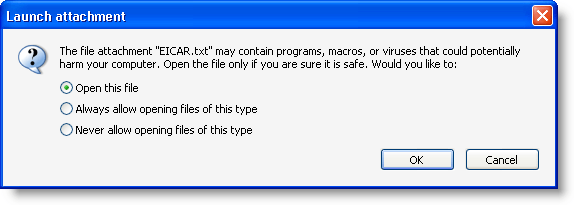
Adobe Acrobat reader will warn you when an application is to be launched:

hook-createprocess-011

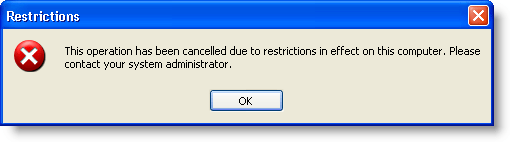
But when you accept, the editor will be prevented to execute:

hook-createprocess-012

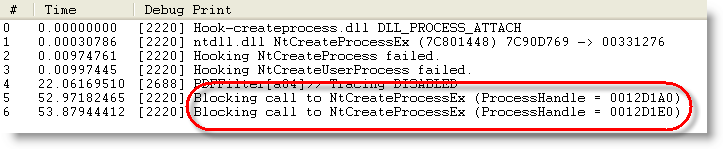
That’s because the DLL intercepted and blocked the Create Process call:

hook-createprocess-013

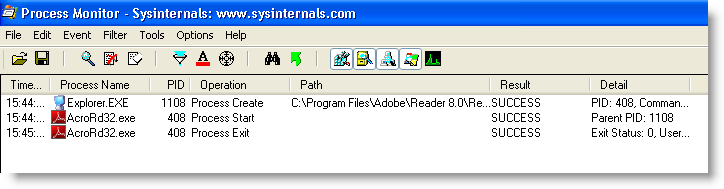
As a second test, let’s use a real malicious PDF document. The hooks installed by the DLL prevent it from executing the trojan:

hook-createprocess-014

Adobe Reader starts and then just crashes, without spawning another process:

hook-createprocess-017

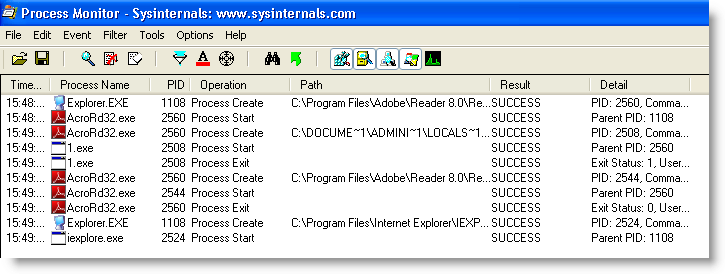
When opening the same malicious PDF, but without the protecting DLL, the machine gets trojaned (execution of 1.exe and Internet Explorer):

hook-createprocess-018

This simple way of preventing applications from launching other applications comes with some drawbacks. For example, the Check Update function in Adobe Reader will not function anymore.

When you have a sandboxing system of HIPS installed on the machines you manage, check if you can use it to prevent vulnerable applications from starting other applications. If it doesn’t provide such a feature, try the new DLL I’ll be posting in the new version of bpmtk.

Wednesday 26 August 2009

Yubikey, Trojans and Twitter

Filed under: Encryption,Hardware,Malware — Didier Stevens @ 11:33

Stina, Yubico’s CEO, gave me a Yubikey at RSA London last year. It’s a small keyfob simulating a USB keyboard. Each time you press the button while it’s inserted in a USB port, it generates a one-time-password.

20090825-221451

The Yubikey is a clever little two-factor authentication device.

But I’ve some issues using the Yubikey in a really secure system. As Twitter plays a role in this, and because lately Twitter started to be used by trojans as a communication channel, I decided it’s time to publish the issues I encountered together with mitigating actions.

Technical details

The OTP generated by the Yubikey is an AES-encrypted data stream. I’ve obtained the AES-key embedded in my Yubikey from Yubico and am able to decode the OTP with a simple Python program.

Insert Yubikey and start generating OTPs:

OTP: lkeuuuceeeivjgtbjcbevigeccerfufugdijuhflckrd
public_id = lkeuuuceeeiv
secret_id = ************
counter = 26
counter_session = 1
random_number = 13042
timestamp = 0x8321a8
  • public_id and secret_id identifies the Yubikey (notice that the public_id is the prefix of the OTP).
  • counter: this is a persistent register. It is increased with 1 each time the Yubikey is inserted in a USB port.
  • counter_session: this is a volatile register. It is set to 0 each time the Yubikey is inserted in a USB port, and increased with 1 for each OTP generation
  • random_number is what it says on the tin: a random number, different per OTP
  • timestamp is a volatile 32-bit register. It is set to a random value each time the Yubikey is inserted in a USB port, and is then increased with 1 by a 8Hz clock. Yubico specifies an average variation of 20% on the 8Hz clock per Yubikey. With the measurements I made, I calculate that the 8Hz clock of my key has a 32% deviation.

Validating an OTP is done by successfully decrypting the OTP. Replay attacks are mitigated by comparing the counters and timestamp with historical data.

When trying to design a website that uses the Yubikey to authenticate, I imagined the following attack and found a way to mitigate it.

Attack 1:

Assume a website that uses the Yubikey to logon (i.e. an OTP generated with your Yubikey is needed to log on to the site, possibly together with more classic credentials like a username/password combo).
Because this website has my AES key and can decrypt my OTP, my Yubikey authenticates me and I’m granted access to the site.
A web browser trojan could steal an OTP like this:

  1. I generate an OTP (OTP1) with my Yubikey
  2. The trojan intercepts and stores OTP1, doesn’t send OTP1 to the website, but makes the browser display a fake error message (404, server load too high, Yubikey error, …) prompting me to generate a second OTP
  3. I’m fooled by the fake error, and generate a second OTP (OTP2) with my Yubikey
  4. The trojan intercepts and stores OTP2, and sends OTP1 to the website
  5. The website grants me access, and the trojan stops interfering
  6. OTP2 can be used by the operators of the trojan to get access to the website, as long as I’m not first to access the website at a later time with a new OTP (OTP3). Twitter could be used as a channel to communicate the OTPs in real-time to the trojan operators.

Mitigation:

The website can detect this attack (the malicious use of OTP2) if the following algorithm is implemented:

  1. for every account, the last valid OTP is stored, together with a server-side timestamp (when it was received by the website)
  2. if a new OTP is received, the counter value of the previous OTP is compared with the counter value of the new OTP
  3. when both counters have the same value, the website knows that the OTPs were generated in the same session, and thus that it can compare timestamps.
  4. it calculates the delta of the timestamps of the OTPs, and also the delta of the server-side timestamps when it received the OTPs.
  5. if the 2 deltas differ too much (more than 20% margin), then it refuses the OTP and doesn’t grand access to the website

But now comes the second attack for which I have no mitigation, despite some help from the Yubico forum.

Attack 2:

Assume a website which uses the Yubikey OTP to 1) authenticate users and 2) validate transactions. A classic example of such a site is an online banking site. The user generates an OTP to logon, and then has to generate an OTP for each financial transaction.
A web browser trojan could insert its own transaction like this:

  1. I generate an OTP (OTP1) with my Yubikey
  2. The trojan intercepts and stores OTP1 together with a timestamp, doesn’t send OTP1 to the website, but makes the browser display a fake error message (404, server load too high, Yubikey error, …) prompting me to generate a second OTP
  3. I’m fooled by the fake error, and generate a second OTP (OTP2) with my Yubikey
  4. The trojan intercepts and stores OTP2 together with a timestamp, and sends OTP1 to the website
  5. The website grants me access
  6. After an amount of time equal to the delta between the 2 stored timestamps, the trojan starts a transaction (invisible to the user) and uses OTP2 to validate the transaction.
  7. When I start my own transactions, the trojan passes the OTPs on to the website, but delays them with the same timestamp delta to avoid post-exploitation detection.

I can’t device an algorithm to detect this fraud server-side, if the Yubikey is the only authentication and validation mechanism used. This attack would not work with a challenge-response token, because the keys generated by such a token are different for logon and transaction validation. Typically, these tokens generate one type of keys for logon, and another type of keys based on a challenge for transactions. The challenge encodes data of the transaction, so that a particular challenge can’t be used for another transaction.

One Yubico forum member suggests a type of CAPTCHA to ensure that each submitted OTP is submitted by a human (hence the CAPTCHA), but I don’t believe this is practical, as malware is able to defeat some CAPTCHAs and humans are unable to solve some CAPTCHAs.

Feel free to post a comment with your migitation suggestions, but please keep them practical ;-).

Wednesday 20 May 2009

Download My Hakin9 Article “Anatomy of Malicious PDF Documents”

Filed under: Malware,PDF — Didier Stevens @ 18:21

Hakin9 has released my article “Anatomy of Malicious PDF Documents” from their latest issue. Get it here in exchange for an e-mail address.

20090520-200713

Thursday 14 May 2009

Malformed PDF Documents

Filed under: Malware,My Software,PDF — Didier Stevens @ 7:55

For the sake of this post, I consider a PDF document malformed when it doesn’t observe the basic structure of a PDF document.

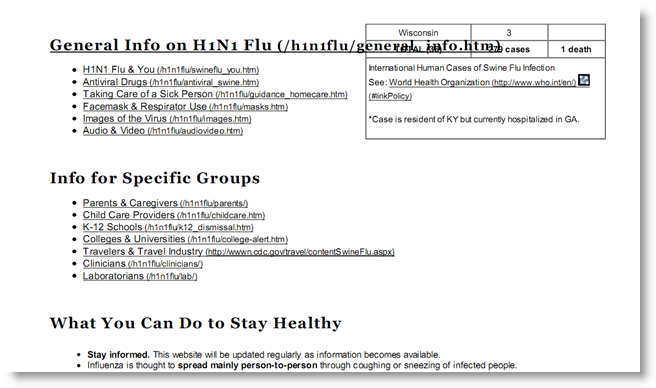
I’ve seen a couple of malicious, malformed PDF documents. The most recent was a malicious swine flu PDF document that contains another, bening, PDF document with information about the swine flu (obtained from the CDC site). This second PDF document is displayed to mislead the user while the exploit runs.

20090513-211945

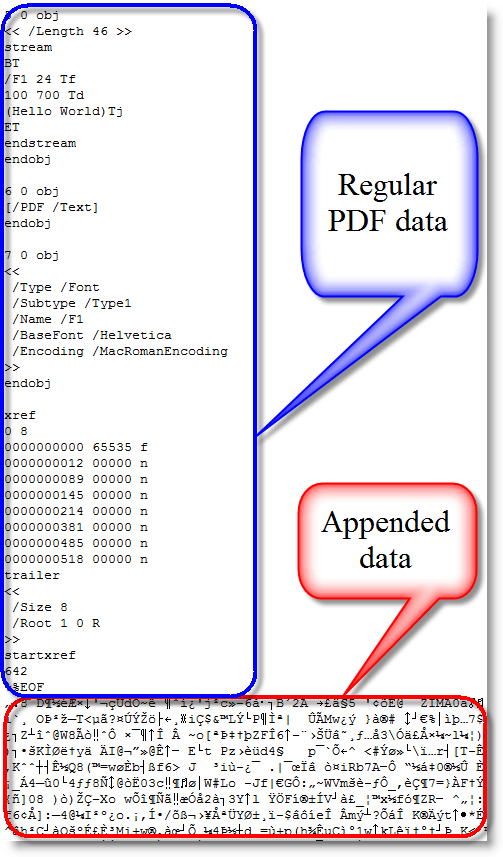
This second PDF document is XOR-encoded and appended to the end of the malicious PDF document, making the malicious PDF document malformed (FYI: the PDF file format supports embedded files, but this wasn’t used here). A PDF reader like Adobe or Foxit has no problems opening this malformed PDF, because it scans a PDF document for the trailer (%%EOF) starting from the end of the document. Everything that follows this trailer and doesn’t adhere to the PDF syntax is just ignored.

20090513-213940

I’ve added some new features to my PDF tools to handle malformed PDF documents.

PDFiD

The new version of PDFiD has an –extra option. Like it names imply, use it to add extra analysis data to the PDFiD report. The extra option adds entropy calculations to the report:

20090513-220050

For a normal PDF file, expect the total entropy and the entropy of bytes inside stream objects to be close to the maximum value 8.0. This means that the distribution of byte values is close to random, which is characteristic of compressed and encrypted data.

Outside streams objects, the data appears much less random, and the entropy is much lower, usually around 4.0 or 5.0.

However, for malformed PDF documents, where data is added without using stream objects, the entropy outside stream objects is much higher. Here is the report for the malicious swine flu PDF:

20090513-203729

Another datum added to the report by using the –extra option is for the end-of-file marker %%EOF.

The “%%EOF” line mentions the number of times %%EOF appears in the document (more than once usually indicates incremental updates). “After last %%EOF” counts the number of bytes after the last %%EOF. This value will be not be zero when data has been appended.

pdf-parser

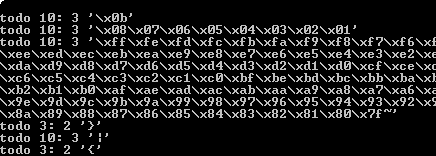
The previous versions of pdf-parser output a lot of “todo 10” data (an indication of malformed PDF data) when they parse a malformed PDF document. I’ve suppresed this behavior, you’ll need to use option –verbose to enable it from now on, should you need it. Since I first use PDFiD to check a PDF document before using pdf-parser, I don’t consider the “todo” output relevant anymore, as PDFiDs entropy and %%EOF report will tell me if a PDF document is malformed.

20090513-223049

But the other new option in pdf-parser, –extract, is more important. Example:

pdf-parser.py –extract payload.bin malformed.pdf

This option will extract all malformed data from malformed.pdf and write it to file payload.bin, giving you easy access to the embedded payload.

Samples

You can download a normal and malformed Hello World PDF file here to get familiarized with my updated tools. 4096 random bytes have been appended to the end of the PDF document to make it malformed.

Here is a last example when the entropy calculation can be handy even if the payload is stored inside a stream object:

20090513-203522

The reason the total entropy and entropy of bytes inside stream objects is very low here, is that this malicious PDF document has a payload with a very long, uncompressed NOP-sled (more than one million times 0x90).

Tuesday 21 April 2009

PDFiD On VirusTotal

Filed under: Malware,My Software,PDF — Didier Stevens @ 16:59

I know my posts here are rather emotionless, and that’s how I prefer them for this blog.

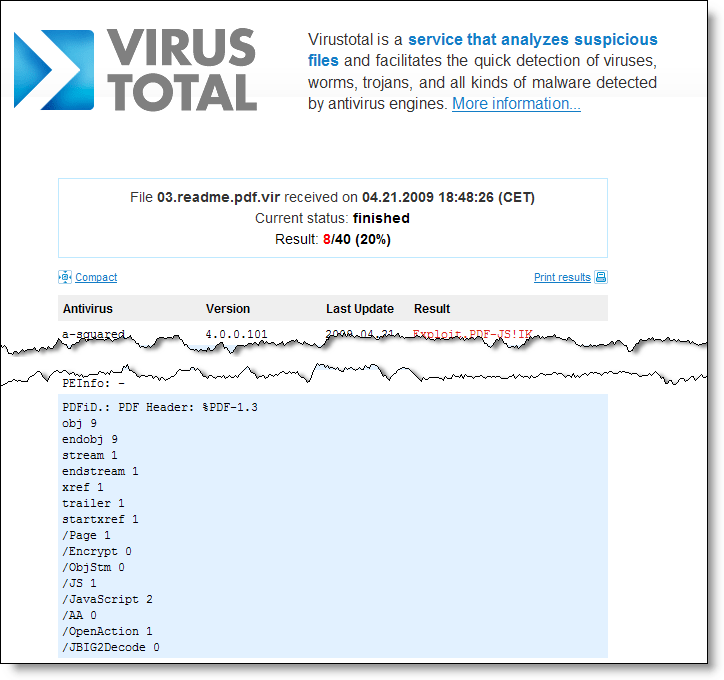
But this time, I’m very proud and I’m not hiding it: my PDFiD tool is now running on VirusTotal!

Thanks for your work Julio!

PDFiD will give you statistics of some very basic elements of the PDF language. This helps you decide if a PDF could be malicious or not.

pdfid-virustotal

Tuesday 31 March 2009

PDFiD

Filed under: Malware,My Software,PDF — Didier Stevens @ 7:08

I’ve developed a new tool to triage PDF documents, PDFiD. It helps you differentiate between PDF documents that could be malicious and those that are most likely not. I’ve kept the design very simple (it’s not a parser, but a string scanner) to be fast and to avoid exploitable bugs.

VirusTotal will included it if Julio Canto is satisfied with the tests 🙂 .

20090330-214223

Monday 9 March 2009

Quickpost: /JBIG2Decode “Look Mommy, No Hands!”

Filed under: Malware,PDF,Quickpost,Vulnerabilities — Didier Stevens @ 7:11

My previous blogpost showed how minimal user interaction can still get a malicious PDF document to infect a machine. Remembering F-Secure’s misadventure with .WMF and Google Desktop Search, I took some time to look at Windows Indexing Service. The news is not good. This time, I can get a PoC PDF document to trigger the /JBIG2Decode bug without any user interaction whatsoever. And the bug happens in a process running with Local System rights!

On a Windows XP SP2 machine with Windows Indexing Services started and Adobe Acrobat Reader 9.0 installed, there is absolutely no user interaction required to trigger the /JBIG2Decode vulnerability. When the PoC PDF file is on the disk, it will be indexed by Windows Indexing Services and the buggy /JBIG2Decode code will be executed.

When Adobe Acrobat Reader 9.0 is installed, it also installs an IFilter (AcroRdIF.dll). This COM object extends the Windows Indexing Service with the capability to read and index PDF documents. When the Windows Indexing Service encounters a PDF file, it will index it. The content indexing daemon (cidaemon.exe) calls the Acrobat IFilter (AcroRdIF.dll) which loads the Acrobat PDF parser (AcroRD32.dll). If the PDF document contains a malformed /JBIG2Decode stream object, it will result in an access violation in the instruction at 0x01A7D89A.

In other words, if you’ve a malicious PDF document on a machine with Windows Indexing Services, it can infect your machine. And you don’t need a user to open or select the PDF document.

The good news is that Windows Indexing Services is not started on a default Windows XP SP2 install. Update: Although Windows Indexing Services is not on by default, after you’ve executed a search as local admin, you’ll be asked if you want “to make future searches faster”. If you answer yes, Windows Indexing Services will be automatically started.
The bad news is that Windows Indexing Services runs under the local system account on Windows XP SP2. This results in a privilege escalation.

Consider a Windows machine with Windows Indexing Services running, Adobe Acrobat reader installed and a file sharing service (FTP/IIS/P2P/…). Uploading a specially crafted PDF document to this machine will give you a local system shell.

To disable Windows Indexing Services’ capability to index PDF documents, unregister the IFilter: regsvr32 /u AcroRdIf.dll

But IFilters are also used by other software:

  • Microsoft Search Server 2008
  • Windows Desktop Search
  • SharePoint
  • SQL Server (full-text search)

My PoC PDF file also triggers in /JBIG2Decode in Windows Desktop Search (I tested version 4.0). But Windows Desktop Search has a better security architecture than Windows Indexing Service. Although the service runs under the Local System account, the actual calling of the IFilters is done in a separate process that runs under the Local Service account (this account has less privileges and can’t take full control of the machine).

wds

I’ve not analyzed other applications using IFilters. If you use ScarePoint (that’s how my wife, who has to work with it, calls it) or another IFilter supporting application and you want to be safe, unregister the Acrobat IFilter.

And don’t forget that, depending on  your Windows version and CPU, you’re also protected by technologies like DEP and ASLR.

Google Desktop Search doesn’t use IFilters, unless you’ve installed this plugin to add IFilter support to Google Desktop Search.

Wednesday 4 March 2009

Quickpost: /JBIG2Decode Trigger Trio

Filed under: Malware,PDF,Quickpost,Vulnerabilities — Didier Stevens @ 14:35

Sometimes a piece of malware can execute without even opening the file. As this is the case with the /JBIG2Decode vulnerability in PDF documents, I took the time to produce a short video showing 3 ways the vulnerability can trigger without even opening the PDF document.

The first 2 demos use a “classic” /JBIG2Decode PDF exploit, the third demo uses a new PoC /JBIG2Decode PDF exploit I developed. This PDF document has a malformed /JBIG2Decode stream object in the metadata instead of the page. All PDF documents used have just a malformed /JBIG2Decode stream object, they don’t include a payload (shellcode), neither a JavaScript heap spray.

So how is it possible to exploit this vulnerability in a PDF document without having the user open this document? The answer lies in Windows Explorer Shell Extensions. Have you noticed that when you install a program like WinZip, an entry is added to the right-click menu to help you compress and extract files? This is done with a special program (a shell extension) installed by the WinZIp setup program.

When you install Adobe Acrobat Reader, a Column Handler Shell Extension is installed. A column handler is a special program (a COM object) that will provide Windows Explorer with additional data to display (in extra columns) for the file types the column handler supports. The PDF column handler adds a few extra columns, like the Title. When a PDF document is listed in a Windows Explorer windows, the PDF column handler shell extension will be called by Windows Explorer when it needs the additional column info. The PDF column handler will read the PDF document to extract the necessary info, like the Title, Author, …

This explains how the PDF vulnerability can be exploited without you opening the PDF document. Under the right circumstances, a Windows Explorer Shell Extension will read the PDF document to provide extra information, and in doing so, it will execute the buggy code and trigger the vulnerability. Just like it would when you would explicitly open the document. In fact, we could say that the document is opened implictly, because of your actions with Windows Explorer.

So let me demo 3 circumstances under which a PDF Shell Extension will act and thereby trigger the vulnerability. One important detail before I do this: when the exception occurs in the Adobe Acrobat code, it is trapped by Windows Explorer without any alert. That’s why in the demos, I attached a debugger (ODBG) to Windows Explorer to intercept and visualize this exception. So each time the vulnerability triggers, the view switches to the debugger to display the exception.

In the first demo, I just select the PDF document with one click. This is enough to exploit the vulnerability, because the PDF document is implicitly read to gather extra information.

In the second demo, I change the view to Thumbnails view. In a thumbnail view, the first page of a PDF document is rendered to be displayed in a thumbnail. Rendering the first page implies reading the PDF document, and hence triggering the vulnerability.

In the third demo, I use my special PDF document with the malformed stream object in the metadata. When I hover with the mouse cursor over the document (I don’t click), a tooltip will appear with the file properties and metadata. But with my specially crafted PDF document, the vulnerability is triggered because the metadata is read to display the tooltip…

So be very careful when you handle malicious files. You could execute it inadvertently, even without double-clicking the file. That’s why I always change the extension of malware (trojan.exe becomes trojan.exe.virus) and handle them in an isolated virus lab. Outside of that lab, I encrypt the malware.

YouTube, Vimeo and hires Xvid.


Quickpost info


Tuesday 9 December 2008

Updates: bpmtk and Hakin9; PDF and Metasploit

Filed under: Announcement,Hacking,Malware,My Software,PDF,Update — Didier Stevens @ 21:23

Hakin9 has published my bpmtk article. The article mentions bpmtk version 0.1.4.0; however, this new version has no new features. But it comes with extra PoC code, like a LUA-mode keylogger and “rootkit”. New blogposts will explain this new PoC code.

bpmtk12

And upcoming bpmtk version 0.1.5.0 contains a new feature to inject shellcode. Just have to update the documentation.

On the PDF front: I’ve produced my first Ruby code ;-). I worked together with MC from Metasploit to optimize the PDF generation code in this util.printf exploit module. It uses some obfuscation techniques I described 8 months ago.

« Previous PageNext Page »

Blog at WordPress.com.