Didier Stevens

Tuesday 19 May 2009

Another Lowcost RFID Detector

Filed under: Hardware,RFID,smart card — Didier Stevens @ 21:30

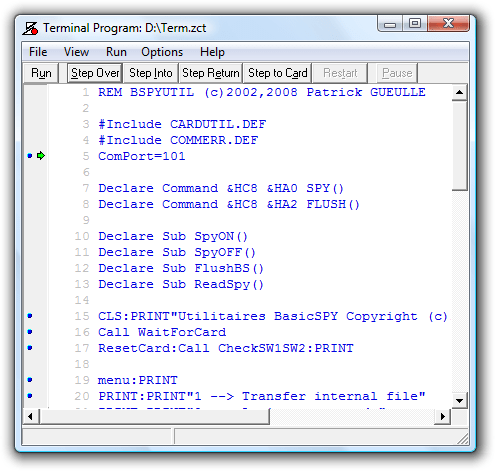
Patrick Gueulle published a logging program (French article) for BasicCards. A BasicCard is a smartcard programmable in a variant of the BASIC language. Patrick’s BasicSPY program logs all APDU requests to a file stored on the smartcard. After using the BasicCard programmed with BasicSPY in a reader, you can retrieve the log file and observe the commands send by the reader to the card.

Patrick’s terminal program to manage the internal file (I translated the menu to English):

20090519-220442

A new type of BasicCard was announced in January: the Dual Interface BasicCard. This smartcard also has a contactless ISO14443/A interface. In other words, this smartcard has a HF RFID interface!

This smartcard is handy to make another lowcost RFID detector: I install BasicSPY on my Dual Interface BasicCard and hold it against an (unknown) RFID reader. When the reader supports ISO14443/A , it will send APDUs to the BasicCard which will log them in the internal file. Later retrieval of the internal file reveals the APDUs send to the smartcard:

20090519-220614

20090519-221114

Monday 4 May 2009

Quickpost: Using Your Poken as a Lowcost LF RFID Detector

Filed under: Hardware,Quickpost,RFID — Didier Stevens @ 0:01

Here’s an alternate use for your Poken: use it to detect 125 kHz RFID readers. Its led will blink red when you bring it next to a LF RFID reader (125 kHz). It will not react with a 13.56 MHz reader; and I haven’t tested with a 134.2 kHz reader.

20090503


Quickpost info


Monday 12 January 2009

A Hardware Tip for Fuzzing Embedded Devices

Filed under: Hardware,WiFi — Didier Stevens @ 21:22

Phidgets are hardware interfaces that let your computer interact with the environment. In this first blogpost of a new series, I explain how to automatically power-cycle a crashed embedded device.

I’ve been playing with Phidgets over the holiday season. Phidgets are inexpensive hardware interfaces for your computer. You connect them via USB, thus extending your machine with digital inputs/outputs and analogue inputs.

There are several aspects I like about the API-software:

  • it’s available for Windows, Linux and Mac
  • the Linux version is open-source (in a next post, I’ll show it running on my nslu2)
  • there’s support for many programming languages, even Python
  • input changes can trigger events (avoids polling loops)

One problem with automated fuzzing of embedded devices (for example a WiFi AP) is that you’ve to power-cycle a device when it crashed. And that’s a problem when you let it run unattended (i.e. overnight). So it would be handy to have your fuzzer power-cycle the device each time it detects the device became unresponsive.

This Phidget Interface Kit with 4 relays lets you do this. Connect the power supply of the embedded device to the NC (Normally Closed) connector of the relay. This way, the un-powered relay will let the current flow through the power-supply and feed the embedded device. To power-cycle the device, activate the relay for a second or two. This will open the circuit and shutdown the embedded device.

Activating a relay for a second is very easy with the Phidgets sofware, here is a Python example for an Interface Kit:

    oInterfaceKit = Phidgets.Devices.InterfaceKit.InterfaceKit()
    oInterfaceKit.openPhidget()
    oInterfaceKit.waitForAttach(10000)

    oInterfaceKit.setOutputState(0, True)
    time.sleep(1)
    oInterfaceKit.setOutputState(0, False)

    oInterfaceKit.closePhidget()

setOutputState is the actual command used to control the relay on output 0. The other statements are necessary to setup the interface.

Before OSes took full control over the input and output ports, a popular solution was to connect a relay to a Centronics printer port and control the output of the port directly from your program. But nowadays, OSes like Windows take full control over the Centronics port (if your machine still has one…), making it much harder to control from user software.

Phidgets were used (but not hurt) for my TweetXmasTree:

20090112-220040

Monday 8 December 2008

@TweetXmasTree

Filed under: Announcement,Entertainment,Hardware — Didier Stevens @ 20:07

I won’t produce an anti-virus related Season’s Greetings movie, like I did in 2006 and 2007.

But this time, I’ve made you an Xmas Tree you can control via Twitter. However, you’ll have to find out yourself how to control it. 😉

Happy New Year!

20081208-204318

Monday 22 September 2008

Quickpost: WiFi Antenna With 360° Servo

Filed under: Hardware,Quickpost,WiFi — Didier Stevens @ 10:17

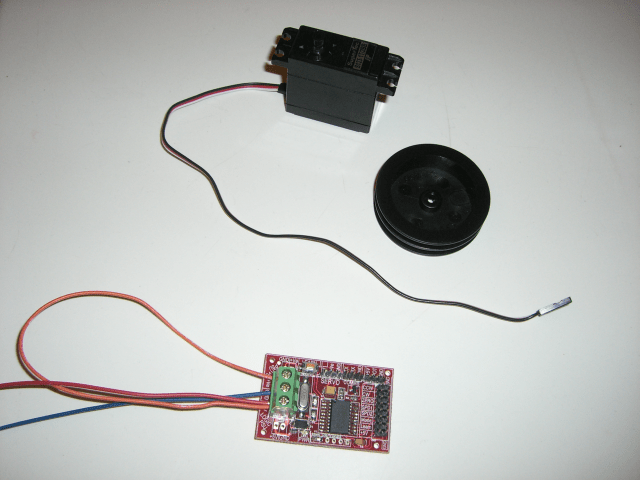
Last weekend, I’ve been playing with a RC servo to automate the recording of wsrradial plots. Metlstorm has presented a solution to do this with Lego Mindstorms, but I present a solution if you don’t want to use Lego components.

RC servos are easy to find, and you can find many servo controllers for PCs (a typical RC servo is controlled with a PWM signal). Though most RC servos though are limited to 180° rotations, there are 360° servos on the market.

Here is a picture of my 360° RC servo, togheter with a servo controller.

The servo in action:


Quickpost info


Thursday 4 September 2008

Pocket Virus Lab

Filed under: Hardware,Malware,nslu2 — Didier Stevens @ 18:57

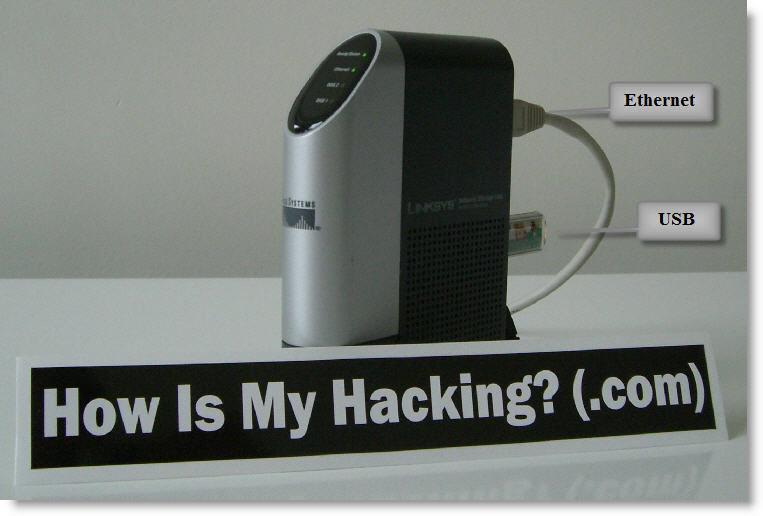
Slugs are versatile little machines. I installed Slugos on my NSLU2, followed by the tools I used in my sampling video.

Unfortunately, it’s too small for my sticker 😉

When I access it with SSH, I see no difference with a shell account on a regular machine.

My Python programs work unmodified, and I can compile my C programs like SpiderMonkey.

As a virus lab, it has a couple of advantages:

  • no malware is targeting this platform (yet), so you can use it to sample and analyze malware without risking infecting the lab
  • the OS is stored on a USB storage device, providing easy swap and imaging (e.g. rollback) capabilities
  • you can connect infected harddisks to it (via a USB adapter) and inspect them without risk
  • it’s a full Linux distro (no GUI, of course): you can find many pre-build (security) tools or compile your own

For an Howto:

Installing Slugos as per these instructions.

Installing a C compiler (not essential for a virus lab):

Installing the Optware feed as per these instructions.

Installing the Optware toolchain:

  • /opt/bin/ipkg-opt install optware-devel

Linking /usr/bin/python to the python2.5 executable


Now if I could just get my hands on a small biohazard sticker…

Tuesday 25 December 2007

Building the Pocket EICAR Test File Server

Filed under: Hardware — Didier Stevens @ 9:11

As I promised last week, here are the technical details of the Pocket EICAR Test File Server.

I bought a mini AVR web server from Tuxgraphics, it’s an AVR microcontroller with an Ethernet controller on a small PCB. The goal is to integrate some sensors (like temperature) and actuators (central heating) into my home network, but my first project was to learn to program it and develop a small web server framework.

The board is ready for operation, I just had to solder 2 wires to provide power and a programming connector. You’ll need an AVR In-System Programmer to upload your compiled C program to the microcontroller. Tuxgraphics sells one that plugs in a USB port, and has the big advantage for me that it comes with a Linux Live-CD with all the programming tools on it. This way, I didn’t have to spend time to build my own developing environment. First I tested the web server, programmer and LiveCD on a real computer with an example from Tuxgraphics. After being satisfied that it worked, I created a virtual machine, booted from the LiveCD, configured networking and sshd and now I develop on that VM. But because it’s a LiveCD and settings are not persisted, I have to take a snapshot before shutting down the VM.

The board has an Ethernet controller, this means that you have to implement the IP functions you need in software on the AVR microcontroller. For example, to get a ping reply from the pocket server, you have to write code to identify the ICMP request, build the reply and transmit it, like this:

petfs-ping.png

Likewise, you have to write code to handle ARP requests, which are essential for IP operation.

And for HTTP web serving, you have to implement TCP connections (e.g. SYN SYN-ACK ACK), parse the HTTP requests and send the corresponding replies. Building on Tuxgraphics’ example, I developed a simple framework to serve static and dynamic HTML pages. All is in the website array that is initialized in the InitWebsite function:

petfs-website.png

Use one entry per web page. The first pointer of each entry points to the URL you want to server, like /info.html. The second pointer is the content type, like HTML or plain text. And the third pointer points to the static content you want to serve. Set this pointer to NULL for dynamic content.

So if you just want to serve static pages for HTTP GET requests, modifying the code doesn’t require real programming skills. In the source code, just change the MAC address and IP address, redimension the website array and populate it with your pages.

But for dynamic pages, you’ll have to write a function that generates the dynamic content, and call that function when the dynamic page is requested:

petfs-http-handling.png

In this example, we check if the index of the requested page (iHTTPURL) equals the index of the status.html page (URL_STATUS). If it does, we call the MakeStatusResponse function that will generate the web page displaying a counter.

You have to realize that this is a very basic HTTP server. It doesn’t keep state for the connections and it’s not multithreaded. If you need a more robust embedded web server, there are solutions like the FOX Board, it runs the BOA web server under Linux.

Download:

eicar.tar.gz (https)

MD5: A8D42CA6628A699C4C76A8412639CEDF

SHA256: 20760F7085830C73BBAE4C1D962D625429920079EFD9A5F38372953B1B5C7896

Untar and make. To program the mini AVR web server: make load_eicar

Tuesday 18 December 2007

Pocket EICAR Test File Server

Filed under: Entertainment,Hardware,Malware — Didier Stevens @ 7:36

Like last year, I produced an anti-virus related Season’s Greetings movie.

The movie is hosted here on YouTube, and you can find a hires version (XviD) here.

Next week, you’ll get the technical details of this pocked web server.

Happy New Year!

Monday 5 February 2007

A running light with a PIN

Filed under: Hardware,Nonsense — Didier Stevens @ 1:49

We all know the problem, you’ve set-up a running light as Christmas decoration, and then a kid starts changing the patterns you’ve programmed.

But not anymore, I’ve made a running light with security: you need a PIN to access the configuration switches!

The movie is hosted here on YouTube, and you can find a hires version (XviD) here.

Joking aside: I got a set of E-blocks from Matrix Multimedia for Christmas.

E-blocks are a suite of small circuit boards each of which contains a block of electronics that you would typically find in an electronic system. Each E-block performs a separate function as either an input sub-system, an output subsystem or a processing subsystem. E-blocks are connected together using 8 wire buses on 9 way D-type plugs and sockets.

My microcontroller is an ARM board. I develop the embedded programs on my laptop in C/C++, and then transfer the executable to the ARM’s flash memory via USB. Once programmed, the ARM executes the program independently, my laptop is disconnected.

To familiarize myself with the E-blocks, I started programming some simple applications, like a running light. And after that, just for fun, I added security…

« Previous Page

Blog at WordPress.com.