Didier Stevens

Wednesday 16 April 2025

Quickpost: Testing The Capacity Of My New Power Bank

Filed under: Hardware,Quickpost — Didier Stevens @ 0:00

I bought a new power bank (Anker PowerCore 533, capacity 10.000 mAh 36 Wh, 30 Watt Power Delivery) and did some tests that I’m summarizing here.

Charging it with a generic USB C charger capable of delivering 20 W PD required 46,979 Wh. That’s measured on the 230V side, thus including the loss in the charger.

Charging it with a Anker 737 Charger (GaNPrime 120W) required 45,515 Wh.

Discharging the power bank via the USB A port connected to an electronic load gave me:

  • 30,970 Wh (6516 mAh ) when drawing 0,5A
  • 29,362 Wh (6523 mAh) when drawing 1,0A

30 Wh compared to 36 Wh (the advertised capacity of the power bank) is 83,33%, which is much better than what Anker estimates you can get out of a power bank (60% to 70%).

As I couldn’t get more than 1,0A out of the power bank via the USB A port, I used the USB C port with a trigger module to deliver 20,0V.

The electronic load drew 1,250A and measured around 18,6V, or 23,25W. I got 29,020 Wh (1557 mAh) out of it.

The power bank became hot while getting completely drained at 23W:

You can see the outline of the cells and the electronic circuit (it’s the hottest: white).

I couldn’t immediately recharge my power bank after that, I had to let it cool down (“Let the power bank cool down before use”):

I also tried to get more out of the power bank by drawing 1,5A at 18,55V or 27,82W (advertized maximum is 30W).

But after 34 minutes (delivering 15,670 Wh) it stopped delivering power and displayed the following message (“Use after protection removal”):

I guess that’s the overcurrent protection kicking in. I’m not sure why this happened, as the electronic load was in constant current mode.

I had to disconnect the cable to use the power bank again.

And finally, this power bank is capable of trickle charging: delivering a very low current for about two hours. You enable this mode by pushing the button twice.

I configured the electronic load to draw a really low current of 0,005A (it measured 0,003A) from the USB A port and it delivered 0,032 Wh (6 mAh) over a period of 2:01:05 after which it shut down automatically (as advertized).


Quickpost info

Sunday 30 March 2025

Quickpost: Electrical Power & Mining: Dissipated Heat

Filed under: Hardware,Quickpost — Didier Stevens @ 0:00

I got an interesting question on my blog post “Quickpost: Electrical Power & Mining“:

Does the temperature in your room increase due to the miner running full blast? Would you turn down the heater to compensate (which may change the calculation slightly).

That was indeed the case: I did turn down the heating in the room, and the heat of the desktop computer made it a nice 20°C.

We heat our home with natural gas, and on that day, we consumed 2,23 cubic meters to heat the rooms in our house, except for the office where the computer was running. Counting the volumes of the rooms, I estimate that 0,55 cubic meters would have been necessary to heat the office.

Using that same spreadsheet, consuming an extra 0,55 cubic meter would cost me €0,55. Deducting this from the €3,91 I had to spend on electricity gives me €3,36, which is still around 10 times more than the €0,39 I earned through mining.


Quickpost info

Monday 10 February 2025

Quickpost: Electrical Power & Mining

Filed under: Hardware,Quickpost — Didier Stevens @ 0:00

I was wondering: how costly is crypto mining for me?

I let an easy-to-use mining application run on my desktop computer (RTX 3080 GPU) for 24 hours.
After 24 hours, the miner reported that I had mined 0,00000365 BTC, and that this would earn me €0,39. The electrical power consumption of my desktop computer for that period was 13,024 kWh.

How much does 13 kWh cost me? Here in Belgium, we pay a lot of taxes on our utility bill. So just multiplying 13 kWh with the cost for 1 kWh would not produce realistic costs.
What I did instead: I took my utility bill of December 2024, with all the taxes, and created a spreadsheet that re-calculates all of the costs and taxes. That gives me a spreadsheet were I can simulate changes to my bill and see what the final result is. And with that spreadsheet, I increased my electrical power consumption for December 2024 with 13,024 kWh. That gave me an extra cost of €3,91.

Spending €3,91 to earn €0,39 is not viable at all.

But what if I would run the miner only when my solar panels produce enough power? That’s free electricity, right?

Yes, but … my electricity supplier also pays me money for the solar power I produce and don’t consume (e.g., inject).
Injecting 13,024 kWh would earn me €0,86. So that’s at least double the amount that mining would earn me.

Conclusion: as long as electricity tariffs don’t change significantly, mining is not financially viable for me. One would be better of buying BTC with the small payouts for injected power.


Quickpost info

Friday 22 November 2024

Interfacing With A Cheap Geiger Counter

Filed under: Hardware,My Software — Didier Stevens @ 0:00

I got a cheap Geiger counter from Aliexpress:

This picture was taken on an airplane: you have more radiation (cosmic rays) at high altitude.

I figured out how to interface with this counter in Python to log real time data:

#!/usr/bin/env python

from __future__ import print_function

__description__ = "Program for geiger meter"
__author__ = 'Didier Stevens'
__version__ = '0.0.1'
__date__ = '2024/05/11'

"""

Source code put in the public domain by Didier Stevens, no Copyright
https://DidierStevens.com
Use at your own risk

History:
  2024/05/11: start

Todo:
"""

import optparse
import serial
import time

def FormatTime(epoch=None):
    if epoch == None:
        epoch = time.time()
    return '%04d%02d%02d-%02d%02d%02d' % time.localtime(epoch)[0:6]

def FindCOMPorts():
    ports = []
    for number in range(1, 10):
        try:
            comport = 'COM%d' % number
            with serial.Serial(comport) as oSerial:
                ports.append(comport)
        except serial.serialutil.SerialException as e:
            if 'PermissionError' in e.args[0]:
                ports.append(comport)
    return ports

def LogToCSV(comport):
    ser = serial.Serial(comport, 115200, timeout=0, write_timeout=0)
    ser.write(b'\xAA\x05\x0E\x01\xBE\x55\x00')
    alldata = b''
    fOut = open('geiger.csv', 'a')
    while True:
        data = ser.read(1000)
        if data != b'':
            alldata += data
            lines = alldata.split(b'\xaaU\x0e')
            alldata = lines[-1]
            lines = lines[:-1]
            for line in lines:
                if line != b'':
                    out = FormatTime() + ';' + line.decode('latin')
                    print(out)
                    fOut.write(out + '\n')
            if alldata.endswith(b'U') and not alldata.endswith(b'\xaaU'):
                out = FormatTime() + ';' + alldata.decode('latin')
                print(out)
                fOut.write(out + '\n')
                alldata = b''
            time.sleep(0.40)

def Main():
    oParser = optparse.OptionParser(usage='usage: %prog [options]\n' + __description__ , version='%prog ' + __version__)
    oParser.add_option('-l', '--listports', action='store_true', default=False, help='List ports')
    (options, args) = oParser.parse_args()

    comports = FindCOMPorts()
    if options.listports:
        print('Available ports:')
        for comport in comports:
            print(' %s' % comport)
        return

    if len(args) == 1:
        LogToCSV(args[0])
    elif len(comports) == 1:
        print('Using %s' % comports[0])
        LogToCSV(comports[0])
    else:
        print('Provide the COM port as argument')
        print('Available ports:')
        for comport in comports:
            print(' %s' % comport)

if __name__ == '__main__':
    Main()

Thursday 21 November 2024

Quickpost: The Electric Energy Consumption Of A Soundbar

Filed under: Hardware,Quickpost — Didier Stevens @ 0:00

I have a Samsung Neo QLED 65 inch TV.

Its standby power consumption is pretty good: 1,3 Watt.

It comes with a soundbar, and its standby power consumption is pretty awful: 5,5 Watt!


Quickpost info

Sunday 3 November 2024

Quickpost: The Electric Energy Consumption Of A Wired Doorbell

Filed under: Hardware,Quickpost — Didier Stevens @ 0:00

I have a classic wired doorbell at home: the 230V powered transformer produces 12V on its secondary winding. The circuit on that secondary winding powers an electromechanical doorbell via a pushbutton. The bell rings (“ding-dong”) when the button is pushed (closing the circuit).

Since losses occur in all transformers, I wanted to know how much my doorbell transformer consumes in standby mode (doorbell not ringing). The primary winding is always energized, as the pushbutton (normal-open switch) is on the circuit of the secondary winding.

I made the measurements on the primary winding: 3,043 Watt. That’s more than I expected, so I double-checked, and noticed I had forgotten this:

There’s a small incandescent light-bulb in the doorbell button. That consumes power too!

Second set of measurements after removing the light-bulb: 1,475 Watt.

So with light-bulb, my doorbell consumes 3 Watt 24/7, and 1,5 Watt without light-bulb.

1,5 Watt is very similar to the standby consumption of linear power supplies. As energy experts here in Europe advice to replace linear power supplies in favor of switched-mode power supplies, I wonder why they never mention doorbells … Replacing your doorbell would not be as easy as replacing a (USB) charger though (it would best be done by an electrician), so that might explain it, but on the other hand, there are enough energy experts proposing impractical solutions.

3 Watt is 26,28 kWh for a whole year. In my case, that’s a cost of €5,89 (that’s total cost: electricity plus taxes). I could reduce this by half, just by removing the incandescent light-bulb.

Should I do this? Well, the decision has already been taken for me: I dropped the light-bulb while it was still hot, and the impact broke the filament …

For comparison: 3 Watt is at least three times higher than the individual standby consumption of our appliances like TV, fridge, freezer, …

Yet another comparison: asking an LLM to write an email requires less (< 0,3 Wh) than my doorbell over a period of an hour (3 Wh).


Quickpost info

Wednesday 28 December 2022

Powerstrip With Neon Lamp Switch

Filed under: Elec,Hardware — Didier Stevens @ 0:00

There are powerstrips with a switch that lights up when the switch is turned on. Like this one:

These switches (certainly older models) often use a neon lamp as light source.

I measured the electric energy consumption of a powerstrip with switch on and neon lamp burning (without anything plugged into the powerstrip’s outlets).

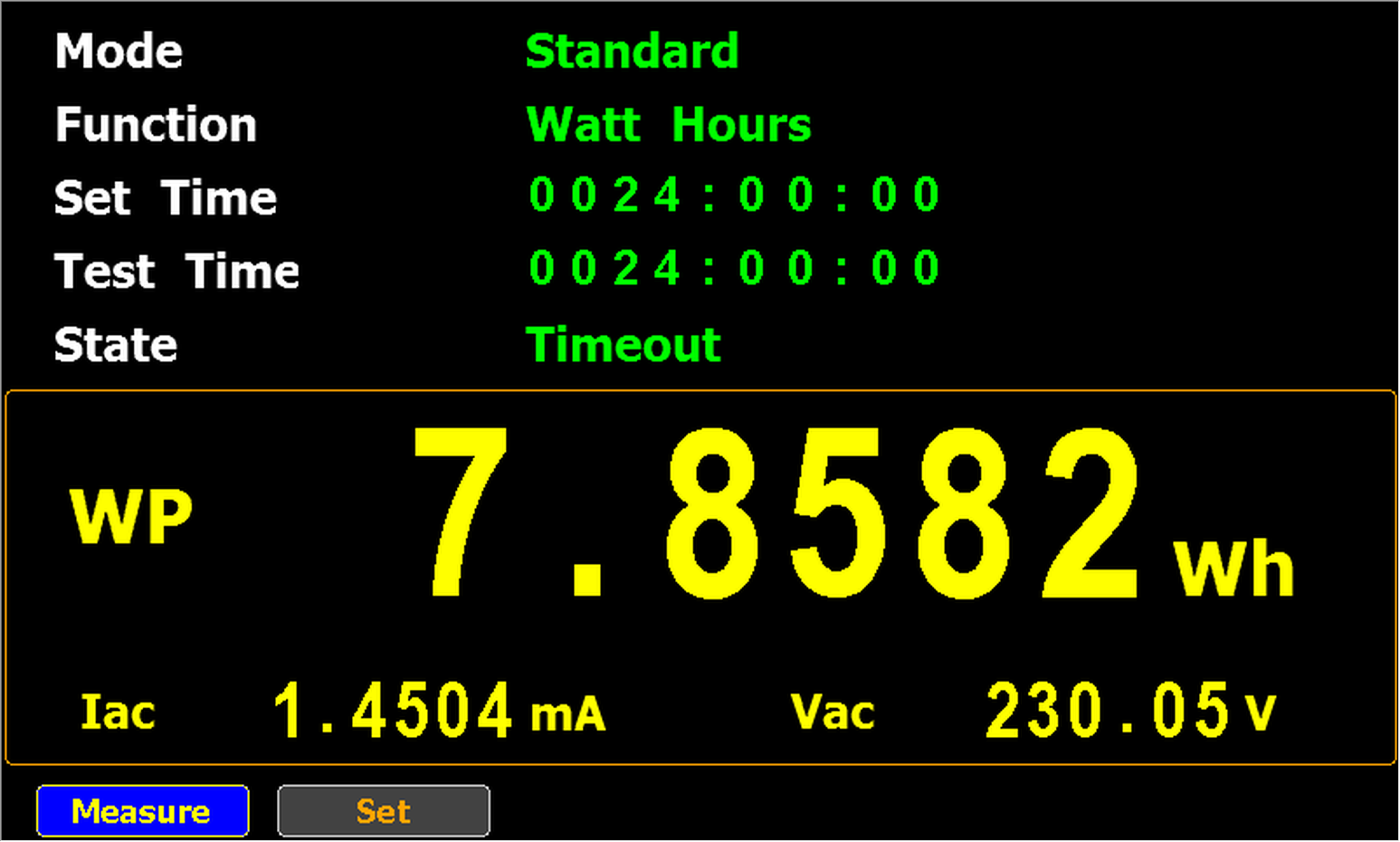
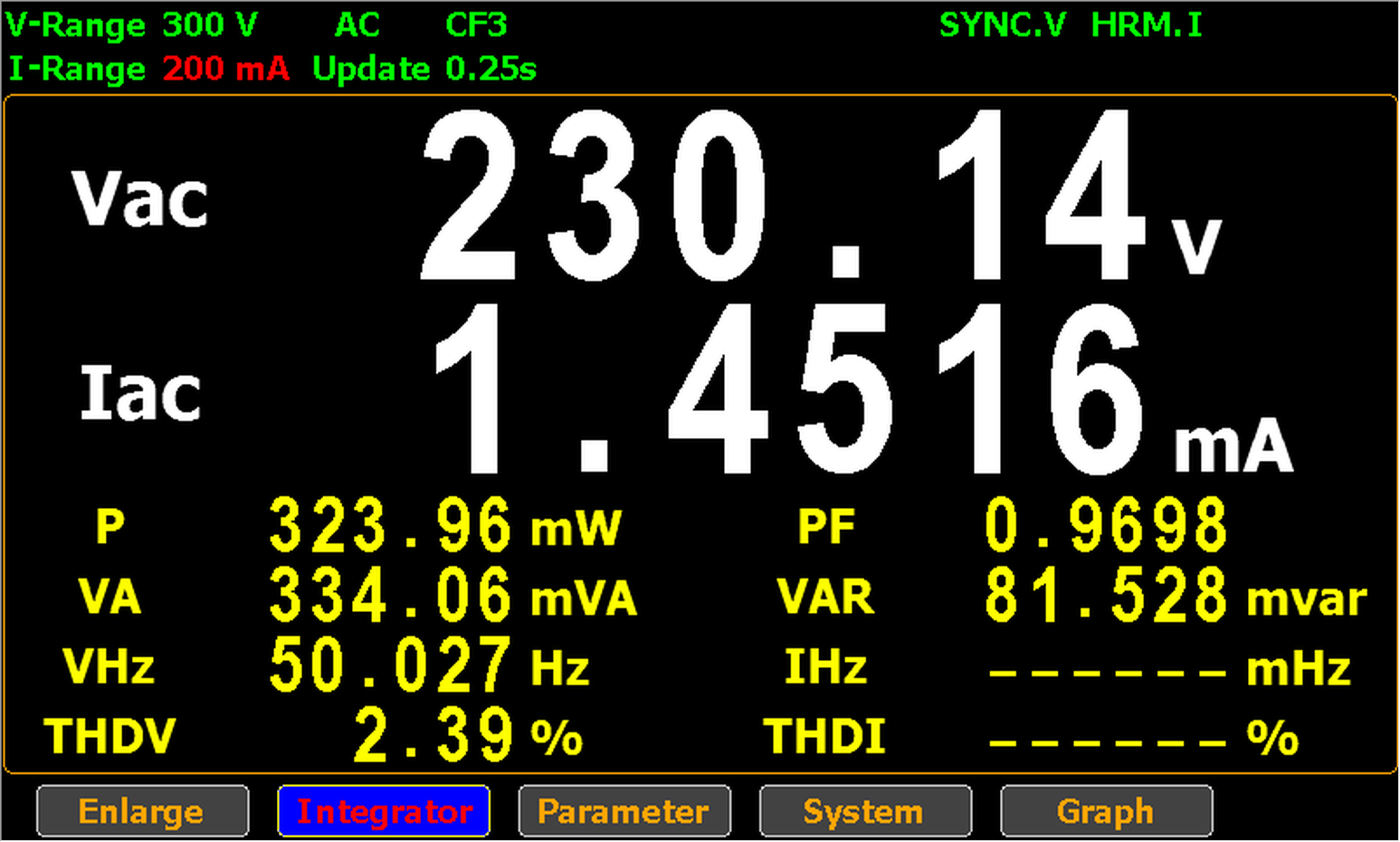
It consumed 7,8582 Wh over 24 hours, thus it drew on average 0,327 W.

That’s about 6 times more than the standby power of my Apple USB charger A2347 (0,0530 W).

FYI: although the switch is turned on in the above picture, you don’t see the neon lamp burning.

That’s because of the AC power here in Belgium is 230V and 50Hz.

50Hz means that the current is 0 A 100 times per second, and thus the neon lamp does not light up around these 0 A current values.

So the picture above was taken at a moment that the lamp wasn’t lighting up because the current was (almost) 0 A.

I will go into more details in an upcoming blog post.

I did not conduct tests with powerstrips that use LEDs in stead of neon lamps yet, because all the powerstrips with LEDs I have, also have a builtin USB charger, and that draws power too.

Saturday 12 November 2022

Quickpost: Testing A USB Fridge (Update)

Filed under: Hardware,Quickpost — Didier Stevens @ 0:00

I performed some extra tests with my USB fridge (see Quickpost: Testing A USB Fridge).

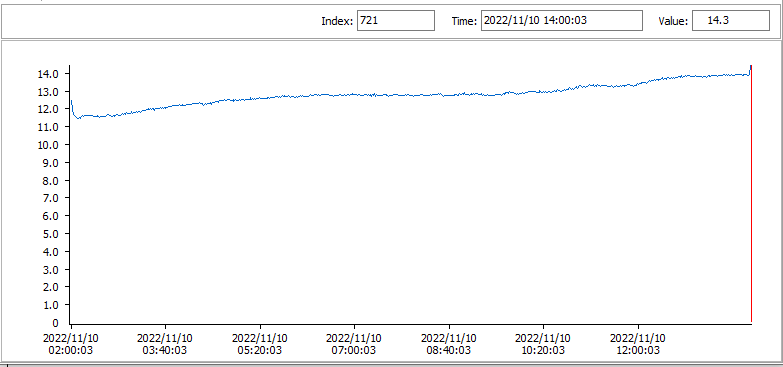
Here is how the temperature evolved when I put a can with cold water (around 12° C) in the USB fridge:

The temperature increased around 2° C over a period of 12 hours (room temperature was around 17 °C).

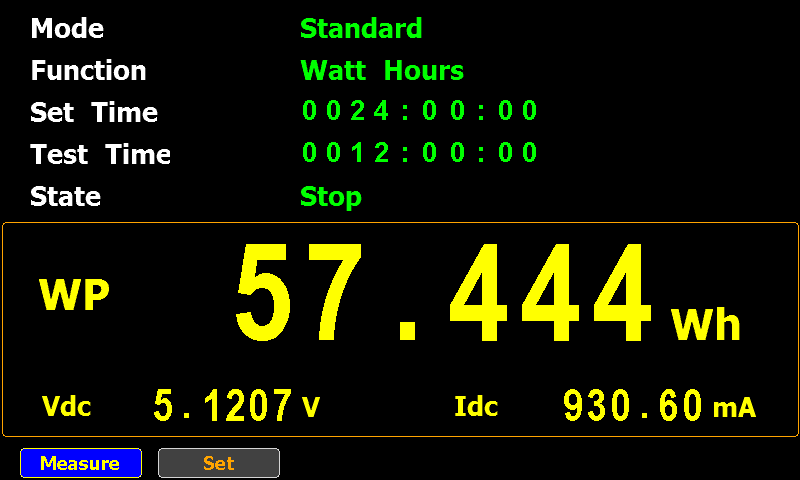
That required around 57 Wh.

And the temperature at the top of the can increased more than at the bottom:

For reference, here is how the temperature evolves of a cooled can of water left on the desk in that same room (so not inside the USB fridge):


Quickpost info

Sunday 6 November 2022

Quickpost: Testing A USB Fridge

Filed under: Hardware,Quickpost — Didier Stevens @ 14:50

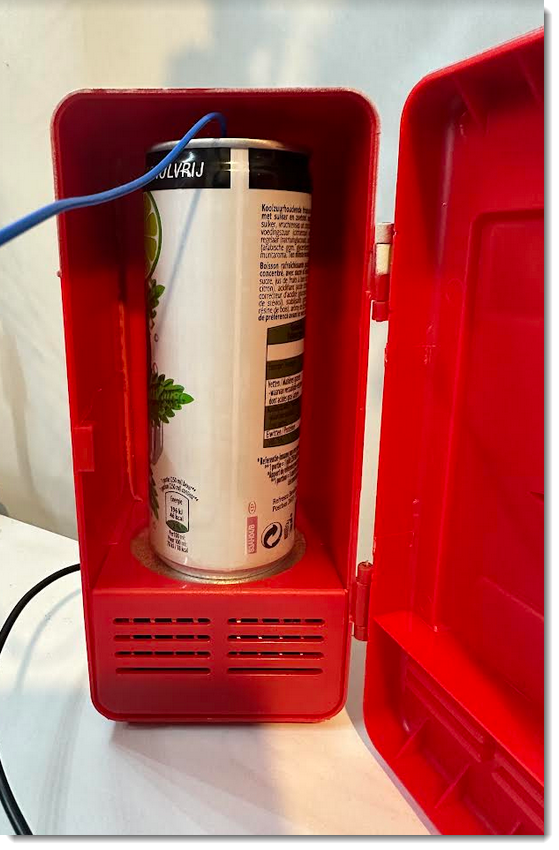
A couple years ago, I received a USB fridge from NVISO’s Secret Santa.

It uses a Peltier element with a fan.

I did the following test: overnight, I let the fridge run for 12 hours. It contained an Aluminum can filled with water at room temperature (around 17° C).

I used a power meter to measure the electric energy consumption, and a multimeter with a thermocouple (type K) to measure the water temperature. The thermocouple was at the bottom of the water, not touching the bottom of the can.

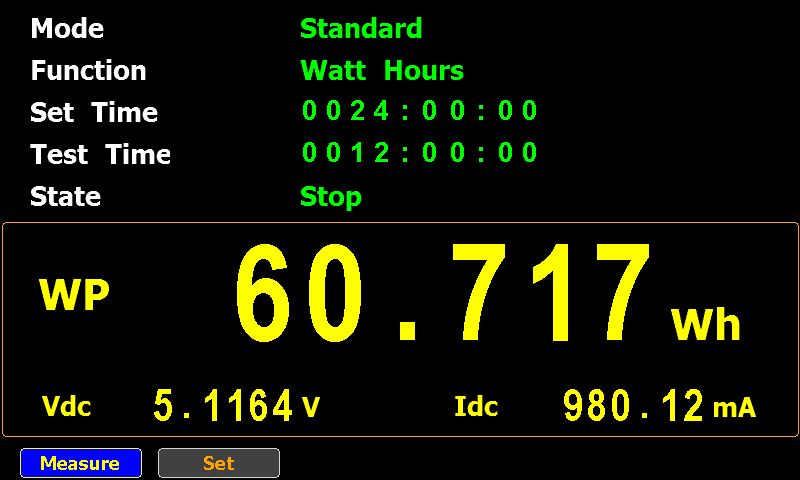
The USB fridge consumed 60.717 Wh over that period, and the water temperature (at the bottom) was around 14.7 °C when I stopped the test. After the test, I moved the thermocouple to the top of the water, and there the temperature was 16.9 °C.

My multimeter logged the temperature every 60 seconds, resulting in this chart:

Notice that the first 12 minutes, the temperature rises a bit, and then starts to lower (I’ll do more experiments to try to figure out why it rises first). And then, when the cooling starts, it gradually slows down. Around 8 hours 45 minutes into the test, the water temperature reaches 14.80 °C and from then on barely changes.

The can is coolest at the bottom, as can be observed in this thermal image:

More pictures:

You don’t get much cooling from this USB fridge for the amount of energy it takes. I didn’t RTFM, so maybe its purpose is not to cool a can from ambient temperature down to a nice cool drink, but to keep a can cooled in a real fridge, cool when it’s sitting on your desk.

But most likely it’s an inefficient USB gadget 🙂


Quickpost info

Monday 31 October 2022

Quickpost: BruCON Travel Charger

Filed under: Hardware,Quickpost — Didier Stevens @ 0:00

In my BruCON speaker goodie bag, I found a travel adapter & USB charger:

I already have a similar travel adapter, but this BruCON travel adapter has one extra important feature for me: a USB C port.

As I still had my setup ready for testing the electrical energy consumption of devices, I quickly tested the standby power of this charger.

It’s average standby electrical power consumption is 236,46 mW. Standby means: I plug the adapter into an electrical outlet (230V) without connecting any device for charging.

I imagine that for a travel adapter, standby consumption is not that important, as one would use it only occasionally.


Quickpost info
« Previous PageNext Page »

Blog at WordPress.com.