Didier Stevens

Thursday 5 June 2008

bpmtk: How About SRP Whitelists?

Filed under: Hacking,My Software — Didier Stevens @ 13:44

After having showed you how my Basic Process Manipulation Tool Kit can be used to bypass Software Restriction Policies, I wanted to follow this with a post showing how SRP whitelisting can prevent this. However, while preparing this new post, I got an idea how I could bypass SRP whitelists (under certain conditions), but I’ve no idea how to prevent this. I finally decided to post this without a solution, maybe you’ll come up with one.

With a SRP whitelist, starting a program is denied by default:

As an administrator, you’ve to explicitly specify the programs that are allowed to be executed by your users (if there are many programs, maintaining this whitelist becomes time consuming). Because of this whitelist, tools like gpdisable or bpmtk can’t be executed to disable SRP. However, if I can execute these tools without starting a new process, SRP will not block them …
Applications with embedded scripting can also be used to manipulate processes. For example, the scripting features of Microsoft Office allow you to call the system APIs I’ve been using in my bpmtk. It’s often not easy (even impossible) to convert a C program to VBscript, but I’ve a workaround.

First, we adapt our C program from an EXE to a DLL (entrypoint DllMain in stead of main), because VBscript can load a DLL.

We’ll use Excel’s scripting features. I’ve created an Excel spreadsheet that embeds a DLL that can be executed with a mouse-click:

The MyDLL dialog is displayed by the embedded DLL.

The DoIt button starts this Sub:

DoIt will create a temporary file (in the user’s temporary file folder), write the embedded DLL to it (DumpFile), and then load the DLL (LoadLibrary).

Generating the temporary filename:

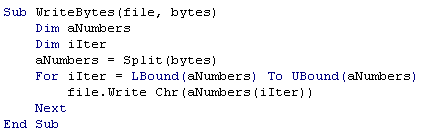
Writing the embedded DLL to the temporary file:

Each DumpFileX sub writes bytes to the temporary file (the DLL is embedded in these subs by including the hex dump in strings). It’s necessary to split this over several subs, because of the sub size limitation.

Once the DLL is stored in the temporary file, we call LoadLibrary to load our library in the Excel process. And this executes our code inside the Excel process. Because of this, SRP will not deny it, and our code can disable SRP.

Creating temporary files and loading libraries is normal behavior for programs, SRP will not block this. Even most HIPS will not block this, because loading a library is not the same as injecting a DLL (injecting a DLL is loading a library inside another process). The only thing that might be considered abnormal by the HIPS, is that a temporary file is mapped into memory, but there are also legitimate programs that do this.

SRP has an option to whitelist DLLs, but then you’re facing the huge task of identifying and specifying all DLLs your programs use!

If you implement a SRP whitelist because you absolutely want to control the programs executed by your users, take some time to reflect on your users and the scripting capabilities of your whitelisted applications. And if you really have to prevent the technique I show here, you’ll have to find another solution than SRP whitelists. Unfortunately, I’ve not found one yet… If you’ve an idea, post a comment (banning applications with embedded scripting or disabling scripting is not an option).

Tuesday 3 June 2008

Quickpost: bpmtk Config File Embedding

Filed under: Hacking,My Software,Quickpost — Didier Stevens @ 5:59

After a rather long detour in PDF file format land, let’s pick up where we left the bpmtk.

My Basic Process Manipulation Tool Kit requires a configuration file with instructions to manipulate processes, like this one to start cmd.exe in a restricted environment:

start cmd.exe
search-and-write module:. unicode:DisableCMD hex:41

Save this configuration in a text file, for example start-cmd.txt. And then start bpmtk with this file:

bpmtk start-cmd.txt

You can also embed this configuration file inside the bpmtk executable, like this:

bpmtk start-cmd.txt bpmtk-cmd.exe

This will create a copy of bpmtk.exe, called bpmtk-cmd.exe, with start-cmd.txt embedded as a resource (called BPMTK).
When you execute bpmtk-cmd.exe (without any arguments), the embedded script will be executed. Use this
trick if you often have to execute the same command, or if you have to execute bpmtk in an environment where you cannot provide an argument.


Quickpost info


Tuesday 8 April 2008

Quickpost: Back from Black Hat Europe 2008

Filed under: Hacking,Quickpost — Didier Stevens @ 7:44

Back from Black Hat Europe 2008, my laptop has undergone another lobotomy.

Mikko from F-Secure was in my training class.

Some briefings I really liked:

  • New Viral Threats of PDF Language
    Good overview of the format of PDF files, and the inherent security issues. Good demos (like rewriting the Acrobat reader alert dialog box to mislead the user) and interesting insights (a PDF has a logical and physical structure, changing the physical structure doesn’t change the content of the document: this is polymorphism). The speaker confirmed that his exploits don’t affect Foxit reader. But the slides don’t to this justice, let’s hope they publish more details. And it was fun to see some French military lingo popping up in a BH presentation.
  • Intercepting Mobile Phone/GSM Traffic
    THC explained how they cracked GSM A5/1 encryption, FPGA style and with 2 TB of rainbow tables. Interesting tidbits: mobile operators don’t provide the strongest available encryption A5/3 (my guess as to why: cost), and the GSM status channel will carry permanent subscriber IDs, although the protocol only foresees temporary IDs.
  • Mobile Phone Spying Tools
    Tools mainly used by untrusting spouses, but I see potential uses for industrial espionage: sales man leaves company for competition, installs mobile phone spying tool on his corporate mobile phone just before handing it back.
  • DTRACE: The Reverse Engineer’s Unexpected Swiss Army Knife
    Looks really powerful and flexible, let’s hope someone is brave enough to attempt a Windows port.

And the networking was great, shout-out to Malta Info Security.


Quickpost info


Wednesday 19 March 2008

bpmtk: Spying on IE

Filed under: Hacking,My Software — Didier Stevens @ 11:07

I was asked if it’s possible to intercept IE’s HTTPS requests. It is, it’s not difficult, and you don’t need admin rights to do it on your own processes. In other words, a malware doesn’t even need admin rights to spy on your IE process, if said malware is also running under your user account.

We need to hook the API calls to WinINet functions, like HTTPOpenRequest. We can do this by patching the Delayed Import Address Table of executables calling WinINet functions. In our case, to spy on IE, we need to patch the DIAT of urlmon.dll. One simple way to hook these API calls, is to develop a DLL that will patch the DIAT, diverting the calls to our own functions. Our functions will just call the original functions while intercepting the data.

Here is an example for HTTPOpenRequest:

wininet1.png

HookHTTPOpenRequestA is our hook function for HTTPOpenRequest. It will just output the flags, verb and objectname parameters to the debugger, and then call the original HTTPOpenRequest function with unmodified arguments (which we saved in variable OriginalHTTPOpenRequestA). BTW, if the declaration and use of OriginalHTTPOpenRequestA looks confusing to you, read the explanation of function pointers in C.

Patching the DIAT is easy, use the PatchDIAT function that I provide with my Basic Process Manipulation Tool Kit (it’s in iat.c).

wininet2.png

PatchDIAT needs the name of the executable we want to patch (urlmon.dll), the name of the API to patch (wininet.dll), the name of the function to patch (HttpOpenRequestA), the address of our hooking function (HookHttpOpenRequestA) and a variable to store the address of the original function (OriginalHttpOpenRequestA). PatchDIAT returns S_OK when patching was successful.

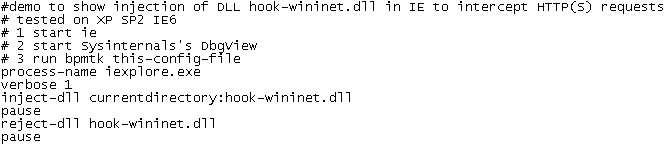
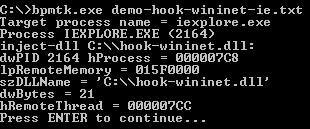
We package everything in a DLL, while hooking some other functions, like InternetReadFile (to intercept actual data), and then inject this DLL in IE with my toolkit:

wininet6.png

wininet7.png

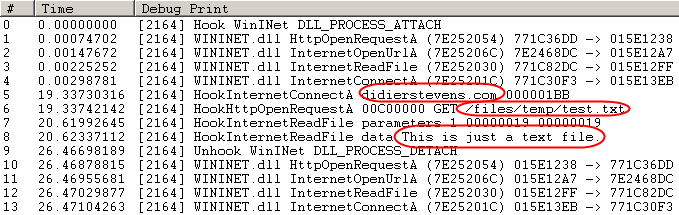
I’ve stored a test file on my server: https://DidierStevens.com/files/temp/test.txt. When you browse to this test file with the patched IE, you’ll see this in Sysinternal’s DebugView:

wininet5.png

Lines 0 to 4 indicate the patching IE was successful.

Line 5 shows IE opening a connection to didierstevens.com on port 443 (that’s 1BB in hexadecimal).

Line 6 shows the preparation of an HTTPS GET request to file /files/temp/test.txt. Flags 00C00000 indicate HTTPS and keep-alive.

Line 7 shows that the call to InternetReadFile was successful and read 25 bytes (0x19).

Line 8 shows the actual data retrieved by IE: This is just a text file.

The next lines indicate we unloaded our DLL with success (thus undoing the patch).

As you can see, we can intercept data before it is encrypted by the HTTPS connection (/files/temp/test.txt) and after it is decrypted (This is just a text file.). This works because we patch the executable before it calls API functions that handle the encryption/decryption, so we get access to the unencrypted data.

I kept my demo DLL very simple to show you the basic principles. A complete spying program would have to hook more functions and tie all the data together to present it in a user friendly way.

It’s also simple to adapt my IE spying DLL to tamper with the data. For example, it could redirect IE to another web site by changing the lpszServerName argument before it calls the original InternetConnect function.

Wednesday 12 March 2008

bpmtk: DisableAMD

Filed under: Hacking,My Software,Reverse Engineering — Didier Stevens @ 0:43

Remember my DisableAMD post? In stead of patching the EXE file, you can also use my Basic Process Manipulation Tool Kit to patch the running process.

There is a small difficulty, however. The check for the DisableCMD key is done when CMD.EXE is started, so to be successful, we have to start the program and change the DisableCMD string in memory before the check is made. Sounds impossible? Not really, the CreateProcess function allows you to create a new process with its main thread in a suspended state (this means that the program is not running). This gives you the opportunity to change the string in memory before it is used.

Use the start statement to start a new process in suspended state:

start cmd.exe

Change the string in memory:

search-and-write module:. unicode:DisableCMD unicode:DisableAMD

The main thread will be resumed after the last statement was executed (search-and-write in our example):

start-cmd-w2k8.png

The cmd.exe window in the background was launched from the start menu (showing you that cmd.exe is disabled), while the cmd.exe window in the foreground was launched with the bpmtk (showing you the bypass of the GPO).

And did you notice that this screenshot is taken on a Windows 2008 server?

Next time, I’ll show some tricks to use the bpmtk in a restricted environment, like a Terminal Server.

Thursday 6 March 2008

bpmtk: Replacing Gpdisable

Filed under: Hacking,My Software,Reverse Engineering — Didier Stevens @ 8:52

Gpdisable is a tool to bypass group policy as a limited user, posted by Marc Russinovich on his blog when he was still the owner of Sysinternals. But now that Sysinternals is owned by Microsoft, the tool is not available anymore.

My Basic Process Manipulation Tool Kit can replace Gpdisable, I’ll show how and give you one more trick.

LikeMarc did, you can inject a DLL that will patch the IAT to subvert NtQueryValueKey, but I’ll leave this technique for an upcoming post.

My example doesn’t require you to program a DLL to inject: since we want to hide the TransparentEnabled registry key, we will just rename the key in the process memory of the programs that impose Software Restriction Policies on us (like explorer.exe). Here is the bpmtk config file to achieve this goal:

dll-name advapi32.dll
#rename TransparentEnabled to AransparentEnabled
search-and-write module:. unicode:TransparentEnabled ascii:A

This will patch each process you’ve rights to and who has loaded advapi32.dll (this DLL enforces SRP).

But as Mark writes in his blog, this will not work for running processes because they have already cached the value of TransparentEnabled and are thus not querying the registry anymore. This is why many people reported that Gpdisable didn’t work for them. Gpupdate /force will force a refresh of the policies, and invalidate the cache.

But if you’re in a restricted environment, there’s a chance you’re prevented from doing a gpupdate. Here’s another way: set the variable _g_bInitializedFirstTime to 0, this will also invalidate the cache. For advapi32.dll version 5.1.2600.2180, this variable is at address 77E463C8. Our script becomes:

dll-name advapi32.dll
#rename TransparentEnabled to AransparentEnabled
search-and-write module:. unicode:TransparentEnabled ascii:A
write version:5.1.2600.2180 hex:77E463C8 hex:00

Thursday 28 February 2008

Introducing the Basic Process Manipulation Tool Kit

Filed under: Forensics,Hacking,My Software,Reverse Engineering — Didier Stevens @ 10:01

For about a month or two now, I’ve been working on a toolkit to manipulate processes (running programs) on Windows. I’ve been using it mainly to research security mechanisms implemented in user processes, like Microsoft .NET Code Access Security.

Here are some of the design goals of the toolkit:

  • the toolkit must support limited accounts (accounts that are not local administrators) as much as possible
  • flexibility: provide a set of commands that can be assembled in a configuration file to execute a given task
  • the toolkit must be able to operate as a single EXE, without requiring the installation of supporting environments like Python
  • it must be a command-line tool

The toolkit has commands to search and replace data inside the memory of processes, dump memory or strings, inject DLLs, patch import address tables, … I’ll be posting examples in the coming weeks, illustrating how these commands can be used.

I’m releasing a beta version of the toolkit now, you can download it here.

This is an example of a configuration file (disable-cas.txt) to disable CAS for a given program (exactly like CASToggle does):

process-name CASToggleDemoTargetApp.exe
write version:2.0.50727.42 hex:7A3822B0 hex:01000000
write version:2.0.50727.832 hex:7A38716C hex:01000000
write version:2.0.50727.1433 hex:7A3AD438 hex:01000000

It looks for processes with the name CASToggleDemoTargetApp.exe, and will then write to the memory of these processes to set a variable to 1 (hex:01000000). The address to write to depends upon the version of the DLL containing the variable. If the DLL has version 2.0.50727.42, we will write to address 7A3822B0. For version 2.0.50727.832, we will write to 7A38716C, … So in this configuration file, at most one write command will be successful and write to memory.

Launch the toolkit with the configuration file like this:

bpmtk disable-cas.txt

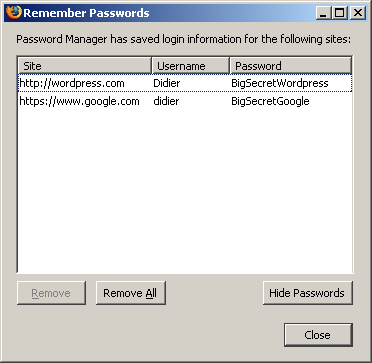
You can also use the toolkit to audit programs, for example to check if they protect secrets correctly. Let’s investigate how Firefox keeps passwords (I tested this with Firefox 2.0.0.12 English on Windows XP SP2):

I created a new Firefox profile, defined a master password and stored two passwords: one for Google (BigSecretGoogle) and one for WordPress (BigSecretWordpress).

This is the config file:

process-name firefox.exe
strings address:on memory:writable regex:BigSecret

This config file will search inside the memory (only the writable virtual memory) of Firefox for strings containing the string BigSecret, and dump them to the screen, together with the address where they were found.

Let’s start Firefox and search inside the memory (bpmtk demo-firefox-passwords.txt):

bpmtk-0009.png

No BigSecrets here. Now let’s navigate to Google mail. We are prompted for the master password, so that Firefox can complete our credentials on the login screen:

bpmtk-0010.png

bpmtk-0012.png

Let’s take another peek inside the memory of the Firefox process:

bpmtk-0013.png

It should be no surprise that we find our Google password in memory (at 2 different addresses, the U indicates that we found a Unicode string).

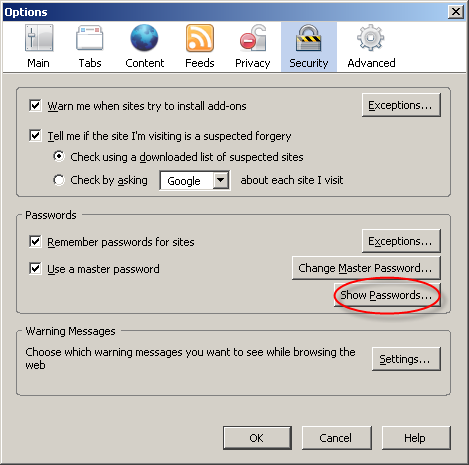
Now let’s go to Firefox’s options and display the passwords:

bpmtk-0014.png

bpmtk-0015.png

The password manager displays the stored URLs and the usernames, but not the passwords. Let’s take another peek inside the memory of the Firefox process:

bpmtk-0016.png

This time, Firefox has also decrypted our WordPress password (BigSecretWordpress), although it’s not displayed. It’s only displayed if we provide the master password a second time:

bpmtk-0017.png

bpmtk-0018.png

So although Firefox prompts you a second time for the master password to display all the passwords, the passwords have already been decrypted in memory before you provided the master password a second time.

Now I don’t have issues with this behavior of the password manager of Firefox, I don’t think it’s a security issue (I’ve an idea why it was programmed like this). But if Firefox was a perfect program, all passwords would only be decrypted when a user explicitly asks to display all passwords.

Do you make online payments with your credit card? Now that I’ve showed you how you can look for specific strings inside a running program with my toolkit, you should know how to use it to check how long your browser keeps your credit card number inside its memory. And can you find out how to use bpmtk to erase that number from your browser’s memory?

Let me finish with an appetizer: I’ve also developed a DLL that, once injected inside a process, will instantiate a scripting engine inside said process, and start executing a script inside the process. This allows you to inject a script inside a process, which can be handy for rapid prototyping or when you’re operating in a limited environment where you don’t have a C compiler to develop a custom DLL to inject. Of course, a script is not as powerful as a compiled C program, but I’m adding some objects to provide some missing functionality.

This script injector will be released with an upcoming version of the bpmtk.

Tuesday 5 February 2008

Hiding Inside a Rainbow, Part 3

Filed under: Hacking — Didier Stevens @ 9:37

(IN)SECURE Magazine has published my research on steganography with rainbow tables. As promised, I publish my last algorithm now (my previous posts: part 1, part 2).

This steganographic technique is based on the fact that a rainbow table contains chains with the same hash index but with a different start index.

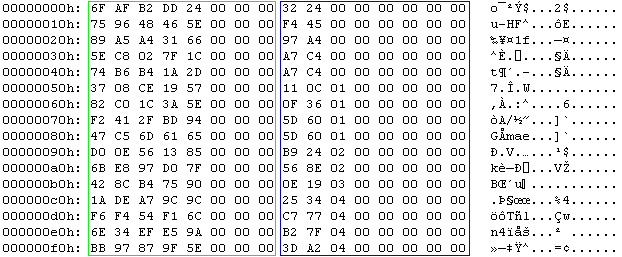
A rainbow table is just a sequence of records. Each record has 2 fields of 8 bytes each, this makes a record 16 bytes wide. Therefore the size of a rainbow table is a multiple of 16. A record represents a chain. The first field is the password that started the chain. Actually, the first field is an index into the keyspace of all possible passwords for the given rainbow table set. It is a random number between 0 and the size of the keyspace – 1. The second field is the hash of the last password in the chain (actually, this is also an index and not the real hash). The rainbow table is sorted on the second field: the record with the lowest hash is first in the table and the one with the highest hash is last.

pict1.png

This is the hex dump of a rainbow table (the first 16 chains). The green box highlights the random data, notice that the 3 most significant bytes are 0. The blue box highlights the hash, notice that this column is sorted.
My steganographic technique is based on the fact that a rainbow table contains chains with the same hash index but with a different start index.

Take the rainbow table I’ve used in my tests. It’s 1 GB large and has 67.108.864 chains. It contains 9.513.435 pairs of chains with the same hash index but with a different start index. For 4.756.561 of these pairs, the first chain has a higher start index than the second chain. And for 4.756.874 of these pairs, the opposite is true: the first chain has a lower start index than the second chain. This even distribution should be no surprise, as the rainbow table is only sorted on the hash index and not on the start index.

We can change the order of these pairs without breaking the chain and without disrupting the order of the rainbow table. This will allow us to encode 1 bit per chain. I define the following encoding convention:

  • a pair of chains with the same hash index and with the start index of the first chain smaller than the second chain represents a bit equal to zero
  • a pair of chains with the same hash index and with the start index of the first chain greater than the second chain represents a bit equal to one

pict2.png

In our test table, the pair in the green box represents a 0 (0x1C7F02C85E < 0x2D1AB4B674) and the pair in the red box represents a 1 (0x94BD2F41F2 > 0x65616DC547).

Use this algorithm to hide a file in a sorted rainbow table:

  • start a sequential search of chain pairs with equal hash indexes and different start indexes
  • for each bit of the file to hide
    • if the bit is 0 and the chain pair has a first start index higher than the second, swap the order of the chains
    • if the bit is 1 and the chain pair has a first start index lower than the second, swap the order of the chains

To extract the hidden file, use this algorithm:

  • start a sequential search of chain pairs with equal hash indexes and different start indexes
  • if a chain pair has a first start index lower than the second, write a bit equal to 0
  • if a chain pair has a first start index higher than the second, write a bit equal to 1

PoC code to store and retrieve data in rainbow tables using this technique can be found here.

Use rthide2 to hide data in a rainbow table, it takes 3 arguments:

  • the rainbow table (remains unchanged)
  • the file to hide (remains unchanged)
  • the new rainbow table

To hide a file data.zip inside a rainbow table called lm_alpha-numeric-symbol14-space#1-7_0_5400x67108864_0.rt, use this command:

rthide2 lm_alpha-numeric-symbol14-space#1-7_0_5400x67108864_0.rt data.zip lm_alpha-numeric-symbol14-space#1-7_0_5400x67108864_0.rt.stego

This will create a new rainbow table called lm_alpha-numeric-symbol14-space#1-7_0_5400x67108864_0.rt.stego

Use rtreveal2 to extract data from a rainbow table, it takes 3 arguments:

  • the rainbow table
  • the file to create
  • the size of the hidden file

To extract the data, issue this command (you have to know the length of the hidden file, my PoC program doesn’t store this).
rtreveal2 lm_alpha-numeric-symbol14-space#1-7_0_5400x67108864_0.rt.stego data.zip 1620

1620 is the length of file data.zip

The advantages of this technique over the previous techniques I developed is that it creates sorted rainbow tables without broken links, and that it is fast. The disadvantage is that it stores much less hidden data. In my example, a maximum of about 1 MB (9.513.435 bits) can be hidden in a rainbow table of 1 GB. Statistical analysis is the only way to detect the hidden data, but you can foil this by making your data appear random, for example with strong encryption.

Tuesday 20 November 2007

Quickpost: Another Funny Vista Trick with ASLR

Filed under: Hacking,Quickpost — Didier Stevens @ 8:06

Dave Maynor’s Vista ASLR tricks post got me thinking. And today, after some inspiring presentations at TechEd last week, I took the time to do some testing. Set the appropriate bit (0x4000) in the DLL Characteristics field of the PE header, and you turn on ASLR for your program of choice. So clearing the bit will disable ASLR, but will Windows File Protection prevent you from changing the program? I didn’t think it would, because you’re only touching the PE Header, which is not protected by the Authenticode signature.

Turns out it does work: you can disable ASLR for a given program, like Internet Explorer. And WFP will not restore the file. But for another reason than I thought: with Vista, WFP is actually called Windows Resource Protection. And it works differently: files are protected by Security Descriptors, and are not replaced automatically when deleted or modified. So the neat trick of deleting a system-file in Windows XP (like utilman.exe) only to see it reappear a couple of seconds later, doesn’t work anymore with Vista. Change the Security Descriptor of the file in Vista (taking ownership and giving you delete rights), delete the file, and it’s gone. No more resurrection.

If you want to play with the ASLR toggle, you can use stud_pe to edit the PE Header and Process Explorer to test it.

So why would you disable ASLR? I don’t know, I just think it’s a funny trick 😉 . But maybe you got an idea? Let me know, post a comment.


Quickpost info


Monday 21 May 2007

Hiding Inside a Rainbow, Part 2

Filed under: Hacking — Didier Stevens @ 10:05

In my previous post about steganography and rainbow tables, I explained a technique to hide data in a rainbow table. The disadvantage of this method is that there is a way, albeit costly, to detect the hidden data. This is because we replace the random bytes, that makeup the start of the chain, by the data we want to hide, thereby breaking the chain. A broken chain can be detected by recalculating the chain and comparing the recalculated hash with the stored hash. If they differ, the chain is broken.

But if we know that we are breaking chains, why don’t we fix them? We can proceed as follows:

  • replace the start of the chain (random bytes) with the data we want to hide
  • recalculate the chain
  • replace the hash of the chain with the new hash we calculated

This way, there are no more broken chains that give away our hidden secret. But now there is another telltale sign that the rainbow table has been modified to hide data: the hashes aren’t sorted anymore. Remember that a rainbow table has to be sorted (the sort key is the index of the hash) to be useful. It is very unlikely that our new hash is greater (or equal) than it’s predecessor and smaller (or equal) than its successor. Detecting an unsorted rainbow table is much easier than finding broken chains.

OK, so if the new rainbow table is unsorted, why don’t we just sort it again? Well, if we resort the rainbow table, we destroy the order in which we stored our hidden data, so we loose the hidden data itself.

You could keep the original order of the hidden data by creating an index, this is another file that indexes the chains with hidden data. For example, you could make a list of all the hashes with hidden data. This list will then allow you to retrieve all chains with hidden data in the correct order. And the fact that you have such a list of chains isn’t necessarily suspicious, it’s just a list of hashes you want to crack…

But there is a simple way out of the unsorted rainbow table problem. Rainbow tables generated with the rtgen program are unsorted. In fact, you have to sort them with the rtsort command after generating them, before they can be used by the rtcrack program. The solution is to adapt the rtgen program to generate a rainbow table with hidden data, and keep this unsorted rainbow table.

And this is not so difficult. We add this method to the chain class:

void CChainWalkContext::InjectHiddenData(FILE *fFile, int bytes)
{
  unsigned char *byteInject;
  int iIter;
  int iChar;

  byteInject = (unsigned char *) &m_nIndex;

  for (iIter = 0; iIter < bytes; iIter++)
  {
    if ((iChar = fgetc(fFile)) == EOF)
      return;
    byteInject [iIter] = iChar;
  }
}

The arguments are a file handle to the file with data we want to hide, and the number of bytes per chain we use to hide data. We call the InjectHiddenData method in the rtgen program just after having generated random data (cwc.GenerateRandomIndex();, line 206 of file RainbowTableGenerate.cpp).

Our modified rtgen program allows us to generate an unsorted rainbow table with hidden data. The only way to detect this hidden data is with statistical analysis, provided that the hidden data doesn’t appear random. There are no broken chains that indicate hidden data, unlike with the previous method.
The disadvantage of this method is that you’ll have to generate a new rainbow table to hide your data, which is a lengthy process.

To extract the data file, use the same program as for the previous method, rtreveal

If you don’t feel comfortable using an unsorted rainbow table to hide data, I have probably two extra techniques for you.
One technique creates a sorted rainbow table without broken chains and it is fast. The disadvantage is that it stores much less hidden data. But you’ll have to wait a bit before I publish this technique. I’ve submitted an article about this steganographic technique to 2600 Magazine, and I can only release it after it gets published or refused.

The other technique also creates a sorted rainbow table without broken chains and it is fast, but I still have to work on it. It works, but it might be detectable. I’ll publish it when I’ve finished working on it.

« Previous PageNext Page »

Blog at WordPress.com.