- Update: python-per-line.py Version 0.0.9
- Extracting Certificates For Defender
- Update: count.py Version 0.3.1
- Update: hash.py Version 0.0.9
- Update: virustotal-search.py Version 0.1.8
- Update: zipdump.py Version 0.0.23
- New tool: teeplus.py
- Update: filescanner Version 0.0.0.8
- Update: InteractiveSieve Version 0.9.2.0
- Update: nsrl.py Version 0.0.4
- Update: file-magic.py Version 0.0.5
- Update: myjson-filter.py Version 0.0.3
- Update: dnsresolver.py Version 0.0.2
- New Tool: dns-pydivert.py
- Combining dns-pydivert And dnsresolver
- Powerstrip With Neon Lamp Switch
- Update: zipdump.py Version 0.0.24
- Combining zipdump, file-magic And myjson-filter
Sunday 1 January 2023
Overview of Content Published in December
Here is an overview of content I published in December:
Blog posts:
Monday 26 December 2022
New Tool: dns-pydivert.py
dns-pydivert is a tool that uses WinDivert, a “user-mode packet capture-and-divert package for Windows” to divert IPv4 DNS packets to and from the machine it is running on.
This tool requires admin rights.
When started, it listens for IPv4 UDP packets with source and/or destination port equal to 53.
When this tools processes its first UDP packet with destination port 53, it considers the source address of this packet as the DNS client’s IPv4 address (e.g., the Windows machine this tool is running on) and the destination address to be the IPv4 address of the DNS server used by the client.
From then on, all IPv4 UDP packets with source or destination port 53 (including that first packet) are altered by the tool.
All IPv4 UDP packets with destination port 53, have their destination address changed to the IPv4 address of the client.
All IPv4 UDP packets with source port 53, have their source address changed to the IPv4 address of the DNS server.
This tool can be used to redirect all DNS IPv4 traffic to the machine itself, where a tool like dnsresolver.py can handle the DNS requests.

Caveats:
- This tool does not handle IPv6.
- This tool does not check if the UDP packets to and/or from port 53 are actual DNS packets.
- This tool ignores DNS traffic over TCP.
- This tool does not handle queries to multiple DNS servers (different IPv4 addresses) correctly.
MD5: BEAB8F9D180E15B27EB86CBEF7429216
SHA256: 7CB4BA7A4ABC0788AB8CE3F2DD1006DF86AD5D80943A4716FC3E62F1FA2100F6
Monday 19 December 2022
New tool: teeplus.py
This new tool, teeplus.py, is an extension of the tee command.
The tools takes (binary) data from stdin, and sends it to stdout, while also writing the data to a file on disk.
While the tee command requires a filename as argument, teeplus.py takes no arguments (only options).
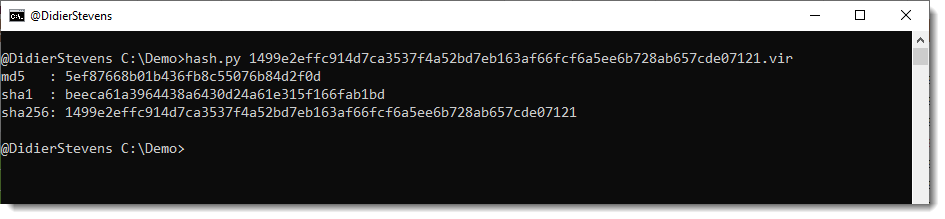
By default, teeplus.py will write the data to a file on disk, with filename equal to the sha256 of the data and extension .vir.
And it will also log this activity in a log file (teeplus.log by default).
Here is an example.
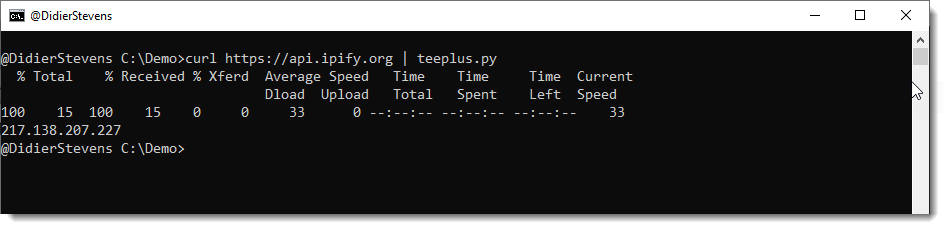
I run curl with a request to ipify to get my current public IPv4 address:

Then I pipe this output to teeplus.py:
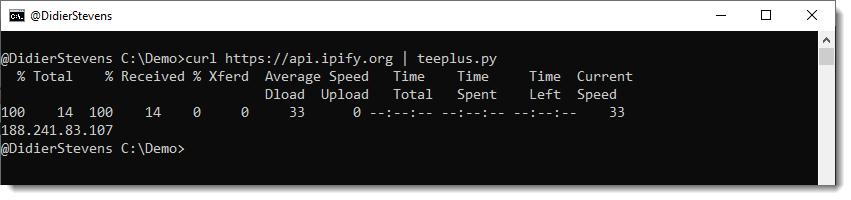
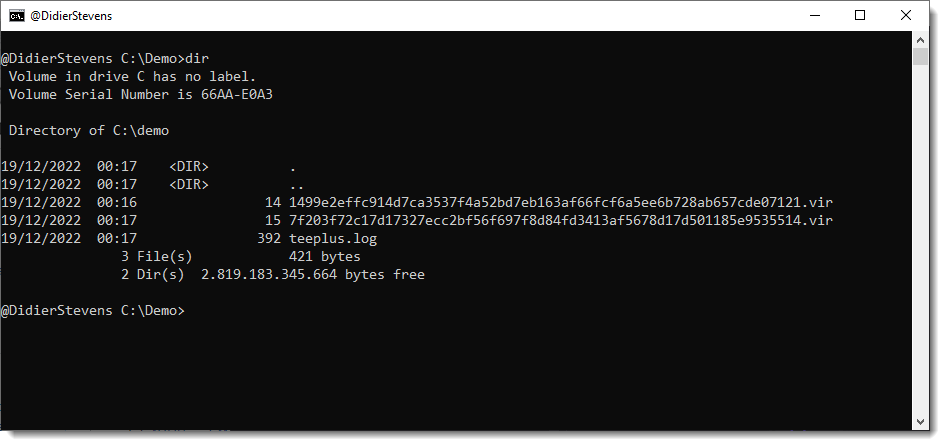
This results in the creation of two files inside the current directory:

The first file it the output of the curl command:
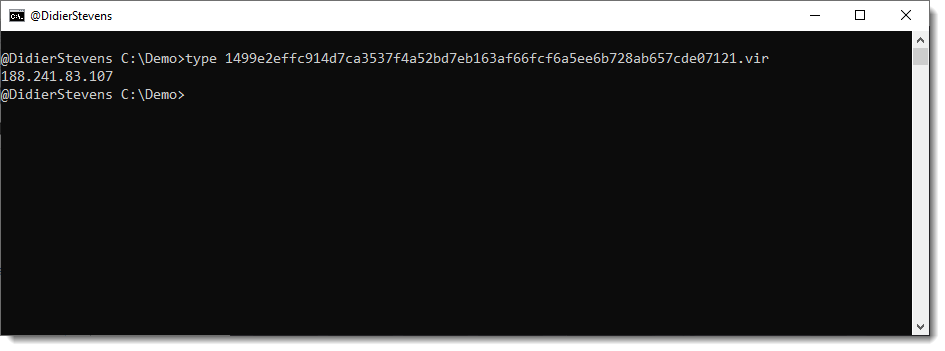
The filename is the SHA256 hash of the data with extension .vir:
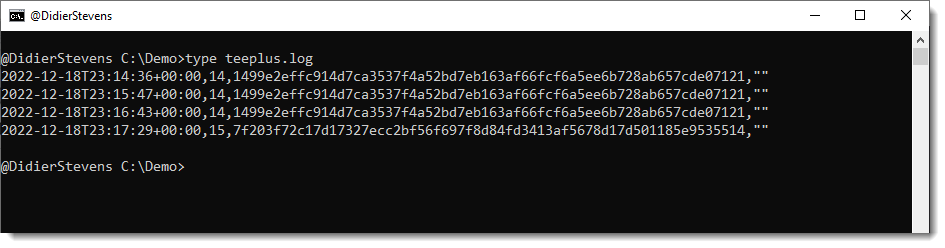
The second file, teeplus.log, is a log file:
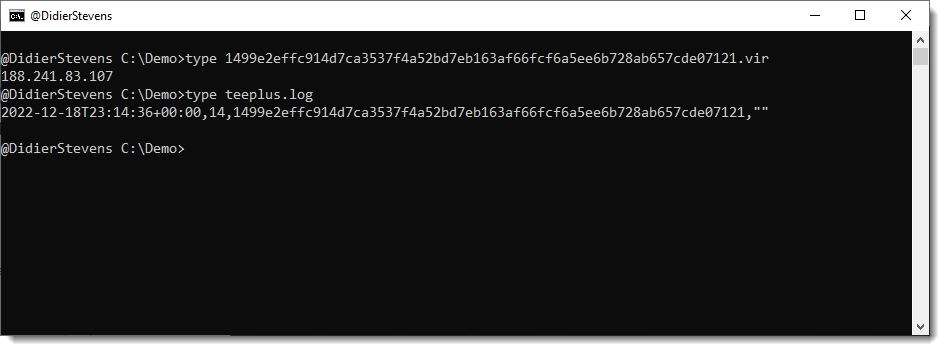
Each line in teeplus.log has 4 fields (comma separated):
- The ISO timestamp when the activity was logged
- The length in bytes of the data
- The SHA256 hash of the data
- An error message (empty string when no error occured)
A line is created for each invocation of the teeplus.py command:

When the IPv4 address changes:
And the command is executed again, a new .vir file is created (since the received data changed):
And this is reflected in the log file:

This allows you to create a log of your public IPv4 address, for example (by scheduling this command as a recurrent task).
I use it for monitoring websites, and saving a copy of the HTML page I downloaded. I will explain how in an upcoming blog post.
teeplus.py has a couple of options: you can change the extension of the saved file, and the filename of the log file. And you can also us option -n to prevent the data to be piped to stdout (or you could redirect to /dev/null).
This is something I would do when the teeplus.py command is not followed by another command.

MD5: 0A3704CD56BD6B3A1FF2B92FD87476FB
SHA256: 9E3CBE7323D83FFC588FD67F7B762F53189391A43EDF465C64BD0E4D8E7E8990
Saturday 3 December 2022
Overview of Content Published in November
Here is an overview of content I published in November:
Blog posts:
- Quickpost: Testing A USB Fridge
- Update: pdf-parser.py Version 0.7.7
- Update: oledump.py Version 0.0.71
- Quickpost: Testing A USB Fridge (Update)
- Update: what-is-new.py Version 0.0.2
YouTube videos:
- Extracting Information From “logfmt” Files With CyberChef
- Extracting Information From “logfmt” Files With InteractiveSieve
Videoblog posts:
SANS ISC Diary entries:
Tuesday 1 November 2022
Overview of Content Published in October
Here is an overview of content I published in October:
Blog posts:
- Quickpost: Standby Power Consumption Of An Old Linear Power Supply
- Update: base64dump.py Version 0.0.24
- Update: rtfdump.py Version 0.0.12
- Quickpost: Testing A Lemon Battery
- Update: byte-stats.py Version 0.0.9
- The Making Of: qa-squeaky-toys.docm
- Quickpost: BruCON Travel Charger
- Sysmon v14.1 Release
- Wireshark 4.0.0 Released
- Curl’s resolve Option
- Wireshark: Specifying a Protocol Stack Layer in Display Filters
- Analysis of a Malicious HTML File (QBot)
- Video: Analysis of a Malicious HTML File (QBot)
- rtfdump’s Find Option
- Video: PNG Analysis
- Quickie: CyberChef & Microsoft Script Decoding
- Sysinternals Updates: Process Explorer v17.0, Handle v5.0, Process Monitor v3.92 and Sysmon v14.11
Friday 7 October 2022
Overview of Content Published in September
Here is an overview of content I published in September:
Blog posts:
- Quickpost: Standby Power Consumption Of My Bosch 18V Chargers
- Update: jpegdump.py Version 0.0.10
- Update: oledump.py Version 0.0.70
- Update: translate.py Version 2.5.12
- Update: xor-kpa.py Version 0.0.6
- Update: hex-to-bin.py Version 0.0.6
- Quickpost: Sun Drying Biodegradable Waste
- Quickpost: Dolmen du roc de l?Arca
- Maldoc Analysis Video ? Rehearsed & Unrehearsed
- Quickpost: An Inefficient Powerbank
- Update: virustotal-search.py Version 0.1.7
- New Tool: split-overlap.py
- Update: strings.py Version 0.0.8
- Update: My Python Templates Version 0.0.8
- Quickpost: Tuning The Electric Energy Consumption Of My TV
- Taking A Look At PNG Files with pngdump.py Beta Version 0.0.3
- Update: rtfdump.py Version 0.0.11
- James Webb JPEG With Malware
- VBA Maldoc & UTF7 (APT-C-35)
- An Obfuscated Beacon – Extra XOR Layer
- Maldoc Analysis: Rehearsed vs. Unrehearsed
- Analyzing Obfuscated VBS with CyberChef
- Grep & Tail -f With Notepad++
- James Webb JPEG With Malware
- VBA Maldoc & UTF7 (APT-C-35)
- An Obfuscated Beacon ? Extra XOR Layer
- Analyzing Obfuscated VBS with CyberChef
- Grep & Tail -f With Notepad++
- James Webb JPEG With Malware
- Video: James Webb JPEG With Malware
- Video: VBA Maldoc & UTF7 (APT-C-35)
- Quickie: Grep & Tail -f With Notepad++
- Analysis of an Encoded Cobalt Strike Beacon
- Analyzing Obfuscated VBS with CyberChef
- Maldoc With Decoy BASE64
- Wireshark 3.6.8 and 4.0.0rc1 Released
- Word Maldoc With CustomXML and Renamed VBAProject.bin
- Video: Analyzing Obfuscated VBS with CyberChef
- Video: Grep & Tail -f With Notepad++
- Maldoc Analysis Info On MalwareBazaar
- Downloading Samples From Takendown Domains
- PNG Analysis
Sunday 18 September 2022
New Tool: split-overlap.py
split-overlap.py is a tool to split a binary file in parts of a given size.
For example: split-overlap.py 1000 test.data
When test.data is a binary file with size 2500 bytes, the above command will create 2 files of 1000 bytes and one file of 500 bytes.
It’s also possible to split a file with some overlap. Like this:
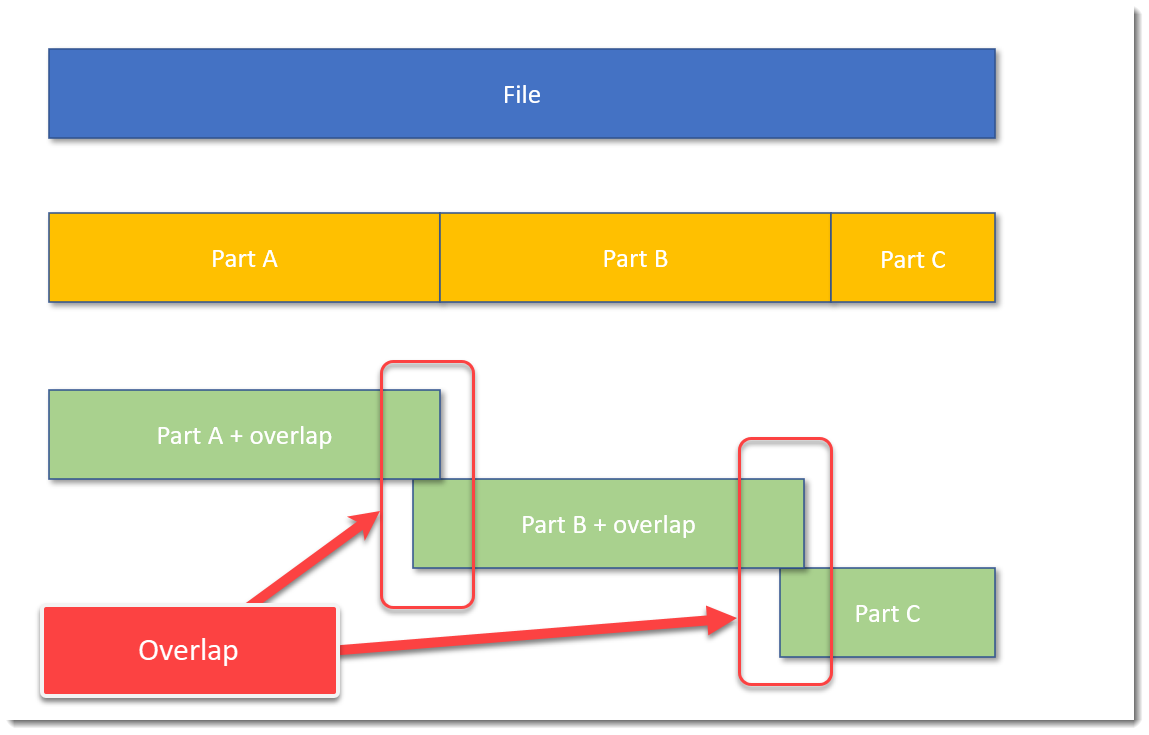
The blue block represents the original file, the yellow blocks are parts of the original file without overlap, and the green blocks represent parts of the original file with some overlap.
A command to achieve this, is, for example: split-overlap.py 100M+1M dump
This will create parts of 101 MB in size, with a overlap of 1 MB.
The main reason I developed this tool, is to be able to handle very large files, like memory dumps, by tools who can not handle such large files.
Splitting up a file in smaller, equal parts is a solution, but then you run the risk (a small risk) that the pattern you are looking for, is just at the “edge”: that the file is split in such a way, that one part contains the beginning of the pattern, and the next part contains the rest of the pattern. Then your tools are unlikely to find the pattern.
I solve this with my tool by using an overlap. You just have to make sure that the size of the overlap, is larger than the pattern you are looking for.
If you want to know more, read the man page: split-overlap.py -m
split-overlap_V0_0_1.zip (http)MD5: 77CFF0787244B3B940B07D099C26C3F1
SHA256: 3C246F35F612A43B83843F327AB4EA4EE2CADDBCEDEAD9C50540228DAB17025A
Thursday 1 September 2022
Overview of Content Published in August
Here is an overview of content I published in August:
Blog posts:
YouTube videos:
Videoblog posts:
SANS ISC Diary entries:
Monday 1 August 2022
Overview of Content Published in July
Here is an overview of content I published in July:
Blog posts:
Blog posts:
- simple_listener.py
- Quickpost: Standby Power Consumption Of My USB Chargers
- Update: base64dump.py Version 0.0.23
- Update: sortcanon Version 0.0.2
- Update: oledump.py Version 0.0.69
- Update: re-search.py Version 0.0.21
- Quickpost: Standby Power Consumption Of My USB Chargers (120V vs 230V)
- Quickpost: iPad Pro Charging – Power Consumption
Saturday 9 July 2022
simple_listener.py
This is the release of simple_listener.py, a Python program that can accept TCP and UDP connections and react according to its configuration. It has evolved from my beta program tcp-honeypot.py, that I will no longer maintain.
Everything you could do with tcp-honeypot, can be done with simple_listener.
I use simple_listener now whenever I need a server that listens for incoming TCP and/or UDP connections. For example, I have a configuration that can accept connections from Cobalt Strike beacons using leaked private keys.
simple_listener has a full man page, explaining all configuration items and options.
simple_listener_v0_1_2.zip (http)MD5: 8F79FCB51EE2C1EB20B0F30F022EAE47
SHA256: F0EED539775AF36FFEB9B91529AF852C833D6A2764A9B9C65998AEA577F08175

 Didier Stevens