split-overlap.py is a tool to split a binary file in parts of a given size.
For example: split-overlap.py 1000 test.data
When test.data is a binary file with size 2500 bytes, the above command will create 2 files of 1000 bytes and one file of 500 bytes.
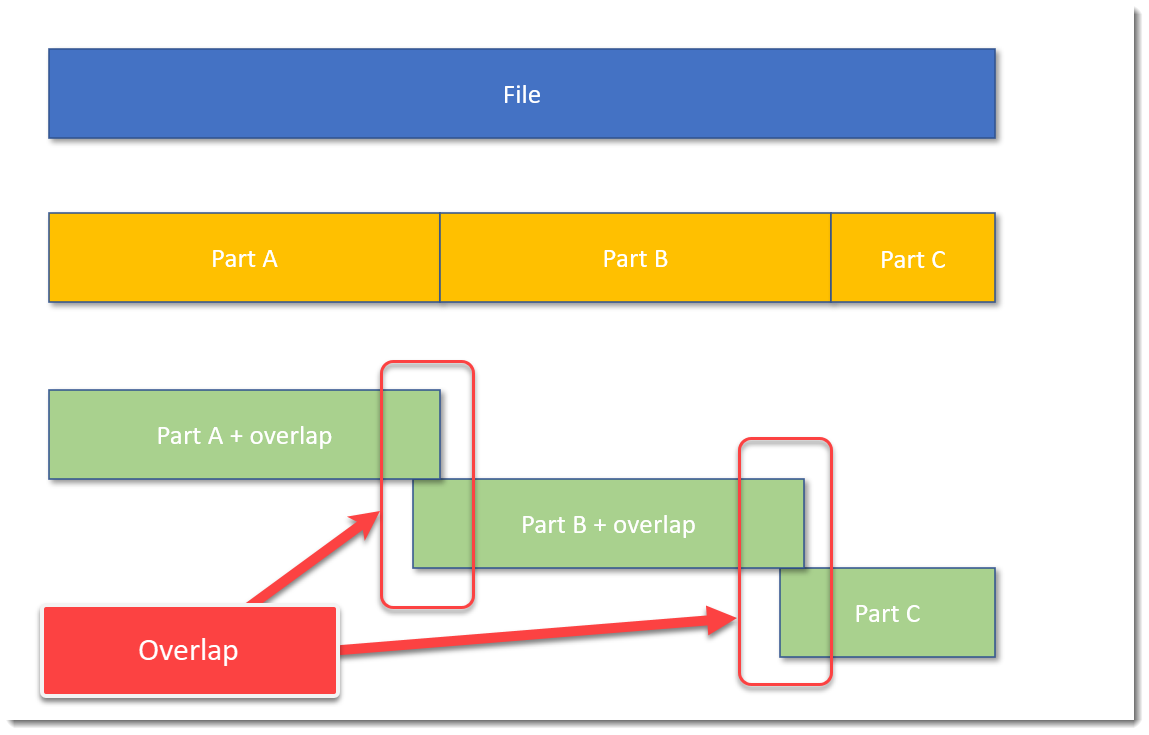
It’s also possible to split a file with some overlap. Like this:
The blue block represents the original file, the yellow blocks are parts of the original file without overlap, and the green blocks represent parts of the original file with some overlap.
A command to achieve this, is, for example: split-overlap.py 100M+1M dump
This will create parts of 101 MB in size, with a overlap of 1 MB.
The main reason I developed this tool, is to be able to handle very large files, like memory dumps, by tools who can not handle such large files.
Splitting up a file in smaller, equal parts is a solution, but then you run the risk (a small risk) that the pattern you are looking for, is just at the “edge”: that the file is split in such a way, that one part contains the beginning of the pattern, and the next part contains the rest of the pattern. Then your tools are unlikely to find the pattern.
I solve this with my tool by using an overlap. You just have to make sure that the size of the overlap, is larger than the pattern you are looking for.
If you want to know more, read the man page: split-overlap.py -m
This is the release of simple_listener.py, a Python program that can accept TCP and UDP connections and react according to its configuration. It has evolved from my beta program tcp-honeypot.py, that I will no longer maintain.
Everything you could do with tcp-honeypot, can be done with simple_listener.
I use simple_listener now whenever I need a server that listens for incoming TCP and/or UDP connections. For example, I have a configuration that can accept connections from Cobalt Strike beacons using leaked private keys.
simple_listener has a full man page, explaining all configuration items and options.
sortcanon.py is a tool to sort text files according to some canonicalization function. For example, sorting domains or ipv4 addresses.
This is actually an old tool, that I still had to publish. I just updated it to Python 3.
This is the man page:
Usage: sortcanon.py [options] [files]
Sort with canonicalization function

Arguments:
@file: process each file listed in the text file specified
wildcards are supported

Valid Canonicalization function names:
 domain: lambda x: '.'.join(x.split('.')[::-1])
 ipv4: lambda x: [int(n) for n in x.split('.')]
 length: lambda x: len(x)

Source code put in the public domain by Didier Stevens, no Copyright
Use at your own risk
https://DidierStevens.com

Options:
  --version             show program's version number and exit
  -h, --help            show this help message and exit
  -m, --man             Print manual
  -c CANONICALIZE, --canonicalize=CANONICALIZE
                        Canonicalization function
  -r, --reverse         Reverse sort
  -u, --unique          Make unique list
  -o OUTPUT, --output=OUTPUT
                        Output file

Manual:

sortcanon is a tool to sort the content of text files according to some
canonicalization function.
The tool takes input from stdin or one or more text files provided as argument.
All lines from the different input files are put together and sorted.

If no option is used to select a particular type of sorting, then normal
alphabetical sorting is applied.

Use option -o to write the output to the given file, in stead of stdout.

Use option -r to reverse the sort order.

Use option -u to produce a list of unique lines: remove all doubles before
sorting.

Option -c can be used to select a particular type of sorting.
For the moment, 2 options are provided:

domain: interpret the content of the text files as domain names, and sort them
first by TLD, then domain, then subdomain, and so on ...

length: sort the lines by line length. The longest lines will be printed out
last.

ipv4: sort IPv4 addresses.

You can also provide your own Python lambda function to canonicalize each line
for sorting.
Remark that this involves the use of the Python eval function: do only use this
with trusted input.
dns-query-async.py is a tool to perform DNS queries in parallel.
This is the man page:
Usage: dns-query-async.py [options] command file
Program to perform asynchronous DNS queries

accepted commands: gethost,getaddr

Source code put in the public domain by Didier Stevens, no Copyright
Use at your own risk
https://DidierStevens.com

Options:
  --version             show program's version number and exit
  -h, --help            show this help message and exit
  -m, --man             Print manual
  -o OUTPUT, --output=OUTPUT
                        Output to file (# supported)
  -s NAMESERVERS, --nameservers=NAMESERVERS
                        List of nameservers (,-separated)
  -n NUMBER, --number=NUMBER
                        Number of simultaneous requests (default 10000)
  -t TRANSFORM, --transform=TRANSFORM
                        Transform input (%%)

Manual:

This tool performs asynchronous DNS queries. By default, it will perform 10000
queries simultaneously.

The first argument is a command. There are 2 commands for the moment: gethost
and getaddr
The second argument is a filename: a text file containing the items to resolve.

Use command getaddr to lookup the IP address of the hostnames provided in the
input file.
Example:
 dns-query-async.py getaddr names.txt
Result:
 didierstevens.com,1,96.126.103.196
 didierstevenslabs.com,1,96.126.103.196
 Duration: 0.20s

Use command gethost to lookup the hostnames of the IP addresses provided in the
input file.
Example:
 dns-query-async.py gethost ips.txt

Use option -s to provide the name servers to use (comma separated list).

Use option -n to change the number of asyncio workers (10000 default).

Use option -t to transform the input list and perform lookups.
For example, take list of subdomains/hostnames https://github.com/m0nad/DNS-
Discovery/blob/master/wordlist.wl
Issue the following command:
 dns-query-async.py -t %%.example.com getaddr wordlist.wl
Result:
 0.example.com,0,Domain name not found
 009b.example.com,0,Domain name not found
 01.example.com,0,Domain name not found
 02.example.com,0,Domain name not found
 03.example.com,0,Domain name not found
 1.example.com,0,Domain name not found
 10.example.com,0,Domain name not found
 101a.example.com,0,Domain name not found

The %% in %%.example.com is replaced by each hostname/subdomain in wordlist.wl
and then resolved.

Use option -o to write the output to a file.