Didier Stevens

Sunday 29 November 2015

Update: oledump.py Version 0.0.21

Filed under: My Software,Update — Didier Stevens @ 11:15

A small change in this new version: the second term of the cut-expression can also be a negative number now. A negative number allows you to cut bytes from the end of the file. Example: cut-expression :-0x100 select the whole stream except the last 256 bytes.

oledump_V0_0_21.zip (https)
MD5: F72CBB797CE8FB810ACE5E54DC832129
SHA256: 016C772575DF381C274F6408B242945DE35679904B7C8B1B693ABFB2B3C023FB

Saturday 28 November 2015

Update: virustotal-search.py Version 0.1.3

Filed under: My Software,Update — Didier Stevens @ 9:29

A small update: I added option -s (separator) so that you can choose your CSV separator.

virustotal-search_V0_1_3.zip (https)
MD5: 6D93F6CCE56AA74C830D66F9AE2E88C0
SHA256: 09D3BA6BCE1A69E8292AD0D44FB216FBCBF5686EA3C64DCD5FC877E91D4141F4

Tuesday 24 November 2015

Authenticode And Timestamping And sha256

Filed under: Encryption — Didier Stevens @ 0:00

I have a couple of how-to posts on digital signatures, like this code signing post. Let me revisit this topic now that Microsoft announced some upcoming changes to code signing.

I use signtool.exe that came with Visual Studio 2013 in my examples. Here is how to use signtool.exe from the command-line to sign an executable:

20151123-204917

FYI: in my case, I use option /a because I have more than one code signing certificate and I let signtool decide which one to use (option /a). But if you have only one code signing cert, you don’t need to use option /a.

As you can see, the version of signtool.exe I use (6.3.9600.16384) still uses sha1 by default.

20151123-204945

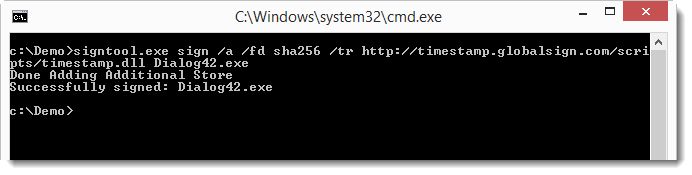
To use sha256 as digest algorithm (since Microsoft will deprecate sha1), use option /fd sha256, like this:

20151123-205150

20151123-205230

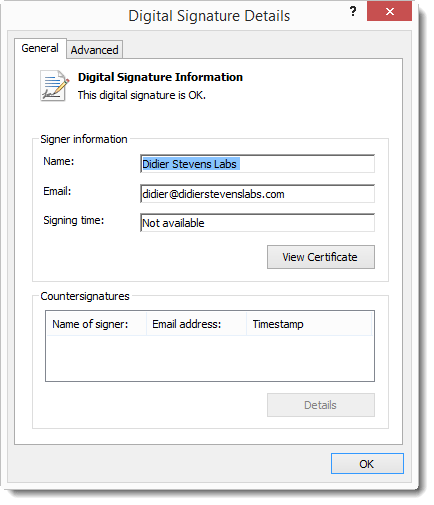
When we look at the details of the signature, we see that there is no Signing time or Countersignatures:
20151123-205310

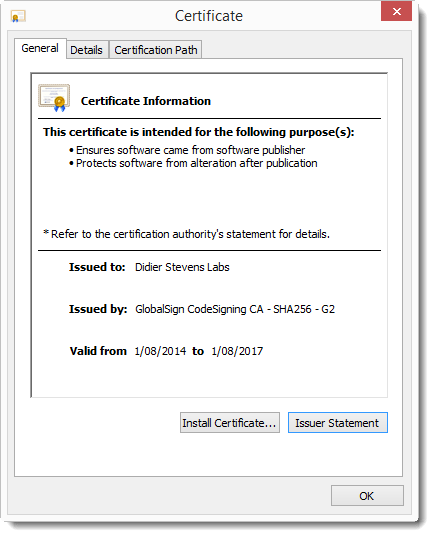
The signature is valid, because we are still in the certificate validity period:
20151123-205524

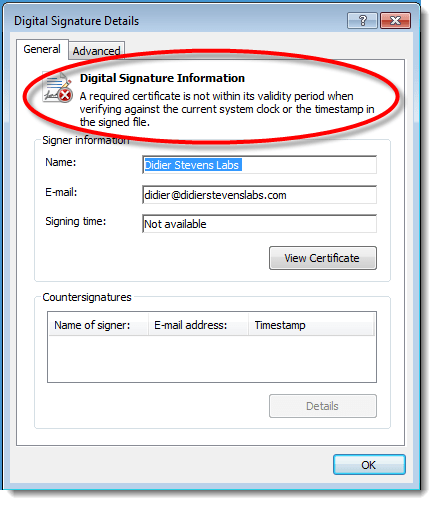
But once we are outside the certificate validity period, the signature is no longer valid:
20151123-205921

And this is because a countersignature from a timestamping service is missing. A countersignature can be added with option /tr and the URL of a timestamping service, like this one:

20151123-210005

Correction: use this URL for sha256 timestamping: http://timestamp.globalsign.com/?signature=sha2

Option /tr URL specifies a timestamping service that supports the RFC 3161 protocol.

And now the signature remains valid, even after the code signing certificate has expired:

20151123-210052

To be sure that the timestamping service uses sha256, we can request this with option /td sha256:

20151123-210426

Conclusion: always use a timestamping service when signing code, this way your signature will not expire.

Remark: code signing and timestamping are 2 different operations. There is no requirement to execute these operation with a single command. You can also timestamp a signed executable like this:
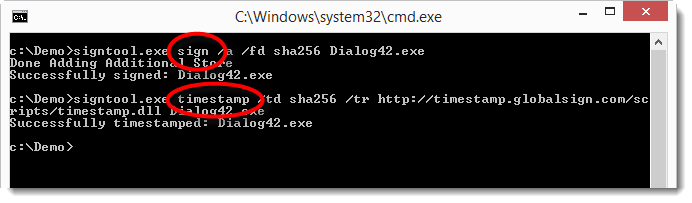
20151123-211435

First command: sign

Second command: timestamp

And you don’t need a code signing certificate to timestamp a signed executable. You can take any executable with an embedded signature, and add a new timestamping signature with this signtool.exe timestamp command. Why do I mention this? This will become clear in a next post, where we take a closer look at Microsoft’s sha256 code signing announcement.

A last remark: as mentioned, option /a lets signtool.exe decide which certificate (from the certificate store) to use for the code signing (in case you have more than one code signing certificate). But if you want to explicitly select the code signing certificate to use, you can use option /sha1 with the sha1 fingerprint of the certificate you want to use. Important: /sha1 is a method to select a certificate, it does NOT instruct signtool to use the sha1 algorithm for the signature.

Sunday 22 November 2015

Update: emldump.py Version 0.0.5

Filed under: My Software,Update — Didier Stevens @ 0:00

A small change in this new version: the second term of the cut-expression can also be a negative number now. A negative number allows you to cut bytes from the end of the file. Example: cut-expression :-5 select the whole file except the last 5 bytes.

emldump_V0_0_5.zip (https)
MD5: 5FAEDF1459114306D57FEABEF3CDDEFD
SHA256: B3D08E1768E1211C44680DD502AC096A324FF209330657F4ABC0CD09B888254C

Saturday 21 November 2015

Update: nsrl.py Version 0.0.2

Filed under: My Software,Update — Didier Stevens @ 0:00

A small update to my nsrl.py program: the CSV output now includes the ApplicationType.

nsrl_V0_0_2.zip (https)
MD5: 816DD5BEF94D289F489399A95824083D
SHA256: 65C4AF8F139651942062EB78D820AD3BE5DBEE2C4331B3105BAE62B220CD4F44

Wednesday 18 November 2015

Maldoc Social Engineering Trick

Filed under: maldoc — Didier Stevens @ 0:00

Xavier has an interesting SANS ISC Diary entry on a malicious Word document we analyzed. The VBA macro code contains a function (func_FormatDocument) for which Xavier has no clear explanation. This function pulls of a social engineering trick. It “decodes” the document by giving the text with a white font color (thus invisible) a black font color, and by removing the headers.

I created my own document to reproduce this trick in this video:

Sunday 15 November 2015

Update: find-file-in-file.py Version 0.0.5

Filed under: My Software,Update — Didier Stevens @ 0:00

A very small change to find-file-in-file:

find-file-in-file.py contained containing
0x00000000 0x00000014 (50%) (End of containing file)
Remaining 20 (50%)

When the tool reaches the end of the containing file, a message is printed to signal this: (End of containing file)

And I also added option -r (regular): to handle a ZIP file as a regular file.

find-file-in-file_v0_0_5.zip (https)
MD5: 1463DBAB808BBE40AC7919BC9A77303D
SHA256: C269B1995B61F0EDE24E4E9C64D5DD64E79B5ED6DD2126E94AF52E15D90C427F

Saturday 14 November 2015

Update: cut-bytes.py Version 0.0.2

Filed under: My Software,Update — Didier Stevens @ 8:50

A small change in this new version: the second term of the cut-expression can also be a negative number now. A negative number allows you to cut bytes from the end of the file. Example: cut-expression :-5 select the whole file except the last 5 bytes.

 cut-bytes_V0_0_2.zip (https)
MD5: B70F851CE74859B38AC3ABA9688593EB
SHA256: 1A0BD64334DA90B21888020B383004A18C3BAEE211D24AA91FF12719F8581AE9

Friday 13 November 2015

Update: emldump.py Version 0.0.4

Filed under: My Software,Update — Didier Stevens @ 0:00

I’m adding the new -E option to my dump tools, this time it’s emldump’s turn. As announced with version 0.0.20 of oledump, option -E (extra) allows the user to specify which extra info needs to be displayed.

I’ve also made a video for oledump (the -E option is the same across my dump tools):

emldump_V0_0_4.zip (https)
MD5: 79DF66048849439E6034F082606A37A1
SHA256: B4AFDE89B6F3B025595A6FD1ACC5F60498BF900D18E624F134F618115DAC0E08

Tuesday 10 November 2015

Update: oledump V0.0.20

Filed under: My Software,Update — Didier Stevens @ 0:00

Option -c calculates extra data per stream. This data is displayed per stream. Only the MD5 hash of the content of the stream is calculated.
Example:
C:\Demo>oledump.py -c Book1.xls
1:      4096 ‘\x05DocumentSummaryInformation’ ff1773dce227027d410b09f8f3224a56
2:      4096 ‘\x05SummaryInformation’ b46068f38a3294ca9163442cb8271028
3:      4096 ‘Workbook’ d6a5bebba74fb1adf84c4ee66b2bf8dd

In stead of adding more calculations to option -c, I added option -E (extra) which allows the user to specify which extra info needs to be displayed. From the man page:

If you need more data than the MD5 of each stream, use option -E
(extra). This option takes a parameter describing the extra data that
needs to be calculated and displayed for each stream. The following
variables are defined:
  %INDEX%: the index of the stream
  %INDICATOR%: macro indicator
  %LENGTH%': the length of the stream
  %NAME%: the printable name of the stream
  %MD5%: calculates MD5 hash
  %SHA1%: calculates SHA1 hash
  %SHA256%: calculates SHA256 hash
  %ENTROPY%: calculates entropy
  %HEADHEX%: display first 20 bytes of the stream as hexadecimal
  %HEADASCII%: display first 20 bytes of the stream as ASCII
  %TAILHEX%: display last 20 bytes of the stream as hexadecimal
  %TAILASCII%: display last 20 bytes of the stream as ASCII
  %HISTOGRAM%: calculates a histogram
                 this is the prevalence of each byte value (0x00 through 0xFF)
                 at least 3 numbers are displayed separated by a comma:
                 number of values with a prevalence > 0
                 minimum values with a prevalence > 0
                 maximum values with a prevalence > 0
                 each value with a prevalence > 0
  %BYTESTATS%: calculates byte statistics
                 byte statistics are 5 numbers separated by a comma:
                 number of NULL bytes
                 number of control bytes
                 number of whitespace bytes
                 number of printable bytes
                 number of high bytes

The parameter for -E may contain other text than the variables, which
will be printed. Escape characters \n and \t are supported.
Example displaying the MD5 and SHA256 hash per stream, separated by a
space character:
C:\Demo>oledump.py -E "%MD5% %SHA256%" Book1.xls
  1:      4096 '\x05DocumentSummaryInformation' ff1773dce227027d410b09f8f3224a56 2817c0fbe2931a562be17ed163775ea5e0b12aac203a095f51ffdbd5b27e7737
  2:      4096 '\x05SummaryInformation' b46068f38a3294ca9163442cb8271028 2c3009a215346ae5163d5776ead3102e49f6b5c4d29bd1201e9a32d3bfe52723
  3:      4096 'Workbook' d6a5bebba74fb1adf84c4ee66b2bf8dd 82157e87a4e70920bf8975625f636d84101bbe8f07a998bc571eb8fa32d3a498

If the extra parameter starts with !, then it replaces the complete
output line (in stead of being appended to the output line).
Example:
C:\Demo>oledump.py -E "!%INDEX% %MD5%" Book1.xls
1 ff1773dce227027d410b09f8f3224a56
2 b46068f38a3294ca9163442cb8271028
3 d6a5bebba74fb1adf84c4ee66b2bf8dd

To include extra data with each use of oledump, define environment
variable OLEDUMP_EXTRA with the parameter that should be passed to -E.
When environment variable OLEDUMP_EXTRA is defined, option -E can be
ommited. When option -E is used together with environment variable
OLEDUMP_EXTRA, the parameter of option -E is used and the environment
variable is ignored.

oledump_V0_0_20.zip (https)
MD5: 715B33E8E090F2A061DB2EA5A913055F
SHA256: 056CC911AEDFFB48B756F1B941E14660EBA8B613C65B1026F5DA77FB3047DAE3

« Previous PageNext Page »

Blog at WordPress.com.