This new version of oledump.py brings a new plugin (plugin_metadata) and Python 3 fixes for 2 plugins (plugin_msi and plugin_ppt).
The new plugin is actually an old unpublished plugin, that I updated recently.
This plugin parses Office document metadata as defined in document [MS-OLEPS].
I started to write this in 2015 to parse the metadata of Word documents, but soon I figured out that this functionality was already present in olefile, and I introduced option -M to call this functionality.
But recently, I had to parse metadata that isn’t (yet) parsed by olefile, so I updated and released plugin_metadata.
I’m now releasing a tool that can be put into a command pipe to filter the JSON data: myjson-filter.py
For example, here I use myjson-filter.py to remove all items that are XML files (based on the content: starting with <?xml) before strings are extracted with strings.py:
When a file (attached to an email, or downloaded from the Internet) is saved to disk on a Windows system, Microsoft applications will mark this file as coming from the Internet. This is done with a ZoneIdentifier Alternate Data Stream (like a “mark-of-web”).
When a Microsoft Office application, like Word, opens a document with a ZoneIdentifier ADS, the document is opened in Protected View (e.g., sandboxed).
But when an Office document is stored inside an ISO file, and that ISO has a ZoneIdentifier ADS, then Word will not open the document in Protected View. That is something I observed 5 years ago.
But this has changed recently. When exactly, I don’t know (update: August 2021).
But when I open an Office document stored inside an ISO file marked with a ZoneIdentifier ADS, Office 2021 will open the document in protected view:
With an unpatched version of Office 2019, that I installed a year ago, that same file is not opened in Protected View:
After updating Office:
Word’s behavior has changed:
The file is now opened in Protected View.
If you want to test this yourself, you can use my ZoneIdentifier tool to easily settings a “mark-of-web” without having to download your test file from the Internet:
I did the same test with Office 2016, I updated an old version and: the document is not opened in Protected View.
I don’t know exactly when Microsoft Office 2019 was updated so that it would open documents in Protected View when they are inside an ISO file marked as originating from the Internet. But if you do know, please post a comment.
Update: this change happened in August 2021. See comments below. Thanks Philippe.
A Philips Hue lamp is a LED lamp that can be controlled wirelessly. It always draws power for its control circuitry, also when the LED is turned off.
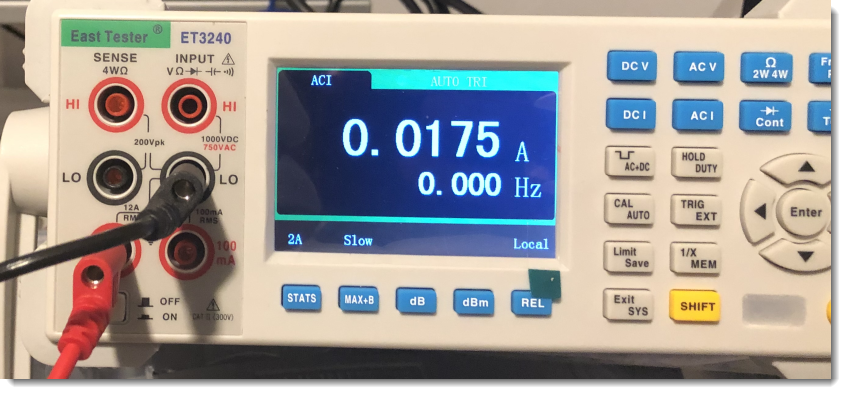
I wondered how much power it consumes in the off state. Doing some research, I found a couple of forums where people asked the same question, and getting answers that is was very little, varying from 0,01 A to 0,02 A.
I got similar results for the current when I measured this:
Figure 1: Switched off Philips Hue drawing 0,0175 A (varying easily with 25%)
But I wanted a more precise answer, and not only the current. I am more interested in the power (Watt) consumption. As our domestic electricity meters measure real power over a period of time.
Thus I measured the power consumption of a 1100 Lumen color Philips Hue lamp that I had switched of via the smartphone app over a period of 10 days.
Figure 2: Test setup
And these are the numbers I got after 10 days:
Figure 3: After 10 days of operation in the off state
0,07756 kWh over a period of 10 days, that’s 0,32316 W. Notice that the display indicates KWh, but that should be kWh (lowercase k for kilo).
Extrapolating to a whole year, that’s 2,831 kWh. Which in my case, correspond to a cost of €1,50 (roughly speaking) per lamp per year.
With online numbers claiming the current to be between 0,01 A and 0,02 A, at first I expected the power consumption to be higher. But the power factor is quite low (around 0,10), explaining a lower power consumption.
Update 2022/09/01: I redid the test for one day (24 hours) using a more precise powermeter (GPM 8310) and measured 8,9188 Wh for 24 hours, or 0,3713 W.





 Didier Stevens