Didier Stevens

Saturday 18 June 2022

New Tool: sortcanon.py

Filed under: Announcement,My Software — Didier Stevens @ 23:02

sortcanon.py is a tool to sort text files according to some canonicalization function. For example, sorting domains or ipv4 addresses.

This is actually an old tool, that I still had to publish. I just updated it to Python 3.

This is the man page:

Usage: sortcanon.py [options] [files]
Sort with canonicalization function

Arguments:
@file: process each file listed in the text file specified
wildcards are supported

Valid Canonicalization function names:
 domain: lambda x: '.'.join(x.split('.')[::-1])
 ipv4: lambda x: [int(n) for n in x.split('.')]
 length: lambda x: len(x)

Source code put in the public domain by Didier Stevens, no Copyright
Use at your own risk
https://DidierStevens.com

Options:
  --version             show program's version number and exit
  -h, --help            show this help message and exit
  -m, --man             Print manual
  -c CANONICALIZE, --canonicalize=CANONICALIZE
                        Canonicalization function
  -r, --reverse         Reverse sort
  -u, --unique          Make unique list
  -o OUTPUT, --output=OUTPUT
                        Output file

Manual:

sortcanon is a tool to sort the content of text files according to some
canonicalization function.
The tool takes input from stdin or one or more text files provided as argument.
All lines from the different input files are put together and sorted.

If no option is used to select a particular type of sorting, then normal
alphabetical sorting is applied.

Use option -o to write the output to the given file, in stead of stdout.

Use option -r to reverse the sort order.

Use option -u to produce a list of unique lines: remove all doubles before
sorting.

Option -c can be used to select a particular type of sorting.
For the moment, 2 options are provided:

domain: interpret the content of the text files as domain names, and sort them
first by TLD, then domain, then subdomain, and so on ...

length: sort the lines by line length. The longest lines will be printed out
last.

ipv4: sort IPv4 addresses.

You can also provide your own Python lambda function to canonicalize each line
for sorting.
Remark that this involves the use of the Python eval function: do only use this
with trusted input.


sortcanon_V0_0_1.zip (http)
MD5: CC20EA756E3E0796C617830C8F91AFF4
SHA256: 42EDE51EE70A39FD0933A77B8FE119F1CA8C174336C0DA4C079B1F02C1AB33EC
Friday 17 June 2022

Update: base64dump.py Version 0.0.22

Filed under: My Software,Update — Didier Stevens @ 15:21

This new version of base64dump.py adds some extra info for the encoded strings.

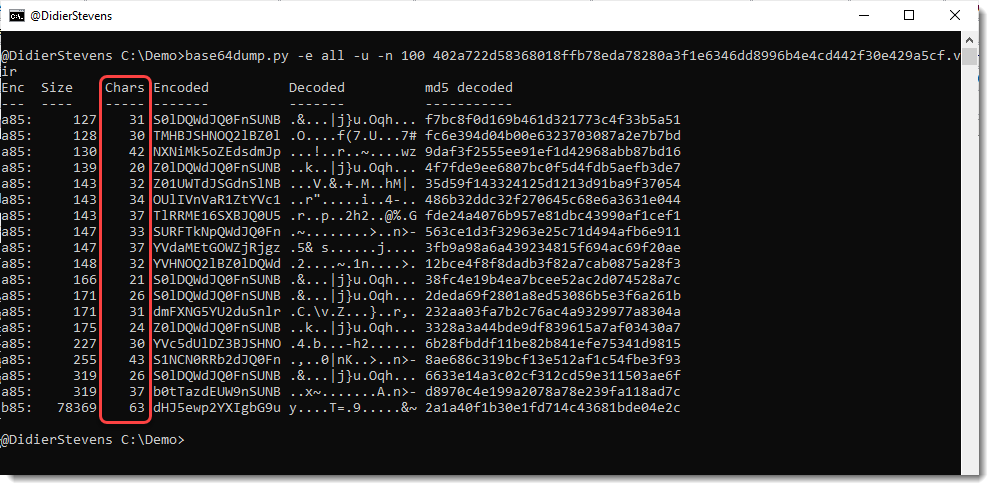
In -e all mode, a new column Chars tells you how many unique characters are used for that encoded string:

For example, the last line is recognized as a syntactically valid variant of BASE85 (b85), but it uses only 63 unique characters (85 unique characters is the maximum). So this is probably not b85, or else the encoded data has low entropy.

And there is also new info when you select a string for info:

base64dump_V0_0_22.zip (http)
MD5: B38E4F454FAE219D771742B44D60A428
SHA256: 32695EEDDADAE9B1AFA1CAA70A69E2A0434E2264CEF836DE172BC5254C8E6281

Thursday 16 June 2022

Discovering A Forensic Artifact

Filed under: Forensics,Hacking,maldoc — Didier Stevens @ 0:00

While developing my oledump plugin plugin_olestreams.py, I noticed that the item moniker’s name field (lpszItem) values I observed while analyzing Follina RTF maldocs, had a value looking like _1715622067:

The number after the underscore (_), is derived from the timestamp when the item moniker was created. That timestamp is expressed as an epoch value in local time, to which a constant number is added: 61505155.

I figured this out by doing some tests. 61505155 is an approximation: I might be wrong by a couple of seconds.

Item name _1715622067 is the value you find in Follina maldocs created from this particular RTF template made by chvancooten. 1715622067 minus 61505155 is 1654116912. Converting epoch value 1654116912 to date & time value gives: Wednesday, June 1, 2022 8:55:12 PM. That’s when that RTF document was created.

RTF documents made from this template, can be detected by looking for string 0c0000005f3137313536323230363700 inside the document (you have to look for this hexadecimal string, not case sensitive, because OLE files embedded in RTF are represented in hexadecimal).

Notice that the newest template in that github repository is taken from a cve-2017-0199 RTF template document, and that it no longer contains a item moniker.

But it does contain another timestamp:

This hexadecimal string can also be used for detection purposes: 906660a637b5d201

I used the following YARA rules for a retrohunt (34 matches):

rule follina_rtf_template_1 {
    strings:
        $a = "0c0000005f3137313536323230363700" nocase
    condition:
        $a
}

rule follina_rtf_template_2 {
    strings:
        $a = "906660a637b5d201" nocase
    condition:
        $a
}

Notice that I do not include a test for RTF documents in my rules: these rules also detect Python program follina.py.

And if you are a bit familiar with the RTF syntax, you know that it’s trivial to modify such RTF documents to avoid detection by the above YARA rules.

Later I will spend some time to find the actual code that implements the generation of the item value _XXXXXXXXXX. Maybe you can find it, or you already know where it is located.

Wednesday 15 June 2022

New Tool: dns-query-async.py

Filed under: Announcement,My Software — Didier Stevens @ 0:00

dns-query-async.py is a tool to perform DNS queries in parallel.

This is the man page:

Usage: dns-query-async.py [options] command file
Program to perform asynchronous DNS queries

accepted commands: gethost,getaddr

Source code put in the public domain by Didier Stevens, no Copyright
Use at your own risk
https://DidierStevens.com

Options:
  --version             show program's version number and exit
  -h, --help            show this help message and exit
  -m, --man             Print manual
  -o OUTPUT, --output=OUTPUT
                        Output to file (# supported)
  -s NAMESERVERS, --nameservers=NAMESERVERS
                        List of nameservers (,-separated)
  -n NUMBER, --number=NUMBER
                        Number of simultaneous requests (default 10000)
  -t TRANSFORM, --transform=TRANSFORM
                        Transform input (%%)

Manual:

This tool performs asynchronous DNS queries. By default, it will perform 10000
queries simultaneously.

The first argument is a command. There are 2 commands for the moment: gethost
and getaddr
The second argument is a filename: a text file containing the items to resolve.

Use command getaddr to lookup the IP address of the hostnames provided in the
input file.
Example:
 dns-query-async.py getaddr names.txt
Result:
 didierstevens.com,1,96.126.103.196
 didierstevenslabs.com,1,96.126.103.196
 Duration: 0.20s

Use command gethost to lookup the hostnames of the IP addresses provided in the
input file.
Example:
 dns-query-async.py gethost ips.txt

Use option -s to provide the name servers to use (comma separated list).

Use option -n to change the number of asyncio workers (10000 default).

Use option -t to transform the input list and perform lookups.
For example, take list of subdomains/hostnames https://github.com/m0nad/DNS-
Discovery/blob/master/wordlist.wl
Issue the following command:
 dns-query-async.py -t %%.example.com getaddr wordlist.wl
Result:
 0.example.com,0,Domain name not found
 009b.example.com,0,Domain name not found
 01.example.com,0,Domain name not found
 02.example.com,0,Domain name not found
 03.example.com,0,Domain name not found
 1.example.com,0,Domain name not found
 10.example.com,0,Domain name not found
 101a.example.com,0,Domain name not found

The %% in %%.example.com is replaced by each hostname/subdomain in wordlist.wl
and then resolved.

Use option -o to write the output to a file.


dns-query-async_V0_0_1.zip (http)
MD5: 5F4253B06EC0C6F6EC8E1DFDB1886164
SHA256: D06D776F7B0042EFD5BFAB5CE32EAFDF6FFB85F1C85BB227156638060B639D33

Tuesday 14 June 2022

Update: python-per-line.py Version 0.0.8

Filed under: My Software,Update — Didier Stevens @ 0:46

This new version adds option -l to provide a short list via an option, in stead of using a file. And there’s a Python 3 bug fix.

python-per-line_V0_0_8.zip (http)
MD5: C7A61FE8FF701BC3A49CF7C093FB290D
SHA256: 63AEBD847D26A9B25F401D8734FBED646E7BB3F9DF2238EF49ACEAB2E1EF5AFA

Monday 13 June 2022

Update: oledump.py Version 0.0.68

Filed under: My Software,Update — Didier Stevens @ 8:18

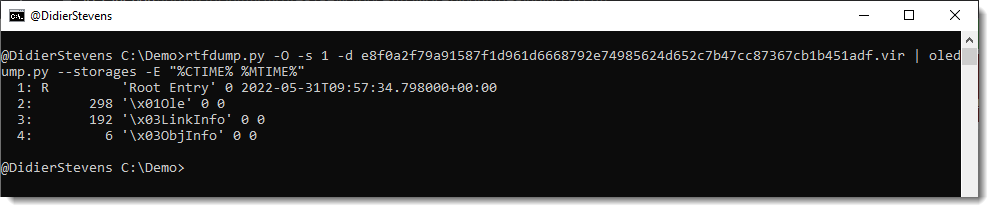
This new version of oledump.py brings extra info variables %CTIME% %MTIME% %CTIMEHEX% and %MTIMEHEX% to view the creation time & modification time of storages (UTC).

And there’s a new plugin (plugin_olestreams) to parse the OLE data found in streams like \001Ole, \003LinkInfo and \003ObjInfo:

oledump_V0_0_68.zip (http)
MD5: 82222BC363C660CE427125261B111FE9
SHA256: 83665E0CF40D43FE96DD6115D7FC0619A284CB141D7C1654B2CB4F64997174AC

Monday 6 June 2022

Overview of Content Published in May

Filed under: Announcement — Didier Stevens @ 23:39
Here is an overview of content I published in May:

Blog posts: YouTube videos: SANS ISC Diary entries:

Friday 27 May 2022

PoC: Cobalt Strike mitm Attack

Filed under: Encryption,Hacking,Malware — Didier Stevens @ 0:00

I did this about 6 months ago, but this blog post didn’t get posted back then. I’m posting it now.

I made a small Proof-of-Concept: cs-mitm.py is a mitmproxy script that intercepts Cobalt Strike traffic, decrypts it and injects its own commands.

In this video, a malicious beacon is terminated by sending it a sleep command followed by an exit command. I just included the sleep command to show that it’s possible to do this for more than one command.

I selected this malicious beacon for this PoC because it uses one of the leaked private keys, enabling the script to decrypt the metadata and obtain the necessary AES and HMAC keys.

The PoC does not support malleable C2 data transforms, but the code to do this can be taken from my other cs-* tools.

Thursday 26 May 2022

Update: Python Templates Version 0.0.7

Filed under: My Software,Update — Didier Stevens @ 14:56

Some small updates to my Python templates.

python-templates_V0_0_7.zip (http)
MD5: 46EE756206A0A941F7B29C3551FF48FF
SHA256: 5158046371E8E925AB7A158827496BA971F24F5FE0A232AC0FDF0B10427DB98B

Update: 1768.py Version 0.0.14

Filed under: My Software,Update — Didier Stevens @ 10:12

Here is a small update of my tool to analyze Cobalt Strike beacons.

1768_v0_0_14.zip (http)
MD5: 6E8494125F4DDB044556182C8A196DD1
SHA256: D8CFCC735666D90BB160E30C7AD7100B0520FAC2929277E7B1DAD1CFFD0B3EC8
« Previous PageNext Page »

Blog at WordPress.com.