I’m attending OHM2013. To mark the occasion of this outdoor hacker conference taking place every 2 years, I’m doing a 20% promo on my workshop videos.
In case you missed it, I posted this during the weekend: MSI: The Case Of The Invalid Signature.
I’m attending OHM2013. To mark the occasion of this outdoor hacker conference taking place every 2 years, I’m doing a 20% promo on my workshop videos.
In case you missed it, I posted this during the weekend: MSI: The Case Of The Invalid Signature.
I found a suspicious file on a Windows XP machine. I was able to trace its origin back to a Windows Installer package (.msi). This package in c:\windows\installer had an invalid digital signature. Like this:
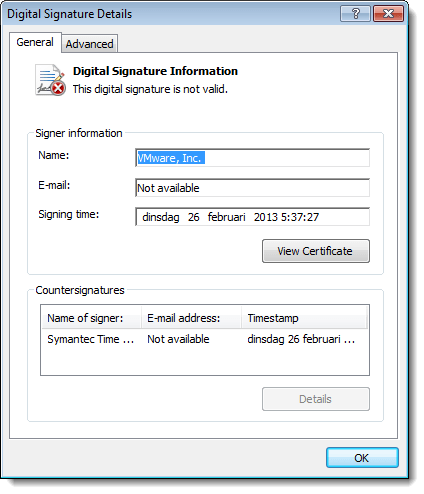
Very suspicious.
A bit later I found another msi package containing the same suspicious file. But this time, the package had a valid digital signature. What’s going on?
After a deep dive into the internals of msi packages, I found the answer.
When an msi package is installed, it is cached inside the Windows Installer directory (%windir%\Installer). Prior to Windows Installer 5.0 (released with Windows 7), cached packages were stripped of their embedded cab files. But with digitally signed msi files, the signature remained inside the file: the digitally signed file was modified, hence the signature was invalidated. This behavior changed with Windows Installer 5.0: cached packages are no longer stripped, hence the signature remains valid.
This blogpost by Heath Stewart explains this change in more detail. Unfortunately, my Google-skills were not good enough to find this blogpost prior to my deep dive into msi files. Hindsight Googling FTW! 😉
It looks like I didn’t release this update to my lookup tools.
lookup-hosts.py has a new argument: -R. This does a reverse lookup of the IP addresses (thus after it resolved the hostname).

And now you can also use letters as a counter: test-[a-z].com
lookup-tools_V0_0_2.zip (https)
MD5: 310904722F900FA34C567FC38634124E
SHA256: 85626574A99BF4D2AB786D8C2FF5B8F6649F1FC7410F1786A24EF0201AAF64AA
Because I had to use a workaround in my js-unicode-unescape.1sc script to copy an array of bytes to the clipboard, I asked the 010 Editor developers if they could add a function that does exactly this.
They included this new function, CopyBytesToClipboard, in their new version 5.0.
Here is a new version that uses this function:
js-unicode-unescape_v0_0_2.zip (https)
MD5: 6200C4F235CA527E8C0DCD5076CB1C09
SHA256: 2CACC9EE1BB1D1BC4C9FABC6EC3B3440CFF304AA560966B0B531279C369549BB
I had something of a puzzle to solve. A friend asked me to look at a set of files, all of the same size, but with some differences.
After some analysis, it dawned on me that these files were the result of a simple fuzzer applied to a single file. So I quickly wrote a program that took these files as input and reconstituted the original file. Later I wrote a more generic defuzzer. Here is an example:
defuzzer.py result.png a*.png

Number of defuzzed bytes: 171
Number of defuzzed sequences: 33
Length of shortest defuzzed sequence: 1
Length of longest defuzzed sequence: 10
Fuzz bytes:
'A': 171
From the result you can see that the program was able to reconstitute the original file, and that the fuzzer that was used to produce the different a*.png files, overwrote 33 byte-sequences with the character A. The longest sequence was 10 bytes long, the shortest only 1 byte. In total, 171 bytes were overwritten.
defuzzer_v0_0_2.zip (https)
MD5: 75188EF950625B78937C3473D825C582
SHA256: 056AB8BA7F3B2B52F8C7BFC2959D7F1AE3FEAC4BE90C675B2DFF6B521225D93E
Mark Woan reported an issue with virustotal-search.py: sometimes VirusTotal returns a JSON object that the json parser can’t parse.
That’s something I didn’t expect. I’ve added error handling for this case.
virustotal-search_V0_0_9.zip (https)
MD5: FECD02796889CDFE9FA67287F2DE567C
SHA256: 0CE06CBAFC6341835EB8A62377F5C4EB067747EE28E7ED8BB25FD69A4B99FA97

 Didier Stevens