This new version is a bugfix version for Python 3 plus I added a new name in the default report: /XFA
pdfid_v0_1_2.zip (https)
MD5: 60FC17757201F014A6ADA0744B74A740
SHA256: 1CF36C50427A2206275C322A8C098CD96A844CAF6077B105ADE9B1974789856F
This new version is a bugfix version for Python 3 plus I added a new name in the default report: /XFA
pdfid_v0_1_2.zip (https)
MD5: 60FC17757201F014A6ADA0744B74A740
SHA256: 1CF36C50427A2206275C322A8C098CD96A844CAF6077B105ADE9B1974789856F
From version 0.4.1 on, you can also pass a URL or a ZIP file as argument to pdf-parser:
pdf-parser.py http://example.com/doc.pdf
pdf-parser.py maldoc.zip
When you pass a URL as argument, pdf-parser will download the PDF document and analyze it. The PDF document will not be written to disk. Supported protocols are http and https.
Passing a ZIP file as argument instructs pdf-parser to open the ZIP file and analyze the first file it finds in the ZIP archive. If the ZIP file is password protected, pdf-parser will try to access the compressed file with password infected. Same as with URLs, the PDF file in the ZIP container is not written to disk.
Further changes are: bug fixes, performance improvement and option –content. This option allows you to view the content of an object without stream or with stream but without filters.
pdf-parser_V0_4_1.zip (https)
MD5: A0314C0CD8AAE376C7448E74D4A7472C
SHA256: 633B7400015B2C936103CC64C37435FB333B0F2634B2A6CD3A8949EAB1D18E9B
A month before my PDF training at HITB, it’s time to release new versions of my pdf tools.
I start with PDFiD. From version 0.1.0 on, you can also pass a URL or a ZIP file as argument to PDFiD:
pdfid.py http://example.com/doc.pdf
pdfid.py maldoc.zip
When you pass a URL as argument, PDFiD will download the PDF document and analyze it. The PDF document will not be written to disk. Supported protocols are http and https.
Passing a ZIP file as argument instructs PDFiD to open the ZIP file and analyze the first file it finds in the ZIP archive. If the ZIP file is password protected, PDFiD will try to access the compressed file with password infected. Same as with URLs, the PDF file in the ZIP container is not written to disk.
pdfid_v0_1_0.zip (https)
MD5: 6A5FF56C22EF2745C3D78C8FD8ACA01F
SHA256: D72FE8555DC89808EE7BFC9F791AD819A465106A95801C09C31B0FD2644B3977
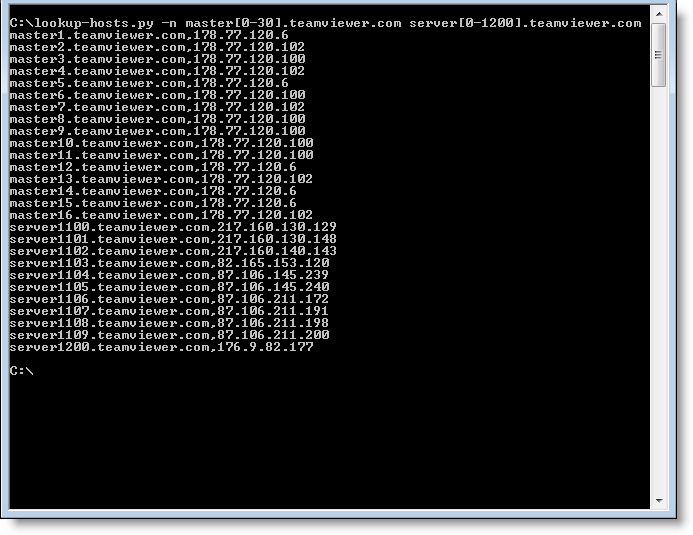
One last thing regarding my TeamViewer research: I had to resolve a bunch of hostnames and IP addresses, so I quickly wrote a Python program that did just that. Later I took the time to make some generic and versatile programs: lookup-hosts.py and lookup-ips.py.
lookup-hosts.py takes hostnames or files with hostnames via arguments or stdin, and then uses getaddrinfo to lookup the IP addresses. And you can use a counter if you need to lookup sequentially numbered hosts, like this: master[0-20].teamviewer.com. This will instruct the program to lookup master0.teamviewer.com, master1.teamviewer.com, … and master20.teamviewer.com. If you need a leading zero, use this syntax: master[0-20:2].teamviewer.com
The programs take options, use the -h option to explore them.
As it names implies, lookup-ips.py does the opposite of lookup-hosts.py by using gethostbyaddr. You provide it IP addresses and/or subnets (like X.X.X.X/24).
lookup-tools_V0_0_1.zip (https)
MD5: EB9C5BEF25EC5ED0F44297AA8A04679E
SHA256: 755E98BA0BC09C31E58ED4BF7B08CD42467BBF9B129C77DD6D558FD6B6E27124
This new version of XORSearch comes with a new operation: shifting left.
It comes in handy to reverse engineer protocols like TeamViewer’s remote access protocol.
Here’s an example. When you run TeamViewer, your machine gets an ID:

We capture some TeamViewer traffic with Wireshark, and then we use XORSearch to search for TeamViewer ID 441055893 in this traffic:

And as you can see, XORSearch finds this ID by left-shifting the content of the pcap file with one bit.
Sorry for the lack of recent posts, I’ve been ill and had to catch up with a lot of work.
Braden Thomas wrote an interesting series of posts on reversing the TeamViewer protocol.
I want to add my own observation: when TeamViewer is forced to communicate over an HTTP proxy, it will issue GET statements with parameter data that can be decoded in a similar way as Braden describes for the direct protocol (i.e. without proxy).
First of all, to identify TeamViewer traffic in proxy logs, you look for this User Agent String: “Mozilla/4.0 (compatible; MSIE 6.0; DynGate)”.
You will see HTTP GET requests like this one:
hxxp://178.77.120.6/dout.aspx?s=55194936&p=10000001&client=DynGate&data=FyQSAAExtjSytzoeqisTMbe3NzKxujS3tza3sjKemJMzHqkyu…
When you decode the value of the data= parameter as base64, you can identify the version of the protocol (first 2bytes) and the command (3rd byte):
0x1724 0x12
0x12 is a CMD_MASTERCOMMAND. By left-shifting the data from the 5th byte with 1 bit, you can decode the arguments of a MASTERCOMMAND, like this:
client=TV&connectionmode=1&f=RequestRoute2&homeserver=&ic=708710721&id=123456789&id1=123456789&id2=987654321&licensecode=…
When parameter f (the function) is RequestRoute2, you know that the TeamViewer user issued a command to connect to another TeamViewer client. Parameter id identifies the originating client (123456789 in my example), and parameter id2 identifies the destination (987654321 in my example).
The ISSA Journal featured my article on Network Device Forensics, making it available to everyone.
And I’m giving a 2-day training on PDF at Hack In The Box Amsterdam 2013.
Today I received my 3th MVP award from Microsoft: MVP 2013 Consumer Security.

To celebrate this, I’ve 2 things for you:
datapipe_V0_0_0_1.zip (https)
MD5: 5BF1594E8144B694431E7A7E3BDF33F7
SHA256: 57CD06EBFEC1C5C2661E44260A7304DFCDEEB2F54132E0627A474AF756AFA956

 Didier Stevens