Another stored password question I was asked: where does SQL Server 2005 Management Studio store the passwords, and are they encrypted?
When you set the Remember Password toggle:

the password is saved in this file (default install, Administrator account):
C:\Documents and Settings\Administrator\Application Data\Microsoft\Microsoft SQL Server\90\Tools\Shell\mru.dat
The password is not stored in cleartext. The file contains a BASE64 blob, strongly resembling a DPAPI protected data blob.
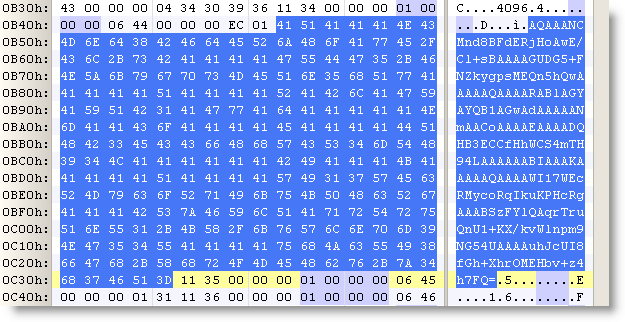
Convert it to hex:
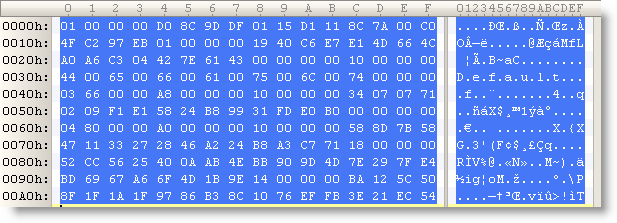
(all the protected DPAPI data blobs I’ve seen start with byte sequence 01 00 00 00 D0 8C 9D…)
Let’s decode this with CryptUnprotectData (all optional parameters set to NULL):

We get no error, proving that it’s indeed data protected by DPAPI on this machine for this user. The content is just the password in UNICODE.
The nice thing for a software developer, is that DPAPI allows him to encrypt/decrypt data without having to worry about encryption keys. For details on all the keys used by DPAPI, read this MSDN article.

 Didier Stevens
could you please share me the tool decrypt the mru.dat file, or tell me how to use the function CryptUnprotectData in this case?
Thank you
Comment by ben — Thursday 6 January 2011 @ 7:27
@ben You just call CryptUnprotectData with the decoded BASE64 data. Of course, you need to call CryptUnprotectData as the same user for which the data was encrypted.
Comment by Didier Stevens — Thursday 6 January 2011 @ 9:31
Hi Didier Stevens,
I can do it now, it’s great.
Initially, I just wasn’t sure how to get the Hex encrypted text from the file.
Thanks 🙂
Comment by ben — Thursday 6 January 2011 @ 9:40