Didier Stevens

Monday 11 June 2007

Some e-voting observations

Filed under: Vulnerabilities — Didier Stevens @ 16:52

Last Sunday, we had federal elections here in Belgium. I’m glad to see that the electronic voting system I used is designed to minimize voter coercion.

The secret ballot prevents coercion (being forced to vote for a certain person or party): if the voter can’t produce evidence of how he voted, he can lie to the coercer about his vote without risk. Some political parties want to change the process of the secret electronic ballot and include a paper trail. This is not a good idea, it will make coercion much more effective, as the voter will have an official paper with his vote.

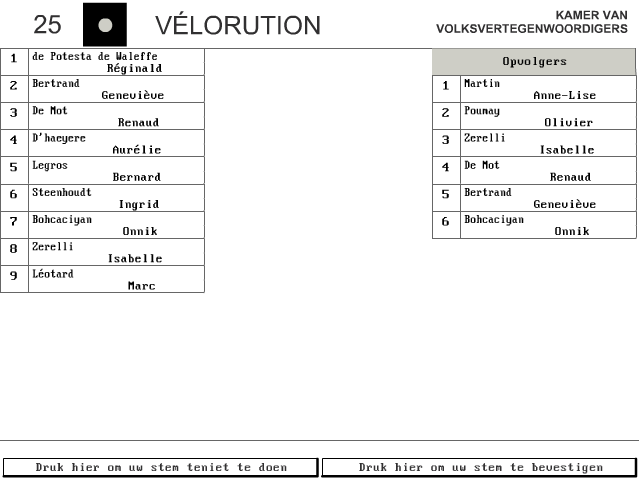
The ubiquitousness of mobile phones equiped with a camera gives coercers a new opportunity to require proof from the persons they are coercing. The coercer just has to instruct his victim to take a picture of his ballot. The Belgian electronic ballot is designed to prevent this. When you’ve casted your vote, you’ll see a screen like this one:

The 2 buttons at the bottom of the screen allow you to:

  • left button: go back a screen and change your vote
  • right button: confirm your vote

Once you have confirmed your vote, the next screen doesn’t display how you voted. So if one is coerced and has to deliver proof, one just has to take a picture of the vote one was coerced into, and then back out from the screen and change ones vote. The only workaround I see is for the coercer to demand a video of the complete voting process, in stead of a picture of the ballot.

I’ve made a video of my voting last Sunday, and it turned out to be rather difficult to do. First of all, I was standing very close to the screen and I clumsily managed to film only the bottom of the screen. Secondly, the brightness of the CRT screen (black letters on a white background) makes it very hard to read my ballot on the video. This could also be an anti-coercion mechanism, taking legible pictures of a white screen is very hard.

This is an advantage that our electronic ballot has over our paper ballot, it is more effective against voter coercion.

You can find a simulation of the Belgian electronic ballot here:

Tuesday 5 June 2007

OMG, My N800 is Infected!

Filed under: N800,Nonsense — Didier Stevens @ 19:02

I followed a link from a comment spam I had on my blog. Turns out my machine is infected:

screenshot-2007-05-06-11-54-53.png

screenshot-2007-05-06-11-56-16.png

This is really disappointing, I didn’t expect my brand new Linux-based Nokia N800 to get infected so soon:

n800-infected.jpg

Monday 28 May 2007

Find Madeleine

Filed under: Malware — Didier Stevens @ 9:24

I knew this was bound to happen, but I still got upset when I was confronted with it.

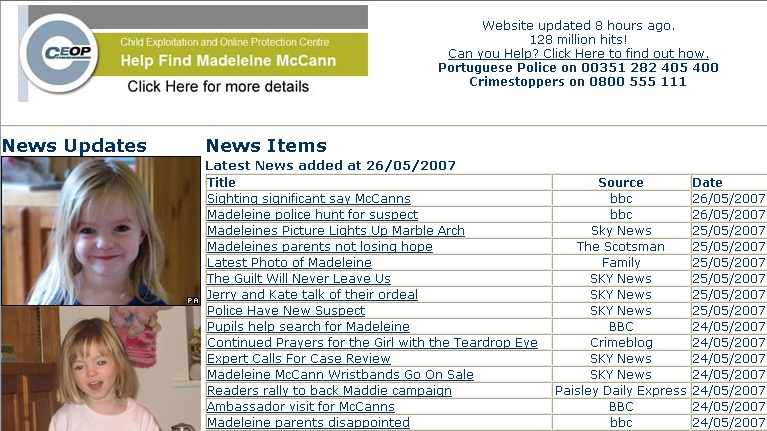
http://findmadeleine.com, the official website to find Madeleine McCann, has a page with links to news articles.

madeleine.png

Several days ago, when clicking on one of the news links, a new IE window opened, showing the news article, and ultimately, downloading a trojan. Someone must have taken action, because as of this writing, the trojan is not downloaded anymore. And just to be clear: the trojan was not hosted on or linked to from the findmadeleine.com site.

The official website to find Madeleine McCann links to news sites with articles about the search for Madeleine. One of these sites links to http://47z.nh5egc.gondar-my.info/htm/cc1.php?p=55, which in turn links to http://ww3.boz.com.my-expert-pop-block.biz/track3/sh.htm, which in turn downloads http://ww3.boz.com.my-expert-pop-block.biz/track3/%73%68%65%2e%6a%73.

%73%68%65%2e%6a%73 (she.js) is an encoded JavaScript trojan, detected as JS/IEstart.gen.c. Some of the things it does are:

  • changing your IE start page
  • installing a VB script to be executed each time your machine boots
  • changing the hosts file

The trojan is encoded with the Windows Script Encoder, I used the Windows Script Decoder to decode it.

It’s a known tactic of scammers to exploit the curiosity of the general public whenever there’s an important news event. I don’t think I can do something to help find Madeleine, but I’ll keep an eye on the news section to try to stop these scammers.

Monday 21 May 2007

Hiding Inside a Rainbow, Part 2

Filed under: Hacking — Didier Stevens @ 10:05

In my previous post about steganography and rainbow tables, I explained a technique to hide data in a rainbow table. The disadvantage of this method is that there is a way, albeit costly, to detect the hidden data. This is because we replace the random bytes, that makeup the start of the chain, by the data we want to hide, thereby breaking the chain. A broken chain can be detected by recalculating the chain and comparing the recalculated hash with the stored hash. If they differ, the chain is broken.

But if we know that we are breaking chains, why don’t we fix them? We can proceed as follows:

  • replace the start of the chain (random bytes) with the data we want to hide
  • recalculate the chain
  • replace the hash of the chain with the new hash we calculated

This way, there are no more broken chains that give away our hidden secret. But now there is another telltale sign that the rainbow table has been modified to hide data: the hashes aren’t sorted anymore. Remember that a rainbow table has to be sorted (the sort key is the index of the hash) to be useful. It is very unlikely that our new hash is greater (or equal) than it’s predecessor and smaller (or equal) than its successor. Detecting an unsorted rainbow table is much easier than finding broken chains.

OK, so if the new rainbow table is unsorted, why don’t we just sort it again? Well, if we resort the rainbow table, we destroy the order in which we stored our hidden data, so we loose the hidden data itself.

You could keep the original order of the hidden data by creating an index, this is another file that indexes the chains with hidden data. For example, you could make a list of all the hashes with hidden data. This list will then allow you to retrieve all chains with hidden data in the correct order. And the fact that you have such a list of chains isn’t necessarily suspicious, it’s just a list of hashes you want to crack…

But there is a simple way out of the unsorted rainbow table problem. Rainbow tables generated with the rtgen program are unsorted. In fact, you have to sort them with the rtsort command after generating them, before they can be used by the rtcrack program. The solution is to adapt the rtgen program to generate a rainbow table with hidden data, and keep this unsorted rainbow table.

And this is not so difficult. We add this method to the chain class:

void CChainWalkContext::InjectHiddenData(FILE *fFile, int bytes)
{
  unsigned char *byteInject;
  int iIter;
  int iChar;

  byteInject = (unsigned char *) &m_nIndex;

  for (iIter = 0; iIter < bytes; iIter++)
  {
    if ((iChar = fgetc(fFile)) == EOF)
      return;
    byteInject [iIter] = iChar;
  }
}

The arguments are a file handle to the file with data we want to hide, and the number of bytes per chain we use to hide data. We call the InjectHiddenData method in the rtgen program just after having generated random data (cwc.GenerateRandomIndex();, line 206 of file RainbowTableGenerate.cpp).

Our modified rtgen program allows us to generate an unsorted rainbow table with hidden data. The only way to detect this hidden data is with statistical analysis, provided that the hidden data doesn’t appear random. There are no broken chains that indicate hidden data, unlike with the previous method.
The disadvantage of this method is that you’ll have to generate a new rainbow table to hide your data, which is a lengthy process.

To extract the data file, use the same program as for the previous method, rtreveal

If you don’t feel comfortable using an unsorted rainbow table to hide data, I have probably two extra techniques for you.
One technique creates a sorted rainbow table without broken chains and it is fast. The disadvantage is that it stores much less hidden data. But you’ll have to wait a bit before I publish this technique. I’ve submitted an article about this steganographic technique to 2600 Magazine, and I can only release it after it gets published or refused.

The other technique also creates a sorted rainbow table without broken chains and it is fast, but I still have to work on it. It works, but it might be detectable. I’ll publish it when I’ve finished working on it.

Click Fraud

Filed under: Malware — Didier Stevens @ 6:49

After last week’s world-wide entertainment, I’m continuing with the more serious topic of steganography and rainbow tables, but first a small remark.

Some persons have commented that I didn’t discount the click fraud factor. The reason why I didn’t is that the motivation of the persons who clicked on my ad doesn’t matter at all. If it’s a person clicking on a “malicious” ad to commit click fraud, the result is the same: the cybercriminal gets a shot at trying to infect his machine.

And if it’s a program instead of a person doing the click fraud, the result is also the same if it’s a Windows program using the MS IE ActiveX component. I’m waiting for feedback to try to quantify the amount of non-Windows automated click-fraud that could have impacted my Google Adwords campaign. I’ll post an update when I get said feedback.

Wednesday 16 May 2007

Game Over!

Filed under: Entertainment,Malware — Didier Stevens @ 16:01

I suspect there is a Google employee reading slashdot 😉

gameover2.png

Tuesday 15 May 2007

1C0D49A102278EBA2CB2D1A4497810A6

Filed under: Malware — Didier Stevens @ 18:56

1C0D49A102278EBA2CB2D1A4497810A6 is the MD5 hash of a statement I make about my ongoing Google Adwords experiment.

The statement will be published on this blog in due time. I’m not trying to build suspense with this post, my statement is not spectacular.

Monday 7 May 2007

“Is your PC virus-free? Get it infected here!”

Filed under: Malware — Didier Stevens @ 6:12

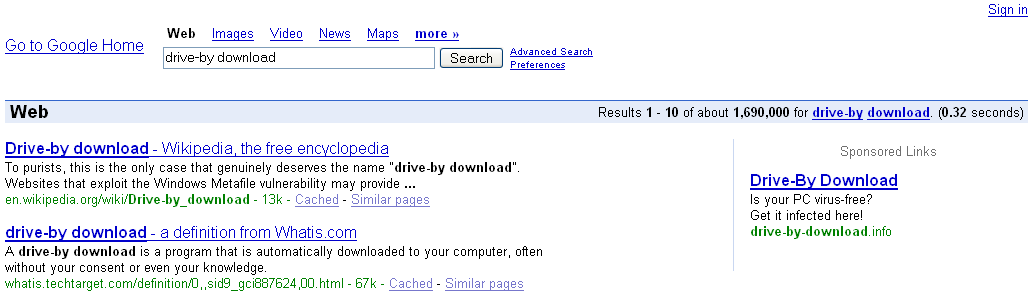
Would you click on this Google ad?

drivebydownload1.png

No? Sure? Because 409 persons did!

How do I know? Because I’ve been running this Google Adwords campaign for 6 months now.

Last fall, my attention got caught by a small book on Google Adwords at our local library. Turns out it’s very easy to setup an ad and manage the budget. You can start with a couple of euros per month. And that gave me an idea: this can be used with malicious intend. It’s a way to get a drive-by download site on the first page of a search result (FYI, I’ve reported on other ways to achieve this). So I started an experiment…

  1. I bought the drive-by-download.info domain. .info domains are notorious for malware hosting.
  2. I setup a web server to display a simple page saying “Thank you for your visit!” and to log each request. That’s all. I want to be absolutely clear about this: no malware or other scripts/code were ever hosted on this server. No PCs were harmed in this experiment.
  3. I started a Google Adwords campaign with several combinations of the words “drive by download” and the aforementioned ad, linking to drive-by-download.info
  4. I was patient for 6 months

During this period, my ad was displayed 259,723 times and clicked on 409 times. That’s a click-through-rate of 0.16%. My Google Adwords campaign cost me only €17 ($23). That’s €0.04 ($0.06) per click or per potentially compromised machine. 98% of the machines ran Windows (according to the User Agent string).

In a previous post on spamdexing , I reported 6,988 click-throughs to malicious websites over a 3 month period. That’s 2,329 click-throughs per month, compared to my 68 click-throughs per month. The Spamdexing “R” Us operation was much more successful than my little experiment, but at a greater cost (they ran a bunch of dedicated web servers). I’m sure I could get much more traffic with a higher Google Adwords budget and a better designed ad.

This is how my ad looks on a search result page:

drivebydownload2.png

I designed my ad to make it suspect, but even then it was accepted by Google without problem and I got no complaints to date. And many users clicked on it. Now you may think that they were all stupid Windows users, but there is no way to know what motivated them to click on my ad. I did not submit them to an IQ-test 😉

Recently there have been several stories in the press pointing out that this technique is used “in the wild”. That’s why I’m publishing my results now, but my experiment is still running. Of course, the nature of the experiment has changed now that I have revealed it, but it could still turn out to be interesting.

You can find a video of Google showing my ad here hosted on YouTube, and you can find a hires version (XviD) here. Not the best quality, but I wanted to show off my new Nokia N800.

I want to thank all participants of my experiment.

Monday 30 April 2007

Hiding Inside a Rainbow

Filed under: Hacking — Didier Stevens @ 16:43

Steganography is the art of hiding messages so that uninitiated wouldn’t suspect the presence of a message. A rainbow table is a huge binary file used for password cracking. This is the first in a series of posts on research I’ve done on how to hide data in rainbow tables, and how to detect its presence.

There are several steganography algorithms to hide data in pictures. They often involve changing the least-significant-bits of the numbers representing the color or another visual property of a pixel. This minute difference cannot be perceived by the naked eye, but it this there. The size of the data you can hide in a picture is limited by the size of the picture and by the numbers of bits involved in the steganography algorithm. It’s impossible to hide large files, like audio or video files, in a picture, unless you split the files and use a lot of pictures. To hide a large amount of data in a single file, you need a large file.

Rainbow tables are huge, usually 1 à 2 GB. I’ve generated a set of LM-hash rainbow tables that is 23 GB. So there should be enough space to hide a large amount of data. The software I’ve used in my research is from Project RainbowCrack. All tables used in my research were generated with this software.

The first method to hide data with a rainbow table is trivial, just rename the file you want to hide to the name of a rainbow table, like this one: lm_alpha-numeric-symbol14-space#1-7_0_5400x67108864_0.rt

But this method will not withstand a superficial inspection of the file. A forensic analyst will see through your subterfuge, by looking at the content of this file she will recognize the format of the media file you’ve renamed and realize that it’s not a rainbow table.

So how can you hide data in a real rainbow table? Let’s look at the structure of a rainbow table.

A rainbow table is just a sequence of records. Each record has 2 fields of 8 bytes each, this makes a record 16 bytes wide. Therefore the size of a rainbow table is a multiple of 16. A record represents a chain. The first field is the password that started the chain. Actually, the first field is an index into the keyspace of all possible passwords for the given rainbow table set. It is a random number between 0 and the size of the keyspace – 1. The second field is the hash of the last password in the chain (actually, this is also an index and not the real hash). The rainbow table is sorted on the second field: the record with the lowest hash is first in the table and the one with the highest hash is last.
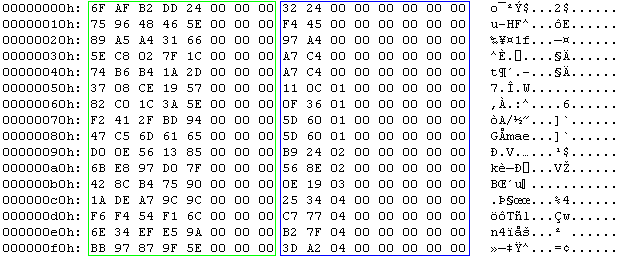
hide1aannot1.png

This is the hex dump a rainbow table (the first 16 chains). The green box highlights the random data, notice that the 3 most-significant-bytes are 0. The blue box highlights the hash, notice that this column is sorted.

My second method will modify a real rainbow table to hide a file.

Because the first field is just a random number, we can replace it with our own data from the file we want to hide. We cannot use all the bytes in this field, because the size of the keyspace is usually smaller than 8 bytes wide. The most-significant-bits of the password field are set to zero. Setting them to one would give our secret away. We must limit our usage of the password field to the least-significant-bytes. Changing these bytes will not change the structure of the rainbow table, so it will still appear as a valid rainbow table. The only consequence of our change is that the chain cannot be used anymore to crack a password. But if we leave a certain percentage of chains in the rainbow table unchanged, the rainbow table can still be used to crack some passwords.

To illustrate the technique, we insert 32 bytes (the sequence from 0x00 through 0x1F) in this rainbow table:

hide1aannot2.png

We will replace the random bytes in the red box. The keyspace of this rainbow table is less than 5 bytes (0xFFFFFFFFFF), that’s why I decide to change only the 4 least significant bytes of the start of a chain. This is the result:

hide1bannot.png

It is clear that this modification is very obvious when you look at it, because the start entries are not random anymore. But if you use data that looks random (using compression or encryption), it will not stand out from the other random bytes. You can even use this modified rainbow table to crack passwords. The first 8 chains will not crack passwords anymore, because the start of the chain has been changed. But this does not cause an error and all the other chains are still usable. The only way to detect the hidden bytes (other than statistical analysis), is to recalculate the chain and compare the calculated hash with the stored hash. If they differ, the start has been tampered with. You can do this with the rtdump command, like this:

rtdump lm_alpha-numeric-symbol14-space#1-7_0_5400x67108864_0.rt 0

If the chain has been modified, the message will be:

rtdump.png

The problem with this test is that it is very time consuming, checking a complete rainbow table takes about as much time as calculating the rainbow table, because you’re in fact recalculating all the chains. FYI, each 1 GB table from my set took about 1 week to generate.

You can find PoC code to store and retrieve data in rainbow tables here in this ZIP file.

Use rthide to hide data in a rainbow table, it takes 5 arguments:

  • the rainbow table (remains unchanged)
  • the file to hide (remains unchanged)
  • the new rainbow table
  • the number of the first chain where we will start replacing the random start bytes
  • the number of bytes per chain we replace

To hide a file data.zip at the start of a rainbow table called lm_alpha-numeric-symbol14-space#1-7_0_5400x67108864_0.rt, using only 4 bytes per chain, use this command:

rthide lm_alpha-numeric-symbol14-space#1-7_0_5400x67108864_0.rt data.zip  lm_alpha-numeric-symbol14-space#1-7_0_5400x67108864_0.rt.stego 0 4

This will create a new rainbow table called lm_alpha-numeric-symbol14-space#1-7_0_5400x67108864_0.rt.stego

Use rtreveal to extract data from a rainbow table, it takes 5 arguments:

  • the rainbow table
  • the file to create
  • the number of the first chain where we will start replacing the random start bytes
  • the number of bytes per chain we replace
  • the size of the hidden file

To extract the data, issue this command (you have to know the length of the hidden file, my PoC program doesn’t store this).

rtreveal lm_alpha-numeric-symbol14-space#1-7_0_5400x67108864_0.rt.stego data.zip 0 4 1620

1620 is the length of file data.zip

You can store a huge amount of data in a couple of minutes with this technique: for a rainbow table 1GB large, you can hide a 256 MB file in it using 4 bytes per chain. There is a way to detect the hidden data, but at a significant cost.

Stay tuned for posts about other techniques to hide data in rainbow tables.
Monday 23 April 2007

USBVirusScan V1.5.0

Filed under: My Software,Update — Didier Stevens @ 18:44

This new version of USBVirusScan adds a switch (-q) to stop a running instance of USBVirusScan.

The program can be found here.

« Previous PageNext Page »

Blog at WordPress.com.