Another very effective way to prevent malicious documents from infecting PCs, is to prevent vulnerable applications from starting other applications. As almost all shellcode found in malicious documents in-the-wild (again, I’m excluding targeted attacks) will ultimately start another process to execute the trojan, blocking this will prevent the trojan from executing.
This is an old idea you’ll find implemented in many sandboxes and HIPS. I added a new DLL to my basic process manipulation tool kit to prevent applications from creating a new process. Loading this DLL inside a process will prevent this process from creating a new process. I’ll explain the technique used in my DLL and how to load it in vulnerable applications in upcoming blogposts, but I want to start with showing how it prevents malicious documents from infecting a PC.
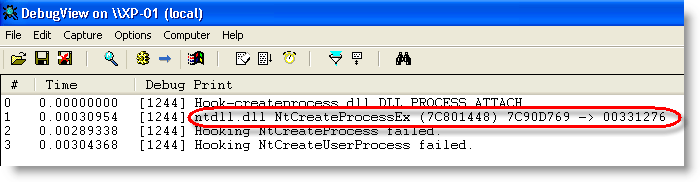
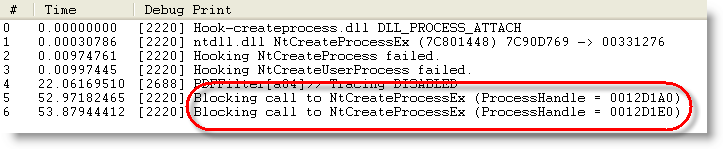
When the DLL is loaded inside a process, it will patch the Create Process API to intercept and block calls to it:
As a first test, we’ll use my eicar.pdf document.
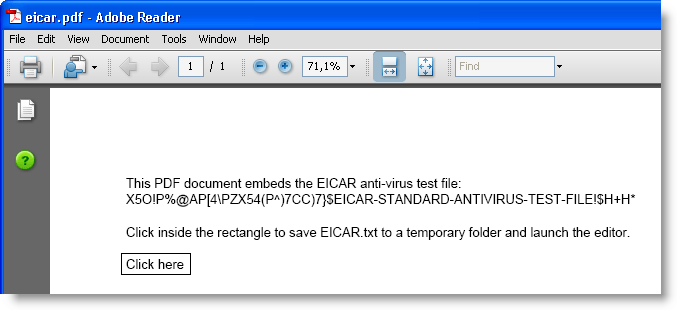
Clicking the button will save the eicar.txt file to a temporary folder and launch the editor.
Adobe Acrobat reader will warn you when an application is to be launched:
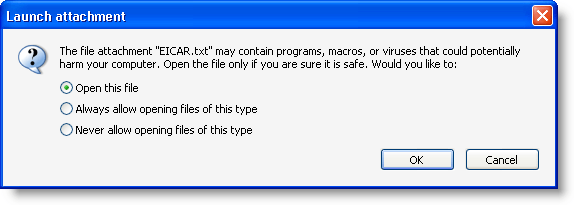
But when you accept, the editor will be prevented to execute:
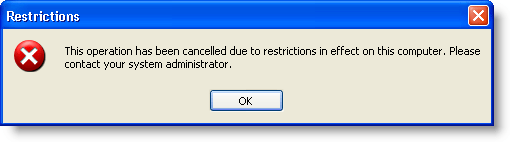
That’s because the DLL intercepted and blocked the Create Process call:

As a second test, let’s use a real malicious PDF document. The hooks installed by the DLL prevent it from executing the trojan:
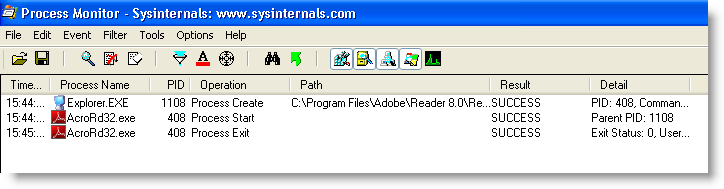
Adobe Reader starts and then just crashes, without spawning another process:
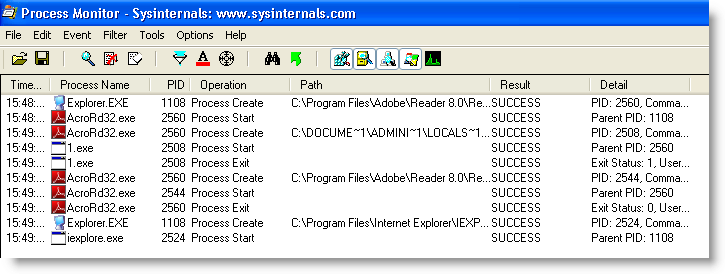
When opening the same malicious PDF, but without the protecting DLL, the machine gets trojaned (execution of 1.exe and Internet Explorer):
This simple way of preventing applications from launching other applications comes with some drawbacks. For example, the Check Update function in Adobe Reader will not function anymore.
When you have a sandboxing system of HIPS installed on the machines you manage, check if you can use it to prevent vulnerable applications from starting other applications. If it doesn’t provide such a feature, try the new DLL I’ll be posting in the new version of bpmtk.

 Didier Stevens
Hi Didier!
Judging from the screenshots, it seems like you only hook NtCreateProcessEx function for blocking process execution attempts.
NtCreateProcess function would still work properly though.
Even if you hook that call too, attacker could use ZwCreateProcess/ZwCreateProcessEx methods for spawning processes.
Vista introduced Nt(Zw)CreateUserProcess that could also be used for process creation by attacker (probably hooked by bpmtk dll, as seen on the screenshot)
Hooking all those calls is still not enough – shellcode could use fixed Nt “magic numbers”, or load them from ntdll.dll file from disk and use KiFastSystemCall method directly (or emulating it).
If a single process is not protected by your DLL, shellcode could took advantage of it and use correct ntdll addresses from this process.
Writing user-mode HIPS is error-prone and not very powerful, but I’m aware that the DLL is used in bpmtk, which is user-mode only.
Still, this is a nice addition to bpmtk, keep up the good work;)
Ael
Comment by Aelthegrin — Tuesday 6 October 2009 @ 9:09
Little correction – Nt/Zw functions point to the same code in user-mode, I forgot that:)
Comment by Aelthegrin — Tuesday 6 October 2009 @ 9:12
Good points Ael!
My DLL has code to patch the 3 exports (NtCreateProcess, NTCreateProcessEx and NTCreateUserProcess). But it depends on the Windows version which function is imported by kernel32.dll. The screenshot you see is from Windows XP SP2, kernel32.dll only imports NTCreateProcessEx. The 2 other are not imported and are thus not patched in the IAT.
I’ll provide more details in the blogpost where I explain the inner workings of my DLL, but I want to take this reply to point out that almost all shellcode in malicious documents is very simple and just looks for a couple of functions in kernel32.dll This shellcode doesn’t use exports from ntdll.dll, because this makes the shellcode more complex and more dependent on the Windows version.
Comment by Didier Stevens — Tuesday 6 October 2009 @ 19:13
Process creation disabling should be done by the kernel in order to be really secure. Usermode could do something like disabling a token, but I don’t think that hooking can provide real security.
The point in blocking this is that it is going to run insecure, malicious, untrusted code. Thus, we should consider that the author knows the way we’re going to block its code. The protection should still work even on this case. Otherwise, it’s only ‘secure’ as far as the ‘attackers’ don’t bother to work around it.
Comment by Anonymous — Monday 12 October 2009 @ 21:35
> Otherwise, it’s only ’secure’ as far as the ‘attackers’ don’t bother to work around it.
That’s always the case. If I have local admin rights, I can also work around the protection you set up in the kernel. To avoid that, you need a TPM and a chain of trust. Until someone breaks the weakest link in that chain…
It’s an arms race.
And another way to bypass this altogether is just not to create a new process…
Use shellcode: https://blog.didierstevens.com/2008/10/23/excel-exercises-in-style/
Or a DLL: https://blog.didierstevens.com/2008/06/05/bpmtk-how-about-srp-whitelists/
Comment by Didier Stevens — Monday 12 October 2009 @ 21:50
[…] should they consider that the protection offered by the warning dialog is not sufficient. BTW, preventing Adobe Reader from creating new processes blocks this […]
Pingback by Escape From PDF « Didier Stevens — Monday 29 March 2010 @ 19:46
[…] should they consider that the protection offered by the warning dialog is not sufficient. BTW, preventing Adobe Reader from creating new processes blocks this […]
Pingback by Escape From PDF (hack exposed) | Cell-Systems — Tuesday 30 March 2010 @ 17:21
Why not just disable non-PDF file attachments in Trust Manager settings of Adobe Reader?
Prefs -> Trust Manader -> PDF File Attachments -> [ ] Allow opening…
Comment by Reader — Wednesday 31 March 2010 @ 11:11
@Reader because that will not help you exploits that download and execute malware.
Comment by Didier Stevens — Wednesday 31 March 2010 @ 11:19
[…] should they consider that the protection offered by the warning dialog is not sufficient. BTW, preventing Adobe Reader from creating new processes blocks this […]
Pingback by Escape from PDF — Wednesday 31 March 2010 @ 19:53
[…] should they consider that the protection offered by the warning dialog is not sufficient. BTW, preventing Adobe Reader from creating new processes blocks this […]
Pingback by Hacker finds a way to exploit PDF files | The PC Report — Thursday 1 April 2010 @ 3:35
[…] PDF readers could disable the functionality completely (perhaps using Didier Stevens’ developed method) or bide their time, waiting on […]
Pingback by Triflex Enterprise | PDFs Exploitable?!? I’m shocked… — Thursday 22 April 2010 @ 5:20
Thanks for that! It\’s just the answer I neeedd.
Comment by Geraldine — Wednesday 21 December 2011 @ 15:53
[…] PDF readers could disable the functionality completely (perhaps using Didier Stevens’ developed method) or bide their time, waiting on […]
Pingback by PDFs Exploitable?!? I’m shocked… | ESET ThreatBlog — Friday 24 February 2012 @ 22:48
I found this while looking for a way to stop google Chrome browser from running their “field trials” on my machine – its causing my harddrive to max out and Chrome to crawl.
If source code is available, I think I could modify it to strip out the offending extra “field trial” cmdline arg before passing the process.start onto OS?
Comment by Paul Traite — Thursday 16 May 2019 @ 20:41
The source code is available, but this is 10 year old code, it’s no longer secure to use.
Comment by Didier Stevens — Saturday 18 May 2019 @ 12:54
re: unsecure — I want this for my personal PC, so am willing to decide if the issues are important enough to keep me from implementing.
So — I didn’t see a link to download the source code. Could you provide one, or some other way for me to find / get it? Thanks.
Comment by Paul Traite — Saturday 18 May 2019 @ 13:36
It’s in my software list, look for bmptk: https://blog.didierstevens.com/my-software/
It’s old code, I no longer maintain it.
Comment by Didier Stevens — Sunday 19 May 2019 @ 8:31