Didier Stevens

Sunday 1 July 2018

Update: re-search.py Version 0.0.11

Filed under: My Software,Update — Didier Stevens @ 13:28

This new version of re-search.py comes with a new option: -e. This option instructs re-search to read its input as a binary file and extract strings from it, to be matched with the chosen regular expression. This allows, for example, the processing of UNICODE strings.

re-search_V0_0_11.zip (https)
MD5: 72F160A83E214351162704EB4B94EB9E
SHA256: 624E2864738008F6A63CC4E3F7B5FCB3738389DBC7E6EF29BC8C2F749ABAD9DE

Friday 29 June 2018

Update: re-search.py Version 0.0.10

Filed under: My Software,Update — Didier Stevens @ 0:00

This new version of re-search.py comes with 3 new regular expressions in its library:

  • email-domain
  • url-domain
  • onion

Regular expressions email-domain and url-domain match exactly like regular expressions email and url, however, the output is just the domain, not the full email/url.

Regular expression onion matches onion addresses.

I use url-domain to make a list of unique domain names for all the URLs found inside a document. Compare the output for url and url-domain:

re-search_V0_0_10.zip (https)
MD5: A4A22FBA70990B57C811DD290C6F0DAA
SHA256: BF5084E4CE7A528AB2701D5AAA6C7366A3A43B8768C712263133A6E302569E86

Wednesday 27 June 2018

Quickpost: Decoding Certutil Encoded Files

Filed under: My Software,Quickpost — Didier Stevens @ 0:00

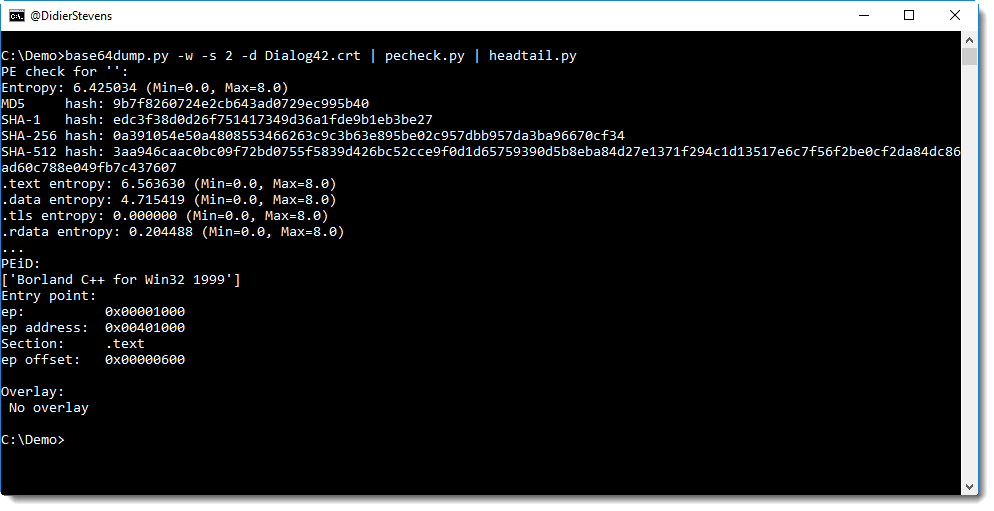
As I showed a colleague, it’s easy to analyze a file encoded with certutil using my base64dump.py tool:

Just use option -w to ignore all whitespace, and base64dump.py will detect and decode the base64 string.

As can be seen in the screenshot, it’s a file starting with MZ: probably a PE file.

We can confirm this with my YARA rule to detect PE files:

Or use pecheck.py:


Quickpost info


Tuesday 26 June 2018

Update: zipdump.py Version 0.0.12

Filed under: My Software,Update — Didier Stevens @ 0:00

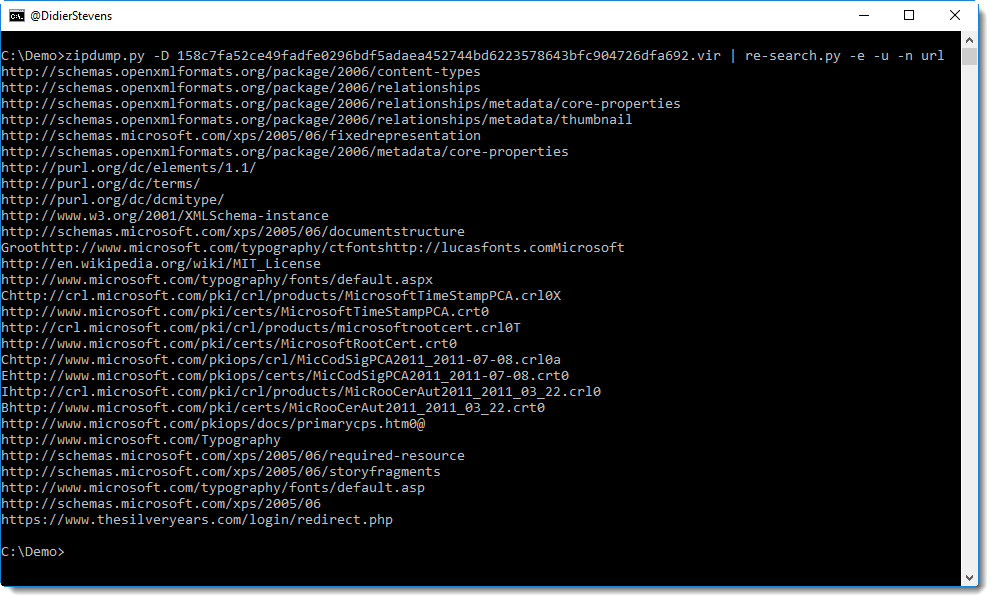
This new version adds option -t (translate), like some of my other tools. This option can be used to specify a codec when dumping the content of a file.

Here I used it to dump a Unicode file for a page of an XPS document:

zipdump_v0_0_12.zip (https)
MD5: 7110FB8B873BFDCF10E4A1C2AB89ACC2
SHA256: EA2D852C132DEF7947EBA0FFDB3E4CC8C69032413D36E67BBB3F943FA7B44B18

Friday 22 June 2018

Update: jpegdump.py Version 0.0.6

Filed under: My Software,Update — Didier Stevens @ 0:00

A small update to indicate a file was decompressed:

jpegdump_V0_0_6.zip (https)
MD5: 14FFB9016A9181DB3A59370B2E0DAFF2
SHA256: 13B610A9BDE68CDB64E482AADBC522DDAABD6F6D746AA032C6FEDDAF6BF4169B

Thursday 21 June 2018

Validating Your Downloads

Filed under: Announcement,My Software — Didier Stevens @ 0:00

Occasionally, a comment is posted on my blog to report that the posted hash of a file doesn’t match the hash of the downloaded file. Often, it’s because the reader calculated the hash of my program, and not the hash of the downloaded ZIP file, containing the program.

Let’s clarify this. Here is an example of download details I use in my blog posts:

hash_V0_0_5.zip (https)
MD5: 2A4D61F692D935E27E4BECA642F19D97
SHA256: 5DA5B59EBC6EB0FADEA868E631057BF14C29486405F75D8183C48FE4631B81A2

First you have the HTTP download link to the file, and then you have the HTTPS download link of the same file.

Next, you have the MD5 hash and SHA256 hash of the hosted file, e.g. the ZIP file.

The links and hashes are served by one host (blog.didierstevens.com), and the file is served by another host (didierstevens.com).

To validate that the file you downloaded has not been tampered with, or corrupted during the download, you have to calculate the hash of the downloaded file (if it’s a ZIP file, calculate the hash of the ZIP file, not of the archived files) and compare this with the hash I published.

If you don’t have a tool to do this, you can use my hash.py tool like this:
Wednesday 20 June 2018

Update: hash.py version 0.0.5

Filed under: My Software,Update — Didier Stevens @ 0:00

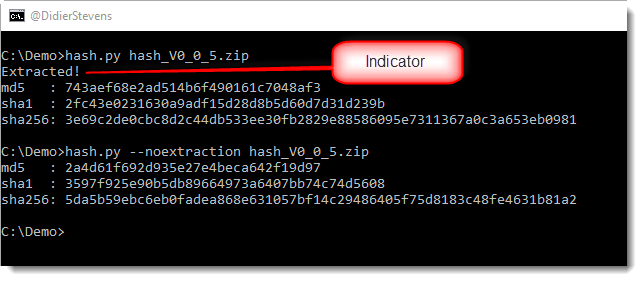
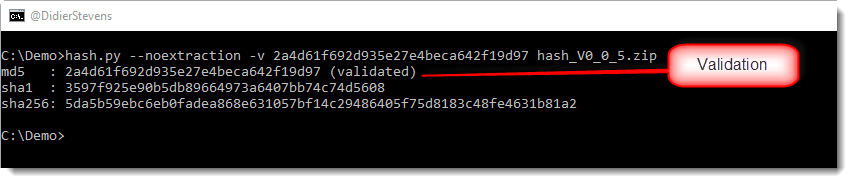
This new version adds option -v to validate hashes, and an indicator when archive files are decompressed.

Compression:

Validation:

hash_V0_0_5.zip (https)
MD5: 2A4D61F692D935E27E4BECA642F19D97
SHA256: 5DA5B59EBC6EB0FADEA868E631057BF14C29486405F75D8183C48FE4631B81A2

Tuesday 19 June 2018

Update: cut-bytes.py Version 0.0.7

Filed under: My Software,Update — Didier Stevens @ 0:00

This too is a minor update for #e# expressions.

More details in this video:

cut-bytes_V0_0_7.zip (https)
MD5: 95CF8E5D2BC2790B25101FC2BFF769FB
SHA256: F1112C96872D15C2CD3F6AF9828C7E39F5EB115D20FB62AAD1C1357D75E3485B

Monday 18 June 2018

Update: translate.py Version 2.5.4

Filed under: My Software,Update — Didier Stevens @ 0:00

This is a minor update for #e# expressions.

More details in this video:

translate_v2_5_4.zip (https)
MD5: C07B37F7AFA0386315843E6A493721C1
SHA256: A2203C643FC8BC64A98DCA3EE1F9444BE16F5D5C2036AC0200A6BA657786C5EC

Friday 15 June 2018

Update: jpegdump.py Version 0.0.5

Filed under: My Software,Update — Didier Stevens @ 0:00

This is a small update to jpegdump.py, my tool to analyze the structure of jpeg files.

The man page (option -m) has been updated.

jpegdump_V0_0_5.zip (https)
MD5: D7157E7FDEEA4257220F60E0081EE138
SHA256: D6940A82CDECEB9D1FB27561E7B748837D666568FC857AEB6680E135D08E897C

« Previous PageNext Page »

Blog at WordPress.com.