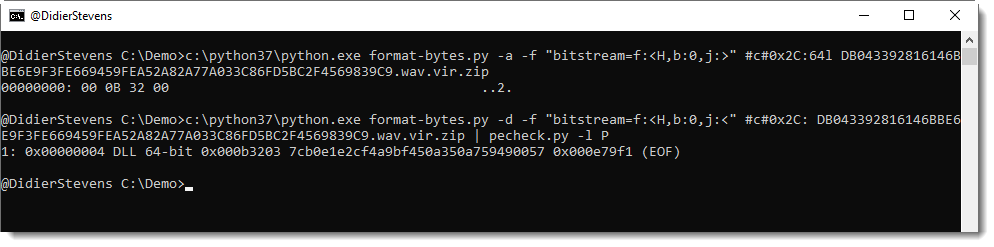
This new version supports CRC32 hashing.
hash_V0_0_7.zip (https)
MD5: 9BE8A26F2940FA2FF5C3671B7BB6DC6F
SHA256: CFA2767F0FAA792F9B75344B2F15FF40267F3EDE77D221B0134F07FDB04E515B
This new version supports CRC32 hashing.
hash_V0_0_7.zip (https)
MD5: 9BE8A26F2940FA2FF5C3671B7BB6DC6F
SHA256: CFA2767F0FAA792F9B75344B2F15FF40267F3EDE77D221B0134F07FDB04E515B
This new version of msoffcrypto-crack.py, a simple tool to crack passwords of MS Office documents, adds rules via option -r.
In this release, there is only one rule to modify candidate passwords: case toggle.
If you use option -r, all passwords in the provide list will be tested, together with their case toggle variant: Secret -> sECRET.
msoffcrypto-crack_V0_0_4.zip (https)
MD5: D3D7A0475FF1C9AAB7BE773514784465
SHA256: 4A27E0FF50863A925FEE55B8F7D16AD29C2DF5E4611F9493DAEEBA89B5F3DBA9
Here is an overview of content I published in August:
Blog posts:
YouTube videos:
SANS ISC Diary entries:
NVISO blog posts:
In my BruCON training “Malicious Documents For Red Teams” (October 2019), we will cover downloading of files over DNS. I Tweeted about downloading Mimikatz via DNS-over-HTTPS with an Excel sheet.

I’m not releasing the Python code to serve files via DNS, nor the VBA code to download files over DNS/DoH: this is reserved for the attendees of my training.
But here I am sharing capture files of the downloads via DNS, so that you can understand how traffic looks like, and how to detect it.
Capture files inside the ZIP container (password is infected):
DNS_TXT_captures.zip (https)
MD5: 5DB5091B9B641E9B8DA0E29CE9870981
SHA256: 49858B8BBA851B86EAB2DB6C5F329C5B587A3B1C7EB1A1E6028BCFBCDF445ECC
This is a bugfix version.
pdf-parser_V0_7_2.zip (https)
MD5: 7D417F2313FF505AC96B80D80495BB78
SHA256: 3CDB98A57DAABC98382BFA361390AE3637F96852F6F078D03A7922766AE14B57
Here is an overview of content I published in July:
Blog posts:
YouTube videos:
Videoblog posts:
SANS ISC Diary entries:
tcp-honeypot.py is a Python program that allows you to define listeners using dictionaries: they listen on a given TCP port and process connections according to their configuration.
It started as a simple TCP honeypot, but now I use it too if I need a small network server.
For my quickpost “Quickpost: Browsers & Content-Disposition“, I needed a simple web server that would serve a page that I could fully control (headers & body).
I did this with tcp-honeypot. Dictionary dListeners (used by tcp-honeypot) defines the listeners: the keys are the TCP port numbers to listen on, and the values are dictionaries with configuration entries.
As I wanted to serve 3 different pages, I resorted to listen on 3 different ports (8080, 8081, 8082), each would serve a different page. Each dictionary for these listeners contains one entry with key THP_REPLY. Because each listener is very simple it listens for a connection and reads incoming data, discards it, and then sends its reply (regardless of input).
Here is the code to do this (file content-disposition-test.py):
#!/usr/bin/env python
__description__ = 'TCP honeypot configuration for Content-Disposition tests'
__author__ = 'Didier Stevens'
__version__ = '0.0.1'
__date__ = '2019/04/03'
"""
Source code put in public domain by Didier Stevens, no Copyright
https://DidierStevens.com
Use at your own risk
History:
2019/04/03: start
Todo:
"""
dListeners = {
8080: {THP_REPLY: TW_CRLF(['HTTP/1.1 200 OK', 'Content-Disposition: inline', '', 'Line 1', 'Line 2', 'Line 3'])},
8081: {THP_REPLY: TW_CRLF(['HTTP/1.1 200 OK', 'Content-Disposition: attachment', '', 'Line 1', 'Line 2', 'Line 3'])},
8082: {THP_REPLY: TW_CRLF(['HTTP/1.1 200 OK', 'Content-Disposition: attachment; filename="test.js"', '', 'Line 1', 'Line 2', 'Line 3'])},
}
THP_REPLY configures a listener to read incoming data when a TCP connection is established, then send a reply (the value of dictionary entry THP_ENTRY) and then close the connection. This value is a string: the HTTP message (start-line, headers and body) to be send to the browser. In stead of defining one long string with start-line, headers and body, separated with carriage return & newline (CR NL), I use convenience function TW_CRNL. When you call convenience function TW_CRNL (Terminate With CR NL) with a list of strings, it terminates each string with CR NL (\r\n) and concatenates all strings into one string, that is returned by the function.
To start the server with this configuration, I just have to run tcp-honeypot.py with content-disposition-test.py as argument.
There are other methods to do this, for example using a single port. I’ll describe these methods in an upcoming blog post.
This new version of format-bytes brings support for TLV records.
Here is an example with certificates in the Windows registry:


More details will be provided in an upcoming blog post.
format-bytes_V0_0_9.zip (https)
MD5: 2F97370D12A7DBB53EB8B30AA0A40463
SHA256: 87C9F3120673C0E92C9562EC2687B60AA93DAF612CE854939E48F6E902BFBBB4
A reminder to myself, how to set a nslookup type via the command-line:


The label of the root domain is an empty string, hence a FQDN with root domain ends with a dot (.), like google.com. :

Here is an overview of content I published in June:
Blog posts:
SANS ISC Diary entries:
NVISO blog posts: