Sunday 19 September 2021
Overview of Content Published in August
Saturday 21 August 2021
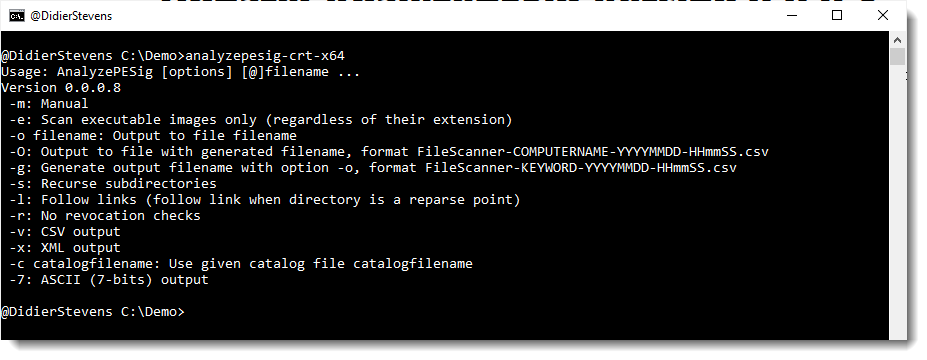
Update: AnalyzePESig Version 0.0.0.8
This new version of AnalyzePESig, my tool to analyze the digital signature of PE files, brings some major updates:
- Support for UNICODE filenames
- Reintroduction of the capability to verify the signature of non-PE files, like .MSI files
And several bug fixes.
MD5: C14A2C8AA91D34F534B4F76E7014E3A9
SHA256: BCCF90BF6E4C26C33BF16DA20CF220DAE8D748B942224659DC720B35BB8EFE86
Friday 20 August 2021
Update: pdfid.py Version 0.2.8
This is a bug fix version
pdfid_v0_2_8.zip (https)MD5: 9DDE1D9010D860303B03F3317DAF07B4
SHA256: 0D0AA12592FA29BC5E7A9C3CFA0AAEBB711CEF373A0AE0AD523723C64C9D02B4
Update: pdf-parser.py Version 0.7.5
This is a bug fix version.
pdf-parser_V0_7_5.zip (https)MD5: D39E98981E6FEA48BF61CA2F78ED0B09
SHA256: 5D970AFAC501A71D4FDDEECBD63060062226BF1D587A6A74702DDA79B5C2D3FB
Thursday 19 August 2021

Tuesday 17 August 2021
Update: oledump.py Version 0.0.62
This new version brings a bug fix and an update to plugin_biff’s XOR deobfuscation.
oledump_V0_0_62.zip (https)MD5: F16DB945970B49A60155443ED82CDE29
SHA256: 4AE5DF2CC8E8F5A395027A8056B1A33B8F05C0AB6FC18D56D46DC151BB4302FB
Wednesday 11 August 2021
dnsresolver.py: Videos For Each Command
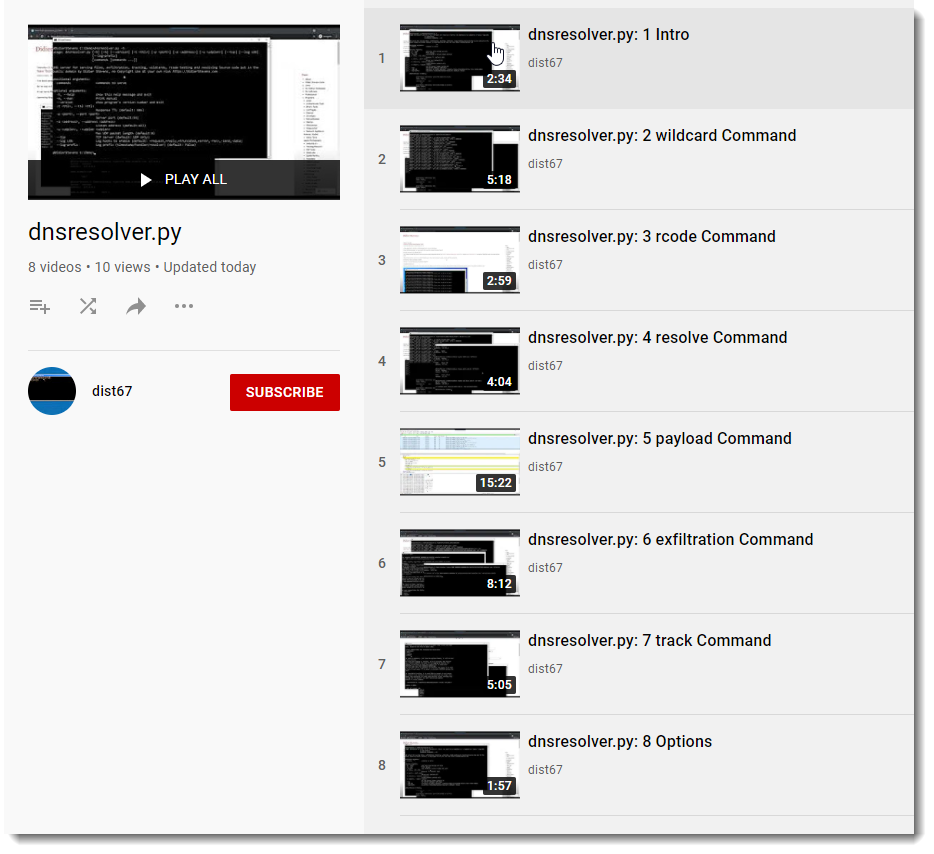
I did record 8 videos explaining the different commands of my dnsresolver.py tool.
This is a tool that can serve files, facilitate exfiltration, do tracking, answer wildcard requests, do rcode testing and also simple resolving.
I have a YouTube playlist with all 8 videos: dnsresolver playlist.
Monday 2 August 2021
Overview of Content Published in July
- Update: xmldump.py Version 0.0.7
- New Tool: texteditor.py
- Update: FileScanner Version 0.0.0.7
- New Tool: dnsresolver.py
- sysmon?s DNS QueryStatus Field
- Update: base64dump.py Version 0.0.16
- Using SeBackupPrivilege With Python
Monday 19 July 2021
Using SeBackupPrivilege With Python
Access to files on a Windows NTFS filesystem is governed by permissions and privileges.
For permissions, it is done with a security descriptor on a file which contains a Discretionary Access Control List (DACL): these are the permissions that decide if a user has access (and which type of access) to said file. Most files don’t have their own, proper permissions: they inherit them from their parent folders.
Even administrators can be denied access to a file through DACL configuration.
But there is another mechanism that governs access to securable objects like files: privileges. A privilege is a property that a user holds. Administrators have many privileges that normal users don’t have. Like SeBackupPrivilege and SeRestorePrivilege (these are privileges necessary for backup operators).
When a user holds a privilege, it allows that user to do things that other users without that privilege are not allowed to do. For example, the SeBackupPrivilege allows a user to read any file, even if the security descriptor denies access.
But just having the SeBackupPrivilege is not enough:
1) it needs to be enabled programmatically
2) when opening a file, the intention to use the privilege must be specified
Doing this in a programming language like C is easy (for example, I programmed this into my FileScanner tool), but for Python, it’s a bit more complicated.
Part 1, enabling the privilege can be done in Python with the following code (it relies on pywin32).
import win32security
import win32api

def EnablePrivilege(privilege):
    hToken = win32security.OpenProcessToken(win32api.GetCurrentProcess(), win32security.TOKEN_ADJUST_PRIVILEGES | win32security.TOKEN_QUERY)
    win32security.AdjustTokenPrivileges(hToken, 0, [(win32security.LookupPrivilegeValue(None, privilege), win32security.SE_PRIVILEGE_ENABLED)])
    win32api.CloseHandle(hToken)

EnablePrivilege(win32security.SE_BACKUP_NAME)
Part 2, opening the file, is typically done with WIN32 API function CreateFile and passing it the FILE_FLAG_BACKUP_SEMANTICS flag with argument dwFlagsAndAttributes.
In Python, we usually access files via function open, and not via WIN32 API function CreateFile. We can do that, but I found a simpler method.
Python’s open function has no argument where we can pass flag FILE_FLAG_BACKUP_SEMANTICS, so we cannot use open.
Python also has function os.open, it returns a file descriptor that can then be used with other file descriptor operations, like read. Like open, os.open has no argument to pass flag FILE_FLAG_BACKUP_SEMANTICS. However, someone figured out it can be done indirectly by using flag 0x2000 (os.O_DIRECTORY ?) :
fd = os.open('c:\\demo\\test.txt', 0x2000)
os.read(fd, 0x10) # read 10 bytes
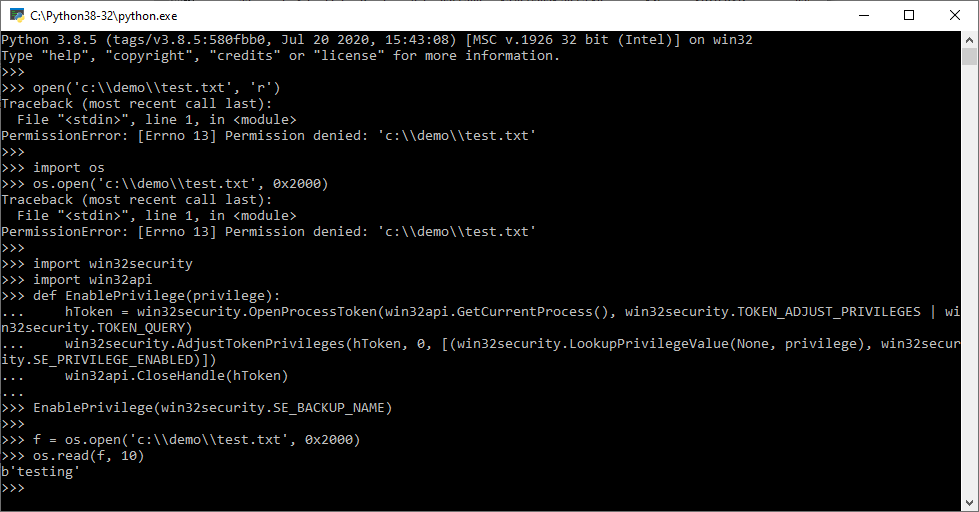
Here under is a demo. File c:\demo\test.txt is only accessible (full control) by a given, normal user. And not by the administrator. This instance of Python is running under the account of an elevated administrator (so that it has the SeBackupPrivilege ready to be enabled).
When attempting to open file c:\demo\test.txt with open and os.open, permission is denied.
But after enabling SeBackupPrivilege, access via os.open is granted:

Saturday 17 July 2021
Update: base64dump.py Version 0.0.16
This new version of base64dump.py brings bug fixes and support for BASE85 RFC 1924 encoding.
If you want to know how I go about adding a new decoding to base64dump.py, watch this video:
Here is version 0.0.0.15, with bug fixes but without base85:
base64dump_V0_0_15.zip (https)MD5: 95C78B0DC830C6240F2A56A3BA0C483F
SHA256: F011136B2CF4F54647AB4B699CE7F3575925B2BD09EED409E4BBE34FEB8C570A
And here is version 0.0.0.16 with base85:
base64dump_V0_0_16.zip (https)MD5: 91E283BDF292C463E349DC535EF50535
SHA256: E85345971D209559ED6602F16C6DBBF526816848B2F15B44C06A7DE7B28F2F8C

 Didier Stevens