This update adds pseudo-field sha256 which can be used to calculate the sha256 hash of the content (compressed or decompressed): -E sha256:data -E sha256:data:decompress -E sha256:decompress -E sha256:extra
The Dutch government is telling people to prepare to be self-sufficient for at least 72 hours in case of a major emergency when many services (electricity, water, internet) could be unavailable. This campaign is called “Denk Vooruit” (Think Ahead). An emergency booklet has been mailed to all inhabitants. The Belgian authorities are voicing similar concerns, but no emergency booklet has been mailed.
The booklet advises people to have a radio in their emergency kit, specifically one that works without mains power, like a battery-powered or hand-crank radio.
I have a battery-powered FM radio, and I wanted to know if I could power it with a USB powerbank and a USB trigger board (I have several high-capacity powerbanks).
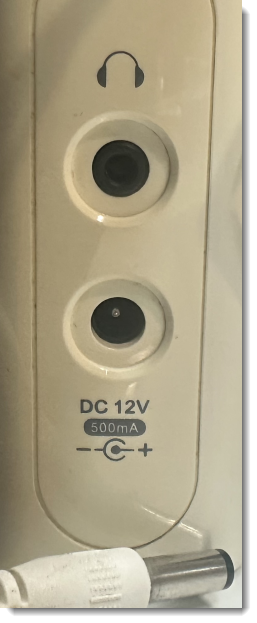
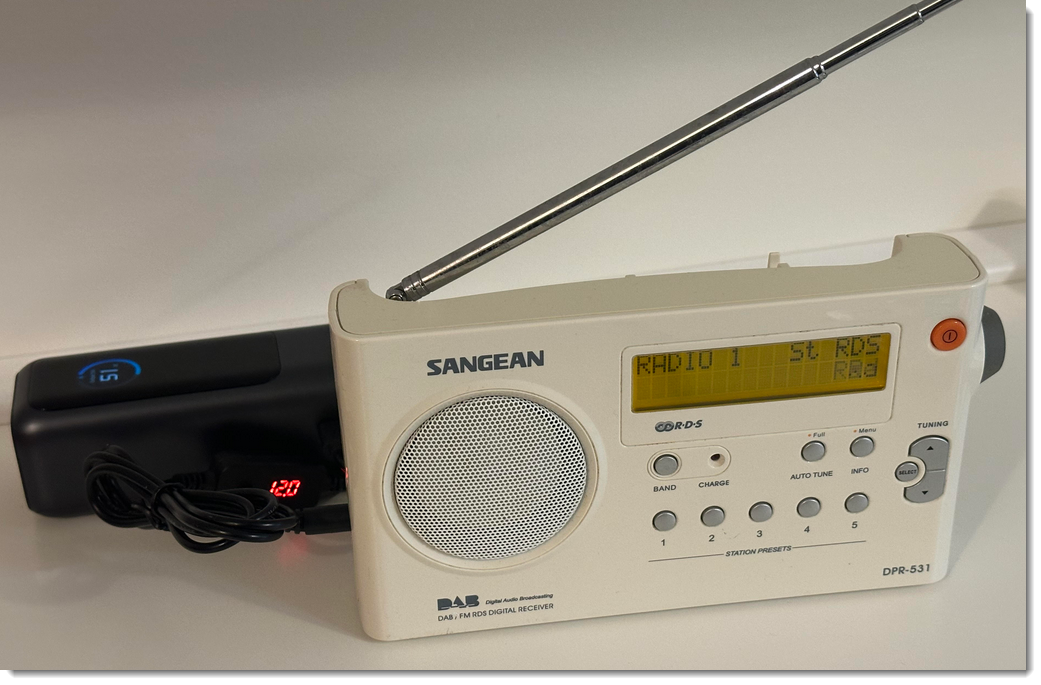
It works: the radio has a 12V barrel jack connector, and I can power it with this USB trigger board/cable, without soldering connectors:
I’ll probably still solder a cable with a fixed 12V USB trigger board, because this setup is prone to accidentally pushing the button of the USB trigger board, and delivering 15V or 20V to the radio (a voltage that is too high, and might destroy the radio).
Although this setup is portable, it’s not very handy to carry around when you go away from home. So I looked around on Aliexpress for a small & cheap FM radio and selected a Junus J-555. It can be powered by two alkaline AAA batteries or by its built-in Li-Po battery. That Li-Po battery can be charged via a USB-C connector, and the radio also works while charging. But what is most important: it has a good reception of FM and AM stations when operating inside my home.
A USB trigger board is a small electronic device that receives power via a USB-C connector, and delivers power with a voltage that it negotiates with the USB power source.
This one for example is set to deliver 12V:
Left you have the USB-C connector, right you have positive and ground soldering pads with 12V between them.
Here is one that can be configured with DIP-switches (5V, 9V, 12V, …):
The USB-C connector is on the left, and you have screw connectors on the right for the output.
Here is one with cables, and a display and switch that lets you cycle between 5V, 9V, 12V, 15V and 20V.
The USB-C cable is on the right, and a cable with a barrel jack connector is on the left, delivering 12V in this example.
And here is one that is even more configurable:
A USB-C connector on the left, and a USB-A connector on the right with a USB-A cable with barrel jack connector. It’s configured for 5V.
This one can not only negotiate fixed voltages (5V, 9V, 12V, …), but also arbitrary voltages via Programmable Power Supply, provided your USB power source supports PPS. For example, one can request 5.5V, and also limit the current, to say 0.1A.
And finally, I also have this Fnirsi DPS-150, a portable power supply that can also be powered via a USB-C connector:
It’s not a USB trigger board, but more like a lab power supply. It is limited by the power it receives from the USB power supply. For example, on the picture above, you can see that it negotiated 20V (20.07V) with the USB power source, it is set to deliver 20V (Vset), and delivers 19.83V (unloaded). The dial button can be used to set a voltage between 0V and 19.83 (in this example). The maximum current can also be set (Iset).
These boards allow me to power devices with various power requirements, and be mobile.
I discovered USB-C rechargeable batteries, and bought a set of AA and AAA batteries.
They have a USB-C connector for recharging, so you don’t need a separate charger like you do for NiMH batteries.
This post is not a full blog post, but more a collection of lab notes.
These USB-C batteries deliver 1,5 Volt (unlike NiMH batteries that deliver 1,3 Volt). And during discharge tests, I noticed that the voltage almost doesn’t change. So not only must they have battery charger electronics inside, but also converter electronics that deliver a constant voltage. Probably something like a switching-mode power supply circuit, because when I look at the ripple of the voltage with an oscilloscope, I see a pattern that makes me think of a switching-mode power supply:
That’s for a AA battery that delivers power to an electronic load that draws 0,100 A current:
The ripple could also come from the electronic load itself, or some electronic noise source in my lab. So to rule that out, I discharged an alkaline battery and got this:
This is a different pattern and it repeats with a different frequency, to the ripple we saw in the first scope picture must come from the battery.
I also did measurements with a spectrum analyzer:
Here you can see a peak (and its harmonics) around 1,20 MHz.
That too comes from the battery, as these peaks do not appear with an alkaline battery:
In the picture of the electronic load screen, one can see 1493 mWh: that’s for the discharge of an AA battery at 0,100 A until the voltage reaches 0,5 V. 1493 is far less than the 3400 mWh printed in a large font on each battery.
I did a series of tests with my AA (0,100 A discharge current) and AAA (0,025 A discharge current) batteries, and on average I get:
Type
Measured output (mWh)
Advertized output
Measured input (mWh)
RTE
AA
1527
3400
2114
72%
AAA
478
1200
754
63%
Unfortunately, these batteries deliver far less electrical energy than advertized.
For comparison, I also discharged an fresh alkaline AAA battery and got 1380 mWh out of it.
I created a discharge graph for a USB-C rechargeable AA battery:
During more than 9 hours, the voltage stays around 1,45 V (for a 0,100 A discharge current). Then it abruptly drops to 1,05 V, and then 0 V.
Charging the AA batteries requires 2114 mWh on average, the AAA batteries require 754 mWh. This is also far less than the advertized capacity. This allowed me to calculate the Round Trip Efficiency (RTE) in the table above.
Despite the discrepancy in capacity, these batteries have advantages too:
the nominal voltage is 1,5 Volt
the voltage curve remains (mostly) flat while discharging
their chemistry doesn’t result in battery leaks that corrode your electronics
you don’t need a battery charger
Disadvantages:
far less capacity than advertized
very abrupt voltage drop when fully discharged
they can’t negotiate power with a USB charger (you can’t charge them with a USB-C to USB-C cable, you must use a USB-A to USB-C cable like the one included)
some electronic noise because of the switching power supply
The USB Power Delivery protocol (USB PD) defines power negotiation.
For example, USB trigger boards negotiate power requirements with a USB power source (like a charger or a powerbank), and can ask for a higher voltage than the standard 5V of a USB source that does not support USB PD.
This also explains why there are (cheap) devices with a USB-C port, that can only be powered with a USB-A to USB-C cable, and not with a USB-C to USB-C cable. These devices are not capable to negotiate their power requirements, they expect 5.0 Volts on the VBUS pins. These devices do not support USB PD.
USB PD made it possible to invent all kinds of gadgets, adapters, …
One adapter I want to talk about in this blog post, allows me to charge my Philips electric razor with a USB-C powerbank.
My Philips electric razor has its own proprietary charger and connector, operating at 15 Volts. When I travel, I need to remember to bring along the charger (it does not fit in the razor’s case).
But now I have this adapter:
On one end, it has a USB-C receptacle:
And on the other end, it has the Philips proprietary razor plug.
The adapter negotiates 15 volts with the USB power source:
I didn’t know such adapters existed, but while experimenting with USB PD, I realized that it makes such adapters possible, and so I started to search and found one on AliExpress.
This allows me to travel without an extra charger, just with a very small adapter (and a USB power source).



 Didier Stevens