EICARgen is a trivial tool I developed to generate the EICAR Anti-Virus test file.
Saturday 25 November 2006
Sunday 19 November 2006
OllyStepNSearch v0.6.1
I’ve released a bugfix for my OllyDbg plugin OllyStepNSearch.
Thanks to Ngan Truong for finding and reporting bugs in the help function. My program worked with an uninitialized pointer, shame on me.
Update 3: Google and the Drive-by Download
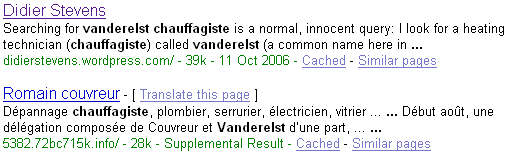
A few days ago I Googled again for Vanderelst Chauffagiste (Google and the Drive-by Download), I noticed the Spamdexing “R” Us site has disappeared from the SERPs. But it still exists.
Wednesday 8 November 2006
FireOx
I’m at TechEd Barcelona this week.
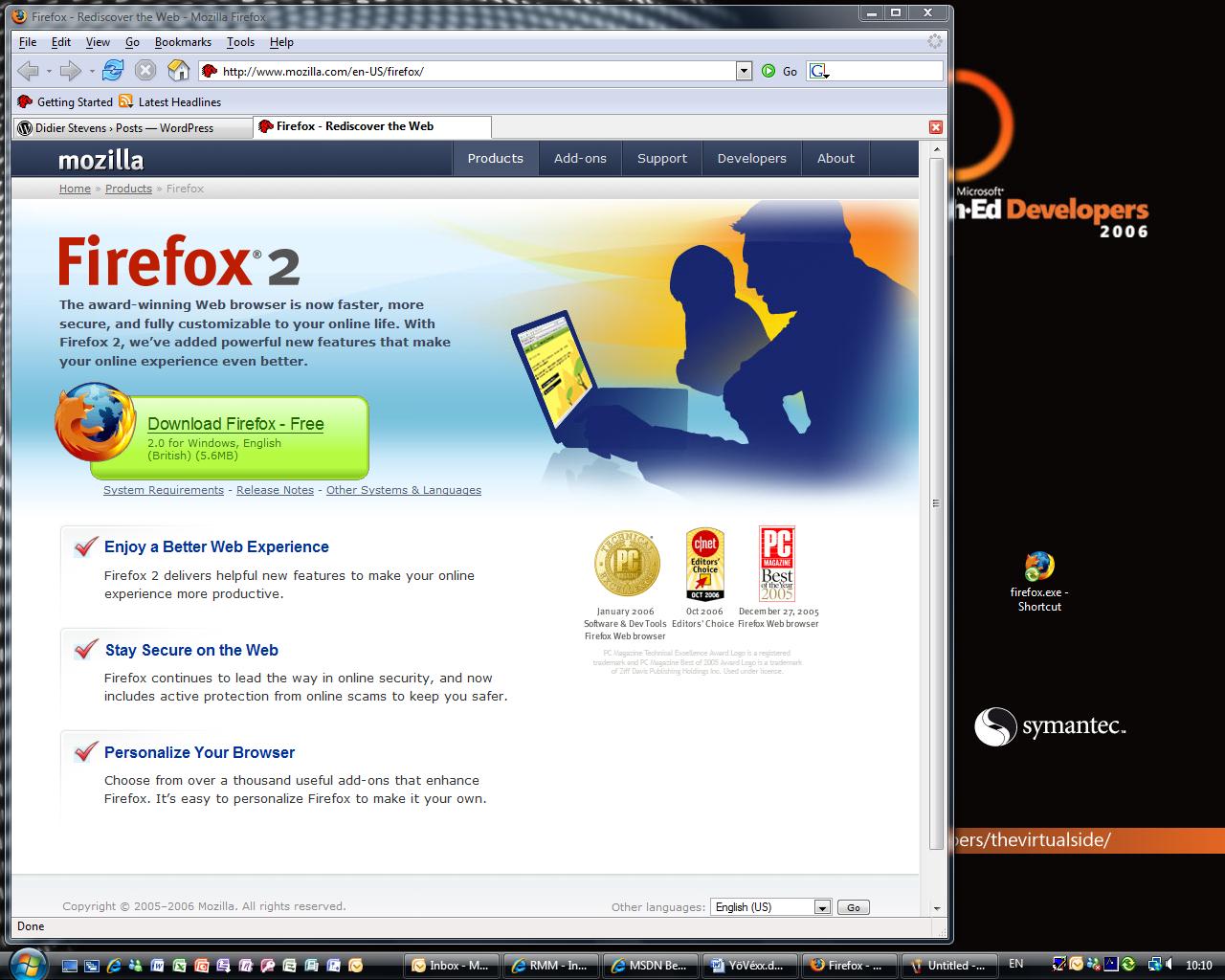
We have locked-down Vista machines at our disposal (The Com Network) to access the Internet. Last year, I installed Firefox in My Documents on my roaming profile. Software Restriction Policies are defined on the domain we logon, so you cannot install software. But installing Firefox in My Documents is still possible.
Yesterday I noticed that Firefox was still available in My Documents, so I started using it right away. But not this morning, the admins must have tuned the policies, because firefox was not allowed to run.
You can specify the software you want to restrict with a name (path) or a hash. I guessed, correctly, that they used a name, so now I’m browsing with FireOx.
Monday 6 November 2006
Challenger
Challenger is a small program I’ve used in reverse-engineering challenges (without success ;-)). It performs dictionary and brute-force attacks on the reverse-engineering challenge program.
The programs used in reverse-engineering challenges are usually console programs. You start the program, it asks for the password (standard output), you type the password (standard input), the program responds and ends.

Challenger automates this process: it runs the program against a list of passwords (dictionary) or it tries out all combinations (brute-force).
Challenger is also a console program taking command-line arguments.
- /executable:program is the only required argument, you use it to specify the program to be challenged
- /arguments:parameters is needed when the program to be challenged also takes command-line arguments. You cannot provide them with the /executable argument, you need to use the /arguments argument. This parameter is optional
- /log:file allows you to write all results to a file. Results are always displayed on the console, with /log:log.txt, all results are also appended to file log.txt
- /dictionary:file is used to perform a dictionary attack and specify the file containing the words to test as a password
- /bruteforce:password is used to specify the starting password of a brute-force attack. By default, Challenger will execute a brute-force attack, starting with password a.
- /characters:characters allows you to specify the characters used in a brute-force attack. By default, this is abcdefghijklmnopqrstuvwxyzABCDEFGHIJKLMNOPQRSTUVWXYZ0123456789
- /search:keyword allows you to specify a keyword that will stop the attack. Once this keyword is detected in the output of the challenged program, Challenger will stop the attack. Searching for the keyword is case-sensitive. Challenger will go on indefinitely if no keyword is provided, it will only report each time the challenged program produces output it has not produced before. If you now what the challenged program outputs when you provide the correct password, you use this search argument to look for it. If you don’t know it, you just let Challenger run and review its output
- /timeout:milliseconds allows you to specify the timeout for the challenged program. By default, this is 100 ms: if the challenged program runs longer than 100 ms, Challenger will stop it.
- /heartrate:count allows you to define how often Challenger writes status info to the log. By default, it’s every 1000 passwords tested
Here is an example where I use my program on F-secure’s Khallenge level 1 program with a tiny wordlist from Openwall. Since I don’t know the output produced by the program when a correct password is entered, I don’t use the search argument: challenger /executable:level1.exe /dictionary:lower.lst /log:log.txt
Here is the result:
Start > 2/11/2006 21:49:45
Start     > Challenger v1.0.0.0 (https://DidierStevens.com)

Config    > dictionary

Config    > file: lower.lst

Config    > executable: level1.exe

Config    > arguments:

Config    > timeout: 100

Config    > heartbeat: 1000

Config    > search: not enabled

Config    > log: log.txt

New output> a -> ASSEMBLY'06 REVERSE ENGINEERING CHALLENGE
*** LEVEL 1 *** Challenge Copyright (c) 2006 F-Secure Corporation
For more information, please see http://www.f-secure.com/weblog/asm.htm
Enter the password:
Try another one.
Heartbeat > 2/11/2006 21:49:58 counter: 1000 password: anonymity

Heartbeat > 2/11/2006 21:50:11 counter: 2000 password: barge

Heartbeat > 2/11/2006 21:50:23 counter: 3000 password: brass

Heartbeat > 2/11/2006 21:50:34 counter: 4000 password: cement

Heartbeat > 2/11/2006 21:50:45 counter: 5000 password: compendia

Heartbeat > 2/11/2006 21:50:57 counter: 6000 password: cuisine

Heartbeat > 2/11/2006 21:51:10 counter: 7000 password: disavow

Heartbeat > 2/11/2006 21:51:21 counter: 8000 password: emergency

Heartbeat > 2/11/2006 21:51:34 counter: 9000 password: feeble

Heartbeat > 2/11/2006 21:51:45 counter: 10000 password: g

Heartbeat > 2/11/2006 21:51:58 counter: 11000 password: handbarrow

Heartbeat > 2/11/2006 21:52:11 counter: 12000 password: identical

Heartbeat > 2/11/2006 21:52:23 counter: 13000 password: ion

Heartbeat > 2/11/2006 21:52:35 counter: 14000 password: lev

Heartbeat > 2/11/2006 21:52:47 counter: 15000 password: meatball

Heartbeat > 2/11/2006 21:53:00 counter: 16000 password: naivete

New output> obvious -> ASSEMBLY'06 REVERSE ENGINEERING CHALLENGE
*** LEVEL 1 *** Challenge Copyright (c) 2006 F-Secure Corporation
For more information, please see http://www.f-secure.com/weblog/asm.htm
Enter the password:
Yup, thats it!
To continue, send an email to: level1-solution_was_obvious@khallenge.com
Heartbeat > 2/11/2006 21:53:13 counter: 17000 password: orthograph

Heartbeat > 2/11/2006 21:53:26 counter: 18000 password: pestle

Heartbeat > 2/11/2006 21:53:39 counter: 19000 password: presume

Heartbeat > 2/11/2006 21:53:51 counter: 20000 password: recount

Heartbeat > 2/11/2006 21:54:04 counter: 21000 password: sandy

Heartbeat > 2/11/2006 21:54:16 counter: 22000 password: sis

Heartbeat > 2/11/2006 21:54:29 counter: 23000 password: stomp

Heartbeat > 2/11/2006 21:54:42 counter: 24000 password: tenor

Heartbeat > 2/11/2006 21:54:54 counter: 25000 password: tunisia

Heartbeat > 2/11/2006 21:55:07 counter: 26000 password: venerate

Heartbeat > 2/11/2006 21:55:19 counter: 27000 password: withhold
For the first password (a), the challenge program outputs “Try another one.”. The challenge program outputs this for every password in the list, until the password “obvious” is tested. When obvious is entered as the password, the output of the challenge program is “Yup, thats it!”, allong with the e-mail address. Since no /search argument was provided, the Challenger program continues until the wordlist is exhausted.
The “New output>” line lists the exact output produced by the tested program, except that all newlines are replaced by a space character to make it fit on one line (for clarity, I’ve added the newlines back in this example).
Had I known that the level 1 program outputed “Yup, thats it!” when the correct password is entered, I could have issued this command: challenger /executable:level1.exe /dictionary:lower.lst /log:log.txt /search:Yup
And the program would stop once the correct password was found:
Found > counter: 16663 password: obvious ASSEMBLY’06 REVERSE …
It’s also possible to start a brute-force attack, like this: challenger /executable:level1.exe
This will start with password ‘a’ and try all alphanumeric combinations.
During the reversing of the level 3 challenge of F-Secure’s Khallenge, I discovered that only characters 2, 4, 6 and 8 were used in the password. So I used my Challenger program to try all combinations, while I continued reversing:
challenger /executable:level3.exe /bruteforce:2 /characters:2468 /log:log.txt
Output:
Start     > 2/11/2006 22:09:25

Start     > Challenger v1.0.0.0 (https://DidierStevens.com)

Config    > brute force

Config    > start: 2

Config    > characters: 2468

Config    > executable: level3.exe

Config    > arguments:

Config    > timeout: 100

Config    > heartbeat: 1000

Config    > search: not enabled

Config    > log: log2.txt

New output> 2 -> ASSEMBLY'06 REVERSE ENGINEERING CHALLENGE
*** LEVEL 3 *** Challenge
Copyright (c) 2006 F-Secure Corporation
For more information, please see http://www.f-secure.com/weblog/asm.htm
Enter password:
Nope.

Heartbeat > 2/11/2006 22:09:40 counter: 1000 password: 66428

Heartbeat > 2/11/2006 22:09:53 counter: 2000 password: 264868

Heartbeat > 2/11/2006 22:10:06 counter: 3000 password: 464628

Heartbeat > 2/11/2006 22:10:20 counter: 4000 password: 664268

Heartbeat > 2/11/2006 22:10:34 counter: 5000 password: 862828

Heartbeat > 2/11/2006 22:10:48 counter: 6000 password: 2262468

Heartbeat > 2/11/2006 22:11:02 counter: 7000 password: 2462228
...
But I found the correct password through reversing before my Challenger program found it with brute-force: the password was so long that my program would take too long…
Challenger is written in C# with Microsoft Visual C# 2005 Express Edition.
Download:
MD5: FC71CAA3F99CB6EE9094098D60B7E4C3
Monday 30 October 2006
OllyStepNSearch v0.6.0
I’ve released a new version of my OllyDbg plugin called OllyStepNSearch.
The new features are:
- an options dialog
- Disable After Break option
- Search in Information Pane
- a new help function
And this time, there is also a demo movie here on YouTube, a hires (XviD) version can be found here.
Thursday 26 October 2006
Wardriving on the Eurostar
No big surprise here, I didn’t get a WiFi signal in the Channel Tunnel today. I only logged packets: plenty enough in London, Lille and Brussels, but not in the tunnel.

Monday 23 October 2006
Spamdexing “R” Us
Still wondering how likely is it to land on a drive-by download page when doing a (Google) search, I analyzed the infamous AOL search data to try to answer this question.
Conclusion: for every 2800 click throughs, 1 landed on a spamdexing site. 1% of the AOL users clicking through landed on a spamdexing site.
The AOL search data was collected over a period of 3 months (01 March, 2006 – 31 May, 2006), it contains 19,442,629 user click through events. A click through event is an entry in the database indicating that the AOL user clicked on the link presented in a Search Engine Result Page (SERP). These are the fields of a click-trough event entry:
- AnonID – an anonymous user ID number.
- Query – the query issued by the user, case shifted with most punctuation removed.
- QueryTime – the time at which the query was submitted for search.
- ItemRank – if the user clicked on a search result, the rank of the item on which they clicked is listed.
- ClickURL – if the user clicked on a search result, the domain portion of the URL in the clicked result is listed.
Of the 19,442,629 user click through events, 15,066 events have a URL of the following format: digits.alphanums.info.
Expressed as a Perl regular expression, this format is: %\d+\.\w+\.info$ (\w is not strictly limited to alphanumerical characters, the underscore character is also included).
I search for URLs of this format because it was used by the original drive-by download I discovered.
Extracting the main domain (alphanums.info) of the URL of these 15,066 click through events produces a list of 1099 unique domains.
I wrote a script to retrieve and analyze one page for each these 1099 domains. 874 of these pages have the same look and feel as the original drive-by download page:
- they contain an iframe to one of these URLs:
- cleansearch.info
- http://www.cucush.info
- http://www.veryfastsearch.info
- they contain lots of keywords
- they look like Google SERPs
- they contain lots of links to other digits.alphanums.info pages
This leads me to believe that these 874 domains form a network of sites that use spamdexing techniques to rank high in SERPs. They use
- lots of keywords
- lots of links to different domains (874 domains)
- lots of different IP addresses (352 unique IP addresses)
From now on, I’ll refer to these sites as Spamdexing “R” Us.
These domains are used now (October 2006) for spamdexing, and I assume they were also used for spamdexing 6 months ago (time frame of the AOL data).
Of the 19,442,629 user click through events, 6,988 events landed on a Spamdexing “R” Us site (i.e. one of the 874 domains I identified). This is 0,04%, or around 1 hit per 2800 SERP click throughs! According to some people I talked with, this is an excellent result for Spamdexing “R” Us: for every 2800 SERP click throughs the AOL users executed, 1 landed in their spider web.
Spamdexing “R” Us rank high on the SERPs:
| Rank | Click throughs | |
|---|---|---|
| 1 | 1313 | 19% |
| 2 | 836 | 12% |
| 3 | 710 | 10% |
| 4 | 553 | 8% |
| 5 | 542 | 8% |
| 6 | 438 | 6% |
| 7 | 376 | 5% |
| 8 | 390 | 6% |
| 9 | 366 | 5% |
| 10 | 384 | 5% |
41% of the traffic comes from the 3 highest ranking click troughs.
How do Spamdexing “R” Us sites compare to the other click through sites in the AOL search data? Ranking all the click throughs per URL shows that Spamdexing “R” Us sites rank high: 142th place. As a side note, it’s interesting to mention that the number 1 in the ranking is http://www.google.com, with 366,623 click throughs.
Here’s a selection of some well-known sites that are in the same click through range as the Spamdexing “R” Us sites:
| Rank | URL | Click throughs |
|---|---|---|
| 87 | http://www.flickr.com | 9369 |
| 101 | http://www.mtv.com | 8760 |
| 102 | http://www.bbc.co.uk | 8739 |
| 116 | http://www.apple.com | 7998 |
| 120 | http://www.facebook.com | 7771 |
| 128 | http://www.washingtonpost.com | 7465 |
| 133 | http://www.usatoday.com | 7300 |
| 142 | Spamdexing ‘R Us | 6988 |
| 144 | http://www.download.com | 6929 |
| 160 | http://www.youtube.com | 6259 |
| 161 | http://www.playboy.com | 6241 |
The AOL search data contains 657,426 unique user ID’s. 521,694 users clicked on links in the SERPs, and 4,952 users landed on Spamdexing “R” Us sites. That’s about 1 AOL user per 100 (0,95%) in a 3 month period.
Some caveats / remarks concerning this research:
- I don’t feel I’m prying into AOL users private lives, the URLs I analyzed are meaningless and I didn’t analyze the queries.
- The published AOL search data is only a fraction of the AOL search data for that time period. I don’t know how the selection was made.
- My research is post factum. I assume that the Spamdexing “R” Us sites were already spamdexing sites since 01 March, 2006.
- There can be other spamdexing sites in the AOL search data that don’t use digits.alphanums.info URLs.
- I crawled the Spamdexing “R” Us sites over a period of a couple of weeks, during which the iframe to the drive-by download site disappeared.
- The size of the Spamdexing “R” Us network is probably larger than I mention (874 domains, 352 IP addresses). I only looked at the part of the spider web that trapped AOL users.
- I talk about AOL users, but more precisely, I should talk about AOL search users. I suppose not AOL users use AOL search.
- I did not analyze the Query and QueryTime fields
- joy thinks AOL search is powered by Google
- The WHOIS data for the Spamdexing “R” Us sites is complete nonsense
- I don’t know what the relationship is between cleansearch.info, http://www.cucush.info, http://www.veryfastsearch.info and the Spamdexing “R” Us sites
- I’ve found Spamdexing “R” Us pages in English, French, German, Spanish and Italian
- The Spamdexing “R” Us sites use DNS wildcards
- It’s difficult to judge on the success of Spamdexing “R” Us without knowing their business model, costs and revenues. If it’s pay per click (0,04%), I don’t know. If it’s installing a bot on the computers of AOL search users, it’s successful (1%)
Monday 16 October 2006
USBVirusScan
When Bruce Scheiner blogged about USBDumper, I downloaded the program and filed it for some later experimentation.
During our vacation I started programming on a rainy evening, and USBVirusScan was born.
USBVirusScan will launch any program you provide as a command line parameter each time a USB stick is inserted. I use it to start a full virus scan on the inserted USB drive, hence the name.
For example, to start a cmd.exe on each USB drive you insert, you start USBVirusScan like this:
USBVirusScan cmd /k %c:
%c is a placeholder for the drive-letter of the inserted USB drive (yes, that’s %c like C’s printf function, and no, that’s not completely secure, but feel free to adapt it…).
USBVirusScan uses a system tray icon and balloons to announce the insertion of a USB drive. If you want to hide this system tray icon, start USBVirusScan with option -i, like this:
USBVirusScan -i cmd /k %c:
You can also hide the command line console with option -c. This only works with Console applications, not with Windows applications.
Here’s a Windows Script example (log.vbs) that will create a log.txt file on the inserted USB drive with the current date & time:
Dim objFSO

Dim objTextFile

Dim strFilename
strFilename = Wscript.Arguments.Item(0) & ":\\log.txt"

Set objFSO = CreateObject("Scripting.FileSystemObject")

If objFSO.FileExists(strFilename) Then

   Set objTextFile = objFSO.OpenTextFile(strFilename, 8 )

Else

   Set objTextFile = objFSO.CreateTextFile(strFilename)

End If

objTextFile.WriteLine Now()

objTextFile.Close
You start it with this command: USBVirusScan.exe wscript log.vbs %c
Example of the content of the log file after inserting the USB drive twice:
14/10/2006 17:05:00
14/10/2006 17:05:21
I used sample code for system tray programming from this Code Project article, and for the rest I generate a new GUID and did some cosmetic changes to the original USBDumper code.
Here is a YouTube movie showing you the program starting a virus scan. A hires (XviD) version can be found here.
Download:
USBVirusScan_V1_0_0.zip (https)
MD5: 7EC0D456717162B84A229CC4A8335B51
This ZIP file contains both the executable and the source code. If you don’t plan to modify the source code of this program, you’ll only need to extract USBVirusScan.exe.
Compiled with Borland’s free C++ 5.5 compiler. Tested on Windows XP SP2 and Windows Vista.
Thursday 12 October 2006
Update 2: Google and the Drive-by Download
This is an unexpected result of my post Google and the Drive-by Download:

 Didier Stevens