Didier Stevens

Friday 6 January 2012

Identifying IOS

Filed under: Forensics,Networking — Didier Stevens @ 10:33

Did you ever had to identify a Cisco IOS image when you couldn’t rely on the filename?

Look for strings starting with CW_ between strings CW_BEGIN and CW_END in the image file, for example like this:

You will find strings like CW_IMAGE, CW_FAMILY, CW_FEATURE, CW_VERSION, CW_MEDIA, CW_SYSDESCR and CW_MAGIC between strings CW_BEGIN and CW_END.

In this example, the IOS version is 12.4(6)T5 (CW_VERSION) and it is designed to run on 870 routers (CW_FAMILY).

The nice thing about these CW_ strings is that you will also find them in a core dump (in the data region), thus allowing you to identify the IOS version that was running on a router when the core dump was produced (provided the image runs from RAM, indicated by a letter m in the filename).

And they are also present in the uncompressed image (compressed image files are identified by a letter z in the filename).

Soon I will release a tool to validate IOS image files, you can use it to extract these CW_ strings too.

Sunday 1 January 2012

Calculating a SSH Fingerprint From a (Cisco) Public Key

Filed under: Forensics,Networking — Didier Stevens @ 17:03

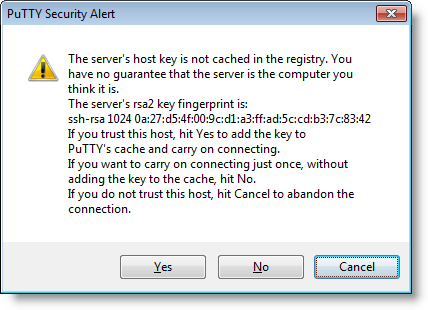
I’m sure some of you verify SSH fingerprints before you use a SSH server for the first time. You obtain the fingerprint via another channel, and you compare it with the fingerprint your SSH client presents you.

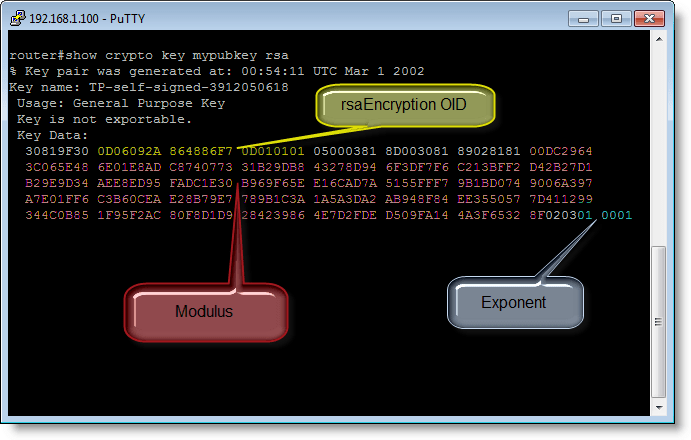
But have you done this with Cisco devices too? Recently I tried to obtain the SSH fingerprint of a Cisco router while connected via the serial console. Turns out there is no CLI command to display the fingerprint (well, at least I didn’t find one). What you can do, is dump the public key with command “show crypto key mypubkey rsa”.

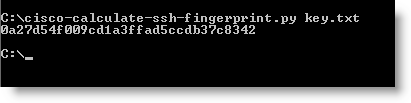
So I developed a small Python program that calculates a SSH fingerprint from the public key. You store the public key in hex format in a file and use that with this new tool.

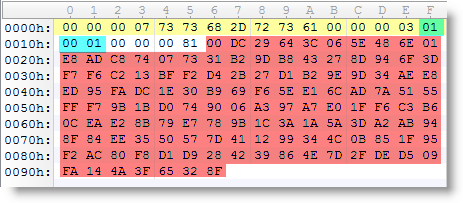
To calculate the fingerprint, I extract the modulus and exponent from the public key, store them in another format (ssh-rsa) and calculate the MD5 hash.

So now I can connect to a router via the serial console while there’s no “man in the middle”, obtain the public key and calculate the fingerprint. Next when I connect to the same router over SSH, I can validate the fingerprint my SSH client presents me. It’s too bad Cisco provides no feature to get the fingerprint directly.

cisco-calculate-ssh-fingerprint_V0_0_1.zip (https)
MD5: 5A6C3A2C466908EE7EFB06727E8D02B7
SHA256: 831CAF7BBF0F6C584436C42D9CEB252A089487B715ADBB81F9547EEB3ED6B0B8

Saturday 24 December 2011

Happy New Router

Filed under: Entertainment,Hacking,Networking — Didier Stevens @ 0:00

Saturday 17 December 2011

FORCE_INTEGRITY With DLLs

Filed under: Windows 7,Windows Vista — Didier Stevens @ 17:36

I’ve talked about using the FORCE_INTEGRITY flag with EXEs, but how about DLLs? Its effect is similar.

If flag FORCE_INTEGRITY is set for a DLL, and the DLL is not signed or the signature is invalid, Windows will not load the DLL inside a process.

The error code will be 577, or:

Windows cannot verify the digital signature for this file.
A recent hardware or software change might have installed
a file that is signed incorrectly or damaged, or that might
be malicious software from an unknown source.

Friday 9 December 2011

LoadDLLViaAppInit with FORCE_INTEGRITY

Filed under: My Software,Windows 7 — Didier Stevens @ 12:46

In Windows 7 and Windows Server 2008 R2, Microsoft added a feature to the AppInit_DLLs mechanism. When the REG_DWORD RequireSignedAppInit_DLLs is set to 1, the DLLs to be loaded via AppInit_DLLs have to be signed.

You can find properly signed versions of LoadDLLViaAppInit here:
LoadDLLViaAppInit_FI.zip (https)
MD5: 2867B6AADF6C9FFA224D2D6A0153AD91
SHA256: E732451401B37087FAC619BD500E370FE3C21FB764F2E2E99C76EDBADEC86204

Nothing has changed to these DLLs, I’ve not changed the version number. I only set the FORCE_INTEGRITY flag and signed them.

Wednesday 30 November 2011

Signed TaskManager

Filed under: My Software — Didier Stevens @ 19:44

This new version 0.1.1 of my TaskManager spreadsheet is exactly the same as version 0.1.0, except that it is digitally signed.

A signature allows you to use it on systems that require VBA macros to be signed.

TaskManager_V0_1_1.zip (https)
MD5: 57D0ED69E034872DE7DF217DD491B732
SHA256: 08FD64B90E34150BD48A54904F04905D84249E7042BF31E6A5AA642B2B855D91

Thursday 17 November 2011

Hotfix For SRP/AppLocker Bypass

Filed under: Windows 7 — Didier Stevens @ 10:53

Remember Microsoft has features to bypass its own Software Restriction Policies and AppLocker: Circumventing SRP and AppLocker, By Design and Circumventing SRP and AppLocker to Create a New Process, By Design.

Microsoft has issued a hotfix for this bypass: KB2532445

It is only for Windows 7 and Windows Server 2008 R2 though, it will not help you if you use SRP on Windows XP or Vista.

Thanks to @mount_knowledge.

Circumventing SRP and AppLocker, By Design

Tuesday 8 November 2011

White Hat Shellcode Workshop: Enforcing Permanent DEP

Filed under: Shellcode — Didier Stevens @ 21:12

Here’s a video of an exercise in my White Hat Shellcode Workshop I gave at Brucon in September.

Wednesday 2 November 2011

Ariad 64-bit

Filed under: My Software,Windows 7 — Didier Stevens @ 19:33

You can now download a 64-bit version of my Ariad driver.

I’ve been using this driver on my x64 Windows 7 test machine only for a couple of days, so this is still beta software.

As for the installation and configuration, it’s exactly the same as the 32-bit version: you need to download the 32-bit version for the .inf files and the GUI.

Thursday 27 October 2011

Using DLLCHARACTERISTICS’ FORCE_INTEGRITY Flag

Filed under: Windows 7,Windows Vista — Didier Stevens @ 17:46

I discovered the flag FORCE_INTEGRITY last year when I released my tool setdllcharacteristics. This flag will force a check of the executable’s digital signature (on Windows Vista and Windows 7) and will prevent the program from running if the signature is invalid (or missing).

But it’s only now that I hold all the pieces to test this flag. A normal authenticode signature is not enough. And you can not use a selfsigned certificate. You need to buy a certificate (aka Software Publisher Certificate, SPC) from a commercial CA for which Microsoft issues a cross-certificate. And then you need to use your SPC and the related cross-certificate to sign your executable (with flag FORCE_INTEGRITY set) as explained here.

This is the same process for signing kernel-mode binaries, or user-mode binaries for AppInit_DLLs or other protected components.

I have the habit of signing my tools with a self-signed cert, so that I can quickly check if my tool has not been altered when I use it on another system (think infected machine). But now that I have a commercial SPC, I can go a step further: I can force Windows to check the integrity of my tools before executing them. If they have changed, Windows will warn me and refuse to run my tools:

There is a small performance hit because the loader has to check the signature, but you will not feel this if you don’t run the executable hundreds of times per second. There’s no problem with casual use.

If you want to test this, you can download a dummy application I signed here (32-bit). When you change the executable (TestIntegrityCheckFlag.exe), Windows will refuse to run it.

If this feature of Windows interests you, consider also the fact that you don’t need to own the source code to sign executables. If you use applications that are not protected by this flag, you can set the flag yourself and then sign the executable. But I don’t recommend that you publish this application, unless you get the author’s permission.

This method is good to protect your tools from malware, but not from malicious individuals: they just need to remove the FORCE_INTEGRITY flag from your executable and Windows will happily execute it regardless of the validity of the signature (I’m not speaking about kernel-mode binaries or other protected processes that require the FORCE_INTEGRITY flag to be set).

Remember that this is for Windows Vista and Windows 7; Windows XP will just ignore this flag. Windows 2008 R2 should also honor this flag, but I’ve not tested this. And it works on 32-bit and 64-bit systems.

« Previous PageNext Page »

Blog at WordPress.com.