Didier Stevens

Saturday 17 December 2011

FORCE_INTEGRITY With DLLs

Filed under: Windows 7,Windows Vista — Didier Stevens @ 17:36

I’ve talked about using the FORCE_INTEGRITY flag with EXEs, but how about DLLs? Its effect is similar.

If flag FORCE_INTEGRITY is set for a DLL, and the DLL is not signed or the signature is invalid, Windows will not load the DLL inside a process.

The error code will be 577, or:

Windows cannot verify the digital signature for this file.
A recent hardware or software change might have installed
a file that is signed incorrectly or damaged, or that might
be malicious software from an unknown source.

Friday 9 December 2011

LoadDLLViaAppInit with FORCE_INTEGRITY

Filed under: My Software,Windows 7 — Didier Stevens @ 12:46

In Windows 7 and Windows Server 2008 R2, Microsoft added a feature to the AppInit_DLLs mechanism. When the REG_DWORD RequireSignedAppInit_DLLs is set to 1, the DLLs to be loaded via AppInit_DLLs have to be signed.

You can find properly signed versions of LoadDLLViaAppInit here:
LoadDLLViaAppInit_FI.zip (https)
MD5: 2867B6AADF6C9FFA224D2D6A0153AD91
SHA256: E732451401B37087FAC619BD500E370FE3C21FB764F2E2E99C76EDBADEC86204

Nothing has changed to these DLLs, I’ve not changed the version number. I only set the FORCE_INTEGRITY flag and signed them.

Wednesday 30 November 2011

Signed TaskManager

Filed under: My Software — Didier Stevens @ 19:44

This new version 0.1.1 of my TaskManager spreadsheet is exactly the same as version 0.1.0, except that it is digitally signed.

A signature allows you to use it on systems that require VBA macros to be signed.

TaskManager_V0_1_1.zip (https)
MD5: 57D0ED69E034872DE7DF217DD491B732
SHA256: 08FD64B90E34150BD48A54904F04905D84249E7042BF31E6A5AA642B2B855D91

Thursday 17 November 2011

Hotfix For SRP/AppLocker Bypass

Filed under: Windows 7 — Didier Stevens @ 10:53

Remember Microsoft has features to bypass its own Software Restriction Policies and AppLocker: Circumventing SRP and AppLocker, By Design and Circumventing SRP and AppLocker to Create a New Process, By Design.

Microsoft has issued a hotfix for this bypass: KB2532445

It is only for Windows 7 and Windows Server 2008 R2 though, it will not help you if you use SRP on Windows XP or Vista.

Thanks to @mount_knowledge.

Circumventing SRP and AppLocker, By Design

Tuesday 8 November 2011

White Hat Shellcode Workshop: Enforcing Permanent DEP

Filed under: Shellcode — Didier Stevens @ 21:12

Here’s a video of an exercise in my White Hat Shellcode Workshop I gave at Brucon in September.

Wednesday 2 November 2011

Ariad 64-bit

Filed under: My Software,Windows 7 — Didier Stevens @ 19:33

You can now download a 64-bit version of my Ariad driver.

I’ve been using this driver on my x64 Windows 7 test machine only for a couple of days, so this is still beta software.

As for the installation and configuration, it’s exactly the same as the 32-bit version: you need to download the 32-bit version for the .inf files and the GUI.

Thursday 27 October 2011

Using DLLCHARACTERISTICS’ FORCE_INTEGRITY Flag

Filed under: Windows 7,Windows Vista — Didier Stevens @ 17:46

I discovered the flag FORCE_INTEGRITY last year when I released my tool setdllcharacteristics. This flag will force a check of the executable’s digital signature (on Windows Vista and Windows 7) and will prevent the program from running if the signature is invalid (or missing).

But it’s only now that I hold all the pieces to test this flag. A normal authenticode signature is not enough. And you can not use a selfsigned certificate. You need to buy a certificate (aka Software Publisher Certificate, SPC) from a commercial CA for which Microsoft issues a cross-certificate. And then you need to use your SPC and the related cross-certificate to sign your executable (with flag FORCE_INTEGRITY set) as explained here.

This is the same process for signing kernel-mode binaries, or user-mode binaries for AppInit_DLLs or other protected components.

I have the habit of signing my tools with a self-signed cert, so that I can quickly check if my tool has not been altered when I use it on another system (think infected machine). But now that I have a commercial SPC, I can go a step further: I can force Windows to check the integrity of my tools before executing them. If they have changed, Windows will warn me and refuse to run my tools:
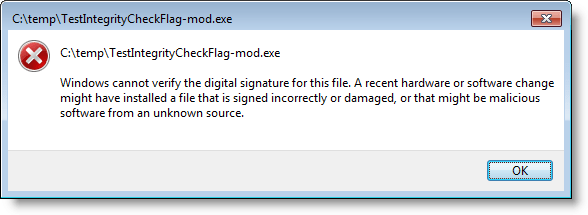
There is a small performance hit because the loader has to check the signature, but you will not feel this if you don’t run the executable hundreds of times per second. There’s no problem with casual use.

If you want to test this, you can download a dummy application I signed here (32-bit). When you change the executable (TestIntegrityCheckFlag.exe), Windows will refuse to run it.

If this feature of Windows interests you, consider also the fact that you don’t need to own the source code to sign executables. If you use applications that are not protected by this flag, you can set the flag yourself and then sign the executable. But I don’t recommend that you publish this application, unless you get the author’s permission.

This method is good to protect your tools from malware, but not from malicious individuals: they just need to remove the FORCE_INTEGRITY flag from your executable and Windows will happily execute it regardless of the validity of the signature (I’m not speaking about kernel-mode binaries or other protected processes that require the FORCE_INTEGRITY flag to be set).

Remember that this is for Windows Vista and Windows 7; Windows XP will just ignore this flag. Windows 2008 R2 should also honor this flag, but I’ve not tested this. And it works on 32-bit and 64-bit systems.

Sunday 23 October 2011

HeapLocker 64-bit

Filed under: My Software,Vulnerabilities — Didier Stevens @ 19:40

I’m releasing my first 64-bit version of my HeapLocker tool.

I had to change many pointer calculations, and had to replace 32-bit shellcode with 64-bit shellcode.

This 64-bit version gets configured via the registry, exactly like the 32-bit version of HeapLocker. The only difference is when you want to protect specific addresses, you need to use a QWORD registry value in stead of a DWORD (QWORD is 64-bit wide, DWORD is 32-bit wide).

And there is a new feature: Bottom Up Randomization. To enable it, create a DWORD registry value with name BottomUpRandomization and value 1.

I will be adding this feature to HeapLocker 32-bit too, but I want to do this from the same code base. The next release of HeapLocker 32-bit will be compiled from Visual Studio 2010 and not from Borland C++ anymore.

HeapLocker64_V0_0_1_0.zip (https)
MD5: F3D43A29CE64F9418AA154C66B0B06A4
SHA256: 7EFF1D9EA20B522D76034DC4CB66E2FD7AC43E585987FC9ABF7EF8EB801FBC6C

Thursday 20 October 2011

RunInsideLimitedJob 64-bit

Filed under: My Software — Didier Stevens @ 6:00

RunInsideLimitedJob is a tool to sandbox applications by containing their process inside a limited job object. There are 2 versions of my RunInsideLimitedJob tool: a .EXE and a .DLL.

As a 32-bit executable, RunInsideLimitedJob.exe is perfectly capable of launching a 64-bit application contained in a limited job object.

But the 32-bit RunInsideLimitedJob.dll can’t be loaded inside a 64-bit process. That’s why I’m releasing a 64-bit version of RunInsideLimitedJob.dll.


RunInsideLimitedJob-DLL64_V0_0_0_1.zip (https)
MD5: A6048613CE00C9F401A8AC7943A451E3
SHA256: 279F6BE0EB124814D37A5E70F2D906B1756B27CDDC7E7AEA40B2B42B39C0CFCA

Wednesday 19 October 2011

LoadDLLViaAppInit 64-bit

Filed under: My Software — Didier Stevens @ 16:47

Many of my security tools are DLLs. If you want to use these tools inside a 64-bit process, you’re stuck, because you can’t use 32-bit DLLs inside a 64-bit process (and vice versa).

LoadDLLViaAppInit is a tool I released to load DLLs inside selected processes. If you want to use this 32-bit version of LoadDLLViaAppInit on a 64-bit Windows machine, you need to configure AppInit_DLLs in this registry key:

HKEY_LOCAL_MACHINE\SOFTWARE\Wow6432Node\Microsoft\Windows NT\CurrentVersion\Windows

You also need to copy LoadDLLViaAppInit.dll in this directory: C:\Windows\SysWOW64

Today I’m releasing a 64-bit version of LoadDLLViaAppInit: LoadDLLViaAppInit64.dll. This will help you to load DLLs inside 64-bit processes.

This 64-bit version has to be installed and configured just like its 32-bit version on a 32-bit OS: you copy the DLL in directory C:\Windows\System32 and you configure the registry:

HKEY_LOCAL_MACHINE\SOFTWARE\Microsoft\Windows NT\CurrentVersion\Windows

The configuration file is LoadDLLViaAppInit64.bl.txt.

This 64-bit version has only been tested on 64-bit Windows, not on 64-bit XP neither on 64-bit Windows Server. I expect it to work on these systems too, but you need to test first. I’ve also compiled this 64-bit version with Visual Studio 2010 and an option to include the runtime Visual C++ libraries inside the DLL, so you don’t need to install the Microsoft Visual C++ 2010 Redistributable Package. But this option has a drawback: when Microsoft releases a patch for the libraries, I (or you) will have the recompile the DLL with the new version of the libraries.

LoadDLLViaAppInit64_V0_0_0_1.zip (https)
MD5: 94C38717690CE849976883FFE4B22CA1
SHA256: 447C8F61A6398CBE6BD5E681FCE28C55D426D4E4EA49BBE367AE5B334B073A55

« Previous PageNext Page »

Blog at WordPress.com.