This is an unexpected result of my post Google and the Drive-by Download:
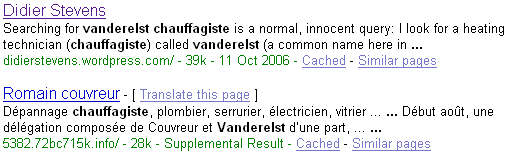
This is an unexpected result of my post Google and the Drive-by Download:
At the end of my post Google and the Drive-by Download, I wondered how prevalent such query results were.
This is an attempt to answer this question.
Here’s a Perl script that will execute Google queries and look for suspect URLs in the first page with a regular expression (remember, suspect URLs are of the form 123.1a2b3c.info). If you want to use the script on your Windows machine and don’t have a Perl interpreter, you can use ActiveState’s free ActivePerl.
Since I have no list of common Google queries used here in Belgium, I included a simple algorithm in my program to generate its own queries. They look like this: name profession. I feed my program with a list of frequently occurring last-names in Belgium and a list of professions you might want to search for (like a plumber).
Here’s the output of my program:
Suspect queries:

613.6x2q1y.info http://www.google.be/search?hl=fr&q=Thys+Blanchisseur

4859.4rhw0hk.info http://www.google.be/search?hl=fr&q=Gerard+Plombier

Suspect URLs:

4859.4rhw0hk.info

613.6x2q1y.info

2 suspect queries out of 2322 queries (0.0861326442721792%).
About 1 out of 1000 queries (looking for a profession) list a drive-by download site on the first result page. That’s not too bad, but still a surprising result to me.
I’ve enhanced my UserAssist utility. After I published my utility, I had do to a small forensic investigation, but I couldn’t install my program on the machine. That’s why I added a feature to import from a REG file.
The treeview has been replaced with a table that also displays the session ID, counter and last timestamp of each entry.

The commands are in a pull-down menu:
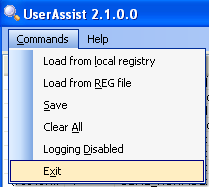
New commands:
The about dialog contains a help section.
I posted my program (source code and binaries) here on the gotdotnet site. Download the ZIP file, you’ll have to extract UserAssist\UserAssist\bin\Release\UserAssist.exe to get my program. There is no setup, it’s just one executable. You’ll need the .NET Framework 2.0 runtime to run my program (download it only if you have a problem running my program, if you have an up-to-date version of Windows XP, the .NET 2.0 Framework will already be installed).
Chris explains how to recover the Safeboot key with a Live CD directly from the System Volume Information directory: Repairing Safe Mode (Safeboot)
Clever idea Chris!
Ryan was inspired by my post Viewing strings in executables and explains how to unpack Packed Executables.
Good work Ryan!


