This version has one new option: -G or –grepall.
re-search_V0_0_4.zip (https)
MD5: 965C484CC5BF447B390BA4E176698972
SHA256: D2F3A52F7590CD38E796B6F6209FC87A1BD6451F1787010557FA39E25AFDBC2F
This version has one new option: -G or –grepall.
re-search_V0_0_4.zip (https)
MD5: 965C484CC5BF447B390BA4E176698972
SHA256: D2F3A52F7590CD38E796B6F6209FC87A1BD6451F1787010557FA39E25AFDBC2F
This new version of oledump.py adds some extra features for YARA rule scanning.
oledump.py declares 2 external variables that can be used in your YARA rules.
External variable streamname is a string with the stream name, as printed in oledump’s report.
External variable VBA is a boolean that is set to true when the data to scan is VBA source code. Previous versions of oledump would scan the raw stream content with YARA, but this new version also decompresses all streams with VBA macros, and concatenates them together to scan them after all streams have been scanned.
Example of a rule using external variable VBA:
rule VBA_Autorun
{
    strings:
        $a = "AutoExec" nocase fullword
        $b = "AutoOpen" nocase fullword
        $c = "DocumentOpen" nocase fullword
        $d = "AutoExit" nocase fullword
        $e = "AutoClose" nocase fullword
        $f = "Document_Close" nocase fullword
        $g = "DocumentBeforeClose" nocase fullword
        $h = "Document_Open" nocase fullword
        $i = "Document_BeforeClose" nocase fullword
        $j = "Auto_Open" nocase fullword
        $k = "Workbook_Open" nocase fullword
        $l = "Workbook_Activate" nocase fullword
        $m = "Auto_Close" nocase fullword
        $n = "Workbook_Close" nocase fullword
    condition:
        VBA and any of ($*)
}
The condition of this rule is true when external variable VBA is true and when at least one of the strings are found:
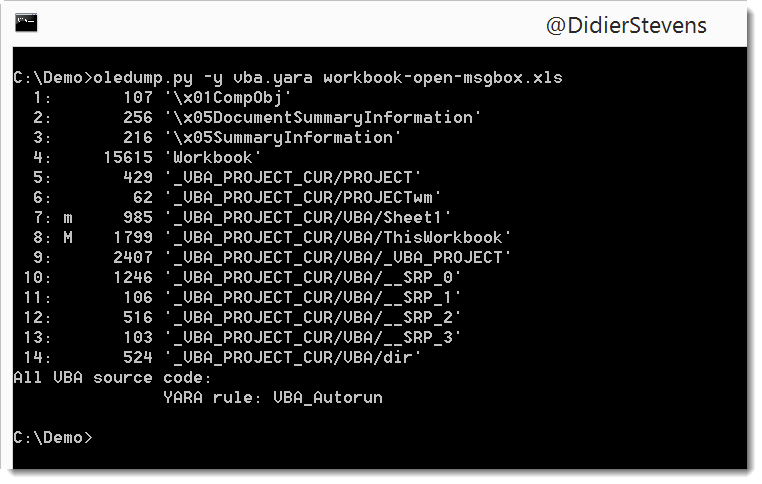
This rule is included in a new set of YARA rules I included with oledump.py: vba.yara.
I made a video to illustrate this:
And there is also a new plugin: plugin_str_sub. It tries to de-obfuscate strings with padded characters:
oledump_V0_0_27.zip (https)
MD5: A6C6728E20AE46A4FECC5F3976AF33BF
SHA256: 54FE550D5102A0E9428F6BD9B5170B50797EDA2076601634519CDBB574004A3C
I just updated the manual of this version, to explain here documents.
cut-bytes_V0_0_5.zip (https)
MD5: B20B9758D50C846CD0E0AEB9E0B15101
SHA256: B12D1E1C510ED4CC820C5D2F62897DF71E567B0D3B23AC36653236D30104157F
A very small update to re-search.py: I added a regular expression for strings to the library:

re-search_V0_0_3.zip (https)
MD5: 6C4F59C4BA5DAC1D16D3E09D1E333FD0
SHA256: BFB019F1350F7D63FB3704322F62894A4B17D8EE03CC186156F2A97045E47F58
I added a feature similar to “here files” to translate.py. It’s something I already did in xor-kpa.py.
In stead of using an input filename, the content can also be passed in the argument. To achieve this, precede the text with character #.
If the text to pass via the argument contains control characters or non-printable characters, hexadecimal (#h#) or base64 (#b#) can be used.
Example:
translate.py #h#89B5B4AEFDB4AEFDBCFDAEB8BEAFB8A9FC “byte ^0xDD”
Output:
This is a secret!
translate_v2_4_0.zip (https)
MD5: B33830C68D8A8A7534AF178243658E70
SHA256: A01AB10FCE42664869C4E31DB1AB2E1E0237172D0AE9685549A09BF866D7F885
This new version of rtfdump.py adds object extraction (-E) and can also handle objects obfuscated with \dde0000…

rtfdump_V0_0_5.zip (https)
MD5: 14475C70D992FB72306D5F83815DDE19
SHA256: A26A60536509BA7CF55FF1876E8BC3A6DBA43F1EF8841F159D55411FD11B5078
After searching with base64dump for encoded strings in this maldoc sample, I decided to add an option to base64dump to check all encodings automatically.
Use option -e with value all to try out all encodings, and report all found strings ordered by increasing length. And with option -u, you can limit the output to unique decoded strings.
zipdump.py -s 5 -d output.docx.vir.zip | base64dump.py -e all -u

base64dump_V0_0_6.zip (https)
MD5: CDC956FAFD7AC2A86C9CD40EC188C7FC
SHA256: BFBCFA51DDC47793C8CA397B261E036701543610F637CE8813BC5870FC4B2C2F
A small feature in this new version: start the -E option value with # to count and group.
Example:
C:\Demo>zipdump.py -E “#%HEADASCII%;%HEADHEX%” Book1.xlsm
1: –…………..;d0cf11e0a1b11ae10000000000000000
1: <xml xmlns:v=”ur;3c786d6c20786d6c6e733a763d227572
12: <?xml version=”1;3c3f786d6c2076657273696f6e3d2231
zipdump_v0_0_5.zip (https)
MD5: 5F49895D3EA97A870ECB1E262A738A04
SHA256: E16CE5A426840D2804E5EF544CF334715F501D0892496D02B6C5000B18CE10BA
I released this new version of FileScanner at the end of 2015, but forgot to announce it here on my blog.
This new version also scans Alternate Data Streams.
FileScanner_V0_0_0_4.zip (https)
MD5: 4BB8F475328B9EB214E6B9405F84816E
SHA256: 5D3B1408C5D2BD17C0441D0D9D0DA565E8D690DE792971092956F4CA10D5A071
This new version of byte-stats.py adds statistics for hexadecimal and base64 characters:
$byte-stats.py all.bin

Byte ASCII Count     Pct
0x00           1   0.39%
0x01           1   0.39%
0x02           1   0.39%
0x03           1   0.39%
0x04           1   0.39%
...
0xfb           1   0.39%
0xfc           1   0.39%
0xfd           1   0.39%
0xfe           1   0.39%
0xff           1   0.39%

Size: 256

                   File(s)
Entropy:           8.000000
Unique bytes:           256 100.00%
NULL bytes:               1   0.39%
Control bytes:           27  10.55%
Whitespace bytes:         6   2.34%
Printable bytes:         94  36.72%
High bytes:             128  50.00%
Hexadecimal bytes:       22   8.59%
BASE64 bytes:            65  25.39%
byte-stats_V0_0_5.zip (https)
MD5: B79C6DF0964C9BA676D88E2085ACF037
SHA256: B9112274BD757FB3311883B0CF179ABDEC149C421EFEB335D70AF972495A5C20


