Didier Stevens

Thursday 14 June 2018

“Here Files” and my Tools

Filed under: My Software,Update — Didier Stevens @ 0:00

Several of my tools, that accept more than one filename as arguments, also accept a “here file” (cfr. here documents). A here file is a text file with a list of filenames, one per line. My tools recognize a here file by prefixing the filename of the here file with character @.

Let’s take for example a text file with filename list.txt and following content:

sample-1.bin
sample-5.bin
sample-7.bin

When using this file (list.txt) in the following command:

hash.py @list.txt

hash.py will calculate the hashes of the following files: sample-1.bin, sample-5.bin and sample-7.bin.

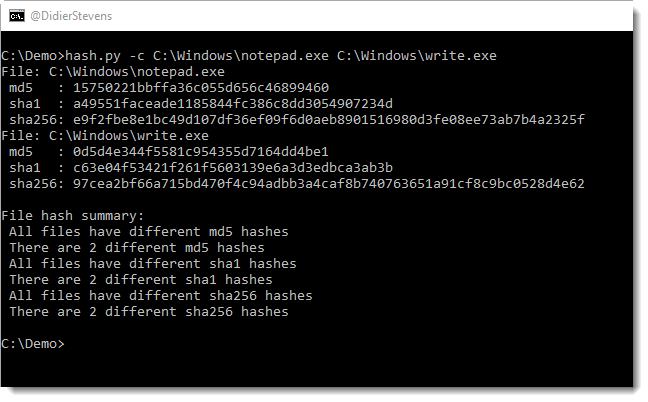
A here file can also be provided via stdin. Just type character @ (without filename) as argument to hash.py and provide a list of files via stdin, like in this example:

I will explain this any many more features of my tools in a workshop at BruCON. During this workshop, I will provide the templates I use to create my tools.
This is BruCON’s 10th edition, and I’m happy I’ll do my 10th workshop for this anniversary edition.

hash_V0_0_4.zip (https)
MD5: 6DAC25432338BEA40B9141A791B8A958
SHA256: D66BF64B91B1BCBA5EA99EA03439A12835C5427BB1C447E6B515F94D9F468137
Tuesday 12 June 2018

Update: pecheck.py Version 0.7.3

Filed under: My Software,Update — Didier Stevens @ 0:00

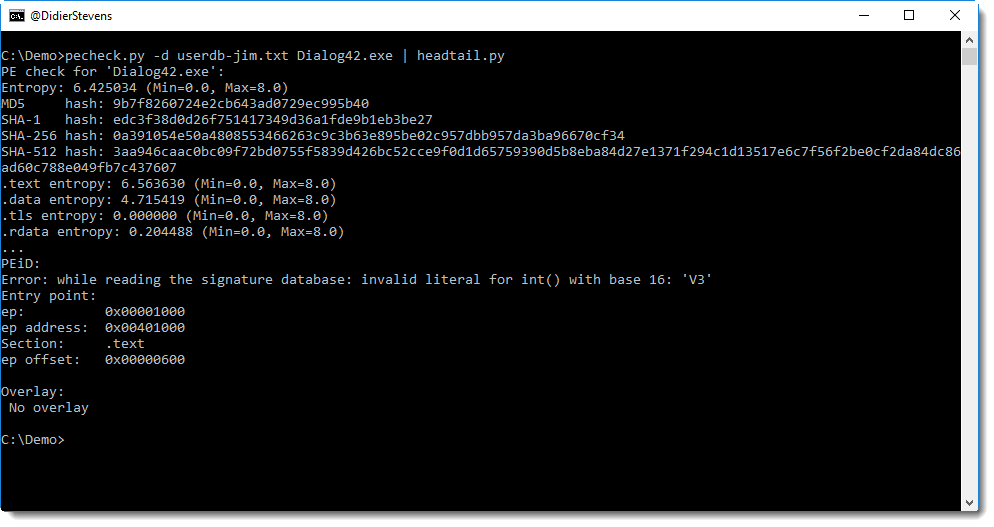
This new version handles errors in PEiD’s userdb files better.

pefile does not support the full syntax used by PEiD, hence errors might occur, like this:

pecheck-v0_7_3.zip (https)
MD5: 480C9AC4BEE09CAAFB1593E214A39832
SHA256: 359A44751BAA34450B2DA92539AB425507EBB90F8F57CF50E561CCE111809637

Friday 25 May 2018

Update: base64dump.py Version 0.0.10

Filed under: My Software,Update — Didier Stevens @ 0:00

And even more encodings added to this version of base64dump.py: 0x…. little-endian (zxle) and 0x…. big endian (zxbe).

base64dump_V0_0_10.zip (https)
MD5: 6670ACD88FD384BA9172F2B98E72D0D4
SHA256: C080F2A5F60A8E9593AE789A69D233EFC86AEF9BD319C409229B3E518E15C725

Tuesday 8 May 2018

Update: base64dump.py Version 0.0.9

Filed under: My Software,Update — Didier Stevens @ 0:00

During last week’s private maldoc training, I got the idea to update base64dump with 2 extra encodings, and add YARA support.

The new encodings are “bx = backslash hexadecimal” like \x90\x90… and “ah = ampersand hexadecimal” like &H90&H90…

Support for YARA rules is identical to my other tools, like oledump.

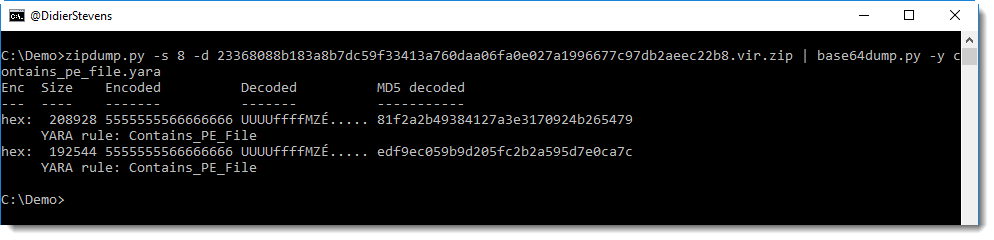
In this example, I use a YARA rule to detect hex-encoded PE files:


base64dump_V0_0_9.zip (https)
MD5: 4CF9F57AD34CC728B05F1307219864BB
SHA256: 01264F82CEFB7B1D2DF51A8DB190840FE6C368C9C3D63566CF14CE4983F73D5A

Sunday 6 May 2018

Update: oledump.py Version 0.0.34

Filed under: My Software,Update — Didier Stevens @ 17:05

Often when I provide training, I get new ideas. This week’s private maldoc training was no different: here’s a new version of oledump with changes inspired by this training.

When you select a stream with a prefix, like A3, you no longer have to type the prefix if it’s A (e.g. the first embedded OLE file).

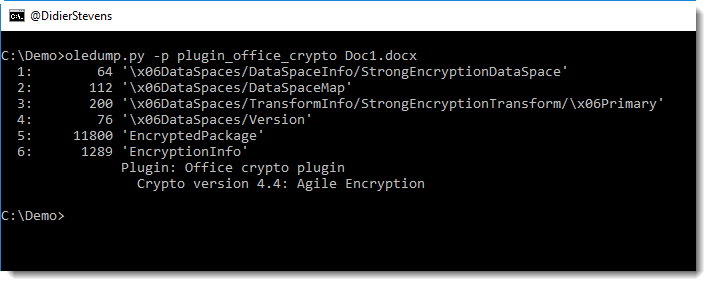
And I have a new plugin for encrypted documents (plugin_office_crypto.py), more on this in an upcoming blogpost.

oledump_V0_0_34.zip (https)
MD5: 1BE4E08DE1B1E73D5808AECE1BD09852
SHA256: 74F1B05E50D2AF8072505587438BB8959F174BAF76ED6255116E806642E6C4B0

Sunday 22 April 2018

Update: python-per-line.py Version 0.0.4

Filed under: My Software,Update — Didier Stevens @ 10:46

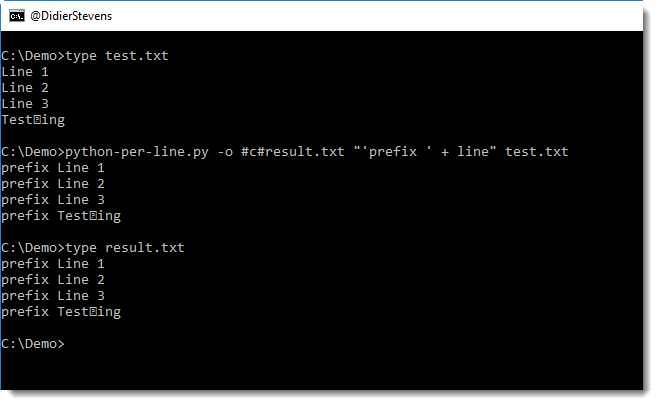
This new version brings new output features. For example, you can use the output option (-o) to output simultaneously to the console and a file:

Explanation:

-o result.txt will write the output to file result.txt, and nothing to the console

-o #c#result.txt will write the output to file result.txt and to the console

For all the details, consult the man page: python-per-line.py -m

python-per-line_V0_0_4.zip (https)
MD5: FE8E875E2A7B8CD89FCAAB3B5830206C
SHA256: 7A6DACBAFC13DDE164F2AAB49DA766613F23BE78FF9BCAF5392EEA01F71620D0

Thursday 19 April 2018

Update: Patched SpiderMonkey

Filed under: My Software,Update — Didier Stevens @ 0:00

I was showing a colleague how to use my patched SpiderMonkey to analyze obfuscated JavaScript, when I realized I had not yet released my latest version.

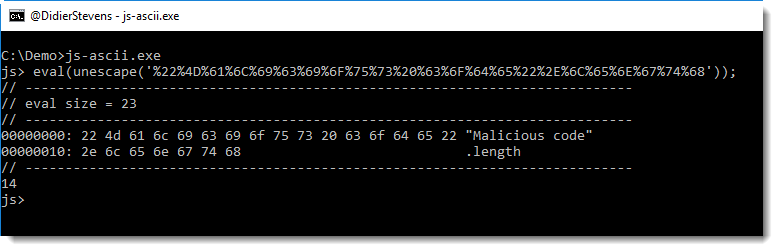
SpiderMonkey is an opensource JavaScript interpreter. I modified it to help with malware analysis. For example, my version will dump the argument of the eval function, and I’ve implemented document.write and window.navigate (dumping arguments too).

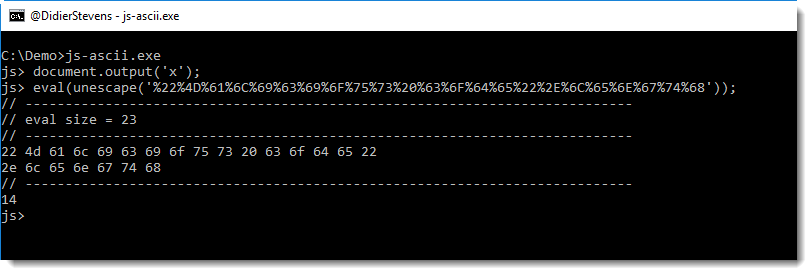
This latest version was developed a couple of years ago (that’s why it’s still based on SpiderMonkey 1.7) to dump arguments to stdout. Previous versions of my patched SpiderMonkey dump arguments to files, in this latest version, you can choose were to dump the arguments. A method was added to object document: document.output(arg). This output method takes one argument: a string. The following values may be used as argument:

  • ‘a’ ASCII/HEX dump
  • ‘x’ HEX dump
  • ‘d’ raw dump
  • ‘A’ pure ASCII/HEX dump
  • ‘x’ pure HEX dump
  • ‘d’ pure raw dump
  • ‘f’ file dump

The ZIP file you can download contains source code and executables for Windows, Linux and OSX. There are 2 versions: js-ascii.exe and js-file.exe. Both are identical, except for their default output behavior. js-file.exe will output arguments by default to files (and thus behave like previous versions of SpiderMonkey) and js-ascii.exe will output arguments by default as ASCII/HEX dump to the console.

I prefer to use js-ascii.exe now, and I’ve renamed it to js.exe (like previous versions).

The ASCII/HEX dump allows me to see exactly, at the byte-level, what is passed as argument to eval.

js-1.7.0-mod-c.zip (https)
MD5: B14B522E81366D6AAF3B7EB235B62707
SHA256: 2CCB2F57DF706A8EE689C54B18A0EA7BB052EF08BA233F1319119825DB32927B

Tuesday 17 April 2018

Update: hash.py Version 0.0.3

Filed under: My Software,Update — Didier Stevens @ 0:00

This new version of hash.py brings a small change to the output for option -c and adds option -s to skip specified hashes.

hash_V0_0_3.zip (https)
MD5: CB4BCB40CA50ED23AC7E47510B308811
SHA256: 6C3C44C5B98C7C7415E332D15B6EA887CD54170DADDDC726B3544F1696F4E324

Monday 16 April 2018

Update: XORSelection.1sc Version 4.0

Filed under: 010 Editor,My Software,Update — Didier Stevens @ 0:00

XORSelection is a 010 Editor script I wrote some time ago, and it is included in the 010 Editor script repository. You provided it with an XOR key (ASCII or HEX), and then it will XOR-encode the file (or selection) open in 010 Editor.

I discovered it will not work properly if the hexadecimal key contains a NULL byte (0x00). This is fixed in this new version.

This new version also allows whitespace characters when an hexadecimal key is provided (hexadecimal keys start with 0x).

XORSelection_V4_0.zip (https)
MD5: 1B3DB8C8DA51224DDE7CA0E4BDAAC945
SHA256: 22E60E10BC99BD24A408C12CC674858DB6F318088CD34B7C70782833401AACF2

Monday 2 April 2018

Update: xmldump.py Version 0.0.3

Filed under: My Software,Update — Didier Stevens @ 0:00

This is a small bugfix version.

xmldump_V0_0_3.zip (https)
MD5: 70D67100DDD30F6178C3E06B7CE97329
SHA256: C0A3199EA69494962CAC6EC3BA3AD47130BE5BB3D9D7D330579856AC9C314BF0

« Previous PageNext Page »

Blog at WordPress.com.