Didier Stevens

Saturday 7 July 2018

Update: zipdump.py Version 0.0.13

Filed under: My Software,Update — Didier Stevens @ 0:00

This update introduces option -j (–jsonoutput) to zipdump.py. Soon I will explain how to use this option together with a new tool I will release soon.

zipdump_v0_0_13.zip (https)
MD5: 264D32D0DC863FC29FED161D4A73560F
SHA256: 14D11D5244973A484E5754F20747D4B544C228AC951C885FE8B9FC6D26C86088

Tuesday 3 July 2018

Update: oledump.py Version 0.0.35

Filed under: My Software,Update — Didier Stevens @ 0:00

This updated brings some changes to option -j (–jsonoutput), an option introduced with version 0.0.33. Soon I will explain how to use this option together with a new tool I will release soon.

oledump_V0_0_35.zip (https)
MD5: 2089AFC496FFE2E44F67CF9C44EB101B
SHA256: C232282BD8AE050EECA1455E6A58EAB8D5CBBDF0D61E9FE2077CDA3DEB15D325

Sunday 1 July 2018

Update: re-search.py Version 0.0.11

Filed under: My Software,Update — Didier Stevens @ 13:28

This new version of re-search.py comes with a new option: -e. This option instructs re-search to read its input as a binary file and extract strings from it, to be matched with the chosen regular expression. This allows, for example, the processing of UNICODE strings.

re-search_V0_0_11.zip (https)
MD5: 72F160A83E214351162704EB4B94EB9E
SHA256: 624E2864738008F6A63CC4E3F7B5FCB3738389DBC7E6EF29BC8C2F749ABAD9DE

Friday 29 June 2018

Update: re-search.py Version 0.0.10

Filed under: My Software,Update — Didier Stevens @ 0:00

This new version of re-search.py comes with 3 new regular expressions in its library:

  • email-domain
  • url-domain
  • onion

Regular expressions email-domain and url-domain match exactly like regular expressions email and url, however, the output is just the domain, not the full email/url.

Regular expression onion matches onion addresses.

I use url-domain to make a list of unique domain names for all the URLs found inside a document. Compare the output for url and url-domain:

re-search_V0_0_10.zip (https)
MD5: A4A22FBA70990B57C811DD290C6F0DAA
SHA256: BF5084E4CE7A528AB2701D5AAA6C7366A3A43B8768C712263133A6E302569E86
Tuesday 26 June 2018

Update: zipdump.py Version 0.0.12

Filed under: My Software,Update — Didier Stevens @ 0:00

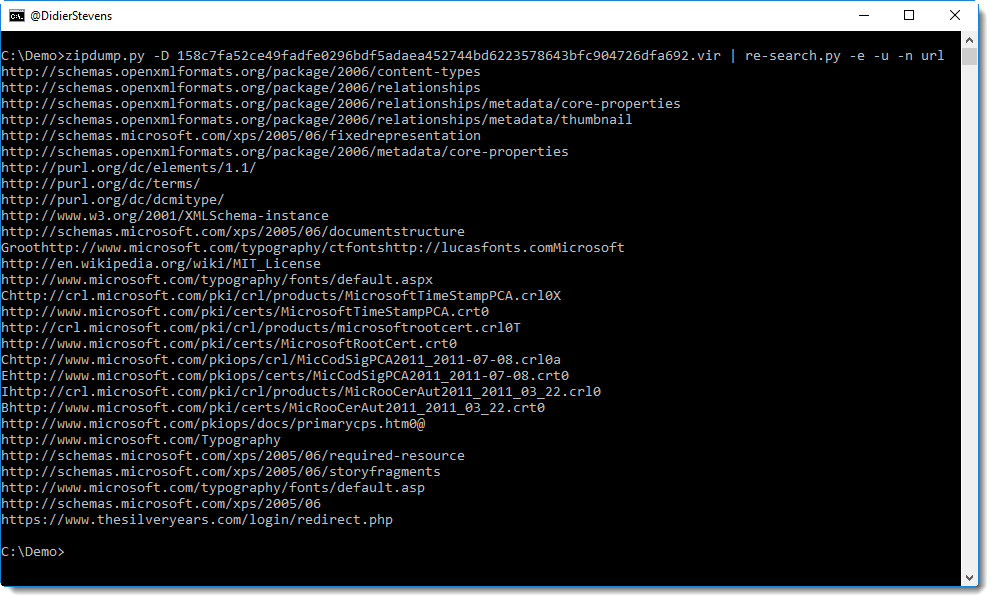
This new version adds option -t (translate), like some of my other tools. This option can be used to specify a codec when dumping the content of a file.

Here I used it to dump a Unicode file for a page of an XPS document:

zipdump_v0_0_12.zip (https)
MD5: 7110FB8B873BFDCF10E4A1C2AB89ACC2
SHA256: EA2D852C132DEF7947EBA0FFDB3E4CC8C69032413D36E67BBB3F943FA7B44B18

Friday 22 June 2018

Update: jpegdump.py Version 0.0.6

Filed under: My Software,Update — Didier Stevens @ 0:00

A small update to indicate a file was decompressed:

jpegdump_V0_0_6.zip (https)
MD5: 14FFB9016A9181DB3A59370B2E0DAFF2
SHA256: 13B610A9BDE68CDB64E482AADBC522DDAABD6F6D746AA032C6FEDDAF6BF4169B

Wednesday 20 June 2018

Update: hash.py version 0.0.5

Filed under: My Software,Update — Didier Stevens @ 0:00

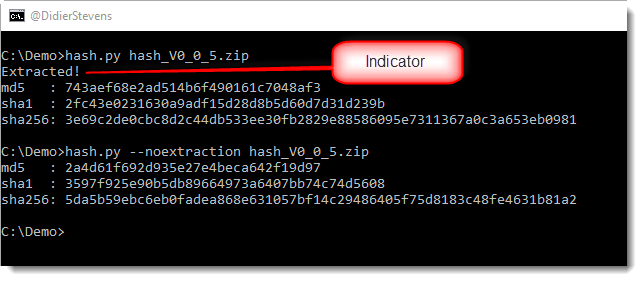
This new version adds option -v to validate hashes, and an indicator when archive files are decompressed.

Compression:

Validation:

hash_V0_0_5.zip (https)
MD5: 2A4D61F692D935E27E4BECA642F19D97
SHA256: 5DA5B59EBC6EB0FADEA868E631057BF14C29486405F75D8183C48FE4631B81A2

Tuesday 19 June 2018

Update: cut-bytes.py Version 0.0.7

Filed under: My Software,Update — Didier Stevens @ 0:00

This too is a minor update for #e# expressions.

More details in this video:

cut-bytes_V0_0_7.zip (https)
MD5: 95CF8E5D2BC2790B25101FC2BFF769FB
SHA256: F1112C96872D15C2CD3F6AF9828C7E39F5EB115D20FB62AAD1C1357D75E3485B

Monday 18 June 2018

Update: translate.py Version 2.5.4

Filed under: My Software,Update — Didier Stevens @ 0:00

This is a minor update for #e# expressions.

More details in this video:

translate_v2_5_4.zip (https)
MD5: C07B37F7AFA0386315843E6A493721C1
SHA256: A2203C643FC8BC64A98DCA3EE1F9444BE16F5D5C2036AC0200A6BA657786C5EC

Friday 15 June 2018

Update: jpegdump.py Version 0.0.5

Filed under: My Software,Update — Didier Stevens @ 0:00

This is a small update to jpegdump.py, my tool to analyze the structure of jpeg files.

The man page (option -m) has been updated.

jpegdump_V0_0_5.zip (https)
MD5: D7157E7FDEEA4257220F60E0081EE138
SHA256: D6940A82CDECEB9D1FB27561E7B748837D666568FC857AEB6680E135D08E897C

« Previous PageNext Page »

Blog at WordPress.com.